
What is Family tax allowance declaration (családi kedvezmény)?
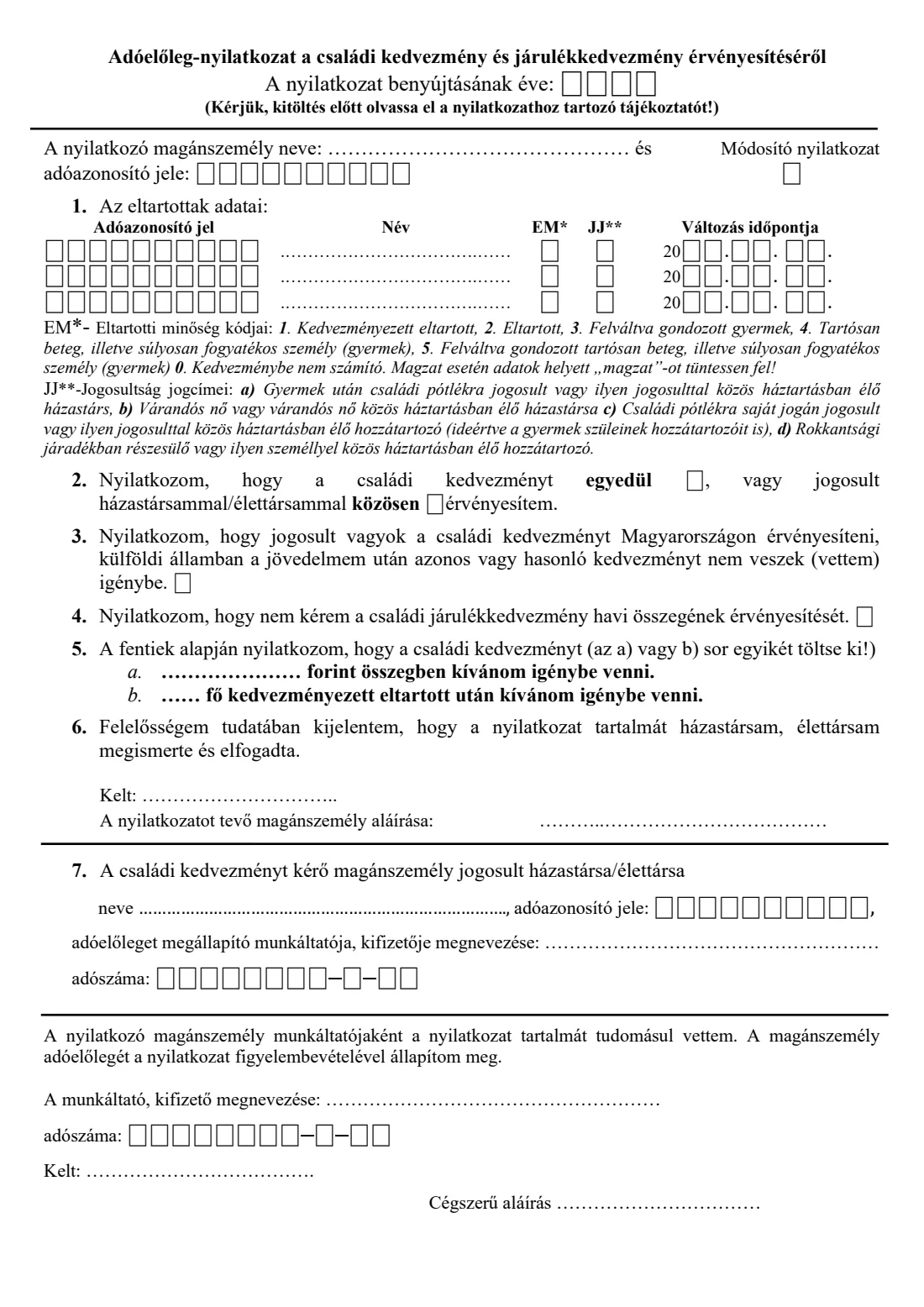
The Adóelőleg-nyilatkozat a családi kedvezmény és járulékkedvezmény érvényesítéséről is a one-page declaration published by Hungary's National Tax and Customs Administration (Nemzeti Adó- és Vámhivatal, NAV). You hand it to your employer, or to another payer who pays you regular income, such as under an agency contract. It tells them to apply the family tax allowance (családi kedvezmény) when they work out the personal income tax advance they deduct from your pay each month. Without it, your employer has no basis for reducing your tax advance, and you would only get the allowance back when you file your annual return.
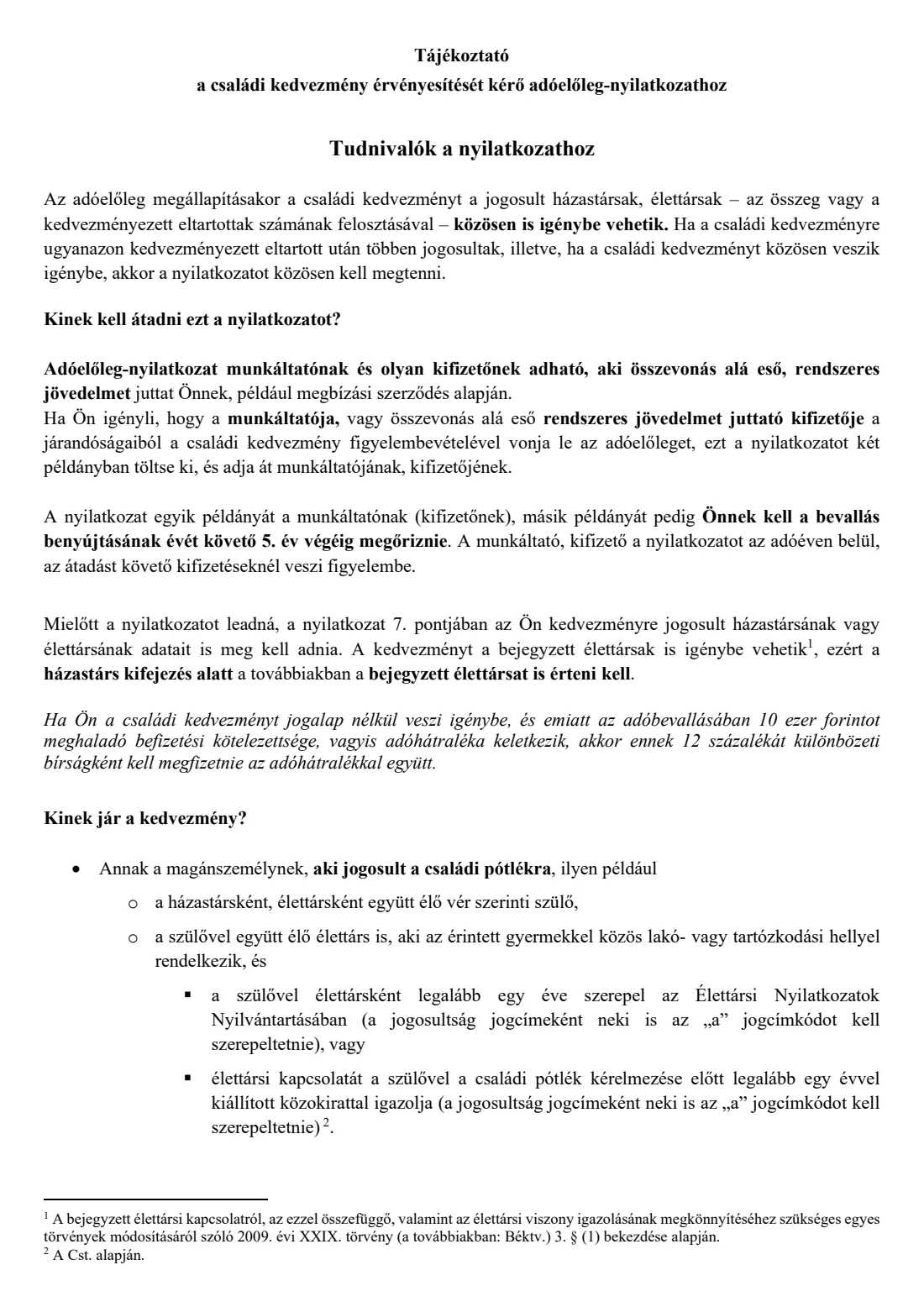
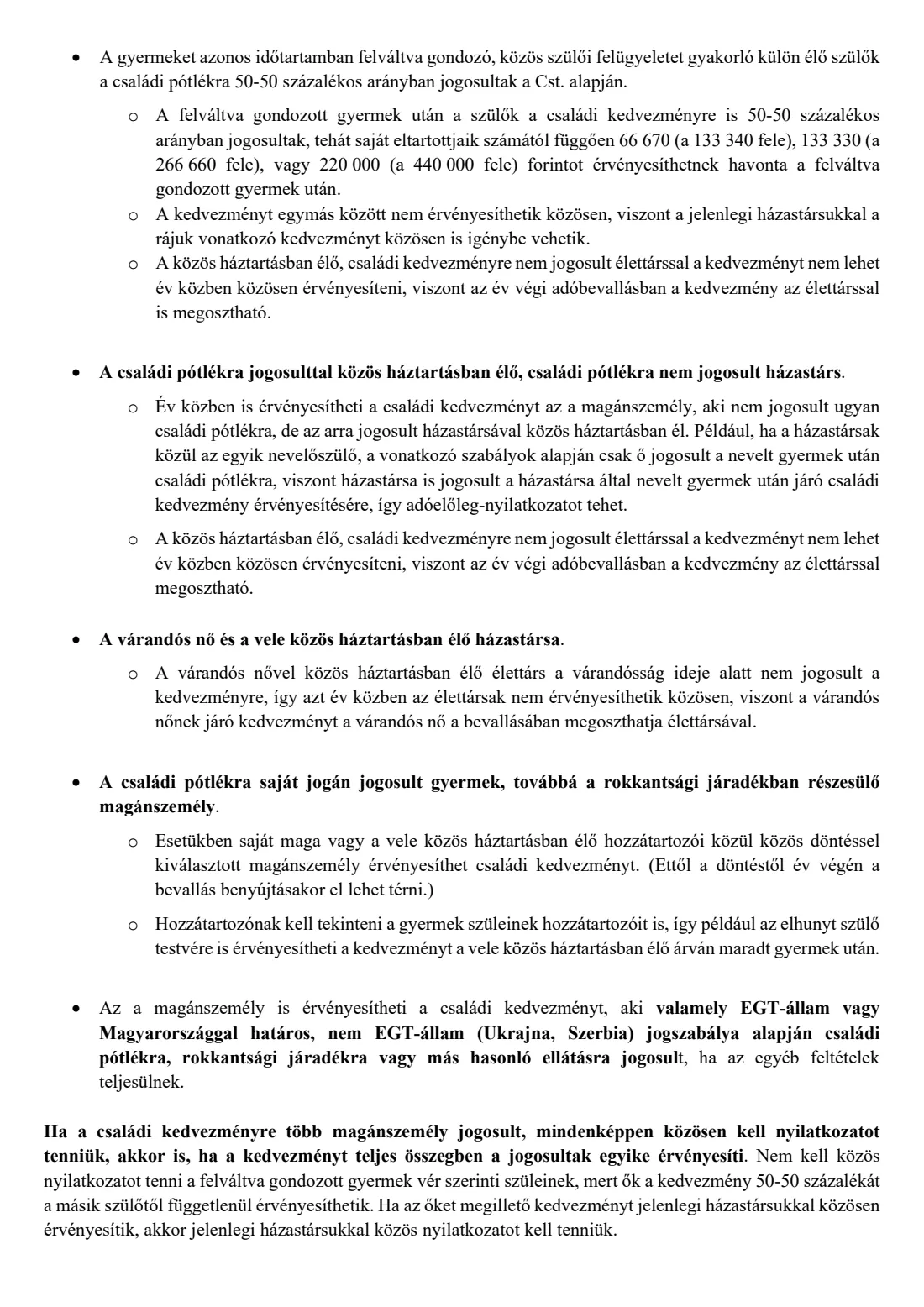
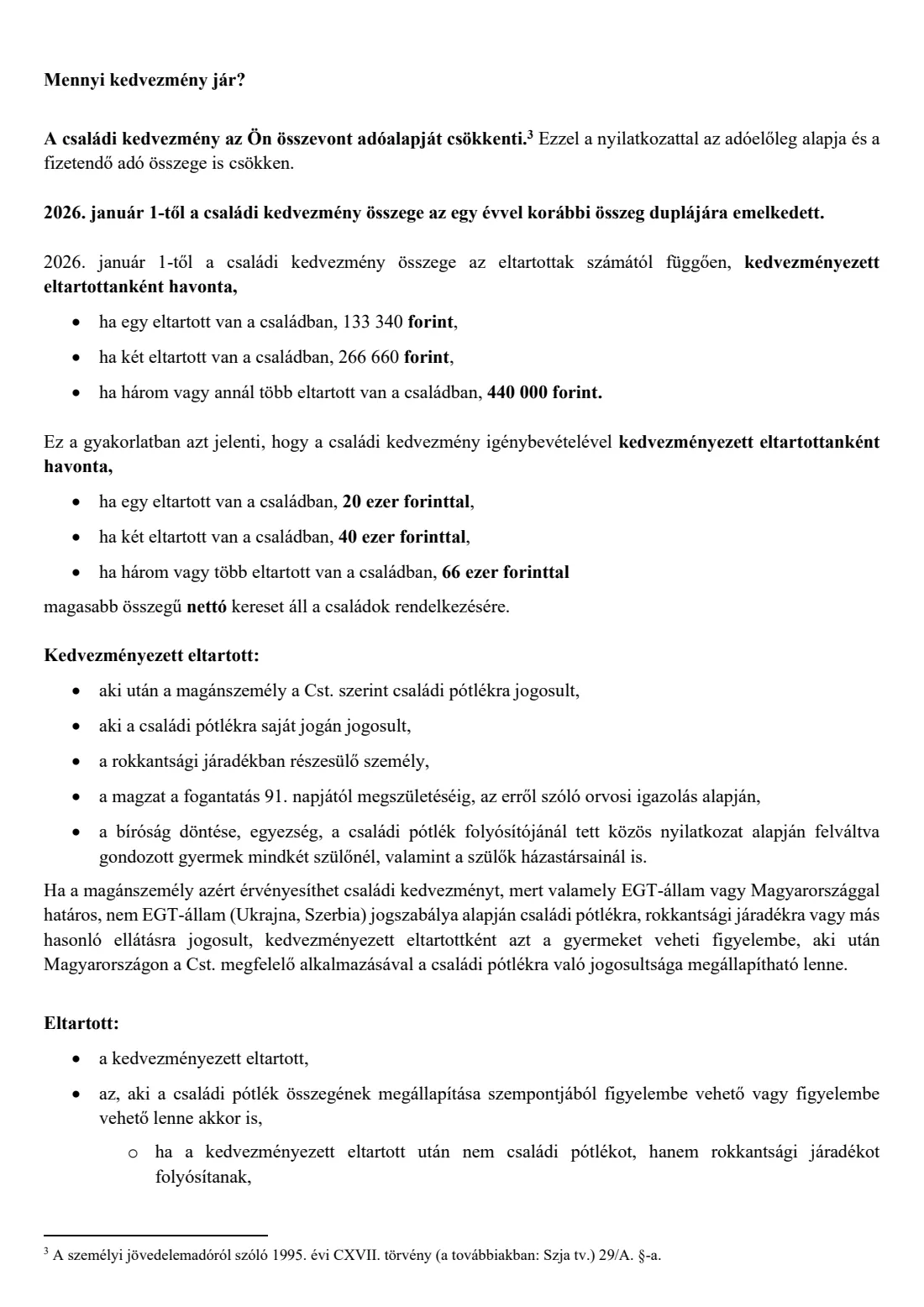
On the form you list your dependants with their tax identification numbers, a status code and an entitlement code. You say whether you claim alone or jointly with your spouse or partner, and whether you want the allowance as an amount in forints or for a number of beneficiary dependants. If you claim jointly, your spouse's or partner's details go in point 7. Your employer acknowledges the declaration at the bottom. NAV's PDF also carries eight pages of guidance (tájékoztató), which explain every code and the amounts for 2026.
FileIt explains each point in English, with the Hungarian terms alongside. It prints your answers into NAV's own PDF: tax numbers digit by digit in the boxes, names family name first, dates the Hungarian way. Your name and date of birth can be pre-filled from the People records in your FileIt vault. FileIt checks the check digit of every tax identification number (adóazonosító jel) and employer tax number (adószám), and checks that your tax number matches your date of birth. It also shows an indicative monthly maximum based on the dependants you list. The finished PDF is saved in your vault and can be sent for e-signature. FileIt doesn't submit anything. You give the declaration to your employer yourself.
- Who fills it
- An employee (or someone paid regular income) who is entitled to the Hungarian family tax allowance, with their spouse or partner for a joint claim
- Given to
- Your employer or payer, in two copies. It does not go to NAV
- When
- When you want the allowance applied in payroll for 2026, and again whenever your details change during the year
- Signatures
- You sign it and your employer acknowledges it with the company's authorised signature
- Edition
- NAV 2026 (family allowance declaration dated 2026.01.01)
Who needs to fill out Family tax allowance declaration (családi kedvezmény)?
- Parents who receive family allowance (családi pótlék) for a child and want the family tax allowance applied in their monthly payroll.
- A spouse who doesn't receive family allowance but lives in the same household as a spouse who does, for example where only one spouse is the foster parent.
- A pregnant woman, or her spouse living with her, who claims for the unborn child from the 91st day of pregnancy, based on a doctor's certificate.
- Separated parents who care for a child alternately in equal periods, each claiming their 50 % share without a joint declaration.
- A relative living with a young person entitled to family allowance in their own right, or with someone receiving disability annuity (rokkantsági járadék), where the household agrees who claims.
- Spouses or registered partners who both qualify and want to share the allowance by amount or by number of beneficiaries.
- Someone entitled to family allowance or a similar benefit under the law of an EEA state, Ukraine or Serbia, if the other conditions in NAV's guidance are met.
When to use Family tax allowance declaration (családi kedvezmény)
- When you start a job, or at the start of the tax year, if you want the family tax allowance to reduce your monthly tax advance rather than waiting for your annual return.
- When your family situation changes during the year, such as a new dependant, a child no longer counting, or a change in who claims. You make an amending declaration (módosító nyilatkozat) straight away.
- When you move to a new employer. A declaration to a new employer is a fresh declaration, not an amending one.
- When a pregnancy reaches the 91st day and you want to claim for the unborn child. When the baby is born you don't need a new declaration if you already claimed for the pregnancy.
- When you and your spouse or partner want to change how you split the allowance between your two employers.
What you need before you start
- Your 10-digit tax identification number (adóazonosító jel) from your tax card. It starts with 8.
- The name and tax identification number of each dependant. Without the dependants' tax numbers, the declaration is invalid. The only exception is an unborn child.
- Each dependant's status code (EM: 1, 2, 3, 4, 5 or 0) and your entitlement code (JJ: a, b, c or d). Both are explained in the form's footnotes and in NAV's guidance.
- For an unborn child, the doctor's certificate of pregnancy. You don't attach it, but you keep it.
- For a joint claim, your spouse's or partner's name and tax identification number, and the name and tax number of their employer or payer, if they have one.
- Whether you want the allowance as a monthly amount in forints or for a number of beneficiary dependants.
- For an amending declaration, the date from which each change applies.
- Your employer's name and tax number (adószáma), if the employer fills in their part in FileIt.
What’s on Family tax allowance declaration (családi kedvezmény)
The 2026 edition has 9 pages. FileIt asks for it in 8 parts, and it is signed by Employee and Employer:
- Your details (a nyilatkozó magánszemély)Employee
- 1. Dependant 1 (az eltartottak adatai)Employee
- 1. Dependant 2 (az eltartottak adatai)Employee
- 1. Dependant 3 (az eltartottak adatai)Employee
- 2.–5. How you claimEmployee
- 6. Signature (Kelt, aláírás)Employee
- 7. Your entitled spouse or partner (házastárs / élettárs)Employee
- Employer's acknowledgement (munkáltató)Employer
How to fill out Family tax allowance declaration (családi kedvezmény), step by step
1 Year and your details
Write the year the declaration is for, your name and your tax identification number. Tick the box for an amending declaration (Módosító nyilatkozat) only when you're changing an earlier declaration you gave the same employer.
FileIt prints your name family name first, the Hungarian way, and checks that your tax number's check digit is right and matches your date of birth. Your date of birth isn't printed.
2 1. Dependants (Az eltartottak adatai)
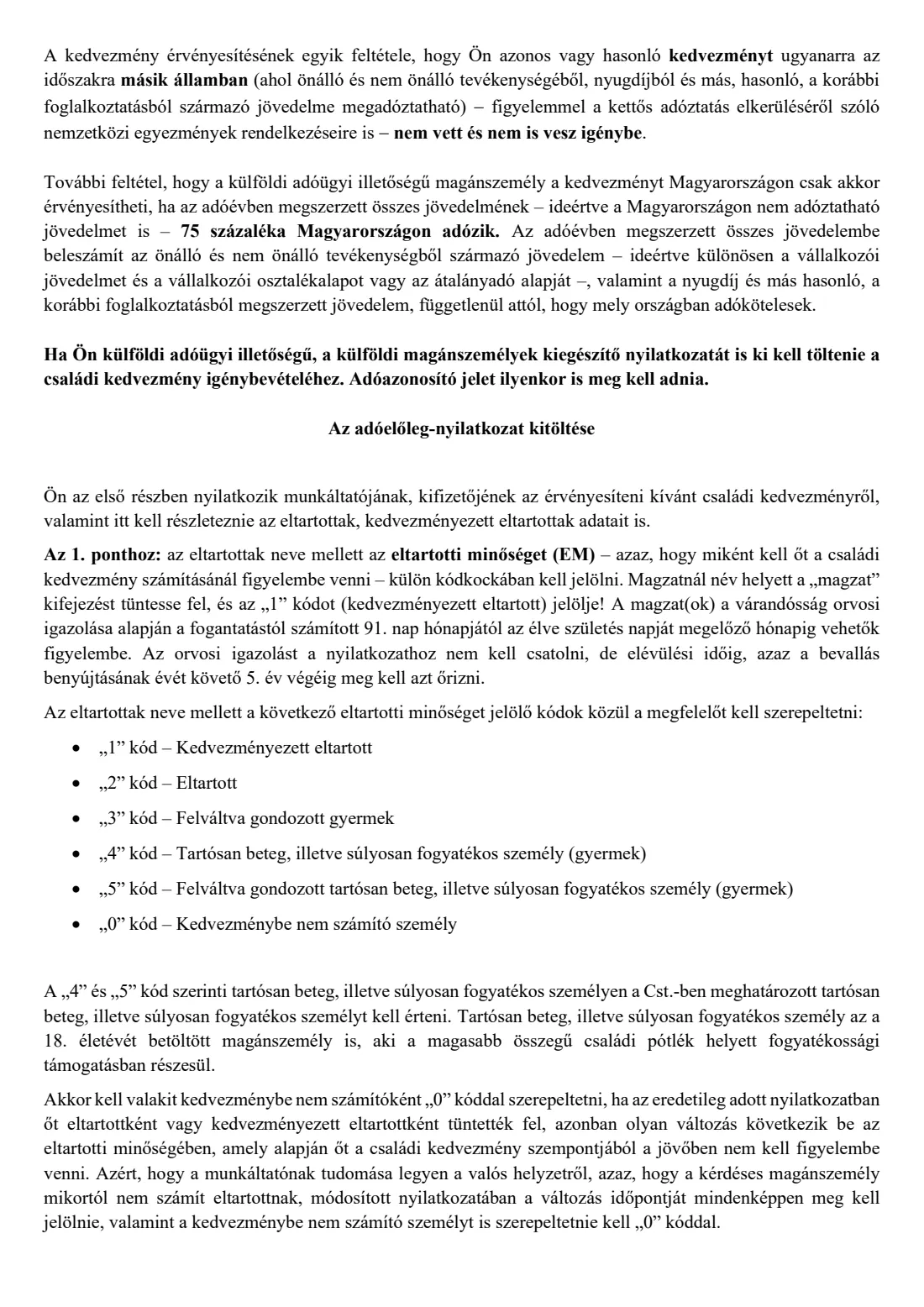
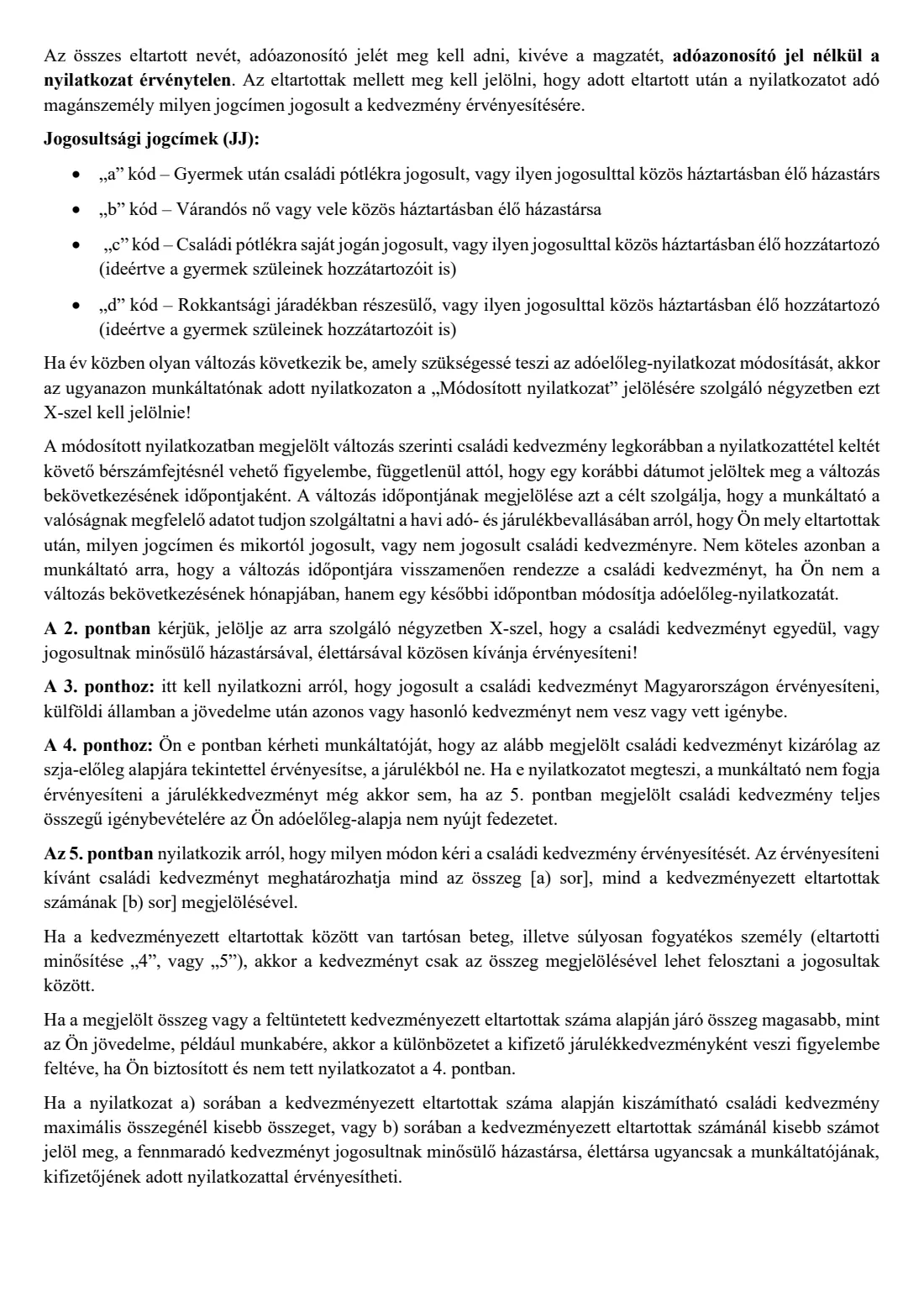
The form has three rows. For each person, give their tax identification number and name, a status code (EM) and an entitlement code (JJ). Code 1 is a beneficiary dependant, the person the allowance is claimed for. Code 2 is a dependant who only counts towards the number of dependants in the family, such as a university student in the guidance's example. Codes 3 and 5 are children cared for alternately by separated parents. Codes 4 and 5 are long-term ill or severely disabled persons. Code 0 is someone listed before who no longer counts.
For an unborn child, write "magzat" instead of the name, leave the tax number empty and use code 1. In FileIt you tick one box and it does this for you. The entitlement codes are: a) entitled to family allowance, or the spouse living with such a person; b) a pregnant woman or her spouse; c) a relative living with someone entitled to family allowance in their own right; d) a relative living with someone who receives disability annuity.
The change date (Változás időpontja) is for amending declarations. For anyone coded 0 you must give it, so your employer knows from when that person stopped counting.
3 2. Alone or jointly
Tick whether you claim the allowance alone (egyedül) or jointly (közösen) with your entitled spouse or partner. If more than one person is entitled to the allowance for the same dependant, NAV's guidance says you must make the declaration together, even if one of you claims it in full. Separated parents with a child in alternating care don't make a joint declaration with each other. Each claims their 50 %.
4 3. Entitlement in Hungary
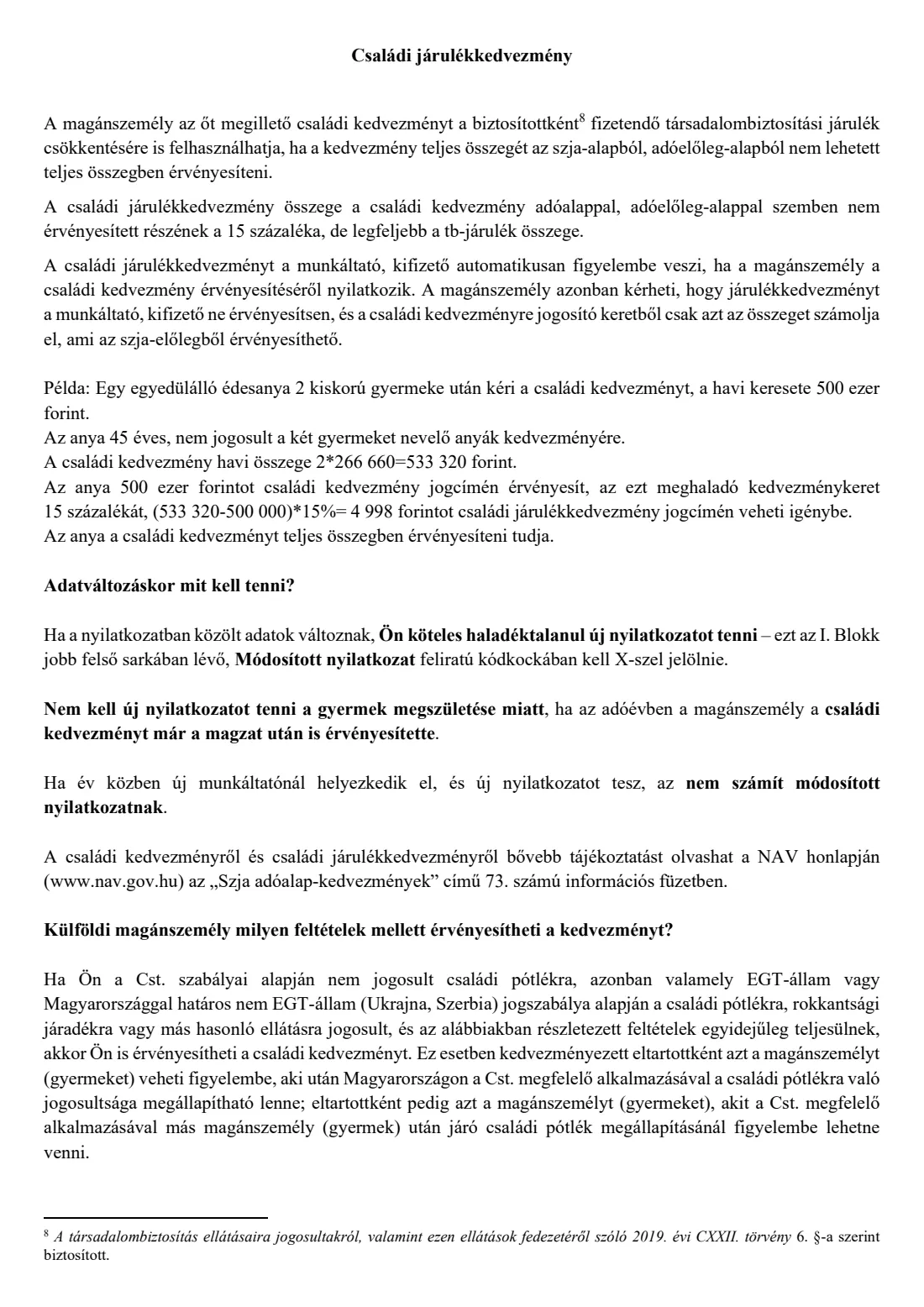
By ticking this box you declare that you are entitled to claim the family allowance in Hungary, and that you don't claim the same or a similar allowance on your income in another country. If you are tax resident abroad, NAV's guidance says you also need to fill in the supplementary declaration for foreign individuals.
5 4. Family contribution allowance (járulékkedvezmény)
If your tax base is too small to use the whole family allowance, your employer normally uses the rest to reduce your social security contribution. NAV's guidance puts this at 15 % of the unused part, up to the contribution. Tick point 4 only if you don't want this, and want the allowance applied only against the tax advance.
6 5. How much you claim
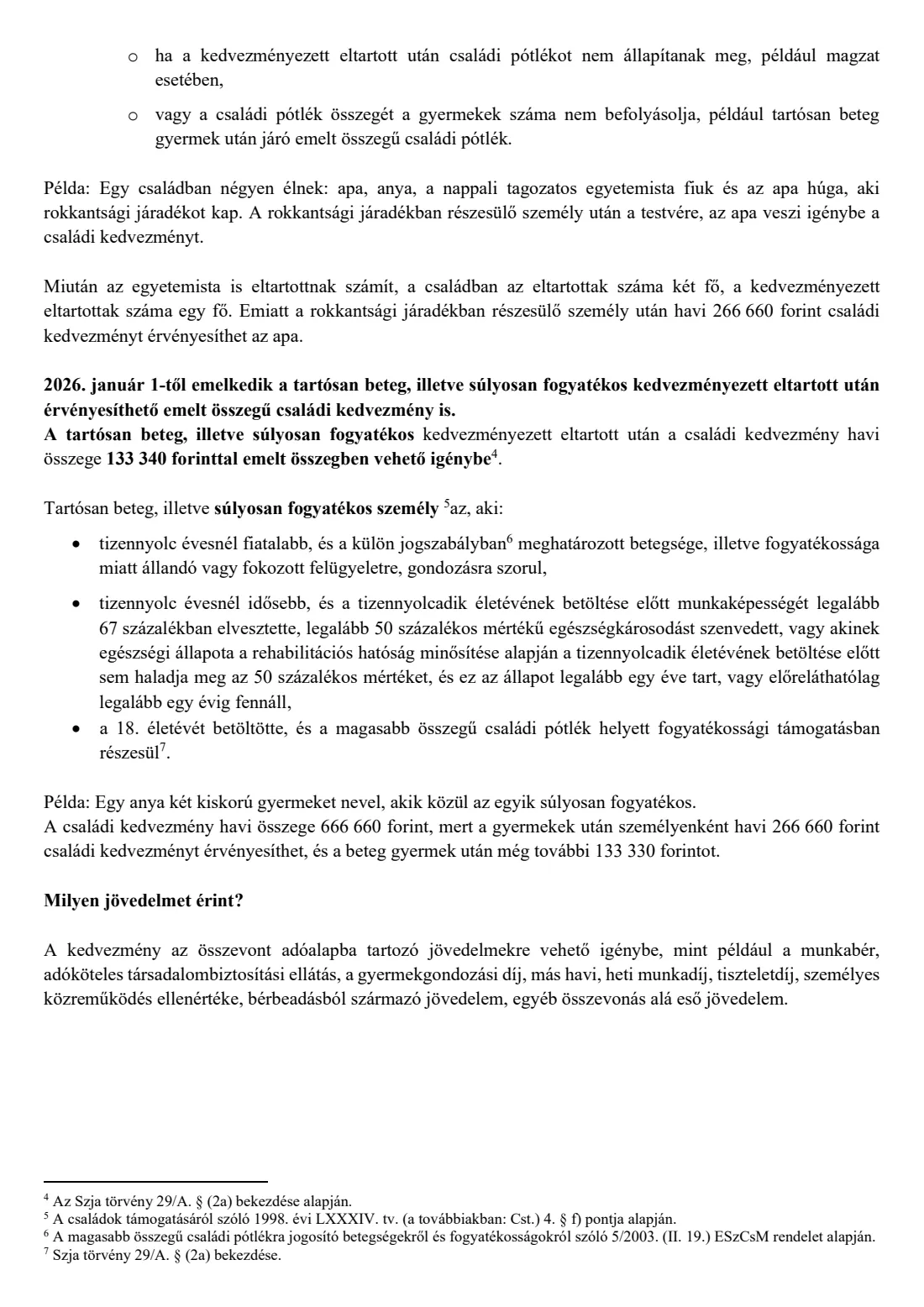
Fill in only one line. On line a) you give a monthly amount in forints. On line b) you give a number of beneficiary dependants. NAV's guidance for 2026 gives the monthly allowance per beneficiary as 133,340 forints with one dependant in the family, 266,660 with two, and 440,000 with three or more. There is a further 133,340 forints for a long-term ill or severely disabled beneficiary. FileIt shows an indicative figure from the rows you fill in, as a guide only.
If you claim less than the full amount, or fewer beneficiaries than you have, your entitled spouse or partner can claim the rest through their own employer. If a beneficiary is coded 4 or 5, a joint claim can be split only by amount.
7 6. Spouse's knowledge, date and signature
Point 6 is a statement that your spouse or partner has read and accepted the declaration. It matters for a joint claim. Then write the place and date (Kelt) and sign. FileIt prints the place and date as, for example, "Győr, 2026. 09. 14.".
8 7. Your spouse or partner
For a joint claim, give your spouse's or partner's name and tax identification number, and the name and tax number of the employer or payer that works out their tax advance. NAV's guidance says a registered partner counts as a spouse. It also covers a partner who has been listed with the parent in the register of partnership declarations for at least a year, or who can prove the partnership with a public document.
9 Employer's acknowledgement
The last part is for your employer or payer. They write their name, tax number and the date, and sign with the company's authorised signature (cégszerű aláírás) to confirm they will use the declaration when working out your tax advance. If you're filling it in as the employee, you can leave this part switched off.
Common mistakes to avoid
- Leaving out a dependant's tax identification number. NAV's guidance says the declaration is invalid without them, except for an unborn child.
- Filling in both line a) and line b) of point 5. Fill in only one of them.
- Using a status code 0 without the change date, or without ticking the amending declaration box.
- Making a joint claim without the spouse's or partner's details in point 7, or splitting the allowance by number of beneficiaries when a beneficiary is coded 4 or 5.
- Forgetting to make a new declaration when something changes during the year. NAV's guidance says you must do this straight away.
- Claiming without being entitled. If this leaves you owing more than 10,000 forints on your annual return, NAV's guidance says you pay a 12 % penalty on the arrears.
- Handing over only one copy. The form is made in two copies: one for your employer and one for you to keep.
After you fill it out
Print the declaration in two copies, sign both, and give them to your employer or payer. Alternatively, send it for e-signature from FileIt if your employer accepts that. The employer acknowledges it at the bottom. NAV's guidance says the employer takes it into account for payments made during the tax year after the declaration is handed over. A change takes effect at the earliest in the first payroll after the date you signed it, even if you give an earlier change date.
Keep your copy, and any doctor's certificate for an unborn child, until the end of the fifth year after the year in which the annual tax return is filed. FileIt saves the finished PDF in your vault. The declaration doesn't go to NAV, and FileIt doesn't send it anywhere.
Whenever your family situation changes, fill in a new declaration and tick the amending declaration box. When you change jobs, give your new employer a fresh declaration. NAV's information booklet no. 73 (Szja adóalap-kedvezmények) has more detail on the allowances.
Fill out Family tax allowance declaration (családi kedvezmény) online with FileIt
- Pick the person. Choose someone from People and FileIt fills in their name, date of birth, address and other details it already knows.
- Answer plain-language questions. One part of the form at a time, with the official help text beside each question — 47 fields in all. Your answers save as you go.
- Check the live preview. Watch your answers land on the real Nemzeti Adó- és Vámhivatal (NAV), Hungary's National Tax and Customs Administration form, and let FileIt do any worksheet arithmetic.
- Generate the official PDF. FileIt prints your answers into the agency’s own PDF and files it in that person’s folder in your vault. Sign it, or send it for e-signature.
FileIt fills the form — it never files or submits anything for you. Deliver the finished form to whoever asked for it, the way the form’s instructions say.
Start Family tax allowance declaration (családi kedvezmény) now — it’s freeFamily tax allowance declaration (családi kedvezmény): frequently asked questions
Can I fill out the családi kedvezmény nyilatkozat online?
Yes. With FileIt you answer the questions in English and get NAV's own PDF back, filled in and ready to sign and hand to your employer. It's free on every FileIt account. NAV also offers its own online form-filling service.
Where do I send the family allowance declaration?
You don't send it to NAV. You give it to your employer, or to the payer who pays you regular income, in two copies. They keep one and you keep the other. FileIt doesn't submit it for you.
How much is the family tax allowance in 2026?
NAV's 2026 guidance gives the monthly amount per beneficiary dependant as 133,340 forints with one dependant in the family, 266,660 with two, and 440,000 with three or more. There is an extra 133,340 forints for a long-term ill or severely disabled beneficiary. The allowance reduces your consolidated tax base, not your tax directly.
What do the EM and JJ codes mean?
EM is the dependant's status: 1 beneficiary dependant, 2 dependant, 3 child in alternating care, 4 long-term ill or severely disabled, 5 both 3 and 4, 0 no longer counted. JJ is your entitlement: a) family allowance, b) pregnancy, c) relative of someone entitled to family allowance in their own right, d) relative of someone receiving disability annuity.
Can I claim for an unborn child?
Yes. NAV's guidance says an unborn child counts from the month of the 91st day of pregnancy until the month before birth, on a doctor's certificate. Write "magzat" instead of the name, leave the tax number blank, use code 1 and entitlement b. You don't need a new declaration when the baby is born.
Do my spouse and I both need to sign?
The form has one signature line for the person claiming, plus the employer's acknowledgement. For a joint claim, point 7 carries your spouse's or partner's details, and point 6 confirms they have read and accepted the declaration. Each spouse gives their own declaration to their own employer.
What is the family contribution allowance?
If your tax base is too small to use your whole family allowance, the rest can reduce your social security contribution. NAV's guidance puts this at 15 % of the unused part, up to the contribution. Your employer applies it automatically unless you tick point 4.
What if my situation changes during the year?
Make a new declaration straight away and tick the amending declaration (módosító nyilatkozat) box. Give the date of the change for anyone affected, and list anyone who no longer counts with code 0.
Official sources
- Blank form (PDF), published by Nemzeti Adó- és Vámhivatal (NAV), Hungary's National Tax and Customs Administration: https://nav.gov.hu/pfile/file?path=%2Fado%2Fszja%2Fadoeloleg-nyilatkozatok%2F2026%2FCsaladi_kedvezmeny.pdf1
- Official instructions and guidance: https://nav.gov.hu/ado/szja/adoeloleg-nyilatkozatok/2026
- Edition shown on this page: NAV 2026 (Családi kedvezmény_2026.01.01) (checked 2026-09-26).
FileIt is not affiliated with or endorsed by Nemzeti Adó- és Vámhivatal (NAV), Hungary's National Tax and Customs Administration or any government. This page explains the form in general terms and is not legal, tax or immigration advice. Always read the official instructions, and check that you are using the edition the recipient accepts. Page last reviewed 2026-09-26.