What is HMRC Starter checklist?
The Starter checklist is an HM Revenue & Customs form for people starting a new job. If you don't have a P45 from your last employer — or you have a student or postgraduate loan, whether or not you have a P45 — your new employer uses the checklist to set up your pay. It replaced the old P46 form, and it is never sent to HMRC: you give it to your employer and they use it for your first Full Payment Submission.
The heart of the form is a choice between statement A, B and C. Your answers to three simple questions decide which statement applies, and that statement tells your employer which tax code to start you on. The student loan questions make sure the correct plan type is deducted. Getting either part wrong can mean paying too much or too little tax or loan repayments until HMRC sends a corrected code.
FileIt walks you through each question, checks that the statement you pick is the one your answers lead to, and prints your answers into HMRC's official Starter checklist PDF. Your name, date of birth and address can be pre-filled from your People record in the FileIt vault, and the finished PDF is saved to your folder. You can print it and sign it, or use FileIt's optional e-signature if your employer accepts that, then hand it to your employer yourself.
- Who fills it
- The new employee
- Given to
- Your new employer — do not send it to HMRC
- When
- As soon as possible when starting a job without a P45, or when you have a student or postgraduate loan
- Signatures
- The employee signs and dates the declaration
- Edition
- HMRC 12/25
- Kept by
- Your employer, for the current and next 3 tax years
Who needs to fill out HMRC Starter checklist?
- Anyone starting a new job in the UK who hasn't got a P45 from a previous employer — for example your first ever job, or a job after a gap.
- People taking on a second job alongside an existing one; a second employer won't have a P45 for you.
- New employees who are receiving a State, workplace or private pension.
- Anyone with a student or postgraduate loan, even if they do have a P45, so the right loan deductions start.
- People coming off Jobseeker's Allowance, Employment and Support Allowance or Incapacity Benefit and starting work.
- Employers onboarding new staff can use it to gather the information HMRC's payroll rules ask for.
When to use HMRC Starter checklist
- Fill it in when you start the job, ideally before your first payday, so your employer can include the right tax code in their first report to HMRC.
- If your employer has already sent that first report, they keep using the tax code in it until HMRC issues a new one.
- If you later find your P45, give it to your employer — they will then use the tax code shown in parts 2 and 3 of the P45.
- There is no annual renewal; you complete it once per new job. Tell your employer about any change to your student loan position.
What you need before you start
- Your full legal name — all first names, with no initials or shortened forms.
- Your date of birth and home address, including postcode and country.
- Your National Insurance number, if you know it (you can leave it blank).
- Your employment start date.
- Whether you have another job or receive a State, workplace or private pension.
- Whether, since 6 April, you have had another job that ended or received Jobseeker's Allowance, Employment and Support Allowance or Incapacity Benefit.
- Your student loan plan type (Plan 1, 2, 4 or 5) and whether you have a postgraduate loan — you can check it in your online student loan account.
What’s on HMRC Starter checklist
The 2025 edition has 4 pages. FileIt asks for it in 4 parts, and it is signed by Employee:
- Employee's personal detailsEmployee
- Employee statementEmployee
- Student loansEmployee
- DeclarationEmployee
How to fill out HMRC Starter checklist, step by step
1 Employee's personal details (questions 1 to 7)
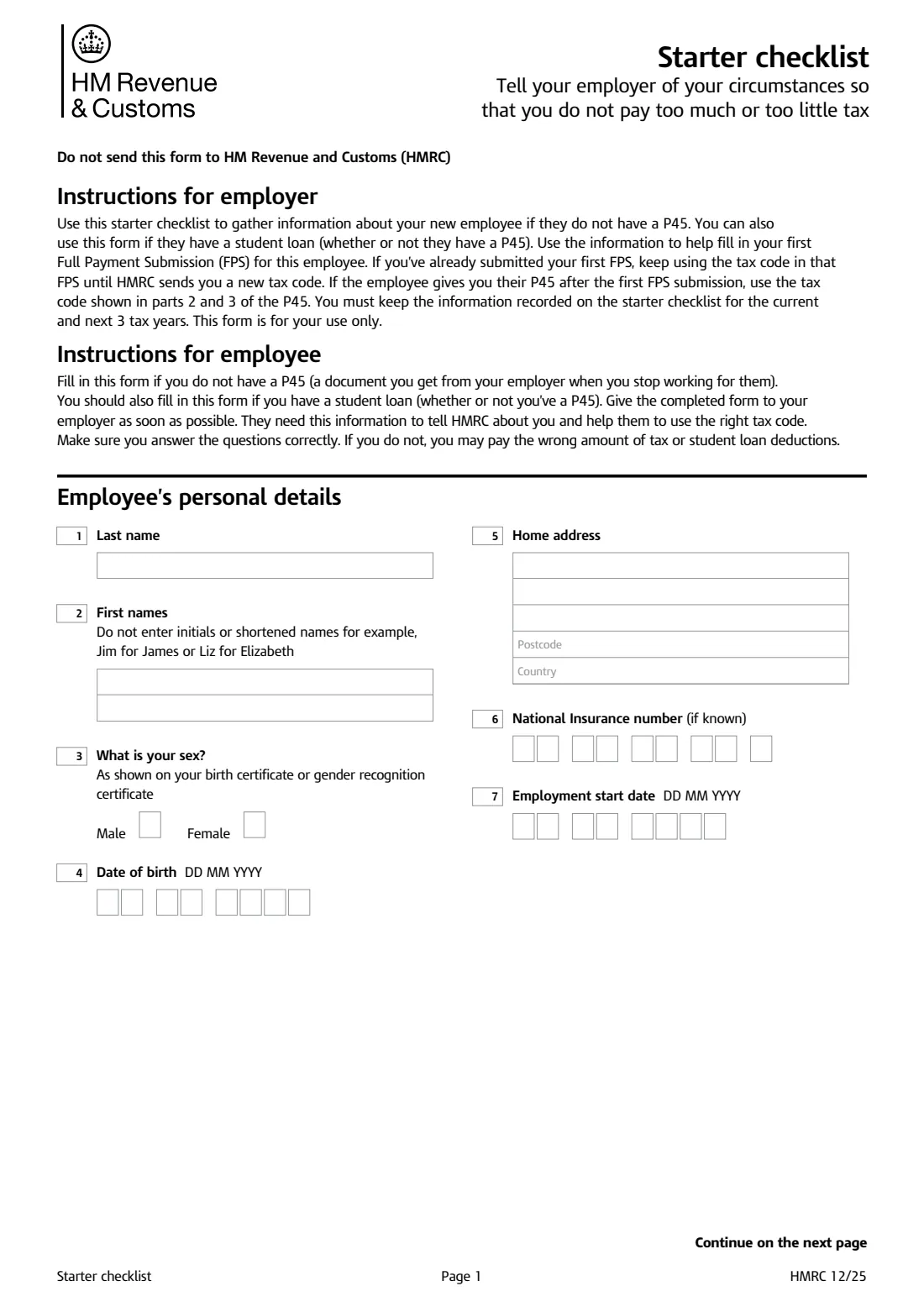
Enter your last name and all your first names in full — the form specifically says not to use initials or shortened names such as Jim for James. Give your sex as shown on your birth certificate or gender recognition certificate, then your date of birth, home address and country.
Your National Insurance number is optional; leave it blank if you don't know it and your employer can still use the form. Finish with the date you start work. FileIt prints the NI number across the form's letter boxes for you.
2 Employee statement (questions 8 to 10)
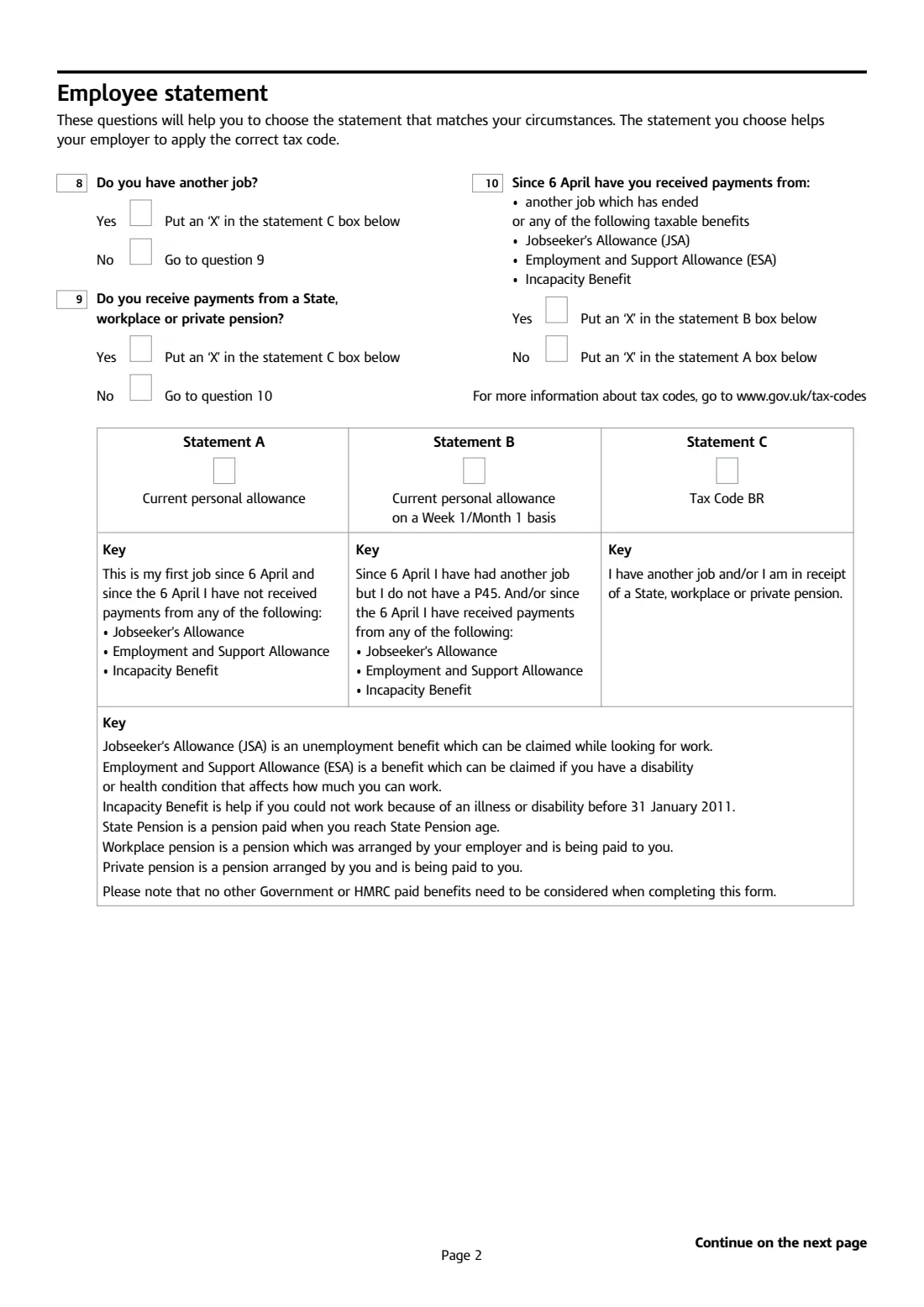
Three yes-or-no questions lead you to one statement. Question 8: do you have another job? If yes, choose statement C. Question 9: do you receive payments from a State, workplace or private pension? If yes, choose statement C. Question 10: since 6 April have you received payments from another job that has ended, or from Jobseeker's Allowance, Employment and Support Allowance or Incapacity Benefit? If yes, choose statement B; if no, statement A.
The form notes that no other government or HMRC benefits need to be considered — only those listed. 'Since 6 April' means since the start of the current tax year.
3 Statements A, B and C
Statement A (current personal allowance) means this is your first job since 6 April and you've had none of the listed benefits. Statement B (current personal allowance on a Week 1/Month 1 basis) means you've had another job or one of those benefits since 6 April but have no P45. Statement C (tax code BR) means you have another job or a pension, so your allowance is assumed to be used elsewhere and this job is taxed at the basic rate.
FileIt checks that the statement you tick matches your answers and tells you if it doesn't.
4 Student loans (questions 11 to 13)
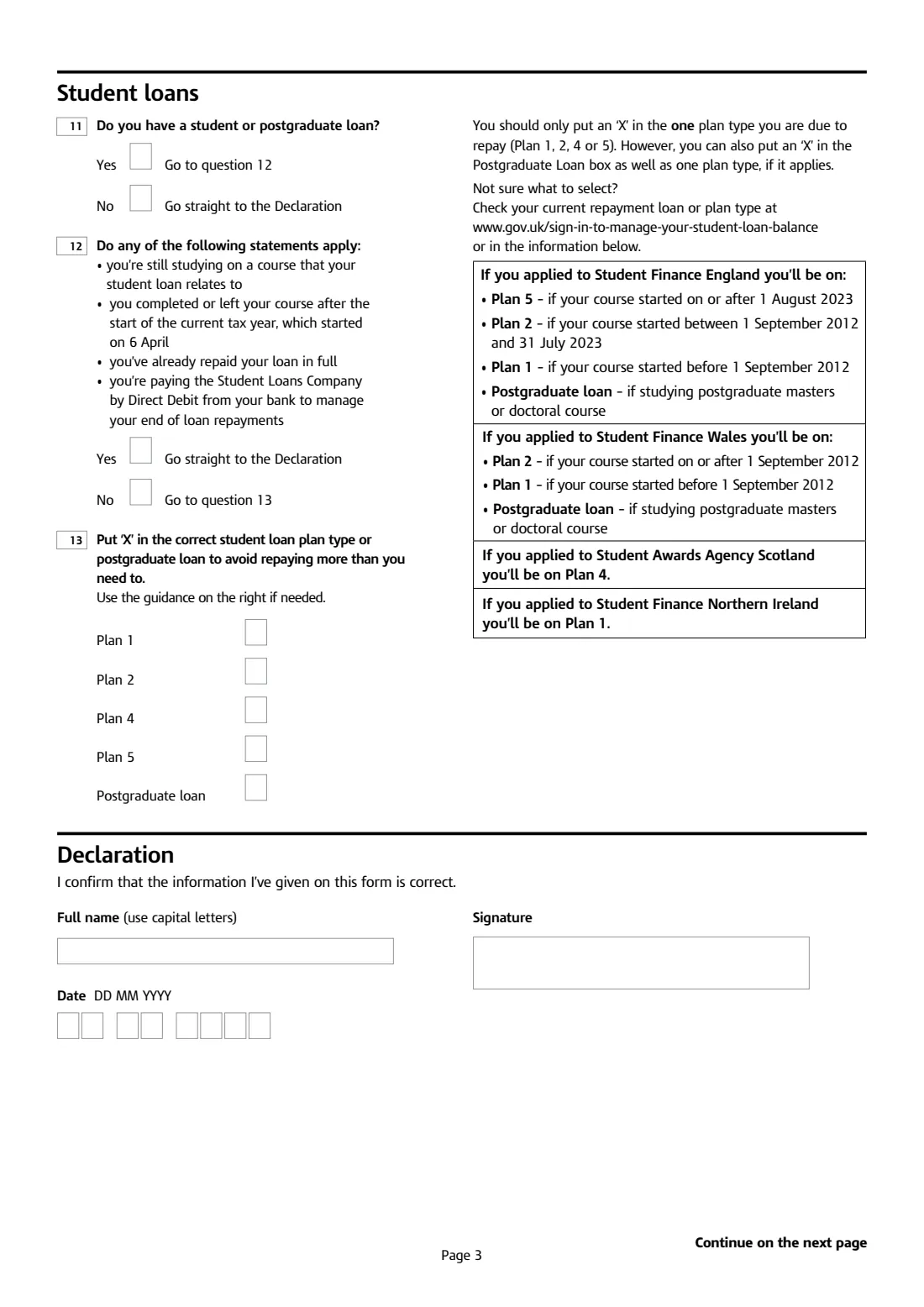
Question 11 asks whether you have a student or postgraduate loan. If you do, question 12 checks whether you should skip deductions: you're still studying on the course the loan relates to, you finished or left the course after 6 April this tax year, you've repaid the loan in full, or you're paying the Student Loans Company by Direct Debit at the end of your loan.
If none of those apply, question 13 asks for your plan type. The form's guidance: Student Finance England — Plan 5 if your course started on or after 1 August 2023, Plan 2 if it started between 1 September 2012 and 31 July 2023, Plan 1 if before 1 September 2012. Student Finance Wales — Plan 2 from 1 September 2012, Plan 1 before. Student Awards Agency Scotland — Plan 4. Student Finance Northern Ireland — Plan 1. Tick only one plan type, plus the postgraduate loan box if you also have one.
5 Declaration
You confirm that the information you've given is correct, print your full name in capitals, sign and date. FileIt prints your name from your earlier answers so it matches exactly.
Common mistakes to avoid
- Choosing statement A when you've had another job since 6 April. That usually leads to underpaid tax; statement B applies instead.
- Forgetting that a pension you're receiving counts. If you get a State, workplace or private pension, the form points you to statement C.
- Counting benefits that aren't on the list. Only Jobseeker's Allowance, Employment and Support Allowance and Incapacity Benefit (and a pension) matter here.
- Ticking more than one student loan plan. Tick one plan type only; the postgraduate loan box can be ticked in addition.
- Guessing your plan type. Check it in your online student loan account or against the dates printed on the form.
- Using a nickname or initials instead of your full first names, which can cause a mismatch with HMRC's records.
- Posting the form to HMRC. It is for your employer only.
After you fill it out
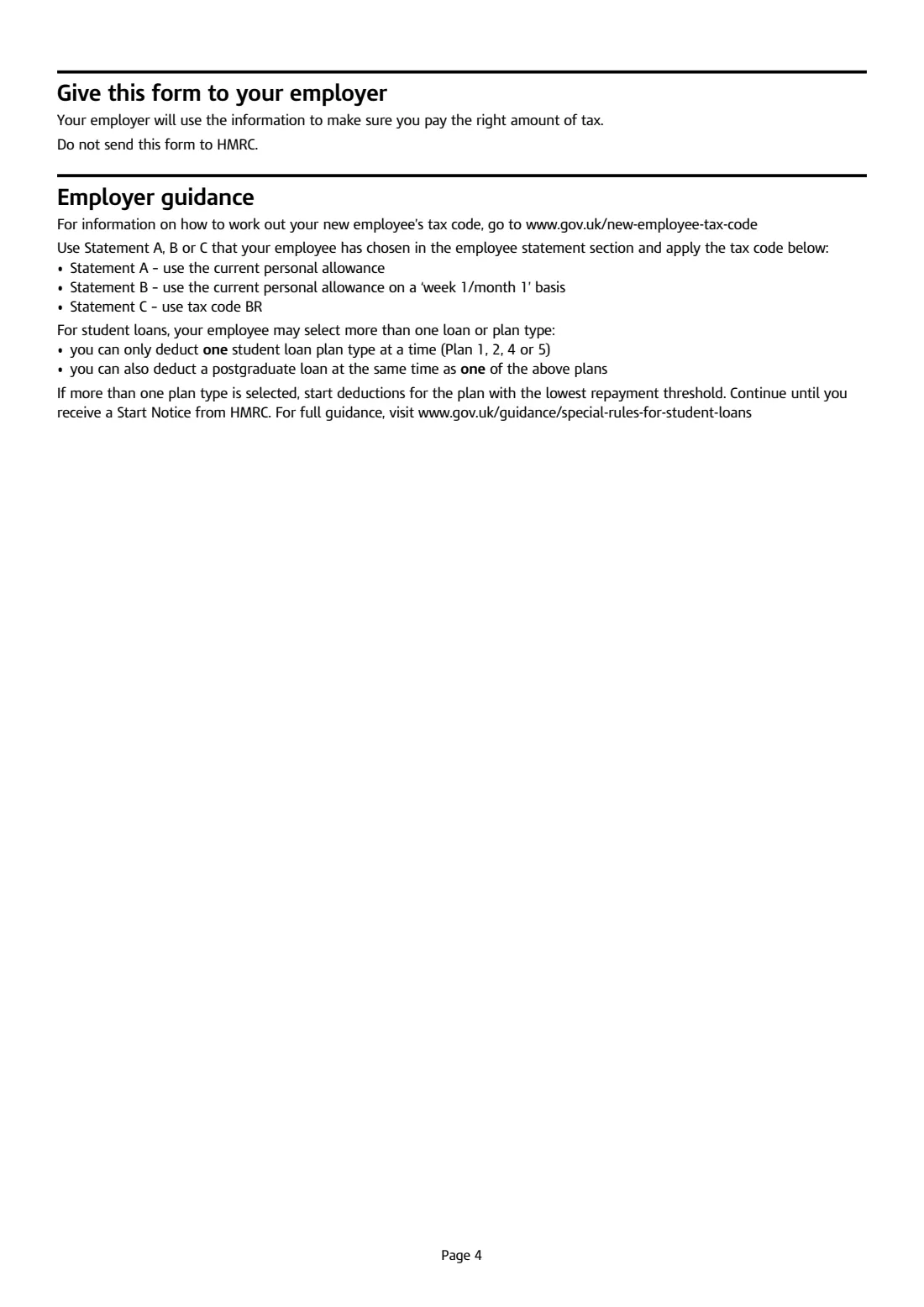
Sign and date the declaration — on paper, or with FileIt's optional e-signature if your employer is happy to accept an electronically signed copy — and give the form to your employer as soon as possible. Your employer uses it to fill in their first Full Payment Submission for you and to apply the tax code linked to your statement: the current personal allowance for A, the same on a Week 1/Month 1 basis for B, or code BR for C.
Do not send the checklist to HMRC. Your employer keeps it for the current and the next 3 tax years. If your circumstances mean the starting code isn't quite right, HMRC will send your employer an updated tax code in due course.
Keep a copy of the completed checklist in your FileIt vault alongside your payslips, P45 and P60 so you can check your tax code later. If you find your P45 after starting, hand it over — your employer will switch to the code on it.
Fill out HMRC Starter checklist online with FileIt
- Pick the person. Choose someone from People and FileIt fills in their name, date of birth, address and other details it already knows.
- Answer plain-language questions. One part of the form at a time, with the official help text beside each question — 21 fields in all. Your answers save as you go.
- Check the live preview. Watch your answers land on the real HM Revenue & Customs (HMRC) form, and let FileIt do any worksheet arithmetic.
- Generate the official PDF. FileIt prints your answers into the agency’s own PDF and files it in that person’s folder in your vault. Sign it, or send it for e-signature.
FileIt fills the form — it never files or submits anything for you. Deliver the finished form to whoever asked for it, the way the form’s instructions say.
Start HMRC Starter checklist now — it’s freeHMRC Starter checklist: frequently asked questions
Do I need a Starter checklist if I have a P45?
Usually not — give your new employer parts 2 and 3 of your P45 instead. But if you have a student or postgraduate loan, the form says you should fill in the Starter checklist as well, whether or not you have a P45.
Is the Starter checklist the same as a P46?
It does the same job. HMRC's Starter checklist replaced the older P46 form that new employees without a P45 used to fill in.
Which statement should I choose — A, B or C?
Choose C if you have another job or receive a State, workplace or private pension. Otherwise choose B if, since 6 April, you've had another job that ended or received Jobseeker's Allowance, Employment and Support Allowance or Incapacity Benefit. If none of that applies, choose A.
What tax code will I get with statement C?
Statement C tells your employer to use tax code BR, which taxes all your pay from this job at the basic rate. That's because your personal allowance is assumed to be used by your other job or pension.
Do I send the Starter checklist to HMRC?
No. The form says clearly not to send it to HMRC. Give it to your employer, who uses the information in their payroll report and keeps the form.
How do I know my student loan plan type?
Check your online student loan account, or use the dates on the form. For example, Student Finance England loans are Plan 5 for courses starting on or after 1 August 2023 and Plan 2 for courses starting from 1 September 2012 to 31 July 2023; Scottish loans are Plan 4.
Can I fill in the Starter checklist online?
Yes. FileIt lets you complete it online for free, checks your statement against your answers, and prints everything into HMRC's official PDF. You can then sign it and give it to your employer yourself.
What if I don't know my National Insurance number?
Leave it blank — the question says 'if known'. Your employer can still use the checklist. It is worth finding your NI number later, though, as it helps match your pay to your HMRC record.
Official sources
- Blank form (PDF), published by HM Revenue & Customs (HMRC): https://assets.publishing.service.gov.uk/media/69959214bfdab2546272bf04/Starter_checklist.pdf
- Official instructions and guidance: https://www.gov.uk/guidance/starter-checklist-for-paye
- Edition shown on this page: HMRC 12/25 (checked 2026-09-25).
FileIt is not affiliated with or endorsed by HM Revenue & Customs (HMRC) or any government. This page explains the form in general terms and is not legal, tax or immigration advice. Always read the official instructions, and check that you are using the edition the recipient accepts. Page last reviewed 2026-09-25.