What is SMP1 Statutory Maternity Pay: employee not entitled?
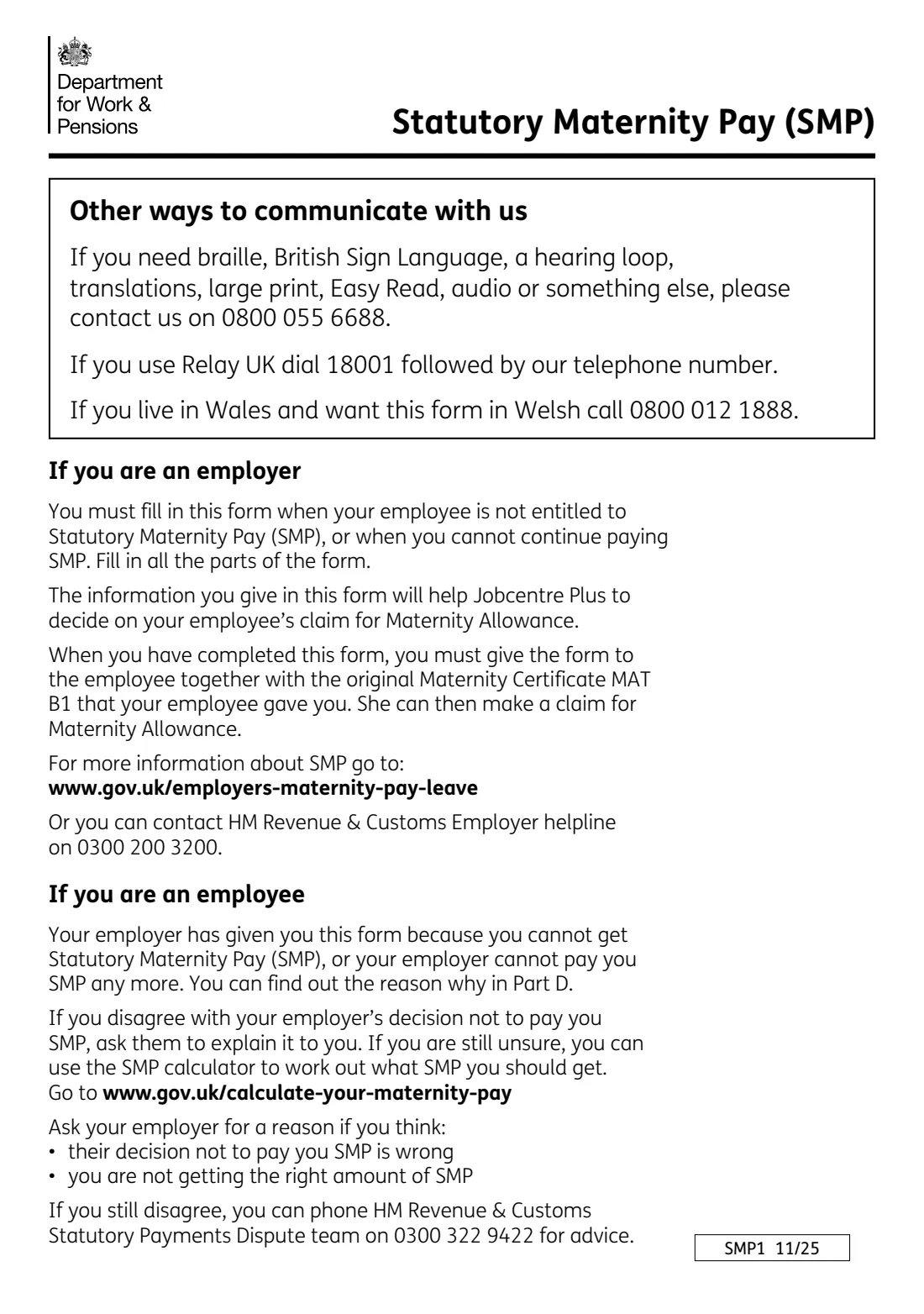
Form SMP1 is the form an employer must fill in when an employee isn't entitled to Statutory Maternity Pay (SMP), or when the employer can't carry on paying it. It's written as a letter to her. It says whether she can't get SMP at all or can't get any more after a certain week, gives the key dates used for her claim, and ticks the reason. The employer signs it and gives it to her with the original MAT B1 maternity certificate.
She then uses SMP1 to claim Maternity Allowance from Jobcentre Plus on form MA1. The form points out that she must claim Maternity Allowance promptly: a claim made more than three months after her Maternity Allowance is due to start loses money. GOV.UK tells employers to give her SMP1 within 7 days of deciding not to pay, and she must get it within 28 days of asking for SMP or of the birth, whichever is earlier.
FileIt asks for the baby's expected date of birth and works out the two Sundays the form needs: the start of the week the baby is due, and the start of the qualifying week 15 weeks before. It prints everything into the official 11/25 SMP1, including the split NI number and date boxes, and saves the finished PDF in your vault. You print it, sign it with a pen and hand it over. FileIt never sends it anywhere.
- Who fills it
- The employer (payroll or HR)
- Given to
- The employee, with her original MAT B1
- Deadline (GOV.UK)
- Within 7 days of your decision, and no later than 28 days after her request for SMP or the birth, whichever is earlier
- Signatures
- The employer signs Part E by hand; a stamp is optional
- Edition
- SMP1 11/25 (Version 2), fill-in-on-screen version
- Length
- 4 pages, Parts A to E
Who needs to fill out SMP1 Statutory Maternity Pay: employee not entitled?
- Employers with a pregnant employee who doesn't qualify for SMP, for example because she hasn't worked for them for 26 weeks by the qualifying week or earns less than the Lower Earnings Limit.
- Employers who have been paying SMP but have to stop, for example because she went into legal custody or started work for another employer after the birth.
- Employers whose employee gave notice or medical evidence too late without a good reason.
- Payroll bureaus and accountants handling statutory payments for small businesses.
- Employees who have been given an SMP1 and want to understand the dates and reasons on it.
When to use SMP1 Statutory Maternity Pay: employee not entitled
- As soon as you decide an employee isn't entitled to SMP. GOV.UK says to give her the form within 7 days of your decision.
- When you can't carry on paying SMP. Tick the second box in Part B and give the date the last week you pay ends.
- She must receive the form within 28 days of asking for SMP or of the birth, whichever is earlier, so she can claim Maternity Allowance in time.
What you need before you start
- Her full name, home address and postcode, National Insurance number and payroll number.
- The baby's expected date of birth from her MAT B1. FileIt works out the week the baby is due and the qualifying week from it.
- The date her Maternity Pay Period starts, or would have started.
- If you're stopping SMP, the date the last week you pay ends.
- The reason or reasons SMP can't be paid.
- Your business name, address, phone, fax (if any), email and your position, plus your stamp if you use one.
What’s on SMP1 Statutory Maternity Pay: employee not entitled
The 2025 edition has 4 pages. FileIt asks for it in 5 parts, and it is signed by Employer:
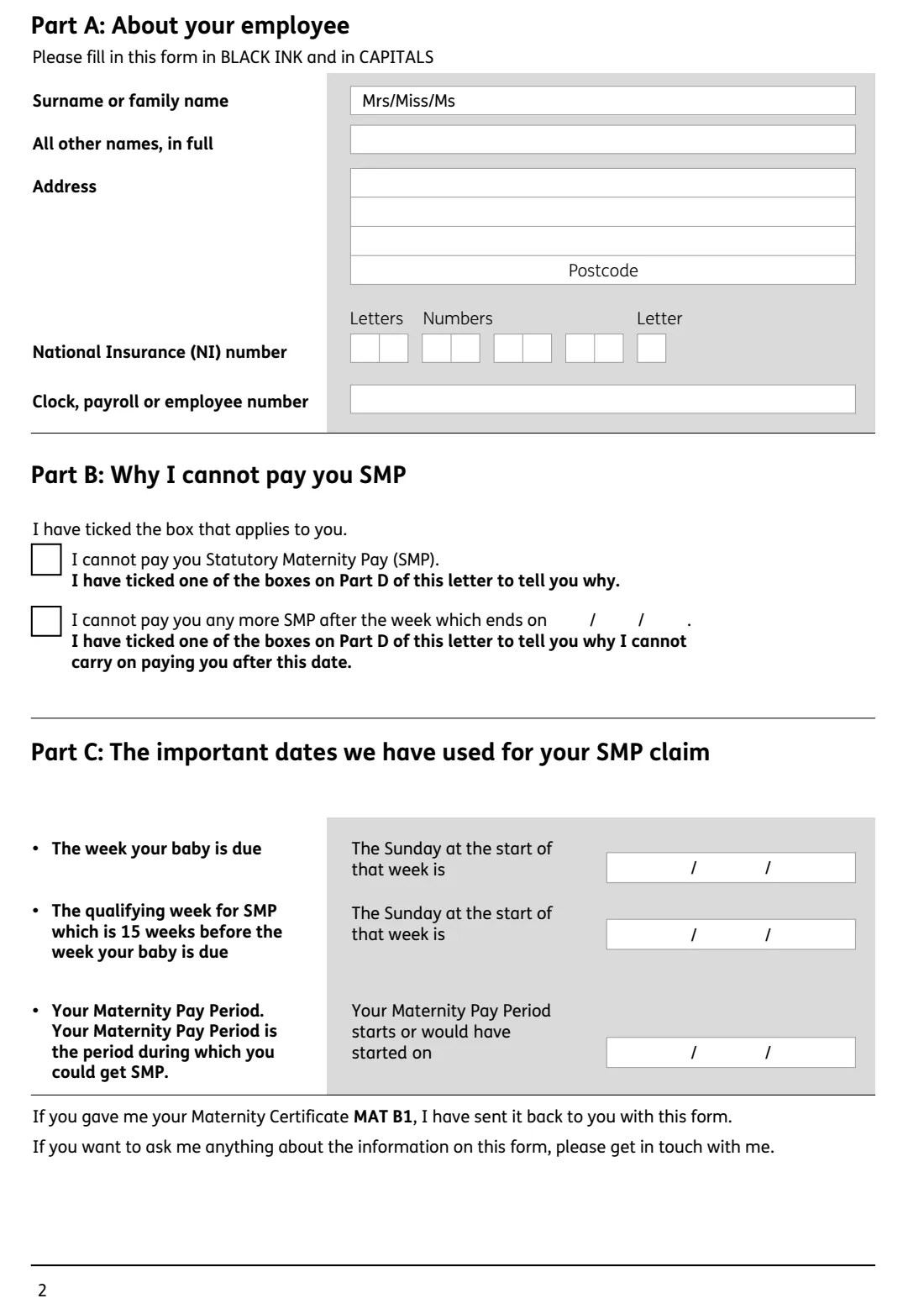
- Part A: About your employeeEmployer
- Part B: Why I cannot pay you SMPEmployer
- Part C: The important dates used for the SMP claimEmployer
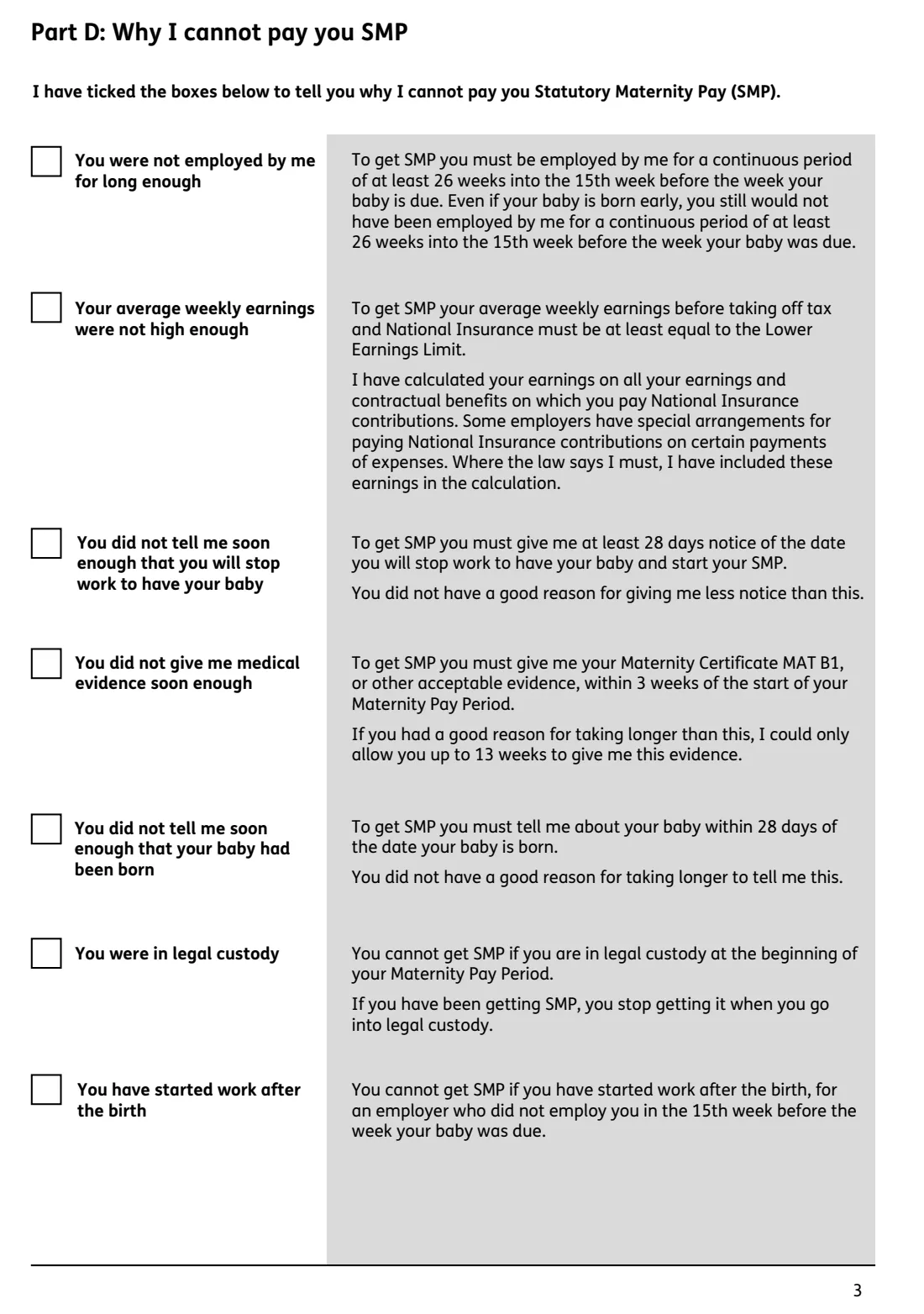
- Part D: Why I cannot pay you SMP — the reasonsEmployer
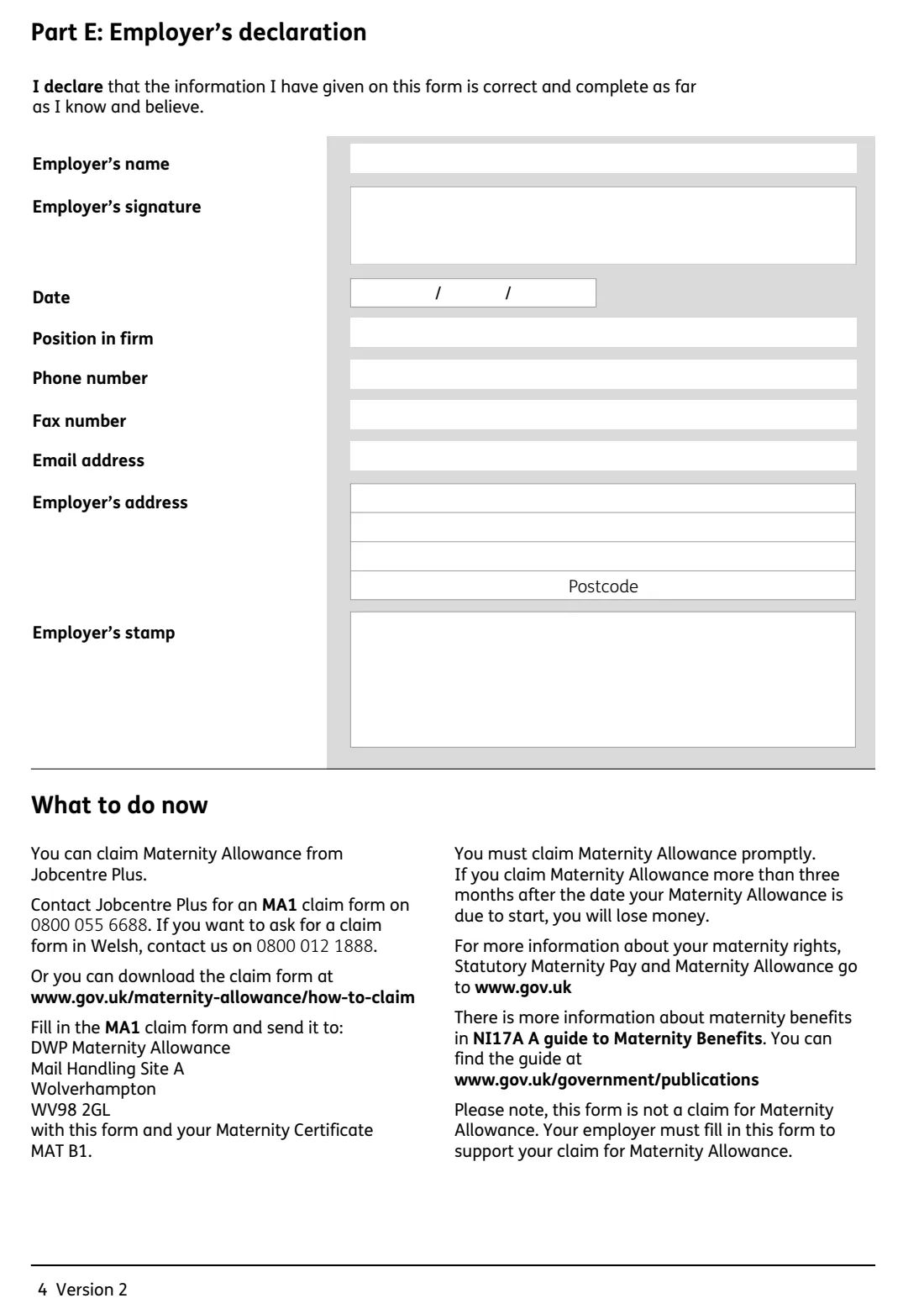
- Part E: Employer's declarationEmployer
How to fill out SMP1 Statutory Maternity Pay: employee not entitled, step by step
1 Part A: About your employee
Her surname ('Mrs/Miss/Ms' is already printed), all other names in full, address and postcode, National Insurance number and clock or payroll number. The form asks for capitals, so FileIt prints names and addresses in capitals, accents included. The NI number is split into its letter and number boxes for you.
2 Part B: Why I cannot pay you SMP
Tick one box. Either you can't pay her SMP at all, or you can't pay any more SMP after the week that ends on a date you give. The date prints in the DD / MM / YY boxes. Both boxes send her to Part D for the reason.
3 Part C: The important dates
The Sunday that starts the week her baby is due, the Sunday that starts the qualifying week (15 weeks earlier), and the date her Maternity Pay Period starts or would have started. FileIt calculates the first two from the expected date of birth on the MAT B1.
4 Part D: The reasons
Tick the reasons that apply. She wasn't employed by you for long enough. Her average weekly earnings weren't high enough. She didn't give 28 days' notice of stopping work. She didn't give medical evidence in time. She didn't tell you about the birth within 28 days. She was in legal custody. She started work for another employer after the birth. The form explains each one to her.
5 Part E: Employer's declaration
Your business name, the date, your position, phone, fax, email and address. Sign in the signature box after printing and add your stamp if you have one.
Common mistakes to avoid
- Using the plain smp1.pdf, which can't be filled in on screen. The interactive version is the one to fill.
- Getting the qualifying week wrong. It's the week starting 15 Sundays before the week the baby is due, not 15 weeks before the due date itself.
- Keeping her MAT B1. Return the original with the form, because she needs it for her Maternity Allowance claim.
- Giving the form late. She needs it quickly, because a late Maternity Allowance claim can lose money.
- Ticking both boxes in Part B, or none.
- Forgetting to sign Part E.
After you fill it out
Print the SMP1, sign Part E with a pen, add your stamp if you have one, and give it to her with her original MAT B1.
She claims Maternity Allowance on form MA1 and sends it with SMP1 and the MAT B1 to DWP Maternity Allowance, Mail Handling Site A, Wolverhampton WV98 2GL, the address printed on the form.
Keep a copy with your statutory pay records. FileIt keeps the finished PDF in your vault. If she disagrees with your decision, the form tells her to ask you first and then gives HMRC's Statutory Payments Dispute team number.
Fill out SMP1 Statutory Maternity Pay: employee not entitled online with FileIt
- Pick the person. Choose someone from People and FileIt fills in their name, date of birth, address and other details it already knows.
- Answer plain-language questions. One part of the form at a time, with the official help text beside each question — 34 fields in all. Your answers save as you go.
- Check the live preview. Watch your answers land on the real HM Revenue & Customs (HMRC) form, and let FileIt do any worksheet arithmetic.
- Generate the official PDF. FileIt prints your answers into the agency’s own PDF and files it in that person’s folder in your vault. Sign it, or send it for e-signature.
FileIt fills the form — it never files or submits anything for you. Deliver the finished form to whoever asked for it, the way the form’s instructions say.
Start SMP1 Statutory Maternity Pay: employee not entitled now — it’s freeSMP1 Statutory Maternity Pay: employee not entitled: frequently asked questions
What is form SMP1?
SMP1 is the form an employer gives to an employee who isn't entitled to Statutory Maternity Pay, or whose SMP has to stop. It explains why and gives the key dates, and she uses it to claim Maternity Allowance instead.
When must I give an employee the SMP1?
GOV.UK says to give it within 7 days of your decision. She must get it within 28 days of her request for Statutory Maternity Pay or the birth, whichever is earlier.
Which SMP1 PDF should I use?
GOV.UK publishes two versions: a plain one to print and fill in by hand, and one you can fill in on screen, print and sign with a pen. FileIt fills the on-screen version (edition 11/25).
How do I work out the qualifying week?
Find the week the baby is due, which runs Sunday to Saturday, and count back 15 weeks. The qualifying week starts on the Sunday 15 weeks before the Sunday that starts the week the baby is due. FileIt works both Sundays out from the expected date of birth.
Does the employee send SMP1 to anyone?
Yes. She sends it with her MA1 Maternity Allowance claim and her MAT B1 to DWP Maternity Allowance. The form isn't a Maternity Allowance claim in itself.
Can I fill in SMP1 online?
Yes, with FileIt. You answer the questions on screen, FileIt prints them into the official SMP1 and saves it in your vault, and you print, sign and hand it over. FileIt doesn't submit anything.
Official sources
- Blank form (PDF), published by HM Revenue & Customs (HMRC): https://assets.publishing.service.gov.uk/media/6a7b0eb0423b0bdba0290ebe/smp1-interactive.pdf
- Official instructions and guidance: https://www.gov.uk/government/publications/statutory-maternity-pay-employee-not-entitled-form-for-employers
- Edition shown on this page: SMP1 11/25 (Version 2), fill-in-on-screen version (checked 2026-09-28).
FileIt is not affiliated with or endorsed by HM Revenue & Customs (HMRC) or any government. This page explains the form in general terms and is not legal, tax or immigration advice. Always read the official instructions, and check that you are using the edition the recipient accepts. Page last reviewed 2026-09-28.