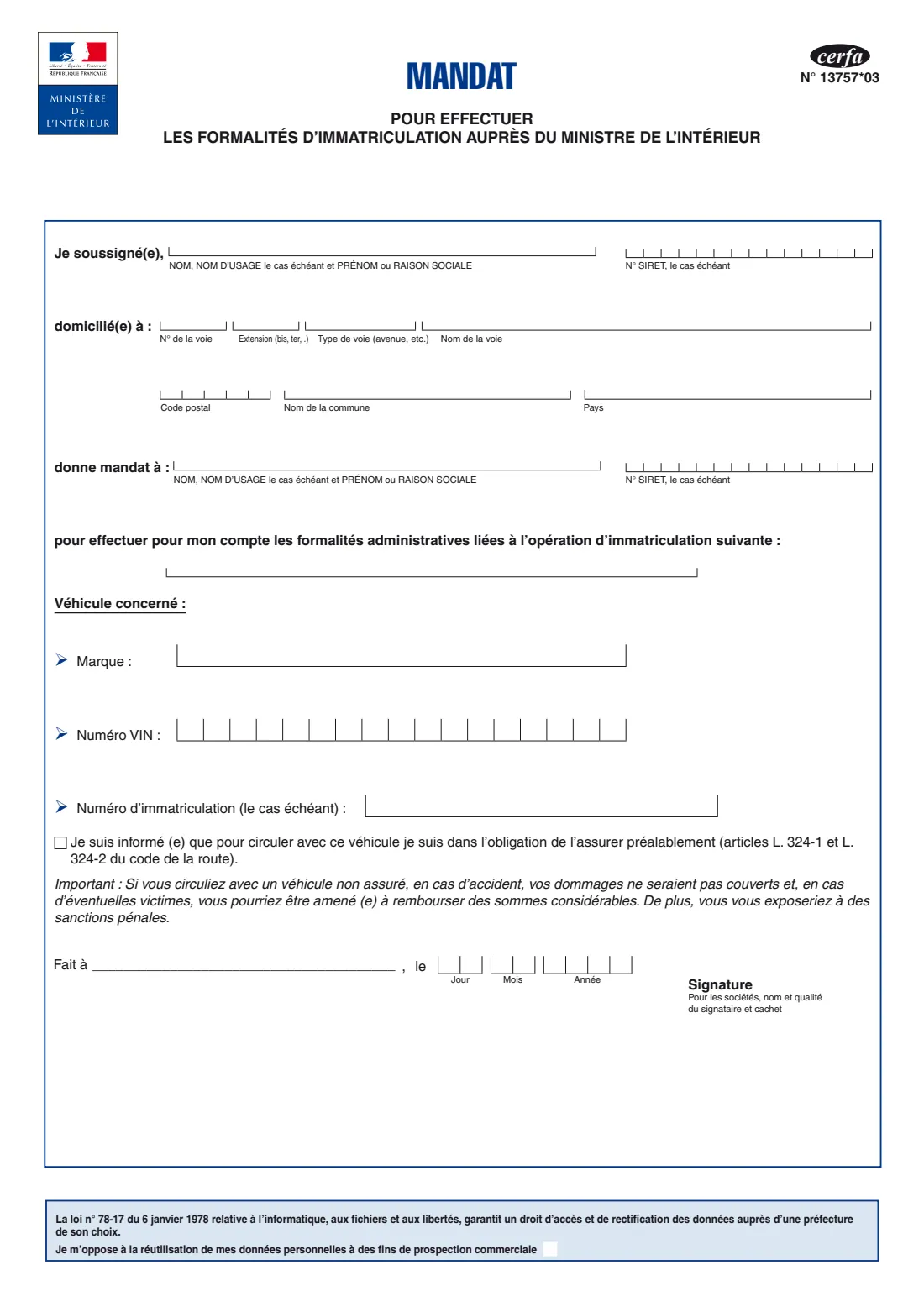
What is Cerfa 13757 - mandat d'immatriculation?
In France, vehicle registration (the carte grise, officially the certificat d'immatriculation) is handled online in the national registration system run for the Ministry of the Interior. You can do it yourself, or have someone do it for you, most often the garage or dealer selling you the car. Motor-trade professionals authorised by the Ministry can register vehicles on their clients' behalf. To act for you, they need your written mandate on cerfa 13757*03.
The mandat names you (the mandant), the person or company you authorise (the mandataire) with its SIRET number, the registration operation, and the vehicle by make, VIN and registration number. You also tick that you know the vehicle must be insured before it is driven, as articles L. 324-1 and L. 324-2 of the code de la route require, and sign.
FileIt fills in the official cerfa with you in English, checks the SIRET and VIN formats, prints each character in its box, and files the PDF in your vault. You sign it and hand it to the person you are authorising. FileIt never submits anything to the registration system.
- Who fills it
- The vehicle owner (or the company, through its representative)
- Given to
- The person or professional you authorise, usually the garage or dealer
- Covers
- One registration operation for one vehicle
- Signatures
- The person giving the mandate (for a company: name, capacity and stamp)
- Edition
- cerfa N° 13757*03, 1 page
Who needs to fill out Cerfa 13757 - mandat d'immatriculation?
- Buyers of a new or used car whose garage or dealer will register it for them.
- Owners who ask an authorised motor-trade professional to change the address or holder on a carte grise.
- Owners who want a relative or another person to carry out a registration formality on their behalf.
- Companies having a fleet vehicle registered by a professional.
When to use Cerfa 13757 - mandat d'immatriculation
- Whenever someone else carries out a registration formality for your vehicle, for example a change of owner, an address change, a first registration or a duplicate.
- Once per operation and vehicle. A new operation or another vehicle needs a new mandat.
- Not if you do the formality yourself online. Then no mandate is needed.
What you need before you start
- Your full name (or company name and SIRET) and address.
- The name of the person or company you authorise, and its SIRET number if it is a business.
- The operation the professional will carry out. Ask them for the exact wording.
- The vehicle's make, its 17-character VIN, and its registration number if it has one. These are on the carte grise.
- Proof the vehicle is or will be insured before it is driven.
What’s on Cerfa 13757 - mandat d'immatriculation
The 2026 edition has 1 page. FileIt asks for it in 4 parts, and it is signed by Person giving the mandate (mandant):
- Je soussigné(e) - the person giving the mandatePerson giving the mandate (mandant)
- Donne mandat à - the person receiving the mandatePerson giving the mandate (mandant)
- Véhicule concerné - the vehiclePerson giving the mandate (mandant)
- Assurance, lieu, date et signature - insurance, place, date and signaturePerson giving the mandate (mandant)
How to fill out Cerfa 13757 - mandat d'immatriculation, step by step
1 Je soussigné(e), domicilié(e) à
Your name, or company name and SIRET, then your address split into house number, extension (bis, ter), street type, street name, postcode, town and country.
2 Donne mandat à
The name or company name of the person you authorise, and their SIRET number if they are a business.
3 Opération d'immatriculation
The formality they will carry out for you, for example 'Changement de titulaire'.
4 Véhicule concerné
The make, the VIN one character per box, and the registration number if the vehicle already has one.
5 Assurance, fait à, le, signature
Tick the insurance acknowledgement, write where and when you sign, and sign. A company adds the signatory's name and capacity and its stamp. At the foot, you can tick to object to your data being reused for marketing.
Common mistakes to avoid
- Mistyping the VIN. It has 17 characters and never contains the letters I, O or Q. FileIt checks the format.
- Leaving out the professional's SIRET number. FileIt checks the SIRET's check digit.
- Naming the operation vaguely. Ask the professional for the exact formality.
- Forgetting to tick the insurance acknowledgement or to sign.
After you fill it out
Sign the mandat and give it to the person you are authorising, with the other documents they ask for. FileIt does not send it anywhere.
Keep the filled PDF in your FileIt vault, next to the carte grise and the certificate of sale if there is one.
Make sure the vehicle is insured before it is driven.
Fill out Cerfa 13757 - mandat d'immatriculation online with FileIt
- Pick the person. Choose someone from People and FileIt fills in their name, date of birth, address and other details it already knows.
- Answer plain-language questions. One part of the form at a time, with the official help text beside each question — 19 fields in all. Your answers save as you go.
- Check the live preview. Watch your answers land on the real Ministère de l'Intérieur (vehicle registration system, via the Agence nationale des titres sécurisés) form, and let FileIt do any worksheet arithmetic.
- Generate the official PDF. FileIt prints your answers into the agency’s own PDF and files it in that person’s folder in your vault. Sign it, or send it for e-signature.
FileIt fills the form — it never files or submits anything for you. Deliver the finished form to whoever asked for it, the way the form’s instructions say.
Start Cerfa 13757 - mandat d'immatriculation now — it’s freeCerfa 13757 - mandat d'immatriculation: frequently asked questions
What is cerfa 13757?
It is the mandat pour effectuer les formalités d'immatriculation: the form by which a vehicle owner authorises someone else, usually an authorised motor-trade professional, to carry out a carte grise formality for them.
Do I need it to register my car myself?
No. The mandat is only needed when someone else carries out the formality for you.
Can one mandat cover several cars?
The form names one operation and one vehicle (make, VIN and registration number), so each vehicle and operation has its own mandat.
What is the insurance tick box for?
By ticking it you confirm you know the vehicle must be insured before it is driven, under articles L. 324-1 and L. 324-2 of the code de la route.
Can I sign the mandat electronically?
FileIt places a signature box you can e-sign. Ask the professional whether they accept an electronically signed mandat or need one signed by hand.
Can I fill in cerfa 13757 online with FileIt?
Yes. FileIt fills the official PDF, checks the VIN and SIRET, and saves it in your vault. You then sign it and hand it over yourself.
Official sources
- Blank form (PDF), published by Ministère de l'Intérieur (vehicle registration system, via the Agence nationale des titres sécurisés): https://www.formulaires.service-public.fr/gf/cerfa_13757.do
- Official instructions and guidance: https://www.service-public.gouv.fr/particuliers/vosdroits/N367
- Edition shown on this page: Cerfa N° 13757*03 (checked 2026-10-01).
FileIt is not affiliated with or endorsed by Ministère de l'Intérieur (vehicle registration system, via the Agence nationale des titres sécurisés) or any government. This page explains the form in general terms and is not legal, tax or immigration advice. Always read the official instructions, and check that you are using the edition the recipient accepts. Page last reviewed 2026-10-01.