What is Kela VK 1e - EU Disability Card?
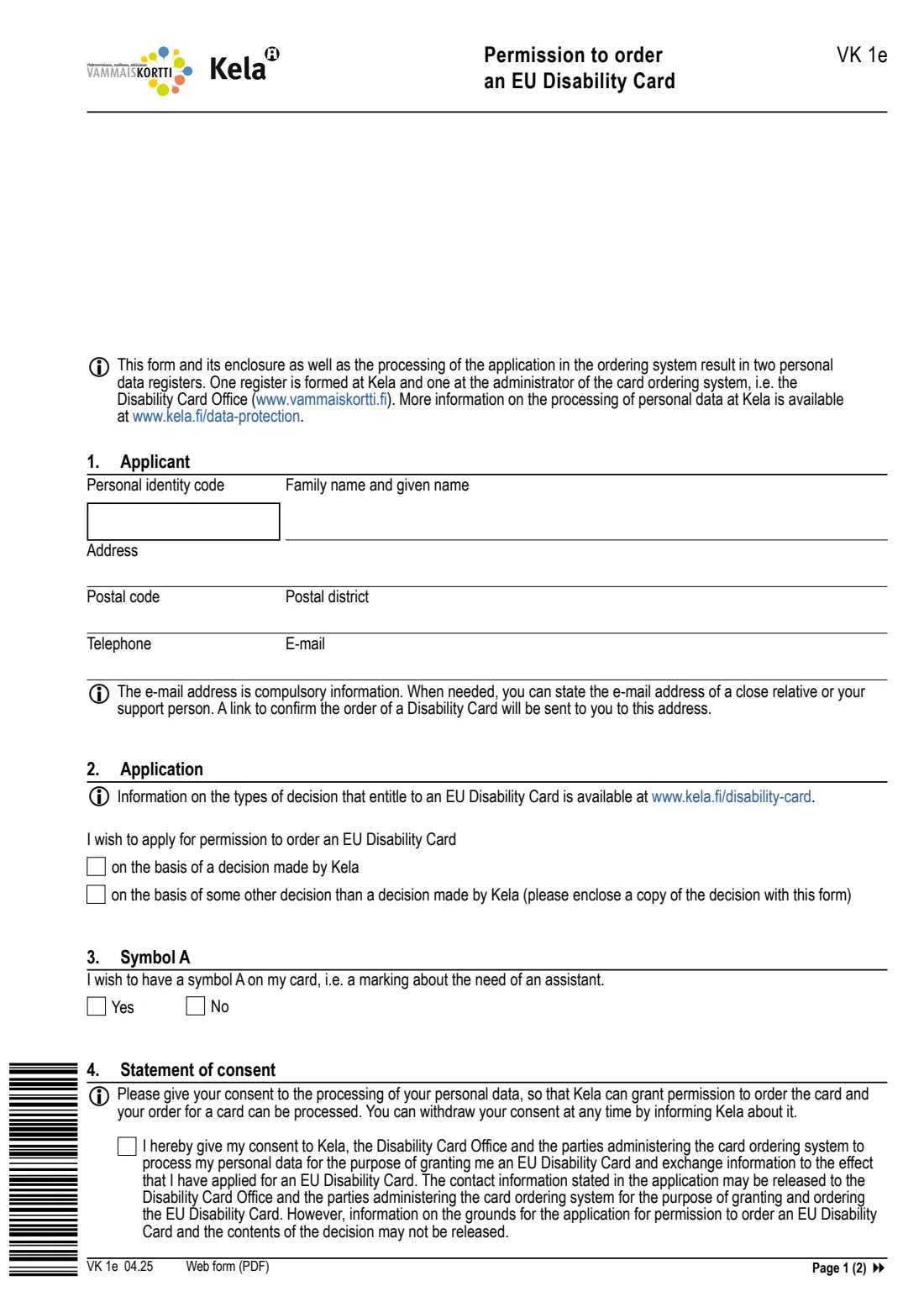
The EU Disability Card (vammaiskortti) is an optional card that shows you have a disability or a long-term illness, without saying what it is. In Finland you get it in two steps. First Kela checks that you have a valid decision on a qualifying benefit or service and grants you permission to order the card. Then you complete the order with the Disability Card Office (vammaiskortti.fi) through a link Kela sends to your e-mail. Form VK 1e is the English paper application for that first step.
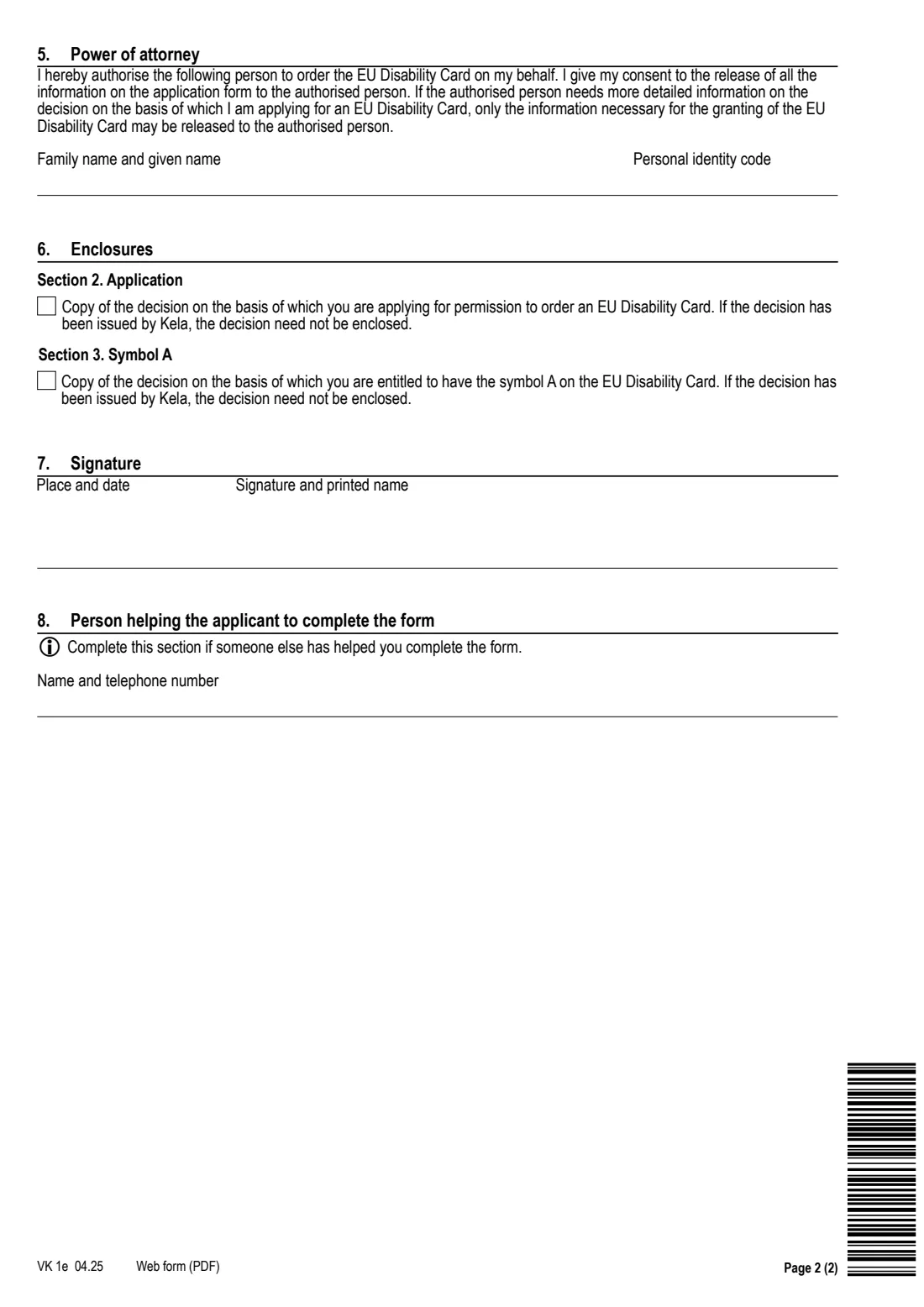
On two pages you give your contact details and say whether your entitlement comes from a Kela decision or from another authority's decision. You also say whether you want symbol A on the card, which shows that you need an assistant or support person with you. You give the consent the ordering system needs, and you can authorise someone else to order the card for you.
FileIt asks the questions in plain language and prints your answers into Kela's own PDF. It fills in your name and e-mail from your People records and checks the personal identity codes. It also reminds you to enclose a copy of any decision that was not made by Kela. The finished PDF is saved in your vault. You send it to Kela yourself. FileIt never submits anything.
- Who fills it
- A person with a valid decision on a qualifying benefit or service who wants an EU Disability Card
- Given to
- Kela, by post (Kela, PL 10, 00056 KELA) or online in OmaKela
- Cost
- Kela's page says the card costs 10 euros, paid when you order it; the card is optional
- Signatures
- The applicant signs page 2 and prints their name
- Edition
- VK 1e 04.25, two pages, in English
Who needs to fill out Kela VK 1e - EU Disability Card?
- People who receive a Kela disability allowance (basic, middle or highest rate) and want to show their disability with a card.
- Pensioners who get Kela's care allowance for pensioners.
- People with a Kela decision on interpreter services for people with hearing or speech impairments.
- People whose services under the Act on Services for Persons with Disabilities were decided by another authority, such as their wellbeing services county. They enclose a copy of that decision.
- Anyone who needs an assistant or support person with them and wants symbol A on the card.
- Anyone who prefers an English paper application to the OmaKela e-service.
When to use Kela VK 1e - EU Disability Card
- Once you have a valid decision that entitles you to the card and you want to order one.
- When you want symbol A added, based on a decision that shows you need an assistant.
- When a family member or support person will order the card for you. Fill in the power of attorney in section 5.
- The card is completely optional. You never have to apply for it to keep your benefit or service.
What you need before you start
- Your Finnish personal identity code (henkilötunnus).
- Your address, postal code and postal district, and your phone number.
- An e-mail address. This is compulsory, because the link to confirm the card order is sent there. It can be a close relative's or your support person's address.
- A copy of the decision your application is based on, if it was not made by Kela.
- A copy of the decision that entitles you to symbol A, if it was not made by Kela.
- If someone will order the card for you: their name and personal identity code.
What’s on Kela VK 1e - EU Disability Card
The 2025 edition has 2 pages. FileIt asks for it in 8 parts, and it is signed by Applicant:
- 1 ApplicantApplicant
- 2 ApplicationApplicant
- 3 Symbol AApplicant
- 4 Statement of consentApplicant
- 5 Power of attorneyApplicant
- 6 EnclosuresApplicant
- 7 SignatureApplicant
- 8 Person helping the applicant to complete the formApplicant
How to fill out Kela VK 1e - EU Disability Card, step by step
1 1. Applicant
Give your personal identity code, family name and given names, address, postal code and district, telephone and e-mail. The e-mail is compulsory: after Kela grants permission, a link to confirm the order is sent there. If you don't use e-mail, you can give the address of a close relative or your support person.
2 2. Application
Tick whether you apply on the basis of a decision made by Kela, or of some other decision. For another authority's decision, enclose a copy with the form. The types of decision that entitle you to the card are listed at www.kela.fi/disability-card.
3 3. Symbol A
Say Yes or No to symbol A, the marking that shows you need an assistant. If the decision that entitles you to it was not made by Kela, enclose a copy.
4 4. Statement of consent
Tick the consent box. Kela can grant permission and your order can be processed only if you consent to Kela, the Disability Card Office and the ordering system's administrators processing your data for the card. The grounds for your application and the contents of the decision are not released to them. You can withdraw the consent at any time by telling Kela.
5 5. Power of attorney (optional)
If someone else will order the card for you, give their name and personal identity code. You consent to all the information on the application being released to them. About the decision itself, only what is needed to grant the card is released.
6 6. Enclosures
Tick the copies you enclose: the decision behind section 2, and the decision behind symbol A. Decisions issued by Kela need not be enclosed.
7 7. Signature
Write the place and date, then sign and print your name.
8 8. Person helping you (optional)
If someone helped you complete the form, give their name and telephone number.
Common mistakes to avoid
- Leaving out the e-mail address. It is compulsory, and without it the order link can't reach you.
- Applying on another authority's decision without enclosing a copy of it.
- Asking for symbol A without the decision that entitles you to it, when that decision was not made by Kela.
- Not ticking the statement of consent. Kela can't grant permission without it.
- Expecting the card to arrive after Kela's decision. You still have to complete the order and pay with the Disability Card Office.
After you fill it out
Sign and date page 2 and add any enclosures.
Send it to Kela, PL 10, 00056 KELA, or apply in the OmaKela e-service instead. FileIt does not send it for you.
When Kela grants permission, you get an e-mail link. Complete your order by following the Disability Card Office's instructions at vammaiskortti.fi. Kela's page says the card costs 10 euros.
Keep the filled PDF in your FileIt vault. When the card arrives, you can add a copy of it to your vault too.
Fill out Kela VK 1e - EU Disability Card online with FileIt
- Pick the person. Choose someone from People and FileIt fills in their name, date of birth, address and other details it already knows.
- Answer plain-language questions. One part of the form at a time, with the official help text beside each question — 20 fields in all. Your answers save as you go.
- Check the live preview. Watch your answers land on the real Social Insurance Institution of Finland (Kansaneläkelaitos / Kela) form, and let FileIt do any worksheet arithmetic.
- Generate the official PDF. FileIt prints your answers into the agency’s own PDF and files it in that person’s folder in your vault. Sign it, or send it for e-signature.
FileIt fills the form — it never files or submits anything for you. Deliver the finished form to whoever asked for it, the way the form’s instructions say.
Start Kela VK 1e - EU Disability Card now — it’s freeKela VK 1e - EU Disability Card: frequently asked questions
What is Kela form VK 1e?
VK 1e is Kela's English application for permission to order an EU Disability Card (vammaiskortti). Kela checks your qualifying decision and grants permission. You then order the card from the Disability Card Office.
Who can get the EU Disability Card in Finland?
Kela's guidance is that you need to be receiving a qualifying benefit or service now and have a valid decision on it. Examples are disability allowance, care allowance for pensioners, interpreter services, and services under the Act on Services for Persons with Disabilities. The full list is at www.kela.fi/disability-card.
What does symbol A mean?
Symbol A on the card shows that you need an assistant or support person who accompanies you. You ask for it in section 3.
How much does the card cost?
Kela's page says the card costs 10 euros and is completely optional. You pay when you order it from the Disability Card Office, not to Kela.
Can I fill in VK 1e online with FileIt?
Yes. FileIt asks the questions in plain language, checks the identity codes, and prints your answers into Kela's official PDF, which is saved in your vault. You send it to Kela yourself, by post or through OmaKela.
Do I need to enclose the decision?
Only if it was not made by Kela. A decision from another authority, such as a wellbeing services county, must be enclosed. The same applies to the decision that entitles you to symbol A.
Can someone else order the card for me?
Yes. Fill in the power of attorney in section 5 with their name and personal identity code.
Official sources
- Blank form (PDF), published by Social Insurance Institution of Finland (Kansaneläkelaitos / Kela): https://www.kela.fi/benefit-forms/VK1e.pdf
- Official instructions and guidance: https://www.kela.fi/disability-card
- Edition shown on this page: VK 1e 04.25 (checked 2026-09-28).
FileIt is not affiliated with or endorsed by Social Insurance Institution of Finland (Kansaneläkelaitos / Kela) or any government. This page explains the form in general terms and is not legal, tax or immigration advice. Always read the official instructions, and check that you are using the edition the recipient accepts. Page last reviewed 2026-09-28.