What is Form RC4288?
Form RC4288, Request for Taxpayer Relief – Cancel or Waive Penalties and Interest, is how you ask the Canada Revenue Agency (CRA) to cancel or waive penalties and interest when you couldn't meet your tax obligations because of circumstances beyond your control. The form covers financial hardship (for individuals and for businesses), natural or human-made disasters, death, accidents, serious illness or emotional or mental distress, civil disturbances or disruptions in services, CRA errors and CRA delays, and other circumstances you explain yourself.
The form identifies you and any authorized representative, lists the penalties and interest (with amounts and tax years) and the individual, business or other accounts they were charged on, and records your reasons and the supporting documents you'll include. You then explain what happened and give the key dates. If you're asking the CRA to reconsider an earlier taxpayer relief decision, you explain why you disagree instead.
FileIt walks you through all seven sections and prints your answers into the CRA's own fillable RC4288 PDF (edition RC4288 E (25)), wrapping your explanation to fit the boxes on the form. The finished PDF is saved in your vault. You print it, sign it by hand and send it to the CRA yourself, online or by mail. FileIt never submits anything, and the CRA decides whether to grant relief.
- Who fills it
- Individuals and businesses charged penalties or interest, or an authorized representative with level 2 authorization
- Sent to
- The CRA, online through Submit documents or by mail to the office for your province or territory
- Covers
- Penalties, interest or both, on individual, business, trust, non-resident and other accounts
- Signatures
- Handwritten signature and date in Section 7
- Edition
- RC4288 E (25)
- What happens next
- A letter acknowledging your request, then a decision letter
Who needs to fill out Form RC4288?
- Individuals charged late-filing penalties, instalment penalties or arrears interest after a serious illness, a death in the family, a disaster or financial hardship.
- Businesses charged late-remitting, failure-to-remit or other penalties when their operations, employees' jobs or the community were at risk.
- Anyone who received incorrect information from the CRA, or whose file was held up by a CRA delay beyond its service standards.
- Authorized representatives with at least level 2 authorization for all the accounts involved, filing on a client's behalf.
- Taxpayers asking the CRA to reconsider a previous taxpayer relief decision.
When to use Form RC4288
- After you've been charged penalties or interest, shown on your notice of assessment or statement of account.
- When circumstances beyond your control kept you from filing, reporting or paying on time.
- When you have new information after a relief decision you disagree with (Section 5).
- If you're not sure it's the right form, the CRA's Self-Evaluation and Learning Tool (canada.ca/taxpayer-relief-self-evaluation) can help. You can also call 1-800-959-8281 (individuals) or 1-800-959-5525 (business and self-employed).
What you need before you start
- Your name, mailing address and phone numbers.
- Your representative's name, RepID, firm, address and phone, if someone is filing for you.
- Your notice of assessment or statement of account, for the penalty and interest types, amounts and tax years.
- Your social insurance number, or your business number(s) with program identifiers and reference numbers, or other account numbers such as a trust (T3) or non-resident (NR) account.
- Supporting documents for each reason, such as Form RC376 and bank statements for individual hardship, financial statements for a business, fire or insurance reports, death certificates or doctor's letters, or proof of a CRA error or delay.
- A clear explanation of what happened and a list of the key dates.
- The case number from the decision letter, if you're asking for a reconsideration.
What’s on Form RC4288
The 2025 edition has 6 pages. FileIt asks for it in 9 parts:
- Section 1 – Taxpayer identificationTaxpayer or representative
- Section 2 – Authorized representative identificationTaxpayer or representative
- Section 3 – Details of request: penaltiesTaxpayer or representative
- Section 3 – Details of request: interestTaxpayer or representative
- Section 3 – Accounts involvedTaxpayer or representative
- Section 4 – Reason(s) for your request and supporting documentsTaxpayer or representative
- Section 5 – Previous decisionTaxpayer or representative
- Section 6 – Supporting detailsTaxpayer or representative
- Section 7 – CertificationTaxpayer or representative
How to fill out Form RC4288, step by step
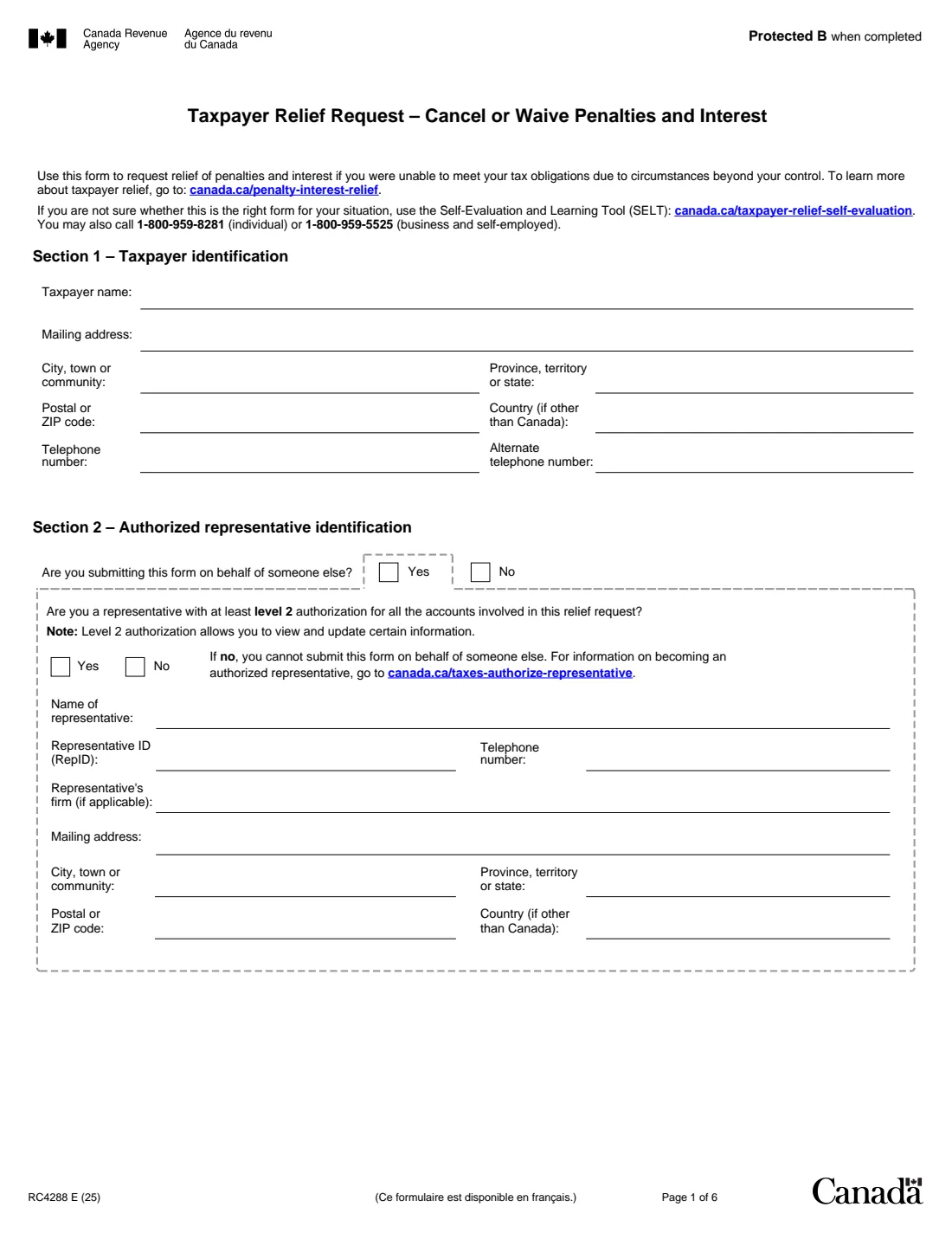
1 Section 1 – Taxpayer identification
Enter the taxpayer's name, mailing address, city, province or state, postal or ZIP code, country if outside Canada, and a telephone number (plus an alternate one if you like).
2 Section 2 – Authorized representative
Say whether you're submitting the form on behalf of someone else. If you are, you must have at least level 2 authorization for all the accounts involved. The form says that without it, you can't submit it for someone else. Give the representative's name, RepID, phone, firm and mailing address.
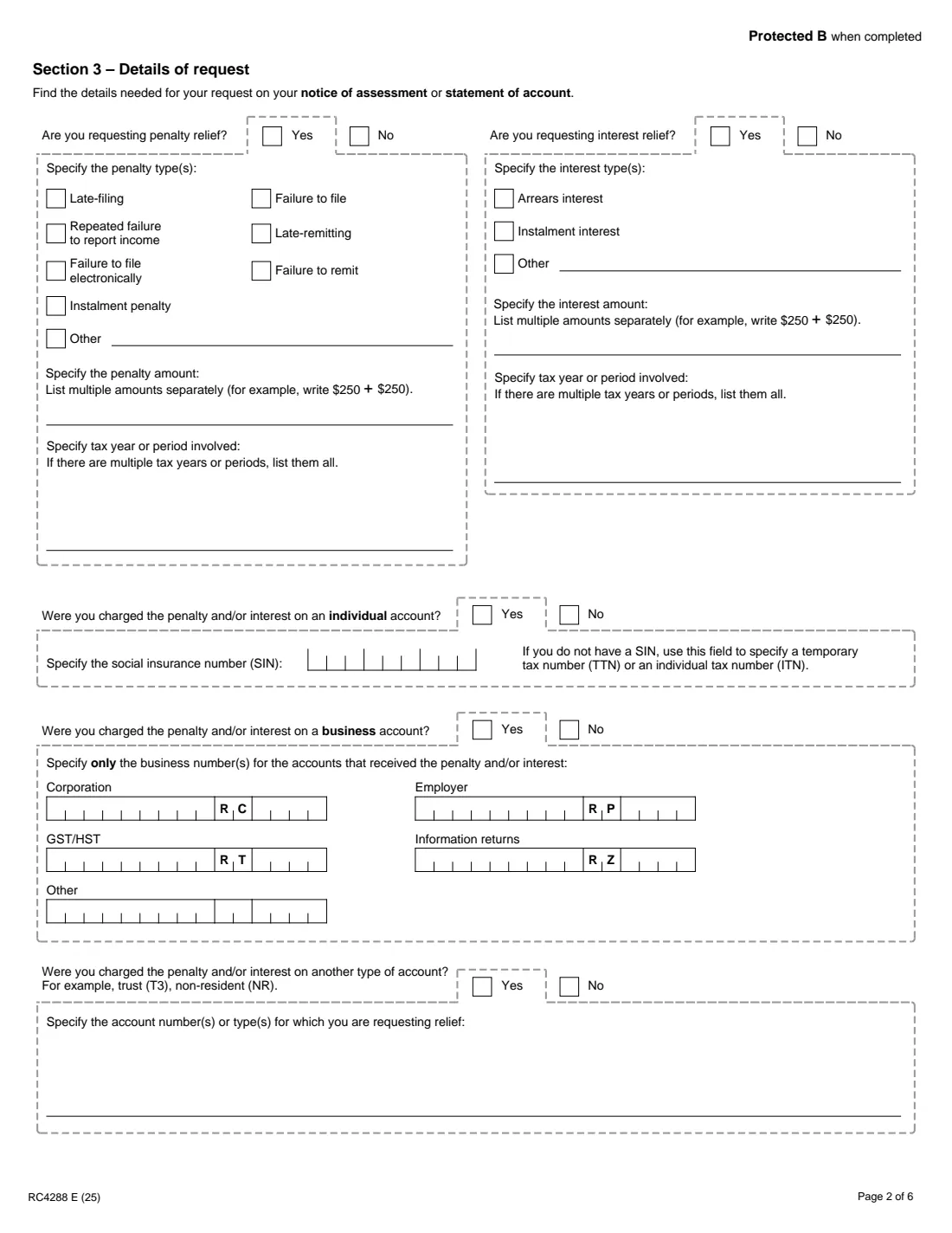
3 Section 3 – Penalties and interest
Say whether you're asking for penalty relief, interest relief or both. For penalties, tick the types (late-filing, failure to file, repeated failure to report income, late-remitting, failure to file electronically, failure to remit, instalment penalty or other), enter the amounts (listing multiple amounts separately, like $250 + $250) and every tax year or period. For interest, tick arrears, instalment or other interest and give the amounts and periods the same way.
4 Section 3 – Accounts involved
Say which accounts the penalties or interest were charged on. For an individual account, enter the SIN, or a temporary tax number or individual tax number if you don't have a SIN. For a business account, enter only the business numbers for the accounts that were charged (corporation RC, GST/HST RT, employer RP, information returns RZ or another program). For other accounts, such as a trust (T3) or non-resident (NR) account, list the account numbers or types.
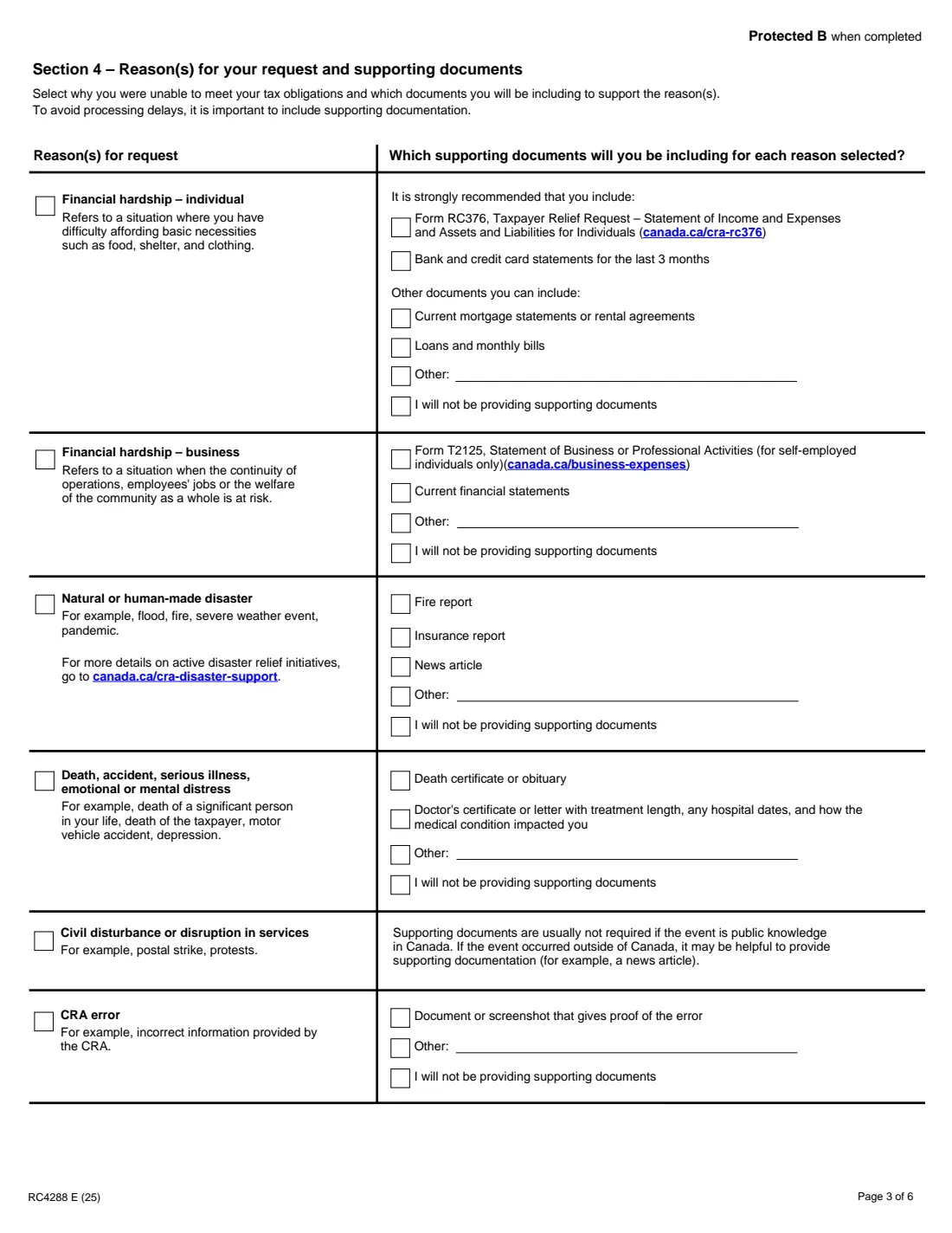
5 Section 4 – Reasons and supporting documents
Tick each reason that applies and, for each one, the documents you'll include. For individual financial hardship, the form strongly recommends Form RC376 and the last 3 months of bank and credit card statements. For a civil disturbance, documents usually aren't needed if the event is public knowledge in Canada. You can also tick that you won't be providing supporting documents, but the form says including them avoids processing delays.
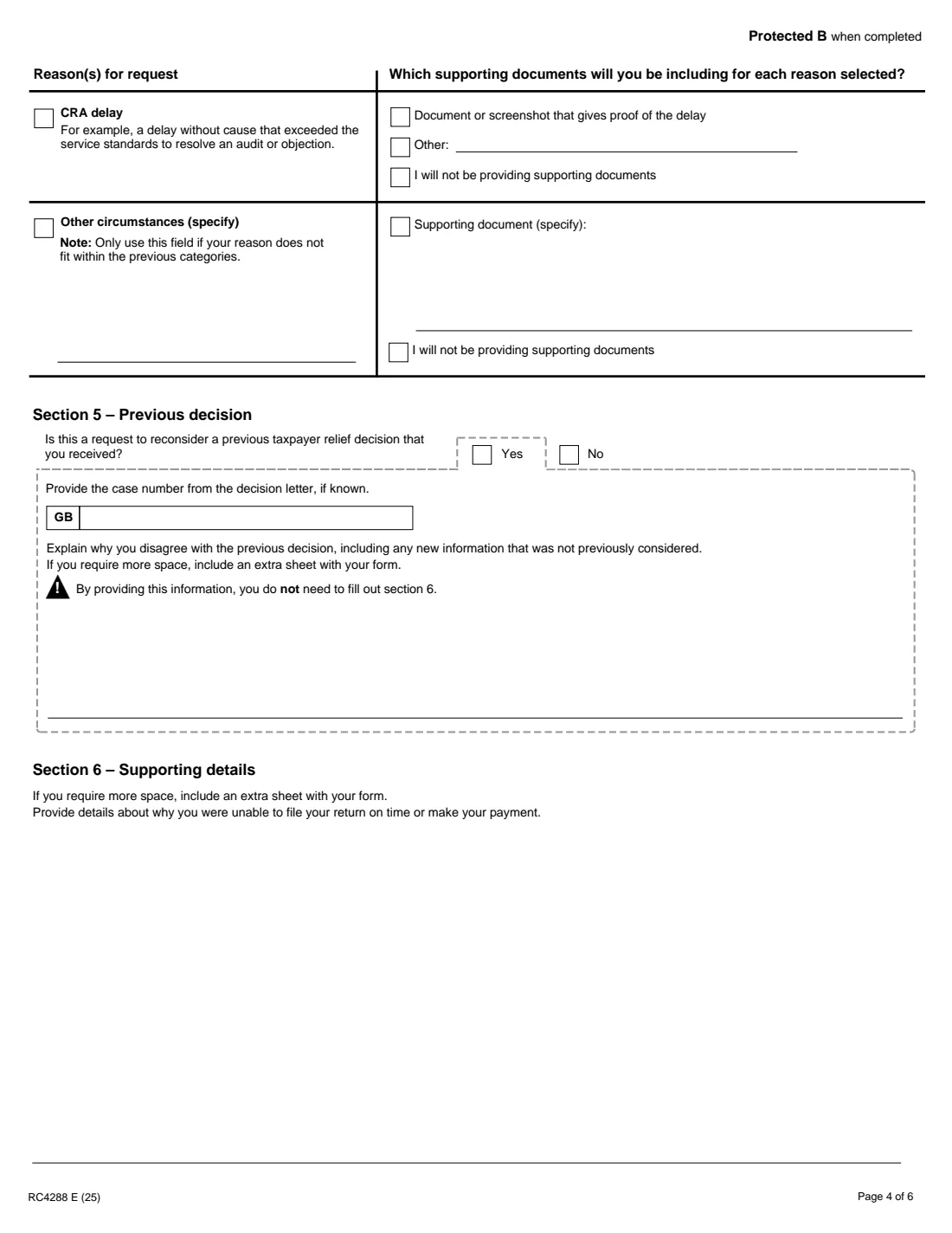
6 Section 5 – Previous decision
If this is a request to reconsider a taxpayer relief decision you received, give the case number from the decision letter if you know it, and explain why you disagree, including any new information. You then don't need to fill out Section 6.
7 Section 6 – Supporting details
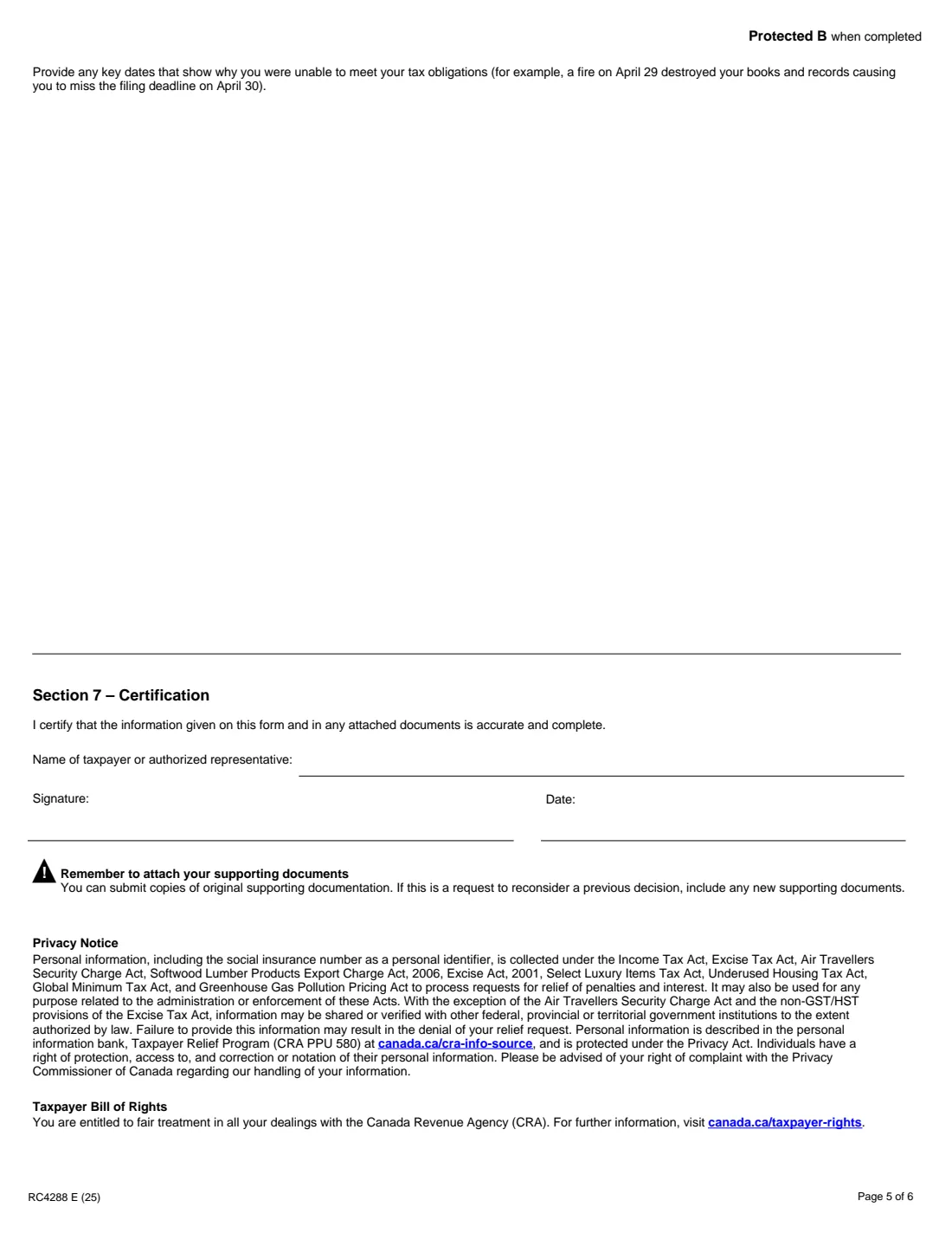
Explain why you couldn't file your return on time or make your payment, and list the key dates. The form's example is a fire on April 29 that destroyed your books and records, causing you to miss the April 30 filing deadline. If you need more space, include an extra sheet.
8 Section 7 – Certification
The taxpayer or authorized representative certifies that the information on the form and in the attached documents is accurate and complete, and prints their name, signs and dates it. The RC4288 isn't on the CRA's list of forms that accept electronic signatures, so print the PDF and sign it by hand.
Common mistakes to avoid
- Sending the form without supporting documents. The form says including them avoids processing delays.
- Leaving out tax years or periods, or combining several penalty amounts into one figure instead of listing them separately.
- Listing every business number you have instead of only the accounts that received the penalty or interest.
- A representative filing without level 2 authorization for all the accounts involved.
- A vague explanation with no dates. Tie each event to the deadline it caused you to miss.
- Forgetting to sign and date Section 7.
After you fill it out
Print the completed PDF from your FileIt vault and sign and date Section 7 by hand. Gather copies of your supporting documents. The form says copies of the originals are fine, and a reconsideration request should include any new documents.
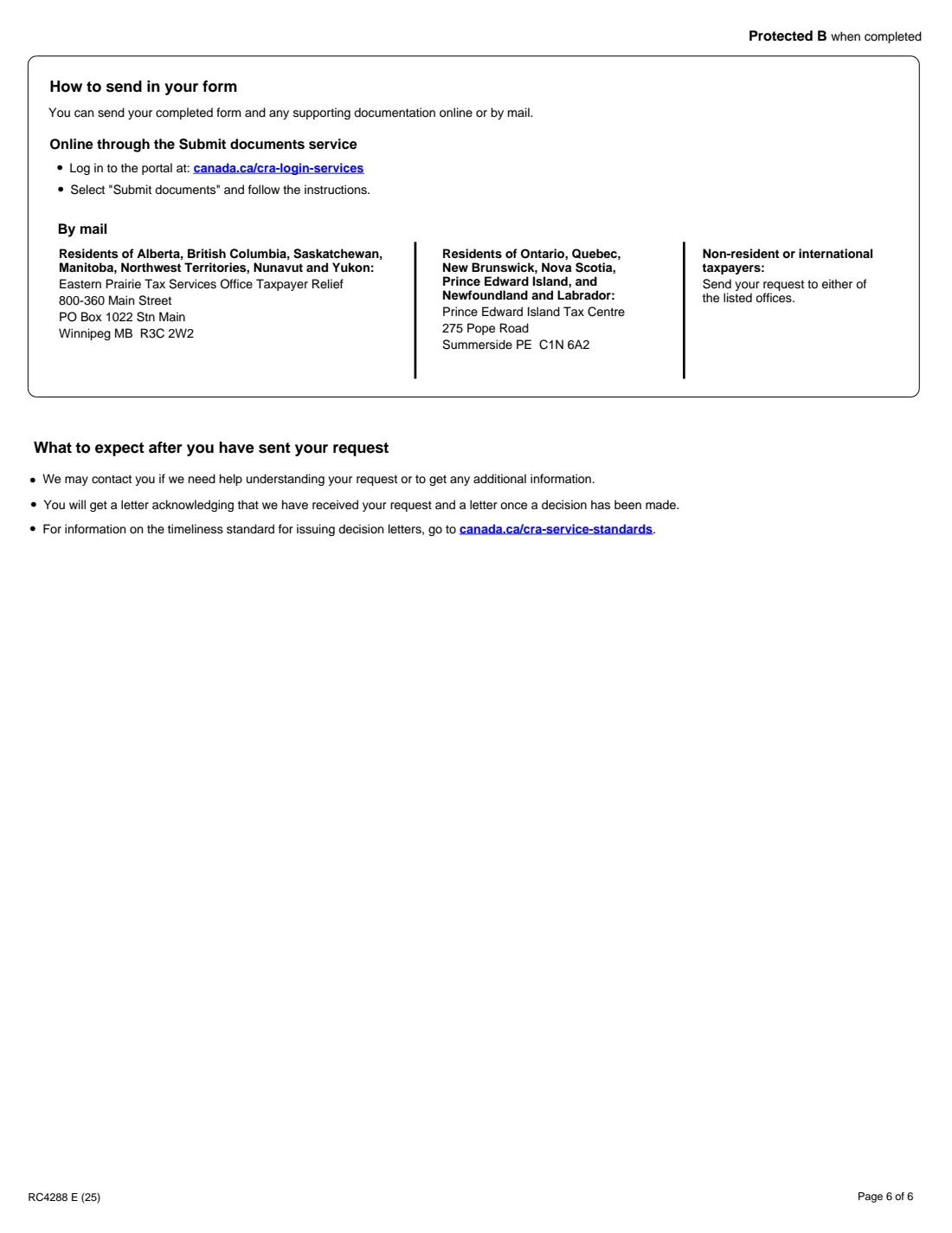
Send it online, by logging in at canada.ca/cra-login-services and choosing "Submit documents", or by mail. Residents of Alberta, British Columbia, Saskatchewan, Manitoba, the Northwest Territories, Nunavut and Yukon mail it to Eastern Prairie Tax Services Office Taxpayer Relief, 800-360 Main Street, PO Box 1022 Stn Main, Winnipeg MB R3C 2W2. Residents of Ontario, Quebec, New Brunswick, Nova Scotia, Prince Edward Island, and Newfoundland and Labrador mail it to the Prince Edward Island Tax Centre, 275 Pope Road, Summerside PE C1N 6A2. Non-resident or international taxpayers can send it to either office. FileIt doesn't send it for you.
The CRA may contact you for more information. You'll get a letter acknowledging your request, then a letter with the decision. The CRA's timeliness standard for decision letters is at canada.ca/cra-service-standards. Keep both letters with your RC4288 in the vault.
Fill out Form RC4288 online with FileIt
- Pick the person. Choose someone from People and FileIt fills in their name, date of birth, address and other details it already knows.
- Answer plain-language questions. One part of the form at a time, with the official help text beside each question — 99 fields in all. Your answers save as you go.
- Check the live preview. Watch your answers land on the real Canada Revenue Agency (CRA) form, and let FileIt do any worksheet arithmetic.
- Generate the official PDF. FileIt prints your answers into the agency’s own PDF and files it in that person’s folder in your vault.
FileIt fills the form — it never files or submits anything for you. Deliver the finished form to whoever asked for it, the way the form’s instructions say.
Start Form RC4288 now — it’s freeForm RC4288: frequently asked questions
Can I fill out Form RC4288 online?
Yes. FileIt guides you through all seven sections and prints your answers into the CRA's official fillable RC4288 PDF. You then sign it by hand and send it to the CRA online or by mail.
What reasons does the CRA accept for taxpayer relief?
The form lists financial hardship (individual or business), natural or human-made disasters, death, accident, serious illness or emotional or mental distress, civil disturbance or disruption in services, CRA error and CRA delay, plus other circumstances you describe. The CRA decides each request on its facts.
Can my accountant file the RC4288 for me?
Yes, if they're an authorized representative with at least level 2 authorization for all the accounts involved. The form says that without it, they can't submit the request for you.
Where do I send Form RC4288?
Online through the Submit documents service after logging in at canada.ca/cra-login-services, or by mail to the Winnipeg or Summerside office listed on page 6 of the form, depending on your province or territory.
Do I have to include supporting documents?
The form strongly recommends them. For individual financial hardship, for example, it suggests Form RC376 and 3 months of bank and credit card statements. You can tick that you won't provide documents, but the form warns that including them avoids processing delays.
Can I sign the RC4288 electronically?
The CRA accepts electronic signatures only on the forms it lists, and the RC4288 isn't one of them. Print the form and sign it by hand.
The CRA denied my request. Can I ask again?
Yes. Section 5 is for asking the CRA to reconsider a previous taxpayer relief decision: give the case number and explain why you disagree, including any new information.
Official sources
- Blank form (PDF), published by Canada Revenue Agency (CRA): https://www.canada.ca/content/dam/cra-arc/formspubs/pbg/rc4288/rc4288-fill-25e.pdf
- Official instructions and guidance: https://www.canada.ca/en/revenue-agency/services/forms-publications/forms/rc4288.html
- Edition shown on this page: RC4288 E (25) (checked 2026-09-28).
FileIt is not affiliated with or endorsed by Canada Revenue Agency (CRA) or any government. This page explains the form in general terms and is not legal, tax or immigration advice. Always read the official instructions, and check that you are using the edition the recipient accepts. Page last reviewed 2026-09-28.