What is RC145?
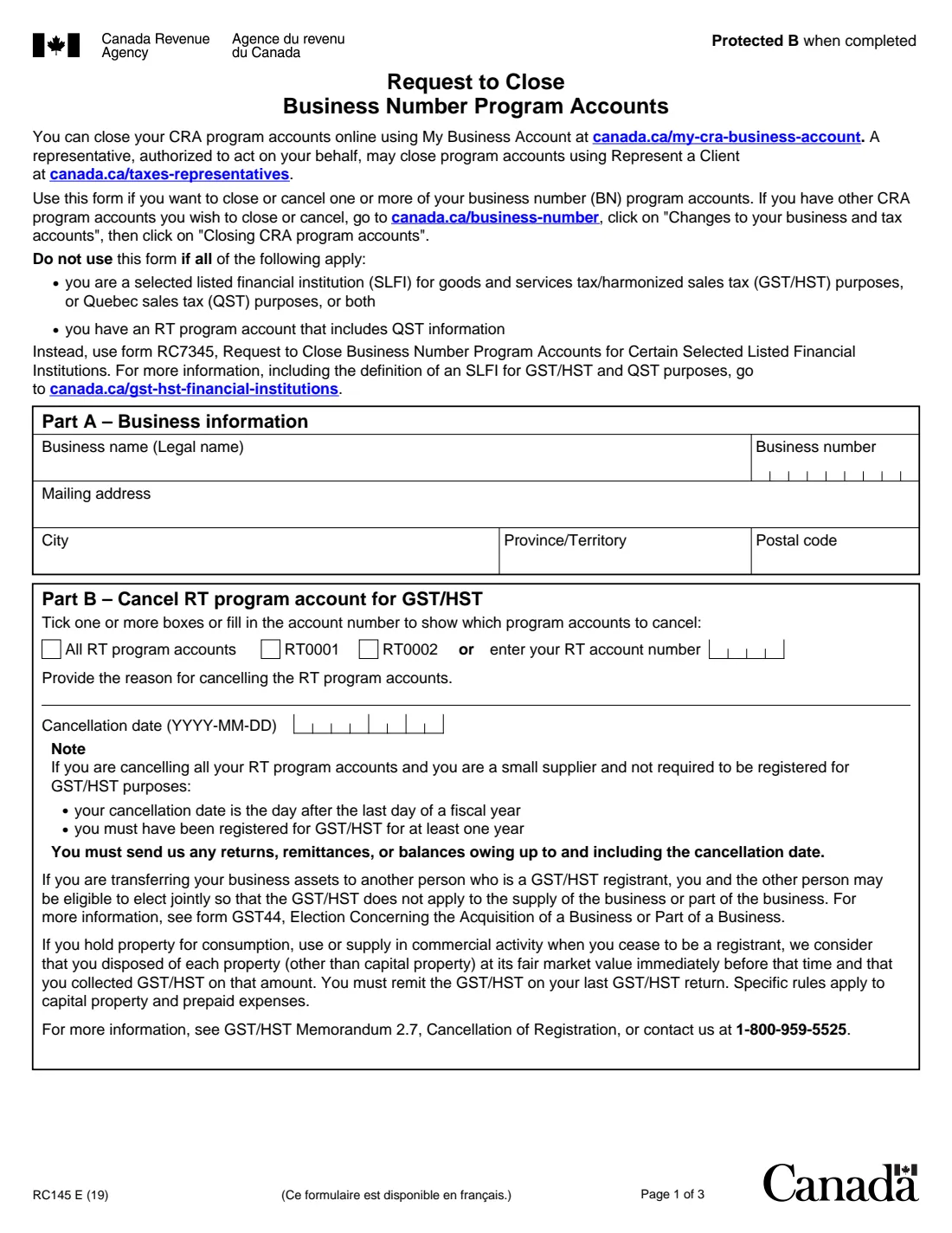
RC145, Request to Close Business Number Program Accounts, is the Canada Revenue Agency (CRA) paper form for cancelling or closing the program accounts attached to a business number: the RT account for GST/HST, the RP account for payroll deductions and the RZ account for information returns. The current edition is RC145 E (19).
The form itself points first to My Business Account, where you can close program accounts online, and to Represent a Client for authorized representatives. On paper you name the accounts, give the reason and the cancellation or closing date for each, and someone with signing authority certifies it. Corporation income tax (RC) accounts are closed through the incorporating authority, or with a copy of the dissolution document if the province isn't partnered with the CRA.
FileIt fills in RC145 from a guided web form and prints your answers on the CRA's own PDF, including the comb boxes for the business number and dates. The business name can come from the entity the person belongs to, and the finished PDF is filed in the vault. FileIt never sends anything to the CRA: you sign the form by hand and mail it yourself.
- Who fills it
- A business closing or cancelling one or more CRA program accounts, signed by someone with signing authority
- Given to
- The Prince Edward Island Tax Centre or the Sudbury Tax Centre, by mail
- When
- When the business stops collecting GST/HST, running payroll or filing information returns; mail it within six months of signing
- Signatures
- Signed and dated by hand
- Edition
- RC145 E (19)
Who needs to fill out RC145?
- Sole proprietors, partnerships and corporations that are closing, selling or winding down a business.
- Small suppliers who no longer need to be registered for GST/HST and want to cancel the registration.
- Employers that no longer have employees and want to close a payroll (RP) account.
- Businesses that no longer file information returns such as T5 slips and want to close an RZ account.
- Not selected listed financial institutions with QST information on their RT account: they use Form RC7345.
When to use RC145
- When you stop a business activity and want the CRA to close the matching program account.
- When you would rather use paper than My Business Account or Represent a Client.
- Mail it within six months of the date it is signed; the form says it will not be processed otherwise.
What you need before you start
- The business's legal name, 9-digit business number and mailing address.
- Which RT, RP or RZ accounts to close (all of them, 0001, 0002 or another account number).
- The reason and the cancellation or closing date for each part.
- The name, title and telephone number of the person signing, who must have signing authority and match the CRA's records.
- For a corporation incorporated in a province not partnered with the CRA: a copy of the dissolution document.
What’s on RC145
The 2019 edition has 3 pages. FileIt asks for it in 5 parts:
- Part A – Business informationBusiness
- Part B – Cancel RT program accounts (GST/HST)Business
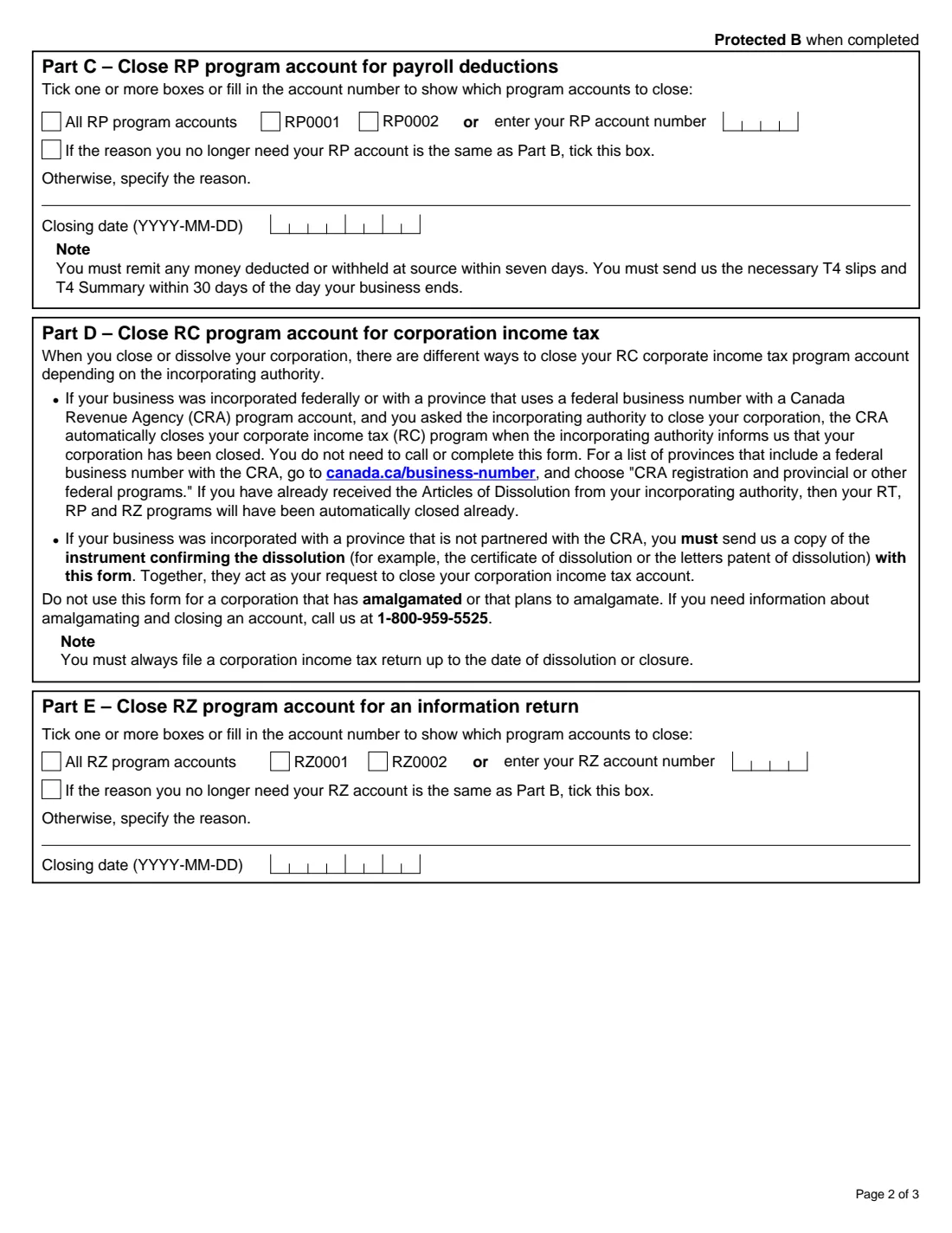
- Part C – Close RP program accounts (payroll deductions)Business
- Part E – Close RZ program accounts (information returns)Business
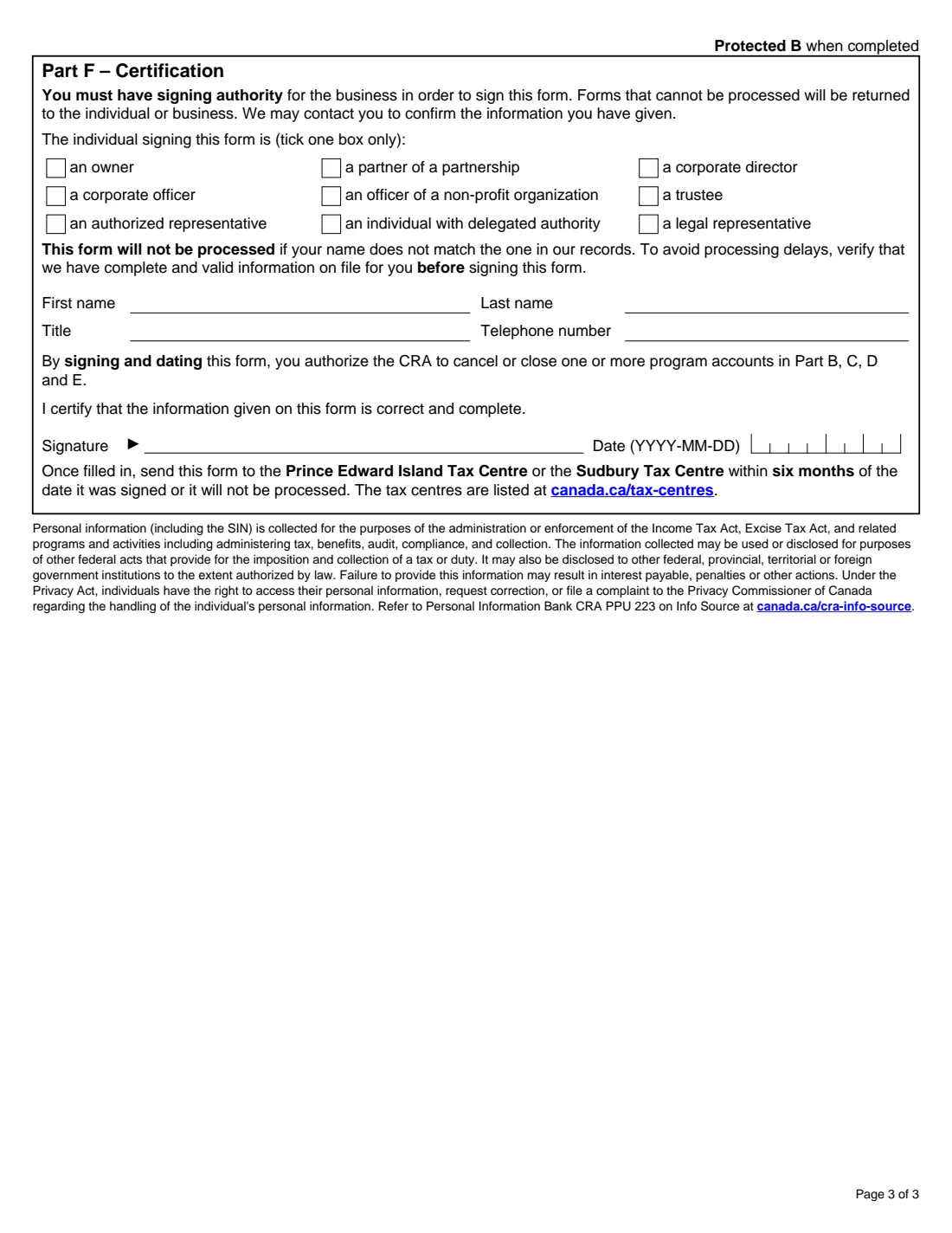
- Part F – CertificationSigner
How to fill out RC145, step by step
1 Part A – Business information
Legal name, business number and mailing address.
2 Part B – Cancel RT accounts (GST/HST)
Tick all RT accounts, RT0001, RT0002 or enter another account number, give the reason and the cancellation date. Small suppliers cancelling all RT accounts have a cancellation date the day after the end of a fiscal year and must have been registered for at least a year.
3 Part C – Close RP accounts (payroll)
Tick the RP accounts, tick the box if the reason is the same as Part B or give one, and enter the closing date.
4 Part D – RC account (corporation income tax)
Nothing to fill in. It explains when the CRA closes the RC account automatically and when you must send a copy of the dissolution document with the form.
5 Part E – Close RZ accounts (information returns)
The same as Part C, for the RZ accounts.
6 Part F – Certification
Tick who is signing (owner, partner, corporate director or officer, officer of a non-profit organization, trustee, authorized or legal representative, or someone with delegated authority), print the name, title and telephone number, and sign and date the form.
Common mistakes to avoid
- Signing without signing authority, or with a name that doesn't match the CRA's records; the form says it will not be processed.
- Mailing the form more than six months after it was signed.
- Not sending the returns, remittances or balances owing up to and including the cancellation date.
- Using RC145 for a corporation that has amalgamated or plans to.
- Forgetting the final payroll obligations: the form notes remittances are due within seven days, and T4 slips and the T4 Summary within 30 days of the day the business ends.
After you fill it out
Print the PDF, sign and date Part F by hand, and mail it to the Prince Edward Island Tax Centre or the Sudbury Tax Centre within six months. FileIt doesn't mail it for you.
File any outstanding GST/HST returns and payroll remittances, T4 slips and the T4 Summary.
File the corporation income tax return up to the date of dissolution or closure, if you have a corporation.
Fill out RC145 online with FileIt
- Pick the person. Choose someone from People and FileIt fills in their name, date of birth, address and other details it already knows.
- Answer plain-language questions. One part of the form at a time, with the official help text beside each question — 32 fields in all. Your answers save as you go.
- Check the live preview. Watch your answers land on the real Canada Revenue Agency (CRA) form, and let FileIt do any worksheet arithmetic.
- Generate the official PDF. FileIt prints your answers into the agency’s own PDF and files it in that person’s folder in your vault.
FileIt fills the form — it never files or submits anything for you. Deliver the finished form to whoever asked for it, the way the form’s instructions say.
Start RC145 now — it’s freeRC145: frequently asked questions
Can I close my business number accounts online?
Yes. The form says you can close program accounts in My Business Account, and a representative can use Represent a Client.
Where do I send RC145?
To the Prince Edward Island Tax Centre or the Sudbury Tax Centre, within six months of the date it was signed. The form refers you to canada.ca/tax-centres for the addresses.
Does RC145 close my corporation's income tax account?
Not by itself. Part D explains that the CRA closes the RC account when a partnered incorporating authority tells it the corporation is closed; otherwise you send a copy of the dissolution document with this form.
Who can sign RC145?
Someone with signing authority for the business, such as an owner, partner, corporate director or officer, trustee, or an authorized or legal representative, whose name matches the CRA's records.
Can I sign RC145 electronically?
RC145 is not on the CRA's list of forms that accept an electronic signature, so print it and sign by hand.
Official sources
- Blank form (PDF), published by Canada Revenue Agency (CRA): https://www.canada.ca/content/dam/cra-arc/formspubs/pbg/rc145/rc145-fill-19e.pdf
- Official instructions and guidance: https://www.canada.ca/en/revenue-agency/services/forms-publications/forms/rc145.html
- Edition shown on this page: RC145 E (19) (checked 2026-10-01).
FileIt is not affiliated with or endorsed by Canada Revenue Agency (CRA) or any government. This page explains the form in general terms and is not legal, tax or immigration advice. Always read the official instructions, and check that you are using the edition the recipient accepts. Page last reviewed 2026-10-01.