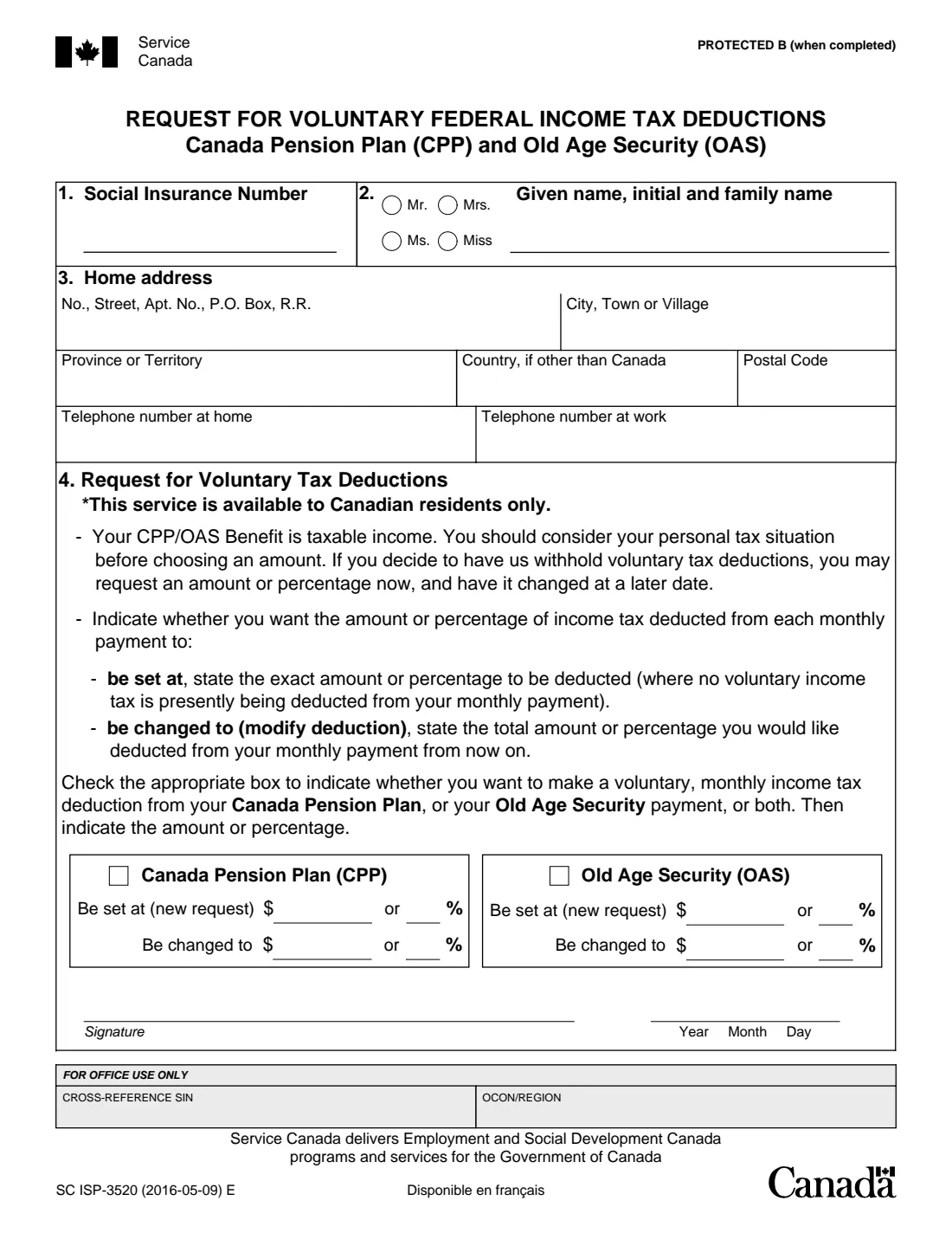
What is ISP-3520 CPP/OAS tax deductions?
Canada Pension Plan (CPP) and Old Age Security (OAS) payments are taxable income, but Service Canada does not deduct income tax from them automatically. If nothing is withheld, you may owe tax when you file your return. Form ISP-3520 asks Service Canada to deduct a fixed dollar amount or a percentage of federal income tax from each monthly payment.
You can ask for a new deduction ('be set at') when none is being taken now, or change an existing one ('be changed to') by giving the new total you want deducted from now on. The same form covers your CPP, your OAS, or both, each with its own amount or percentage. Canada.ca also lets you make the change in My Service Canada Account or by phone; this form is the mail-in route.
FileIt walks you through the form, prints your answers into Service Canada's own PDF, and checks that each benefit has either an amount or a percentage, not both. Names and addresses with accents print correctly. The finished PDF is saved in your vault. You sign it and mail it yourself: FileIt never submits anything to Service Canada.
- Who fills it
- Canadian residents receiving CPP and/or OAS payments who want federal income tax withheld
- Given to
- Service Canada, by mail to the office for your province or territory
- When
- Any time: to start a deduction, or to change the amount of one already in place
- Pages
- 1
- Signatures
- The pensioner, with the date
- Edition
- SC ISP-3520 (2016-05-09) E
- Not for
- Non-residents of Canada: non-resident tax is deducted automatically (form NR5 asks for a lower rate)
Who needs to fill out ISP-3520 CPP/OAS tax deductions?
- Retirees receiving a CPP retirement pension who would rather pay tax monthly than face a bill at tax time.
- Seniors receiving Old Age Security who want tax withheld from the OAS pension.
- People who already have a voluntary deduction and want to raise or lower it.
- An adult child helping a parent set up tax deductions (the parent signs the form).
When to use ISP-3520 CPP/OAS tax deductions
- When your CPP or OAS starts and you want tax withheld from the first payments.
- After your income changes, for example when you stop working or start drawing an RRIF, so the amount withheld matches your tax.
- When your last tax return showed a balance owing on pension income.
- Whenever you want to change the amount or percentage already being deducted.
What you need before you start
- Your Social Insurance Number.
- Your name as Service Canada knows it, your home address in Canada and your phone numbers.
- Which benefit(s) you want tax taken from: CPP, OAS, or both.
- The monthly dollar amount or the percentage you want deducted from each, and whether it is a new deduction or a change.
What’s on ISP-3520 CPP/OAS tax deductions
The 2016 edition has 1 page. FileIt asks for it in 2 parts, and it is signed by Pensioner:
- 1–3. About youPensioner
- 4. Request for voluntary tax deductionsPensioner
How to fill out ISP-3520 CPP/OAS tax deductions, step by step
1 1–3. About you
Give your Social Insurance Number, an optional salutation, your given name, initial and family name, and your home address and phone numbers. The service is only for Canadian residents, so the address is normally in Canada and the country box stays empty.
2 4. Choose the benefit(s)
Tick Canada Pension Plan, Old Age Security, or both. Each has its own two rows, so you can deduct a different amount from each payment.
3 Be set at, or be changed to
Use 'Be set at (new request)' if no voluntary tax is being deducted from that benefit now, and give the exact amount or percentage. Use 'Be changed to' to modify an existing deduction, giving the total amount or percentage you want deducted from each monthly payment from now on. For each benefit, fill in a dollar amount or a percentage, not both.
4 Sign and date
Sign the form and date it (year, month, day). Then mail it to Service Canada.
Common mistakes to avoid
- Filling in both a dollar amount and a percentage for the same benefit.
- Using 'Be set at' when a deduction already exists. To change one, use 'Be changed to' and give the new total, not the increase.
- Ticking a benefit but leaving its amount and percentage empty.
- Using the form while living outside Canada: the service is for Canadian residents only.
- Forgetting to sign and date the form.
After you fill it out
Print the PDF, sign and date it, and mail it to Service Canada. Service Canada's return-the-form page lists a mailing address for each province or territory, for example PO Box 5100 Station D, Scarborough ON M1R 5C8 for Ontario postal codes beginning with L, M or N.
Keep the filled copy in your FileIt vault so you know what you asked for when your T4A(P) and T4A(OAS) slips arrive.
If you would rather not mail it, Canada.ca says you can change your tax deductions in My Service Canada Account or by calling Service Canada.
Fill out ISP-3520 CPP/OAS tax deductions online with FileIt
- Pick the person. Choose someone from People and FileIt fills in their name, date of birth, address and other details it already knows.
- Answer plain-language questions. One part of the form at a time, with the official help text beside each question — 24 fields in all. Your answers save as you go.
- Check the live preview. Watch your answers land on the real Service Canada, for Employment and Social Development Canada (ESDC) form, and let FileIt do any worksheet arithmetic.
- Generate the official PDF. FileIt prints your answers into the agency’s own PDF and files it in that person’s folder in your vault. Sign it, or send it for e-signature.
FileIt fills the form — it never files or submits anything for you. Deliver the finished form to whoever asked for it, the way the form’s instructions say.
Start ISP-3520 CPP/OAS tax deductions now — it’s freeISP-3520 CPP/OAS tax deductions: frequently asked questions
Is income tax deducted from CPP and OAS automatically?
No. Canada.ca says taxes are not automatically deducted for residents of Canada, and if you choose not to ask for monthly deductions you may have to pay income tax when you file your return. ISP-3520 is how you ask for them by mail.
Can I request the deduction online instead?
Yes. Canada.ca says you can sign in to My Service Canada Account and use the 'Change my tax deductions' link in the Canada Pension Plan section, or call Service Canada. The paper form is an alternative.
Should I give a dollar amount or a percentage?
Either one, but not both, for each benefit. The form asks you to consider your personal tax situation before choosing, and you can change the amount or percentage later.
How do I change a deduction I already have?
Tick the benefit and fill in the 'Be changed to' row with the total amount or percentage you want deducted each month from now on.
I live outside Canada. Can I use this form?
No. The form says the service is available to Canadian residents only. For non-residents, Canada.ca says non-resident tax is deducted automatically, and form NR5 can be used to ask for lower deductions.
Where do I mail ISP-3520?
To the Service Canada office for your province or territory, as listed on Service Canada's 'returning the form' page for CPP forms.
Can I fill out ISP-3520 online with FileIt?
Yes. FileIt prints your answers into Service Canada's official PDF and saves it in your vault. You then sign it and mail it; FileIt never sends it for you.
Official sources
- Blank form (PDF), published by Service Canada, for Employment and Social Development Canada (ESDC): https://catalogue.servicecanada.gc.ca/apps/EForms/pdf/en/ISP-3520.pdf
- Official instructions and guidance: https://www.canada.ca/en/services/benefits/publicpensions/taxes.html
- Edition shown on this page: SC ISP-3520 (2016-05-09) E (checked 2026-09-28).
FileIt is not affiliated with or endorsed by Service Canada, for Employment and Social Development Canada (ESDC) or any government. This page explains the form in general terms and is not legal, tax or immigration advice. Always read the official instructions, and check that you are using the edition the recipient accepts. Page last reviewed 2026-09-28.