What is Form T1213(OAS)?
If your income was high enough in a past year, Service Canada deducts Old Age Security recovery tax, often called the OAS clawback, from each monthly OAS payment. Those deductions are based on your income from earlier years. Form T1213(OAS), Request to Reduce Old Age Security Recovery Tax at Source, is how you ask the Canada Revenue Agency (CRA) to reduce them when you expect your income for the current year to be lower than it was the year before, for example because you retired, stopped a business or sold fewer investments.
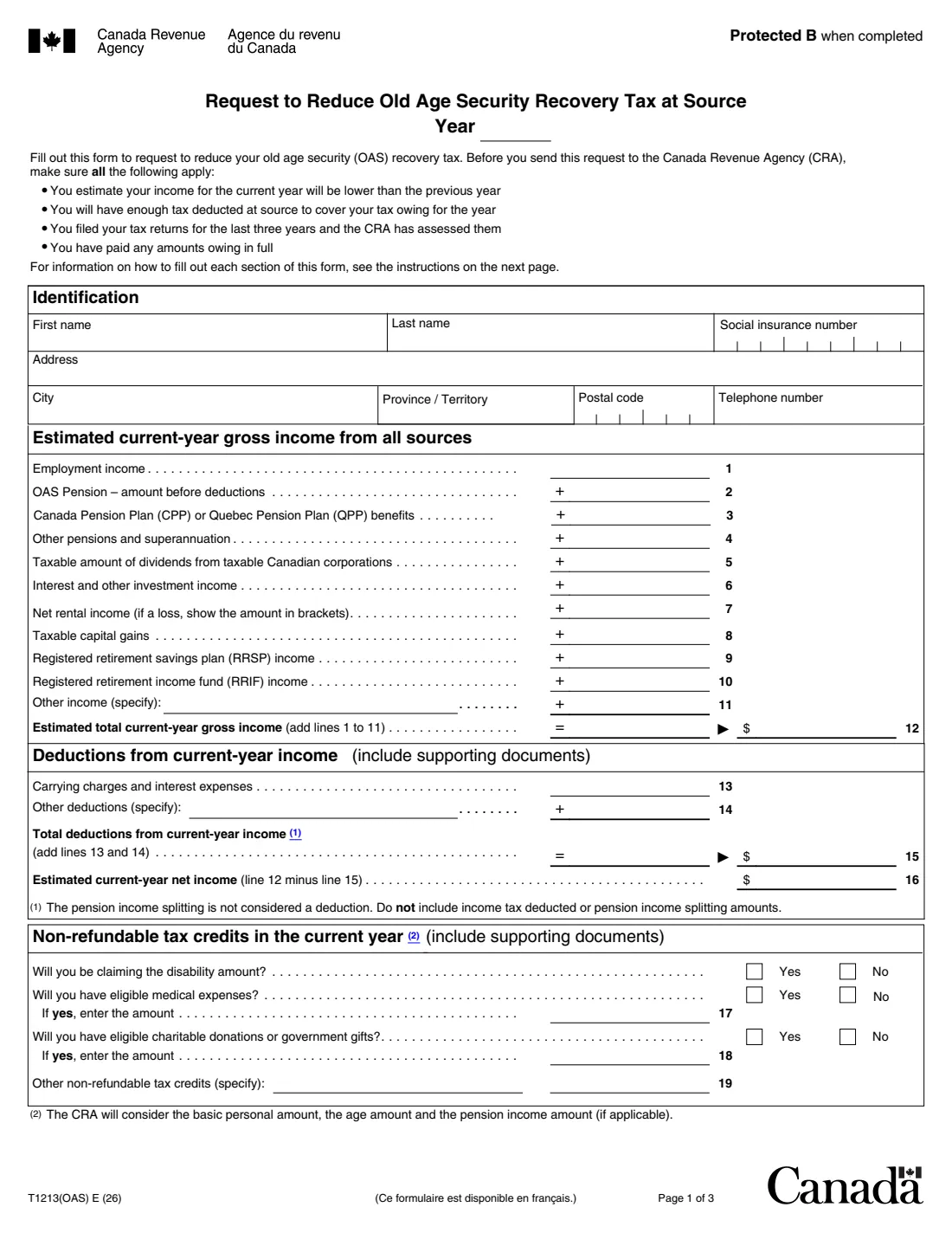
On the form you estimate your gross income for the year from every source, your deductions, some non-refundable credits and the income tax that will already be deducted or paid by instalment. The form says to send it only if your income this year will be lower than last year's, you'll still have enough tax deducted at source to cover what you owe, your returns for the last three years are filed and assessed, and you've paid any amounts owing in full. If the CRA accepts the request, it passes the information to Service Canada, which the form says processes it in about two months.
FileIt walks you through each part and prints your answers into the CRA's own fillable PDF (edition T1213(OAS) E (26)). It adds up lines 12, 15, 16 and 25 for you, shows a net rental loss in brackets as the form asks, and saves the finished PDF in the person's vault folder. You print it, sign it by hand and send it with your supporting documents; FileIt never submits anything. Filling forms is free on every FileIt plan.
- Who fills it
- OAS pensioners who have recovery tax deducted and expect lower income this year
- Sent to
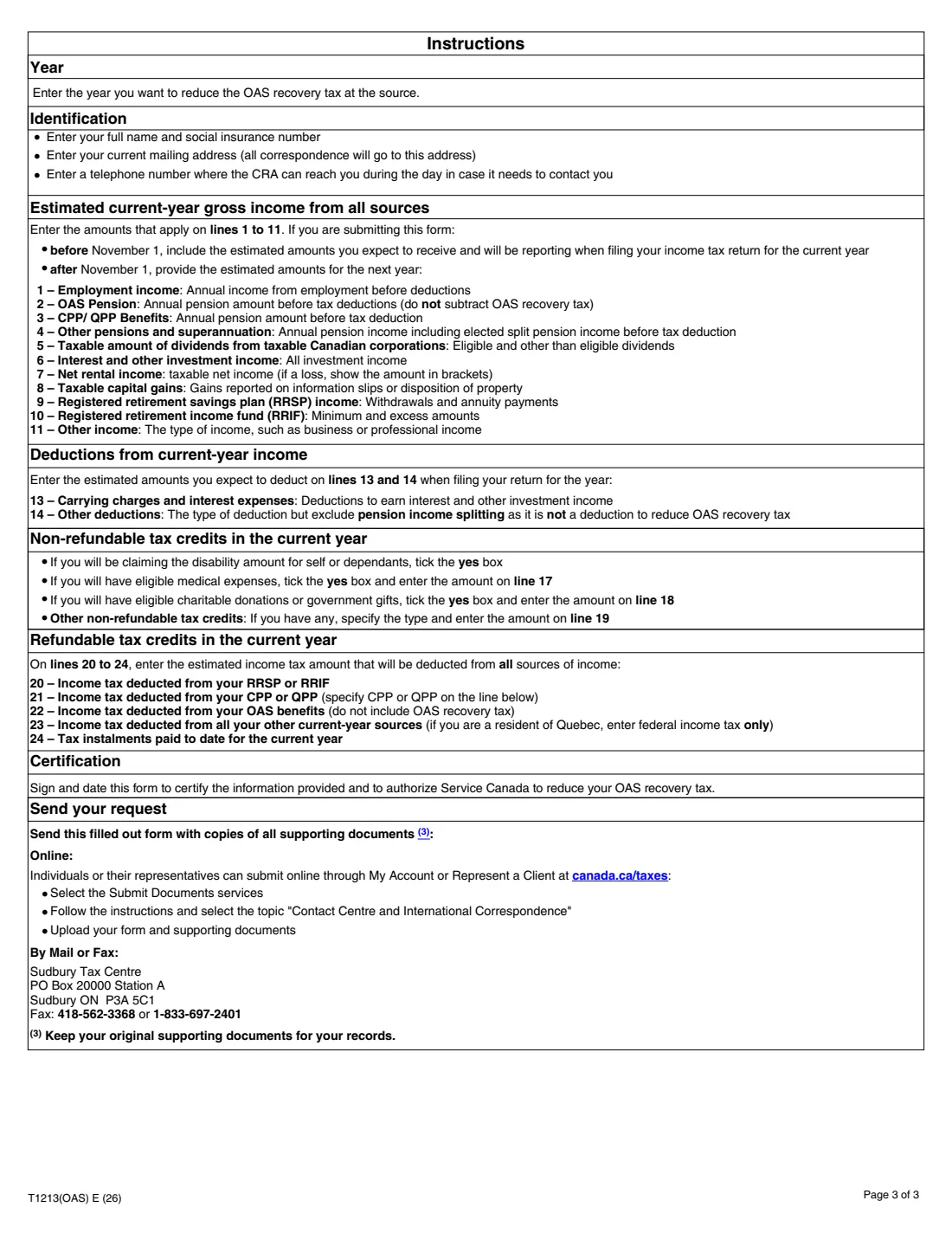
- The CRA — online through My Account or Represent a Client, or by mail or fax to the Sudbury Tax Centre
- Period covered
- The OAS recovery-tax period, July 1 of the current year to June 30 of the next
- Signatures
- Your handwritten signature and date in the Certification
- Edition
- T1213(OAS) E (26)
- Processing
- If accepted, the CRA sends it to Service Canada, which processes it in about two months
Who needs to fill out Form T1213(OAS)?
- Seniors whose monthly Old Age Security payment has OAS recovery tax deducted from it.
- Pensioners whose income dropped this year, for example after retiring from a job or closing a business.
- People whose income last year was unusually high because of a one-time item, such as a large capital gain or RRSP withdrawal, that won't repeat this year.
- Anyone who expects to have more deductions or credits this year, such as large medical expenses or donations, that bring their net income down.
When to use Form T1213(OAS)
- When you estimate your income for the current year will be lower than the previous year.
- Before or early in the recovery-tax period (July 1 to June 30), so the reduction applies to as many payments as possible.
- Again after the period ends, if your situation hasn't changed: the form says you need to send a new request for each period.
- After November 1, the form asks for estimated amounts for the next year instead of the current one.
- Only once your returns for the last three years are filed and assessed and any balance owing is paid.
What you need before you start
- Your social insurance number, current mailing address and a daytime phone number.
- Estimates of each kind of income for the year: employment, OAS, CPP or QPP, other pensions, dividends, interest, net rental income, taxable capital gains, RRSP and RRIF income, and any other income.
- Your expected carrying charges, interest expenses and other deductions.
- Amounts of eligible medical expenses and charitable donations, and whether you'll claim the disability amount.
- The income tax that will be deducted from your RRSP or RRIF, CPP or QPP, OAS and other income, and any instalments you've paid.
- Copies of supporting documents for your deductions and credits (keep the originals).
What’s on Form T1213(OAS)
The 2026 edition has 3 pages. FileIt asks for it in 6 parts:
- Year and identificationPensioner
- Estimated current-year gross income from all sourcesPensioner
- Deductions from current-year incomePensioner
- Non-refundable tax credits in the current yearPensioner
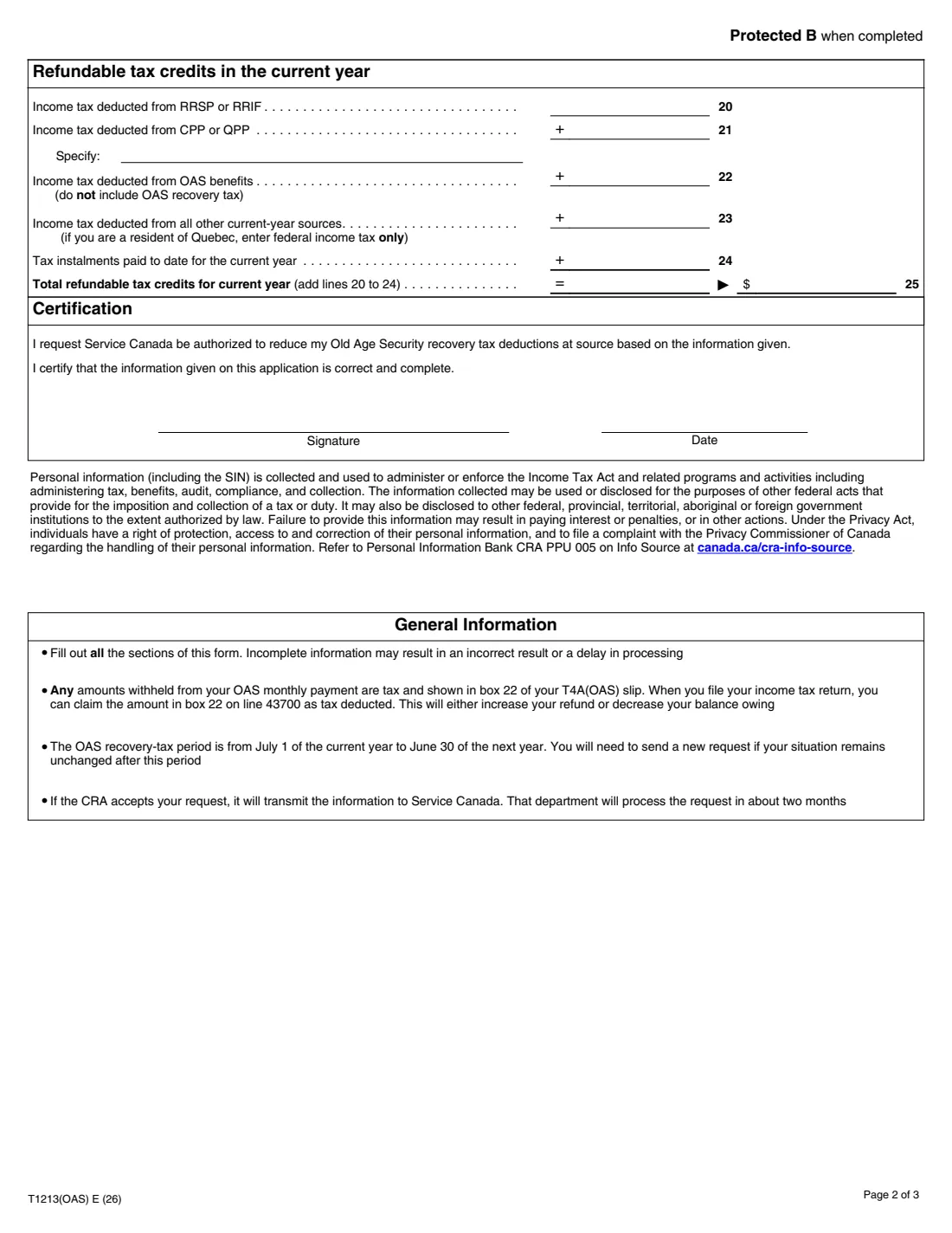
- Refundable tax credits in the current yearPensioner
- CertificationPensioner
How to fill out Form T1213(OAS), step by step
1 Year and identification
Enter the year you want the recovery tax reduced for, then your name, social insurance number, current mailing address and a daytime phone number. The CRA sends all correspondence to the address you give here.
2 Estimated gross income (lines 1 to 12)
Enter what you expect to receive this year on lines 1 to 11: employment income, your OAS pension before deductions (don't subtract the recovery tax), CPP or QPP, other pensions including split pension income you elect to receive, the taxable amount of dividends, interest, net rental income, taxable capital gains, RRSP and RRIF income, and other income such as business income.
A rental loss goes in brackets on line 7. FileIt totals lines 1 to 11 on line 12 and prints it in both places the form shows it.
3 Deductions (lines 13 to 16)
Line 13 is carrying charges and interest expenses, the costs of earning investment income. Line 14 is other deductions: say what they are. The form reminds you that pension income splitting is not a deduction here and that income tax deducted doesn't belong in this part.
Line 15 adds lines 13 and 14, and line 16 is your estimated net income (line 12 minus line 15). FileIt works both out.
4 Non-refundable tax credits (lines 17 to 19)
Answer whether you'll claim the disability amount, and whether you'll have eligible medical expenses (line 17) or charitable donations and government gifts (line 18). Line 19 is for other non-refundable credits: name them and give the amount.
The CRA already considers the basic personal amount, the age amount and the pension income amount, so don't list those.
5 Refundable tax credits (lines 20 to 25)
Enter the income tax that will be deducted this year from your RRSP or RRIF (line 20), CPP or QPP (line 21, and specify which), OAS benefits not counting the recovery tax (line 22) and all other sources (line 23 — Quebec residents enter federal tax only), plus instalments you've already paid (line 24). FileIt adds them up on line 25.
6 Certification
You ask that Service Canada be authorized to reduce your OAS recovery tax deductions and certify the information is correct and complete. Sign and date it by hand. The T1213(OAS) isn't on the CRA's list of forms that accept electronic signatures, so FileIt doesn't offer e-signature for it.
Common mistakes to avoid
- Subtracting the recovery tax from the OAS amount on line 2 — the form asks for the pension before deductions.
- Including the OAS recovery tax on line 22, which is only for regular income tax deducted from OAS.
- Treating pension income splitting as a deduction on line 14.
- Listing the basic personal, age or pension income amounts as other credits on line 19; the CRA already considers them.
- Sending the form while a previous year's return is still unfiled or unassessed, or while you owe a balance.
- Forgetting copies of the supporting documents for deductions and credits.
- Giving current-year estimates when you send the form after November 1, when the form asks for next year's.
After you fill it out
Print the completed PDF from your FileIt vault, sign and date the Certification by hand, and send it with copies of your supporting documents, online through My Account or Represent a Client (Submit documents, topic "Contact Centre and International Correspondence"), by mail to the Sudbury Tax Centre, PO Box 20000, Station A, Sudbury ON P3A 5C1, or by fax to 418-562-3368 or 1-833-697-2401. Keep the originals. FileIt does not send the form for you.
If the CRA accepts the request, it transmits the information to Service Canada, which the form says processes it in about two months. Any amount still withheld from your OAS is shown in box 22 of your T4A(OAS) slip, and you claim it as tax deducted on line 43700 of your return.
The request covers the recovery-tax period from July 1 to June 30. Keep your copy in the vault: if your situation stays the same after that period, the form says you need to send a new request.
Fill out Form T1213(OAS) online with FileIt
- Pick the person. Choose someone from People and FileIt fills in their name, date of birth, address and other details it already knows.
- Answer plain-language questions. One part of the form at a time, with the official help text beside each question — 42 fields in all. Your answers save as you go.
- Check the live preview. Watch your answers land on the real Canada Revenue Agency (CRA) form, and let FileIt do any worksheet arithmetic.
- Generate the official PDF. FileIt prints your answers into the agency’s own PDF and files it in that person’s folder in your vault.
FileIt fills the form — it never files or submits anything for you. Deliver the finished form to whoever asked for it, the way the form’s instructions say.
Start Form T1213(OAS) now — it’s freeForm T1213(OAS): frequently asked questions
Can I fill out Form T1213(OAS) online?
Yes. FileIt guides you through every line, does the totals, prints your answers into the CRA's official fillable T1213(OAS) PDF and saves it in your vault, free on every plan. You then sign it by hand and send it to the CRA yourself.
What is the OAS recovery tax?
It's the repayment of Old Age Security that applies when your net income is above a threshold, often called the OAS clawback. Service Canada deducts it from your monthly OAS payments based on your income for earlier years. This form asks for those deductions to be reduced when your income this year will be lower.
Where do I send it?
To the CRA, not Service Canada. The form lists three ways: upload it with your documents through My Account or Represent a Client using Submit documents, mail it to the Sudbury Tax Centre, or fax it to 418-562-3368 or 1-833-697-2401.
How long does it take?
If the CRA accepts the request, it sends the information to Service Canada. The form says Service Canada processes the request in about two months.
Is this the same as Form T1213?
No. Form T1213 asks for less income tax to be deducted from your pay or other payments. The T1213(OAS) is only about the OAS recovery tax deducted from your Old Age Security pension.
Do I have to send it every year?
The request covers one recovery-tax period, July 1 of the current year to June 30 of the next. The form says you need to send a new request if your situation remains unchanged after that period.
What if the recovery tax was still deducted?
Any amount withheld from your OAS is tax and appears in box 22 of your T4A(OAS) slip. You claim it on line 43700 of your return as tax deducted, which increases your refund or reduces your balance owing.
Official sources
- Blank form (PDF), published by Canada Revenue Agency (CRA): https://www.canada.ca/content/dam/cra-arc/formspubs/pbg/t1213oas/t1213oas-fill-26e.pdf
- Official instructions and guidance: https://www.canada.ca/en/revenue-agency/services/forms-publications/forms/t1213oas.html
- Edition shown on this page: T1213(OAS) E (26) (checked 2026-09-28).
FileIt is not affiliated with or endorsed by Canada Revenue Agency (CRA) or any government. This page explains the form in general terms and is not legal, tax or immigration advice. Always read the official instructions, and check that you are using the edition the recipient accepts. Page last reviewed 2026-09-28.