What is ISP-1603 CPP/OAS consent?
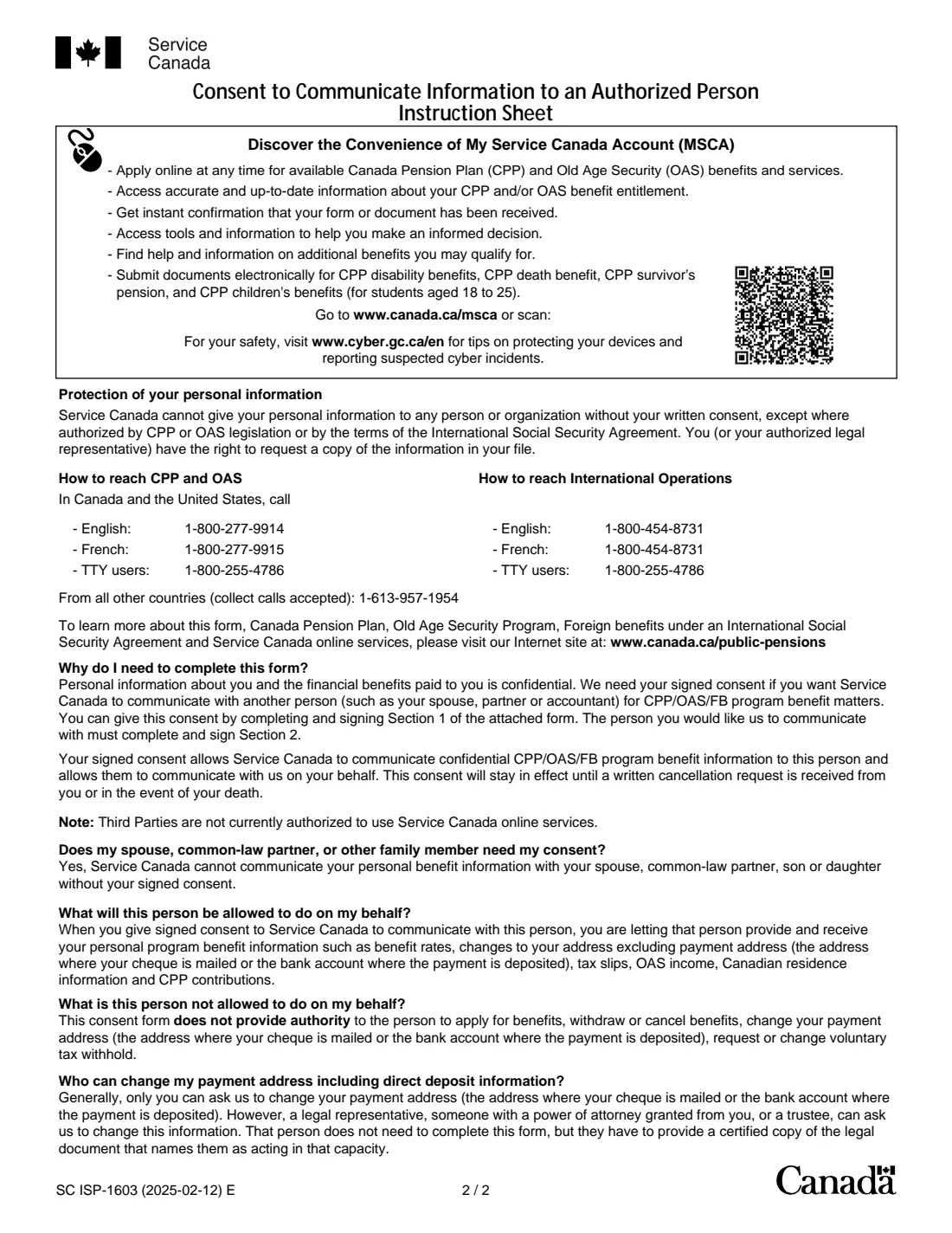
Your CPP and OAS information is confidential. The form's instruction sheet says Service Canada cannot discuss your benefits with your spouse, common-law partner, son or daughter without your signed consent. Form ISP-1603 is that consent: you name a person, and Service Canada can then share your program information with them and act on information they give.
The authorized person can give and receive information such as benefit rates, address changes (not the payment address), tax slips, OAS income, Canadian residence information and CPP contributions. They cannot apply for benefits, withdraw or cancel them, change where your payment goes, or request or change voluntary tax withholding. For that, Service Canada needs a legal representative such as a power of attorney or trustee.
FileIt walks you and the person you name through the two sections, prints the answers into Service Canada's own PDF (names with accents print correctly) and saves it in your vault. Both of you sign. FileIt never sends the form to Service Canada; you do.
- Who fills it
- A CPP, OAS or foreign-benefit client (Section 1) and the person they authorize (Section 2)
- Given to
- Service Canada
- Valid
- Until you cancel it in writing or on your death, but only if Service Canada receives it within one year of the date you sign
- Pages
- 1 form page and a 1-page instruction sheet
- Signatures
- You and the authorized person; a witness only if you sign with a mark
- Edition
- SC ISP-1603 (2025-02-12) E
- Not for
- Giving someone power to apply for benefits or change your payment details: that needs a legal representative
Who needs to fill out ISP-1603 CPP/OAS consent?
- Older parents who want an adult son or daughter to be able to call Service Canada about their CPP or OAS.
- Spouses and common-law partners, who the form says still need signed consent to discuss each other's benefits.
- People who want their accountant or a friend to be able to deal with Service Canada on benefit questions.
- People receiving foreign benefits under an International Social Security Agreement who want help with them.
When to use ISP-1603 CPP/OAS consent
- When a family member starts helping you with your pension questions, calls or mail.
- Before an upcoming change, such as a move, so your helper can follow up with Service Canada.
- When you want a different person authorized, or a new consent after the one-year window to deliver the form has passed.
What you need before you start
- Your name and Social Insurance Number.
- Which programs the consent covers: Canada Pension Plan, Old Age Security, foreign benefits, or any combination.
- The authorized person's name, relationship to you, telephone numbers and mailing address.
- If you sign with a mark: a witness (not the authorized person) with their name, relationship, phone and address.
What’s on ISP-1603 CPP/OAS consent
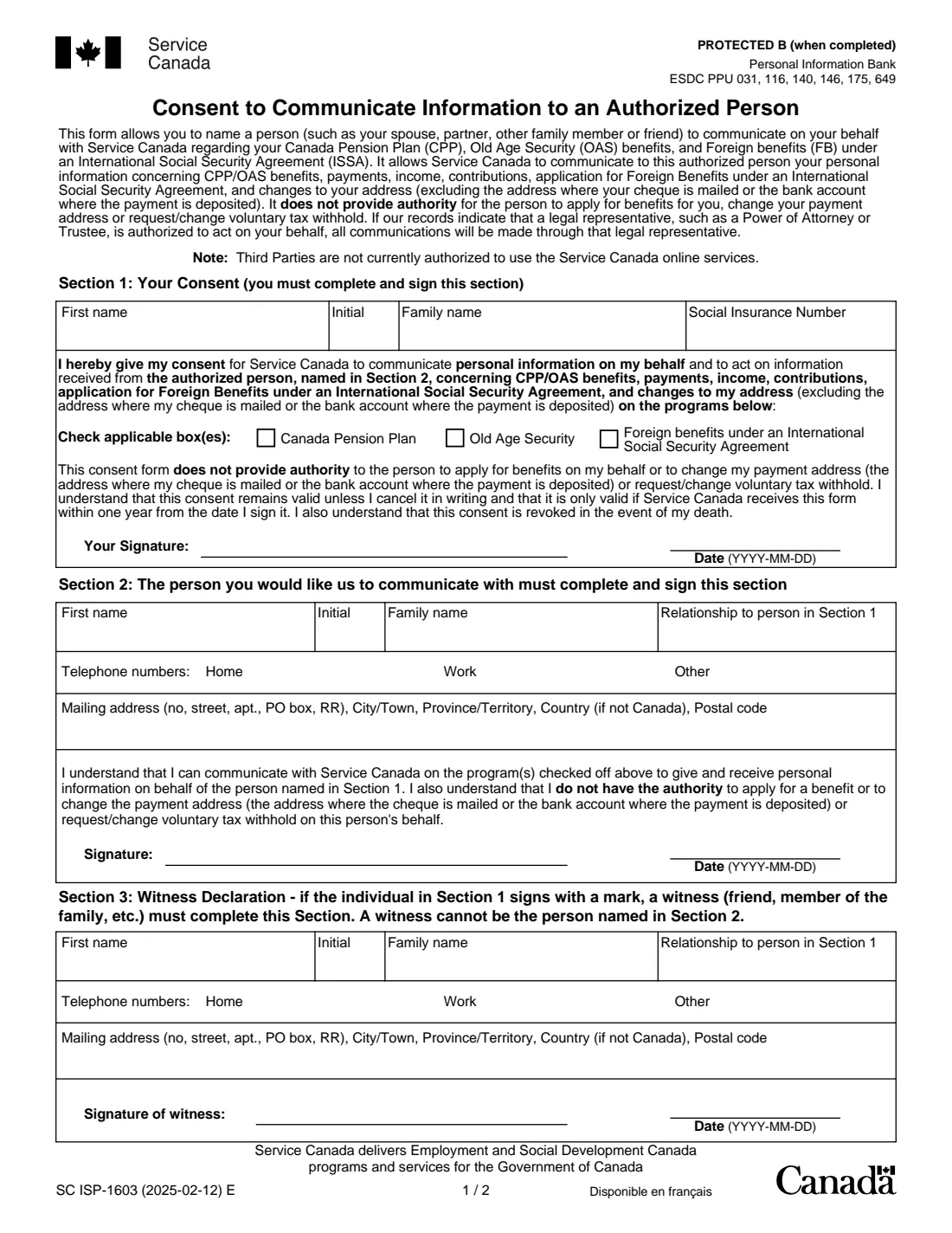
The 2025 edition has 2 pages. FileIt asks for it in 3 parts, and it is signed by Person giving consent and Authorized person:
- Section 1: Your consentPerson giving consent
- Section 2: The person Service Canada may communicate withAuthorized person
- Section 3: Witness declarationWitness
How to fill out ISP-1603 CPP/OAS consent, step by step
1 Section 1 — Your consent
Give your first name, initial, family name and SIN, tick the programs the consent covers, then sign and date. Your signature confirms you understand that the consent doesn't let the person apply for benefits or change your payment address or tax withholding, stays valid until you cancel it in writing, and is only valid if Service Canada receives the form within one year of the date you sign it.
2 Section 2 — The authorized person
The person you name gives their name, relationship to you, home, work and other phone numbers, and mailing address on one line. They sign and date to confirm they understand what they can and cannot do on your behalf.
3 Section 3 — Witness (only if needed)
If you sign Section 1 with a mark such as an X, a witness such as a friend or family member completes this section and signs. The witness cannot be the person named in Section 2.
Common mistakes to avoid
- Leaving all three program boxes empty. Tick every program the person should be able to discuss.
- Expecting the form to let your helper apply for benefits, change your bank account or change tax withholding. It explicitly does not.
- Holding on to the signed form. It only works if Service Canada receives it within one year of the date you sign.
- Having the authorized person also act as the witness.
- Forgetting the second signature: the authorized person must complete and sign Section 2.
After you fill it out
Print the PDF. You sign and date Section 1 and the authorized person signs and dates Section 2 (and a witness signs Section 3 if you signed with a mark). Then send it to Service Canada.
Keep the filled copy in your FileIt vault, and give the authorized person a copy so they know what they may discuss.
To end the consent, the instruction sheet says to send Service Canada a written cancellation. It also ends on your death.
Remember that the note on the form says third parties can't use Service Canada's online services, so your helper will deal with Service Canada by phone or in writing. The instruction sheet lists 1-800-277-9914 (English) and 1-800-277-9915 (French) in Canada and the United States.
Fill out ISP-1603 CPP/OAS consent online with FileIt
- Pick the person. Choose someone from People and FileIt fills in their name, date of birth, address and other details it already knows.
- Answer plain-language questions. One part of the form at a time, with the official help text beside each question — 23 fields in all. Your answers save as you go.
- Check the live preview. Watch your answers land on the real Service Canada, for Employment and Social Development Canada (ESDC) form, and let FileIt do any worksheet arithmetic.
- Generate the official PDF. FileIt prints your answers into the agency’s own PDF and files it in that person’s folder in your vault. Sign it, or send it for e-signature.
FileIt fills the form — it never files or submits anything for you. Deliver the finished form to whoever asked for it, the way the form’s instructions say.
Start ISP-1603 CPP/OAS consent now — it’s freeISP-1603 CPP/OAS consent: frequently asked questions
Does my spouse or adult child need this form to talk to Service Canada for me?
Yes. The instruction sheet says Service Canada cannot communicate your personal benefit information with your spouse, common-law partner, son or daughter without your signed consent.
Can the authorized person apply for benefits or change my direct deposit?
No. The consent does not let them apply for, withdraw or cancel benefits, change your payment address or bank account, or request or change voluntary tax withholding. Generally only you, or a legal representative such as someone with your power of attorney or a trustee, can change payment details.
How long does the consent last?
Until you cancel it in writing, or on your death. It is only valid if Service Canada receives the form within one year from the date you sign it.
What if I already have a power of attorney?
The form says that if Service Canada's records show a legal representative, such as a power of attorney or trustee, is authorized to act for you, all communications will be made through that legal representative.
Can the authorized person use My Service Canada Account for me?
No. The form notes that third parties are not currently authorized to use Service Canada's online services.
When do I need a witness?
Only if you sign Section 1 with a mark. The witness, for example a friend or family member, completes Section 3 and cannot be the person named in Section 2.
Can I fill out ISP-1603 online with FileIt?
Yes. FileIt prints both sections into Service Canada's official PDF and saves it in your vault. You and the authorized person then sign it, and you send it to Service Canada yourself.
Official sources
- Blank form (PDF), published by Service Canada, for Employment and Social Development Canada (ESDC): https://catalogue.servicecanada.gc.ca/apps/EForms/pdf/en/ISP-1603.pdf
- Official instructions and guidance: https://www.canada.ca/en/services/benefits/publicpensions.html
- Edition shown on this page: SC ISP-1603 (2025-02-12) E (checked 2026-09-28).
FileIt is not affiliated with or endorsed by Service Canada, for Employment and Social Development Canada (ESDC) or any government. This page explains the form in general terms and is not legal, tax or immigration advice. Always read the official instructions, and check that you are using the edition the recipient accepts. Page last reviewed 2026-09-28.