What is IMM 5476?
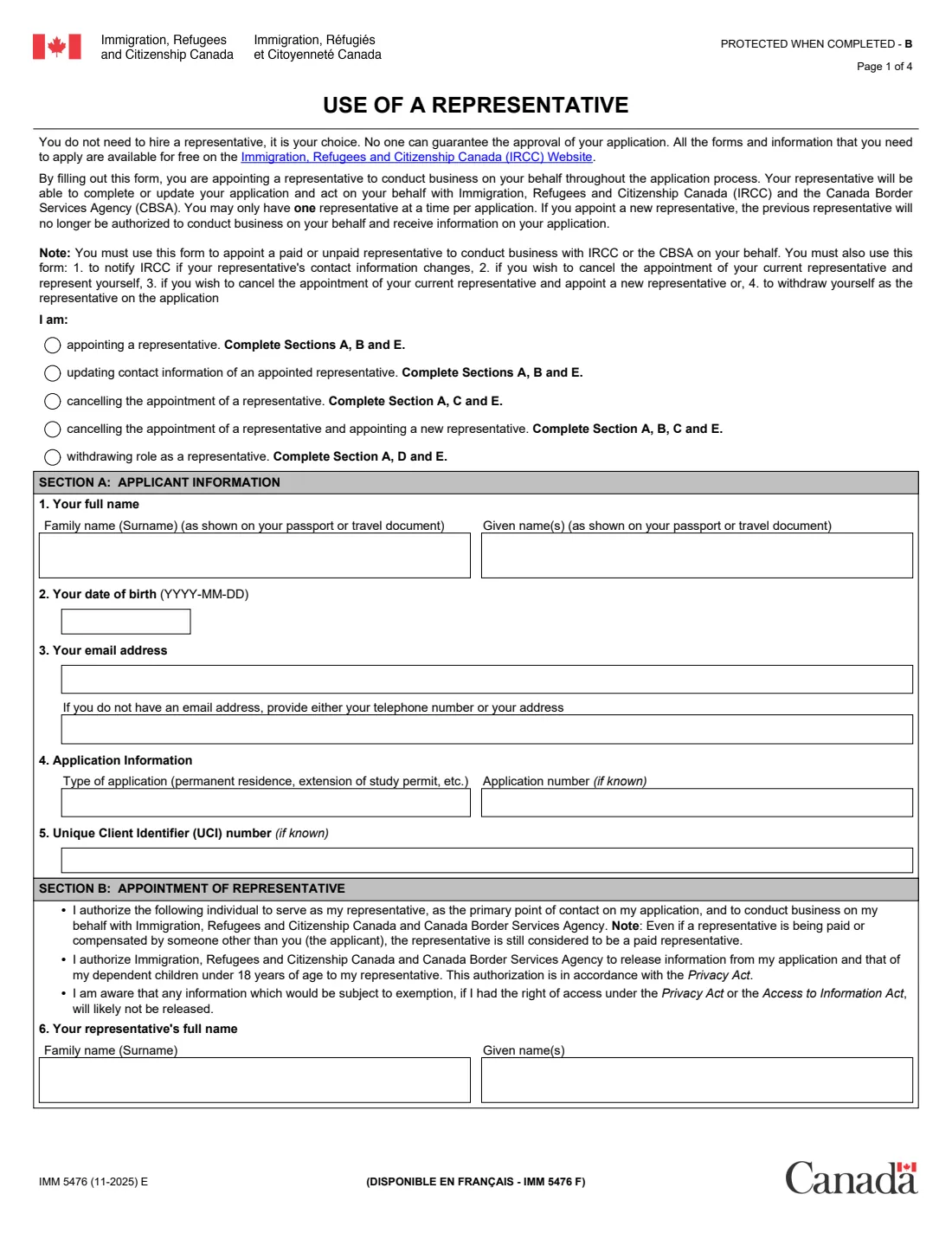
IMM 5476, Use of a Representative, is the form from Immigration, Refugees and Citizenship Canada (IRCC) that authorizes a representative to conduct business on your behalf with IRCC and the Canada Border Services Agency (CBSA) for one application. It is used with almost every IRCC application where someone helps you, whether paid or unpaid. The current edition is IMM 5476 (11-2025) E.
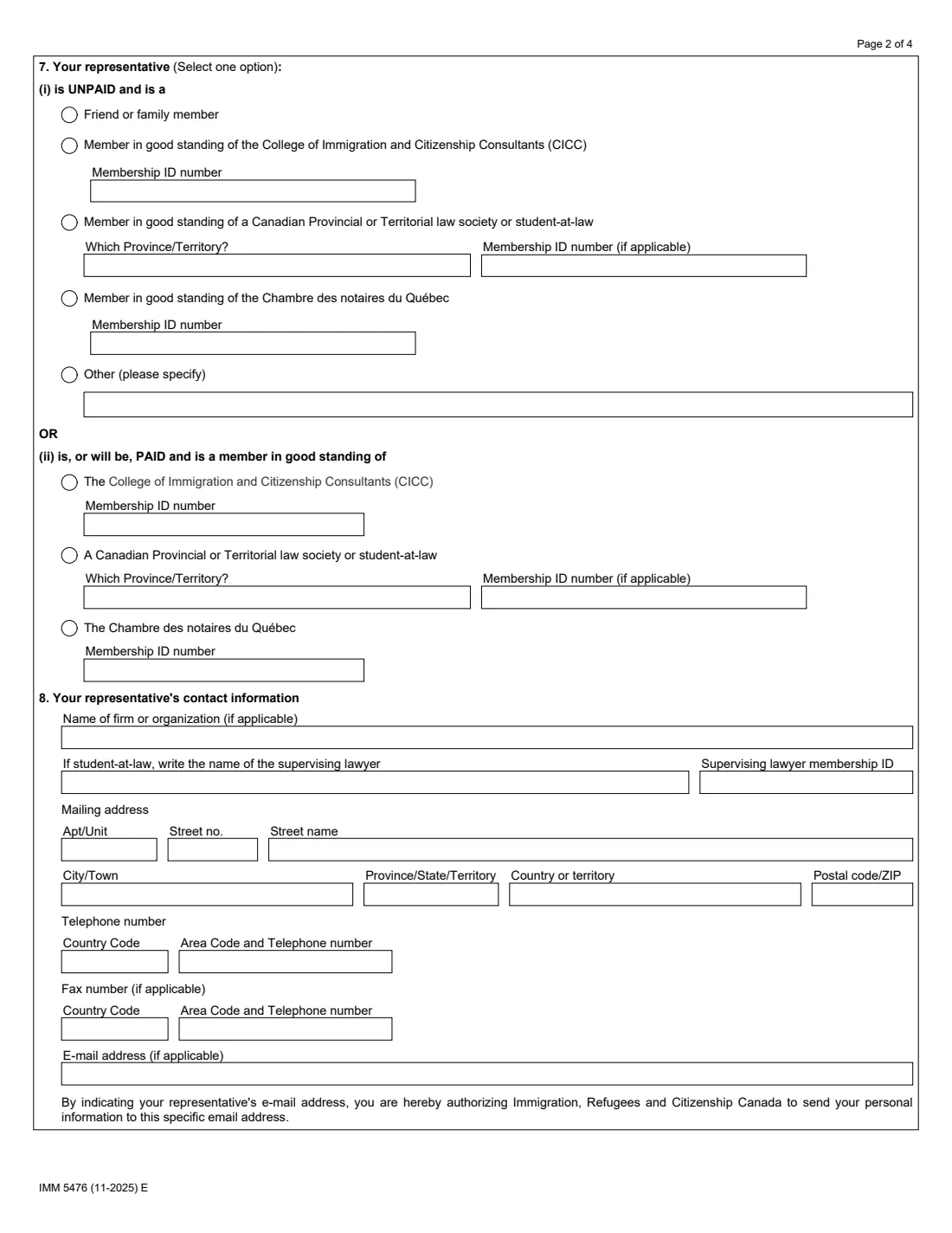
The same form covers five requests: appointing a representative, updating their contact information, cancelling an appointment, replacing one representative with another, and a representative withdrawing. You tick the request, give your details and the application, then complete the sections that apply. Paid representatives must be members in good standing of the College of Immigration and Citizenship Consultants (CICC), a Canadian provincial or territorial law society, or the Chambre des notaires du Québec.
FileIt guides you through IMM 5476, asks only the questions your request needs, and prints the answers onto IRCC's official PDF. You can then sign it on paper, or send it for signature to you and your representative. FileIt does not submit anything to IRCC.
- Who fills it
- The applicant (a parent or guardian for someone under 18), with the representative's details
- Given to
- IRCC, with the application or afterwards through IRCC's web form or to the processing office
- When
- To appoint, update, cancel or replace a representative, or for a representative to withdraw
- Signatures
- Applicant in section E; the representative in question 9 (and a supervising lawyer for a student-at-law)
- Edition
- IMM 5476 (11-2025) E
Who needs to fill out IMM 5476?
- Anyone using an immigration consultant, lawyer or Quebec notary for a Canadian visa, permit, permanent residence, sponsorship or citizenship application.
- Applicants who want a friend or family member to deal with IRCC for them without pay.
- People changing or dropping their representative.
- Representatives whose contact details changed, or who are withdrawing from a file.
- Dependent children aged 18 or older who also want the representative to act for them complete their own copy.
When to use IMM 5476
- With a new application if someone will act for you.
- Any time your representative's contact information changes.
- When you cancel a representative, or cancel one and appoint another; you can have only one representative at a time per application.
- Before a paid representative acts for you: IRCC returns an application if a paid representative is not a member in good standing of a designated body.
What you need before you start
- Your name and date of birth as on your passport, your email address (or phone or address), and the type of application.
- Your application number and UCI (Unique Client Identifier) if you have them.
- Your representative's full name as on their regulator's membership list, and their CICC, law society or Chambre des notaires membership ID.
- Your representative's firm, mailing address, phone, fax and email.
- For a student-at-law, the supervising lawyer's name and membership ID.
What’s on IMM 5476
The 2025 edition has 4 pages. FileIt asks for it in 5 parts, and it is signed by Applicant and Representative:
- Section A: Applicant informationApplicant
- Section B: Appointment of representativeRepresentative
- Section C: Cancel the appointment of a representativeApplicant
- Section D: Withdrawing role as a representativeRepresentative
- Section E: Your declarationApplicant
How to fill out IMM 5476, step by step
1 Choose your request
Tick whether you are appointing a representative, updating their contact information, cancelling an appointment, cancelling and appointing a new one, or (as a representative) withdrawing. The choice decides which sections you complete.
2 Section A: Applicant information
Give your name as on your passport, date of birth, email address (or a phone number or address), the type of application, and the application number and UCI if known.
3 Section B: Appointment of representative
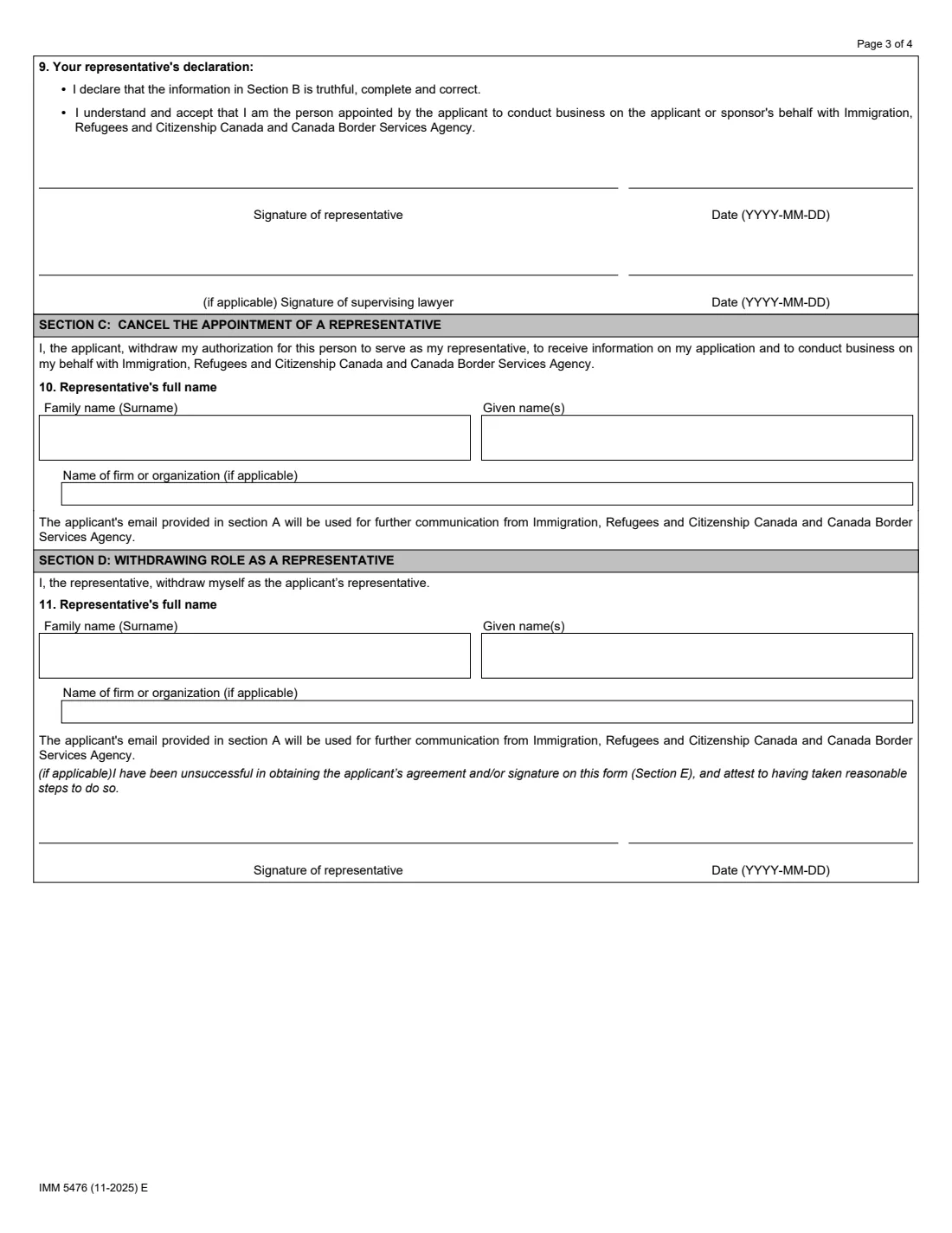
Give the representative's name, say whether they are unpaid (friend or family, a CICC member, a law society member or student-at-law, a Chambre des notaires member, or other) or paid (CICC, law society, or Chambre des notaires), with their membership ID, then their contact information. The representative signs the declaration in question 9, with the supervising lawyer for a student-at-law.
4 Section C: Cancel the appointment
Give the name and firm of the representative you are cancelling. IRCC will then use the email address in section A.
5 Section D: Withdrawing as a representative
Completed by the representative. They sign here only if they could not obtain your agreement and signature in section E.
6 Section E: Your declaration
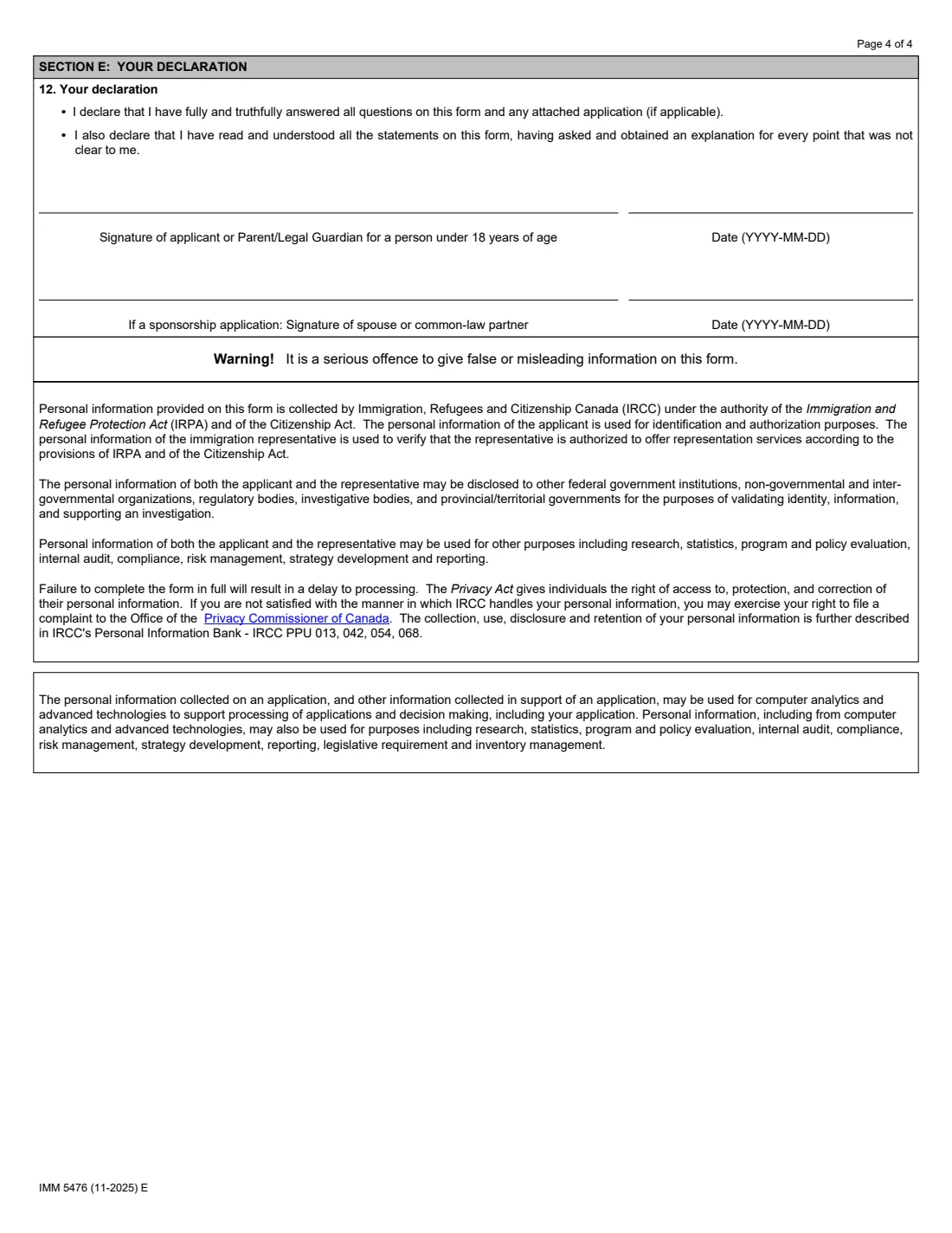
You sign and date the form, or a parent or legal guardian for someone under 18. For a sponsorship application, the spouse or common-law partner signs too.
Common mistakes to avoid
- Paying a representative who is not a member in good standing of the CICC, a Canadian law society or the Chambre des notaires du Québec.
- Writing the representative's name differently from their regulator's membership list.
- Leaving out the membership ID for an authorized representative.
- Forgetting the representative's signature in question 9 when appointing them.
- Not sending a new IMM 5476 when the representative's contact details change or you change representatives.
After you fill it out
Sign the form. IRCC's form page says a typed, app-based or scanned signature is accepted when the form is submitted through a portal or secure account; otherwise print it and sign by hand.
Upload it with an online application, or send it with a paper application. If your application is already submitted, IRCC's form page points to its web form, or to mailing it to the office processing your application.
Keep the signed copy in your FileIt vault with your application papers.
Fill out IMM 5476 online with FileIt
- Pick the person. Choose someone from People and FileIt fills in their name, date of birth, address and other details it already knows.
- Answer plain-language questions. One part of the form at a time, with the official help text beside each question — 48 fields in all. Your answers save as you go.
- Check the live preview. Watch your answers land on the real Immigration, Refugees and Citizenship Canada (IRCC) form, and let FileIt do any worksheet arithmetic.
- Generate the official PDF. FileIt prints your answers into the agency’s own PDF and files it in that person’s folder in your vault. Sign it, or send it for e-signature.
FileIt fills the form — it never files or submits anything for you. Deliver the finished form to whoever asked for it, the way the form’s instructions say.
Start IMM 5476 now — it’s freeIMM 5476: frequently asked questions
Do I need a representative for an IRCC application?
No. The form itself says you don't need to hire one, that it is your choice, and that no one can guarantee approval. IRCC treats applicants equally whether or not they use a representative.
Who can be a paid immigration representative?
Members in good standing of the College of Immigration and Citizenship Consultants, of a Canadian provincial or territorial law society (and students-at-law they supervise), or of the Chambre des notaires du Québec.
Can a friend or relative be my representative?
Yes, as an unpaid representative, as long as they don't and won't charge a fee or receive any other compensation.
Can I have more than one representative?
Only one at a time per application. Appointing a new representative ends the previous appointment.
How do I cancel my representative?
Tick the cancel option, complete sections A, C and E, and send the form to IRCC. To switch to someone new in one step, choose cancel and appoint, and complete sections A, B, C and E.
Is IMM 5476 the same as IMM 5475?
No. IMM 5475 only lets IRCC release information about your application to a designated person; it doesn't let them act for you.
Official sources
- Blank form (PDF), published by Immigration, Refugees and Citizenship Canada (IRCC): https://www.canada.ca/content/dam/ircc/documents/pdf/english/kits/forms/imm5476/01-11-2025/imm5476e.pdf
- Official instructions and guidance: https://www.canada.ca/en/immigration-refugees-citizenship/services/application/application-forms-guides/imm5476.html
- Edition shown on this page: IMM 5476 (11-2025) E (checked 2026-09-28).
FileIt is not affiliated with or endorsed by Immigration, Refugees and Citizenship Canada (IRCC) or any government. This page explains the form in general terms and is not legal, tax or immigration advice. Always read the official instructions, and check that you are using the edition the recipient accepts. Page last reviewed 2026-09-28.