What is Authorise a person or organisation (SS313)?
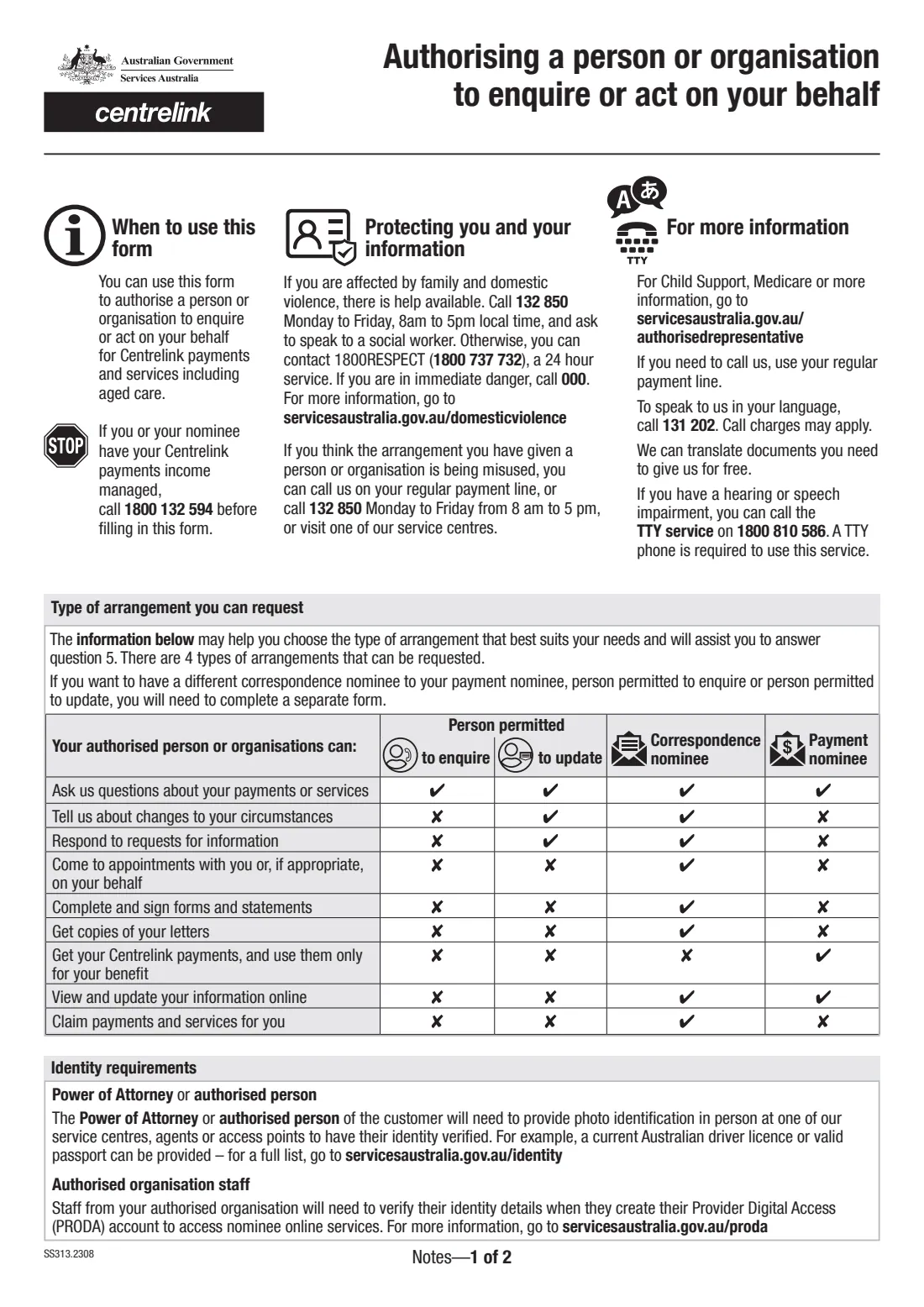
Form SS313, Authorising a person or organisation to enquire or act on your behalf, is how a Centrelink customer sets up a nominee or authorised representative with Services Australia. It covers Centrelink payments and services, including aged care. The person or organisation you name can be allowed to simply ask questions, to update your details, to handle your letters and forms as a correspondence nominee, or to receive your payments as a payment nominee.
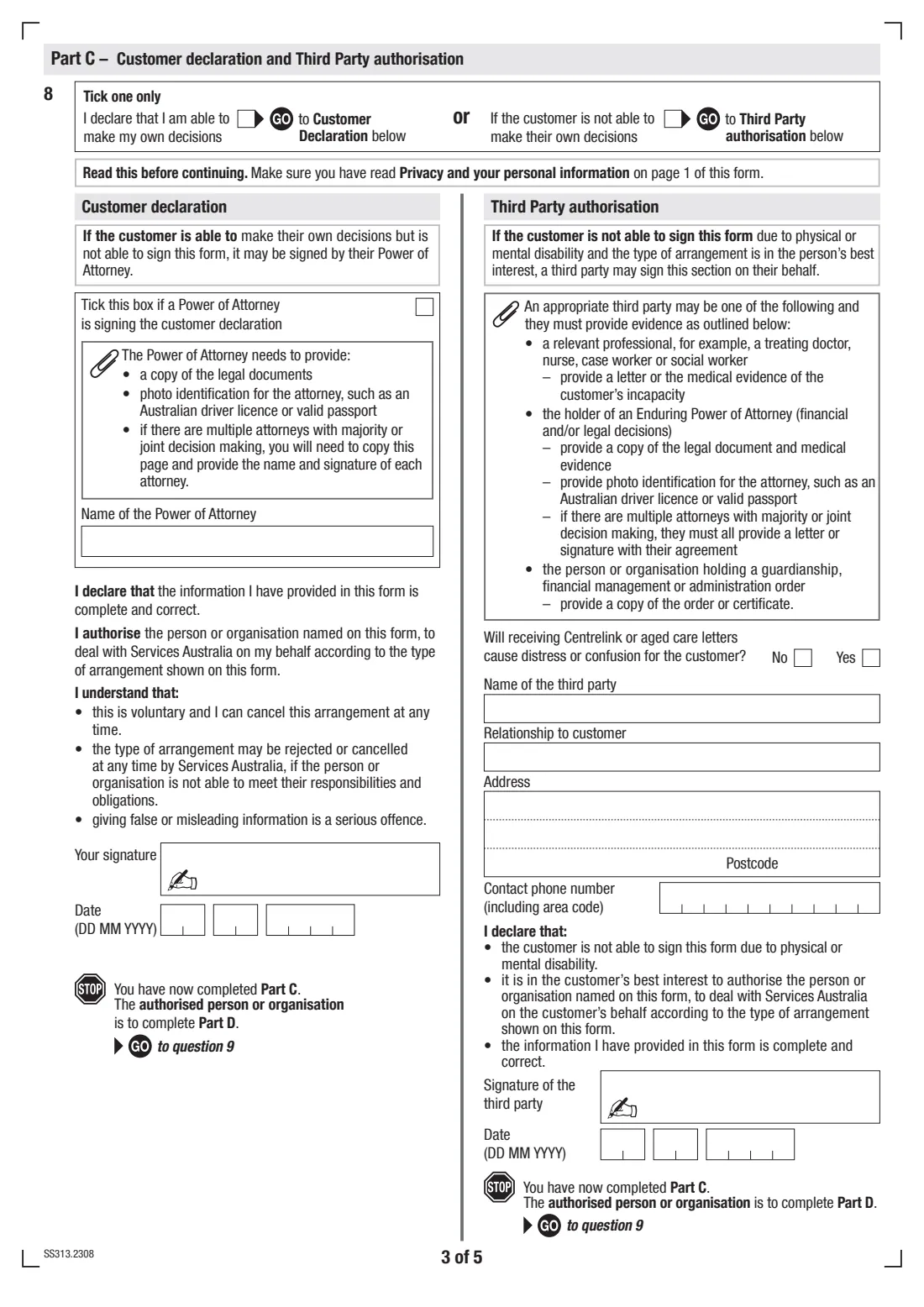
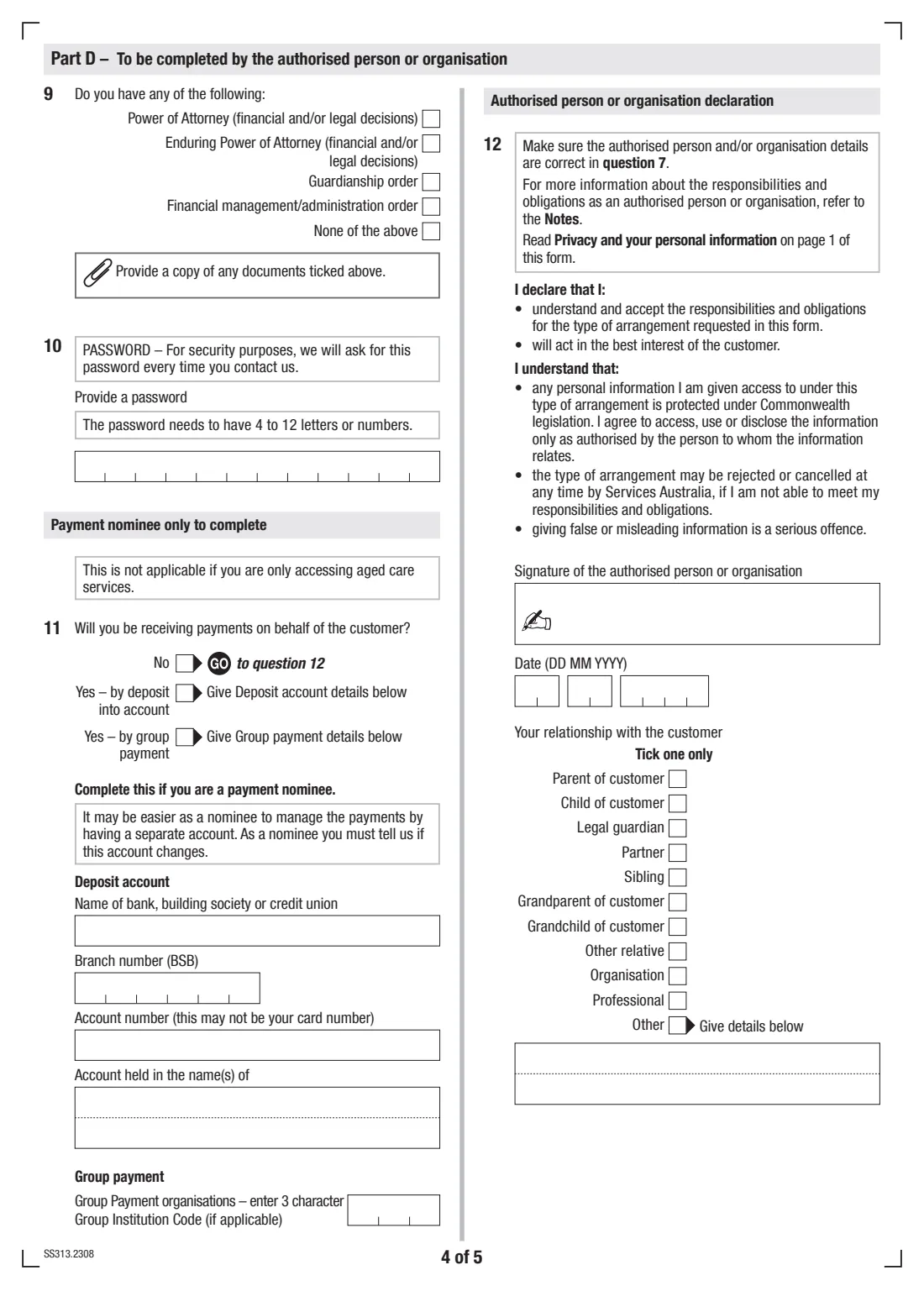
The form has four parts. The customer fills in Parts A to C: their own details, the type of arrangement, who is being authorised, and a declaration. If the customer can't make their own decisions, a suitable third party signs a Third Party authorisation instead. The authorised person or organisation then completes Part D, including a password and, for payment nominees, the account the payments go into. Both sides sign.
FileIt walks you through the current edition (SS313.2308) question by question and prints the answers into Services Australia's own PDF. It can pre-fill the customer's name and date of birth from your People records, only shows the parts that apply to your choices, checks things like the ABN of an organisation, and saves the finished form to the customer's folder in your FileIt vault. You can print it and sign by hand, or send it for e-signature to the people who need to sign. You then return it to Services Australia yourself — FileIt never sends it anywhere.
- Who fills it
- The customer (Parts A–C) and the authorised person or organisation (Part D)
- Given to
- Services Australia (Centrelink) — online through your Centrelink online account, by post, by fax or in person
- When
- Whenever you want someone to enquire or act for you with Centrelink, or to change an existing nominee
- Signatures
- The customer (or their Power of Attorney, or a third party) and the authorised person or organisation
- Edition
- SS313.2308
- Identity check
- An authorised person or Power of Attorney must show photo ID in person at a service centre, agent or access point
Who needs to fill out Authorise a person or organisation (SS313)?
- Older Australians who want a son, daughter or other relative to talk to Centrelink or manage aged care paperwork for them.
- Centrelink customers who want a partner, friend or carer to be able to ask questions about their payments without being able to change anything.
- People who need someone to receive their Centrelink letters and deal with forms and reporting as a correspondence nominee.
- People who can no longer manage money and want a trusted person to receive their payments as a payment nominee.
- Family members or professionals acting under an Enduring Power of Attorney, guardianship order or financial management order.
- Organisations — for example an advocacy or care provider — that are being authorised to act for a customer.
When to use Authorise a person or organisation (SS313)
- When you first want someone else to be able to deal with Centrelink or aged care means assessments on your behalf.
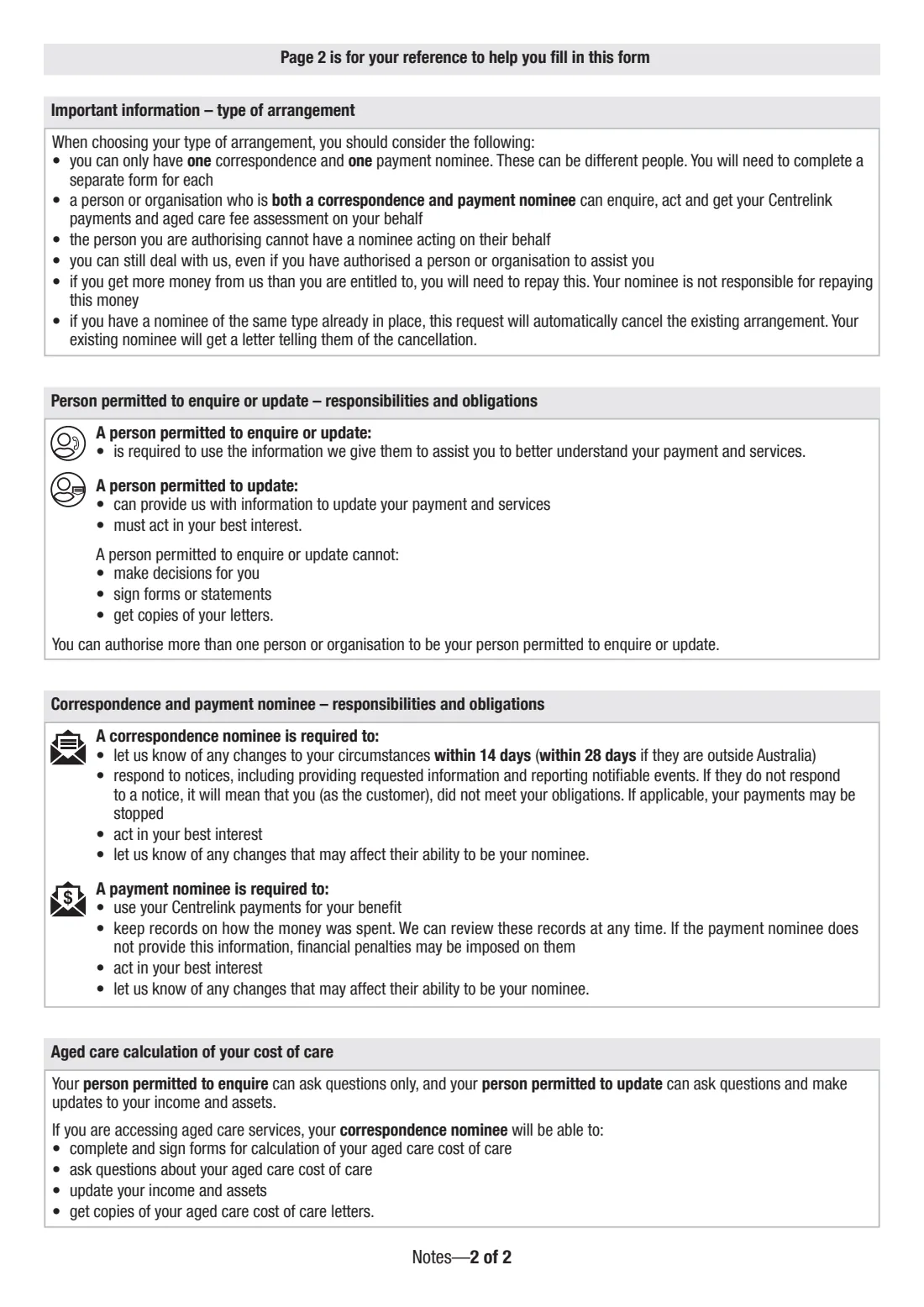
- When you want to replace a nominee: a new nominee of the same type automatically cancels the existing arrangement, and the old nominee gets a letter.
- When a customer loses capacity and a doctor, attorney or guardian needs to put an arrangement in place through the Third Party authorisation.
- When you want different people for different roles — for example one correspondence nominee and a different payment nominee — use a separate form for each.
- When you want an arrangement for a set period only: you can give an end date instead of choosing 'indefinitely'.
What you need before you start
- The customer's Centrelink Customer Reference Number (CRN), if known, and the authorised person's CRN if they have one.
- Full names, dates of birth and permanent and postal addresses for the customer and the authorised person.
- For an organisation: its trading and business name, ABN (mandatory), contact person, email and phone number.
- A decision about which arrangement you want: person permitted to enquire, person permitted to update, correspondence nominee, payment nominee — or a combination.
- Any Power of Attorney, Enduring Power of Attorney, guardianship or financial management order, plus medical evidence if a third party is signing.
- For a payment nominee: the bank, building society or credit union, BSB, account number and account name — or the Group Institution Code for a group payment.
- A password of 4 to 12 letters or numbers that the authorised person will use whenever they contact Services Australia.
- Photo identification for the authorised person or attorney, to be shown in person.
What’s on Authorise a person or organisation (SS313)
The 2023 edition has 7 pages. FileIt asks for it in 9 parts, and it is signed by Customer (or their power of attorney) and Third party and Authorised person or organisation:
- Part A — Customer details (the person requesting an authorised person or organisation)Customer
- Part A — Type of arrangement (questions 5–6)Customer
- Part B — Authorised person or organisation details (question 7)Customer
- Part C — Customer declaration or Third Party authorisation (question 8)Customer
- Part C — Customer declarationCustomer (or their power of attorney)
- Part C — Third Party authorisationThird party
- Part D — To be completed by the authorised person or organisation (questions 9–11)Authorised person or organisation
- Part D — Authorised person or organisation declaration (question 12)Authorised person or organisation
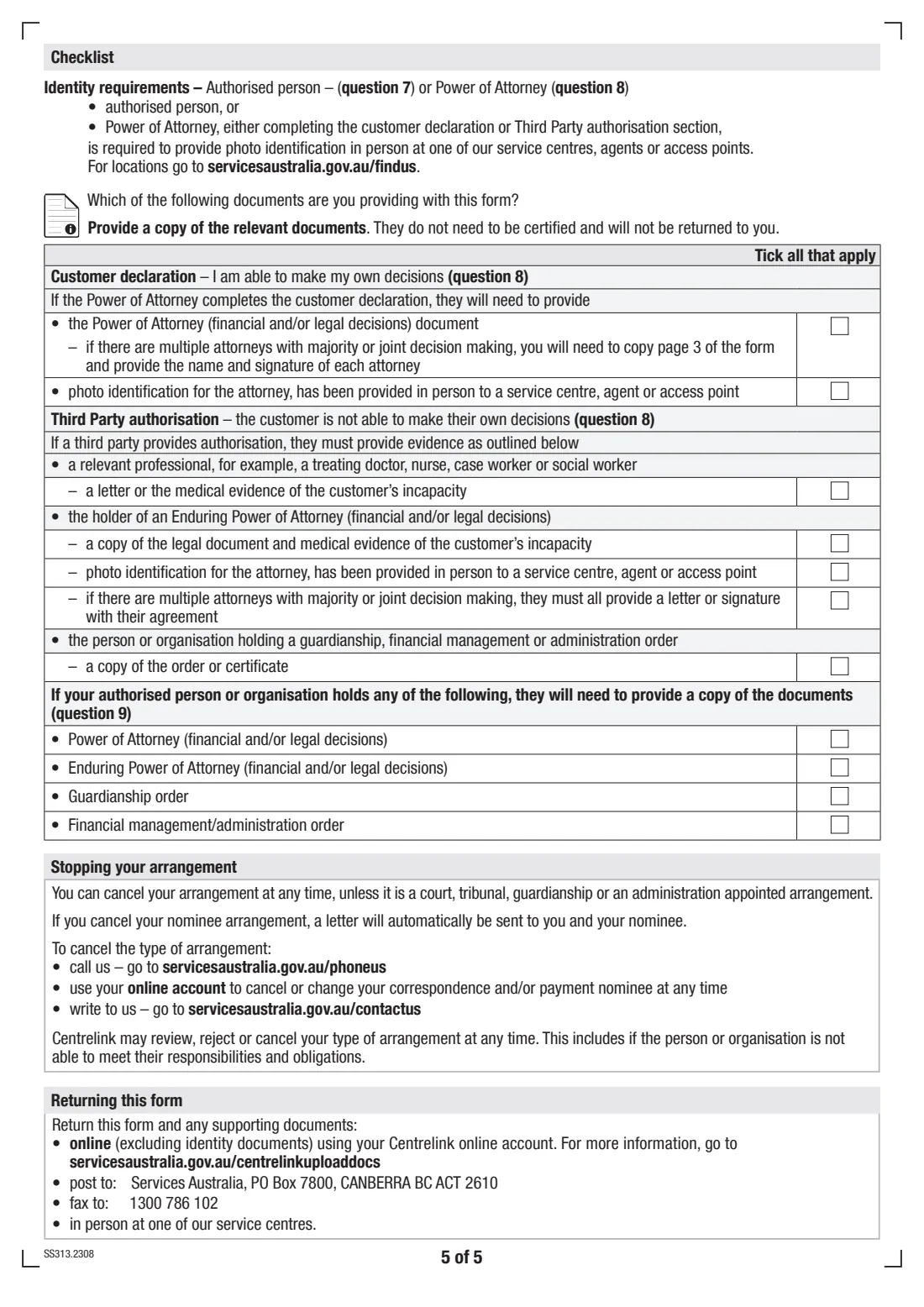
- Checklist — documents you are providingCustomer
How to fill out Authorise a person or organisation (SS313), step by step
1 Part A — Customer details (questions 1–4)
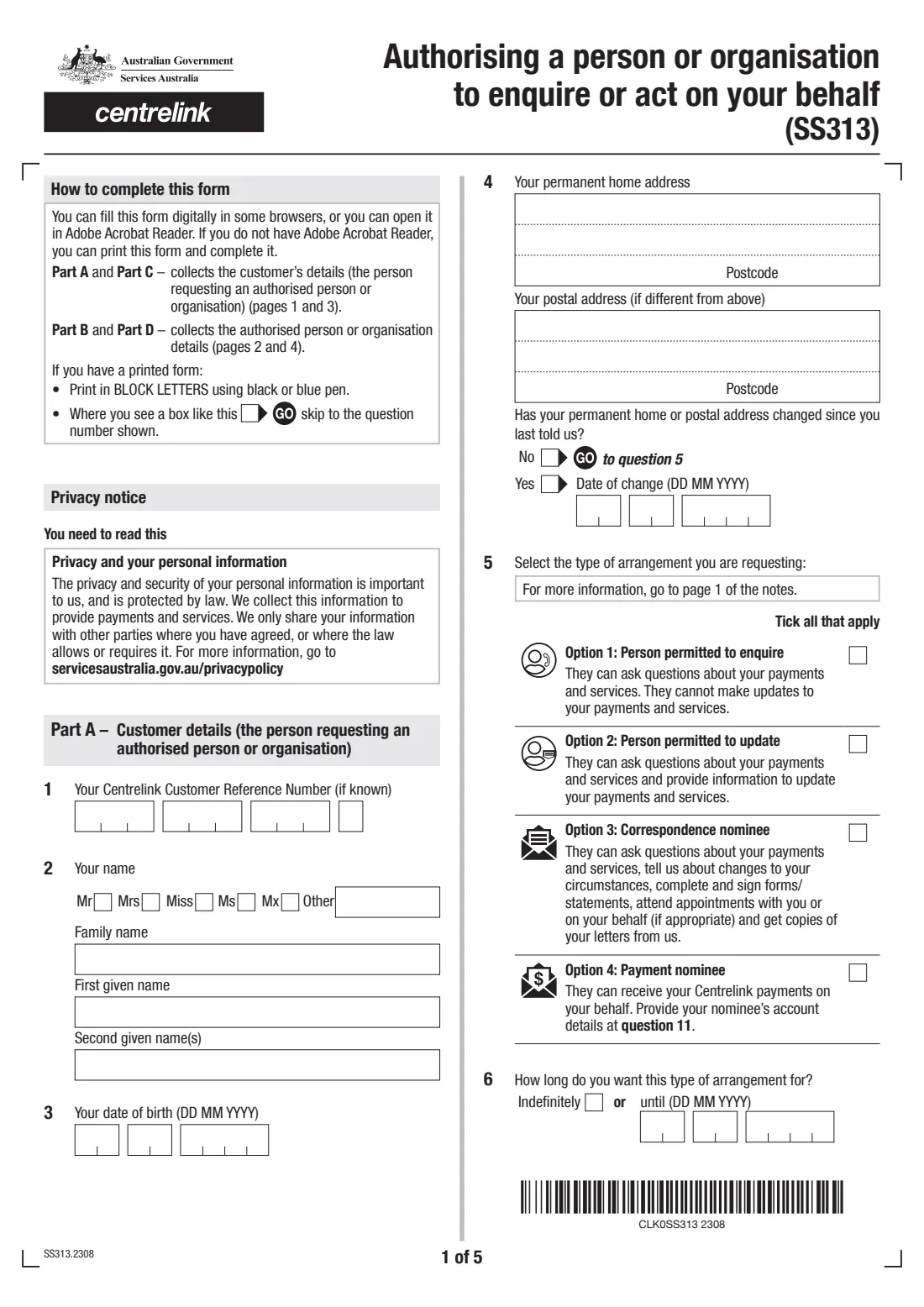
The customer gives their CRN if they know it, their name, date of birth, permanent home address and postal address if different. Question 4 asks whether either address has changed since you last told Services Australia and, if so, the date of change.
FileIt pre-fills the customer's name and date of birth from their People record, and prints suburb and state together on the address's third line, as the form expects.
2 Type of arrangement (questions 5–6)
Tick every arrangement you want. A person permitted to enquire can only ask questions. A person permitted to update can also give information to update your payments and services. A correspondence nominee can act for you — reporting changes, signing forms and statements, attending appointments and getting copies of your letters. A payment nominee receives your Centrelink payments and must use them for your benefit.
Question 6 sets how long the arrangement lasts: indefinitely, or until a date you choose.
3 Part B — Authorised person or organisation (question 7)
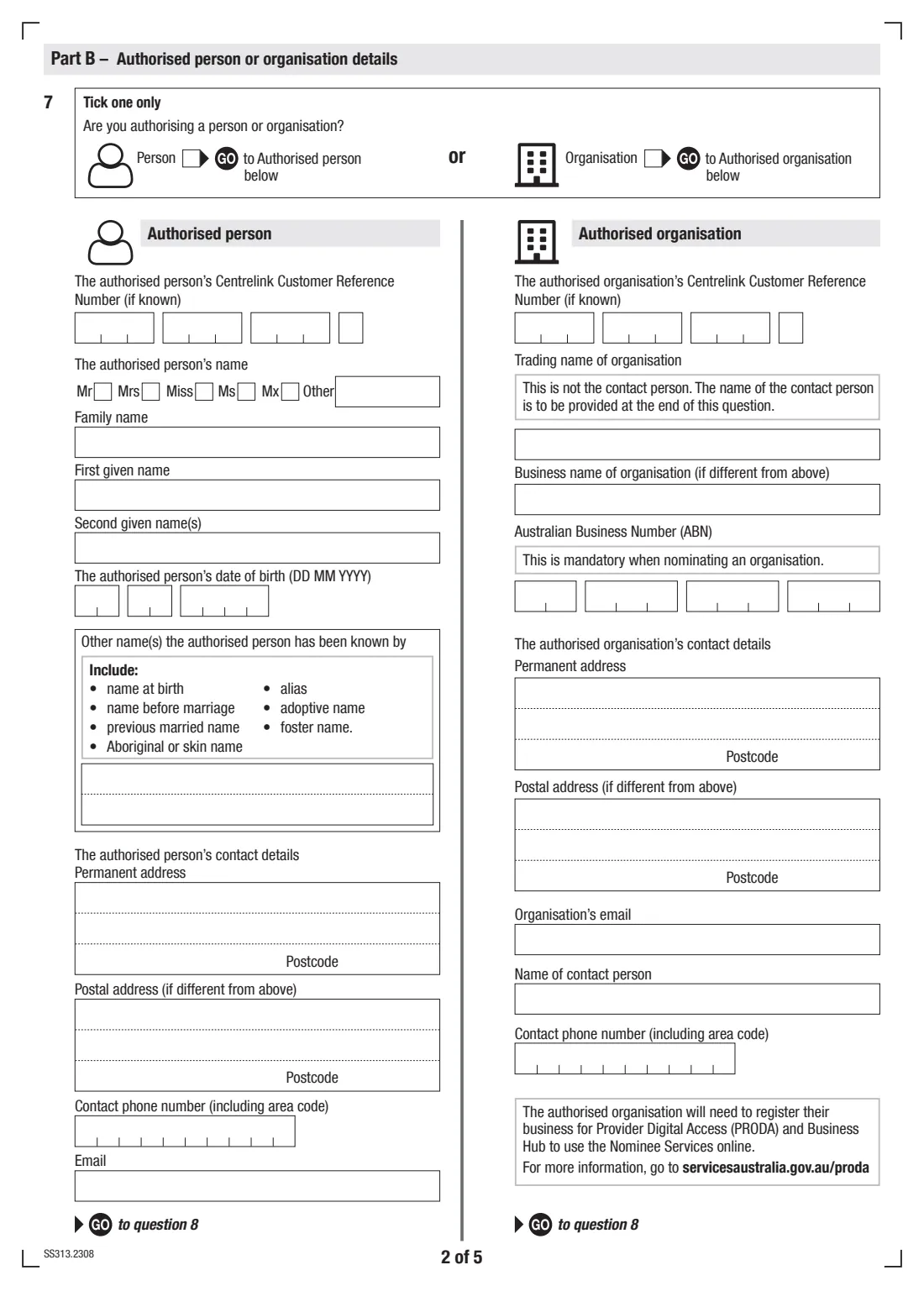
Choose whether you're authorising a person or an organisation, then fill in only that side of the page. For a person: their CRN if known, name, date of birth, any other names they have been known by (such as a birth or previous married name), addresses, phone and email. For an organisation: CRN if known, trading name, business name, ABN, addresses, email, contact person and phone.
An organisation must also register for Provider Digital Access (PRODA) and Business Hub to use Nominee Services online.
4 Part C — Customer declaration or Third Party authorisation (question 8)
If the customer can make their own decisions, they sign the Customer declaration. If they can't physically sign, their Power of Attorney may sign it — tick the box and give the attorney's name.
If the customer can't make their own decisions, an appropriate third party signs the Third Party authorisation instead: a relevant professional such as a treating doctor or social worker, the holder of an Enduring Power of Attorney, or the holder of a guardianship, financial management or administration order. The third party also says whether receiving Centrelink or aged care letters would cause the customer distress or confusion. FileIt only shows the declaration that matches your answer to question 8.
5 Part D — Authorised person or organisation (questions 9–11)
The authorised person or organisation says whether they hold a Power of Attorney, Enduring Power of Attorney, guardianship order or financial management order, and sets a password of 4 to 12 letters or numbers.
Question 11 is for payment nominees only: payments can go by deposit into an account (bank name, BSB, account number and account names) or by group payment (a three-character Group Institution Code, if applicable). It isn't needed if you're only accessing aged care services.
6 Authorised person or organisation declaration (question 12)
The authorised person or organisation checks the details at question 7, reads the responsibilities in the notes, signs and dates the declaration, and ticks their relationship to the customer — parent, child, legal guardian, partner, sibling, grandparent, grandchild, other relative, organisation, professional, or other with details.
7 Checklist and returning the form
The last page lists the supporting documents you may be sending, such as a Power of Attorney document, medical evidence, or a guardianship or administration order. Copies don't need to be certified and won't be returned.
The form then explains how to return it: online through the customer's Centrelink online account (not identity documents), by post, by fax, or in person at a service centre.
Common mistakes to avoid
- Ticking payment nominee but leaving question 11 blank — a payment nominee needs to say how the payments will be received.
- Filling in both the authorised person and authorised organisation columns at question 7 — tick one only and complete that side.
- Leaving out the ABN when nominating an organisation — it's mandatory.
- Having the customer sign the Customer declaration when they can't make their own decisions — the Third Party authorisation is the right section then.
- Forgetting that the authorised person or Power of Attorney must show photo ID in person at a service centre, agent or access point.
- Choosing a password with symbols or spaces — it must be 4 to 12 letters or numbers.
- Assuming one form can create two different nominees — a different correspondence and payment nominee need separate forms.
- Not sending copies of the Power of Attorney, order or medical evidence that the checklist asks for.
After you fill it out
Check the arrangement you ticked, then sign. The customer (or their Power of Attorney, or the third party) signs Part C and the authorised person or organisation signs Part D. With FileIt you can print the form and sign by hand, or send it for e-signature so each signer adds their signature to the official PDF.
Return the form and copies of any supporting documents to Services Australia: upload it through the customer's Centrelink online account (identity documents excluded), post it, fax it, or hand it in at a service centre — the addresses are printed on the last page. The authorised person or attorney also needs to show photo ID in person. FileIt doesn't lodge the form for you.
A copy stays in the customer's folder in your FileIt vault. You can cancel the arrangement at any time (unless it was appointed by a court, tribunal, guardianship or administration order) by calling, writing or using the online account, and Services Australia may review or cancel it if the nominee can't meet their obligations.
Fill out Authorise a person or organisation (SS313) online with FileIt
- Pick the person. Choose someone from People and FileIt fills in their name, date of birth, address and other details it already knows.
- Answer plain-language questions. One part of the form at a time, with the official help text beside each question — 102 fields in all. Your answers save as you go.
- Check the live preview. Watch your answers land on the real Services Australia (Centrelink) form, and let FileIt do any worksheet arithmetic.
- Generate the official PDF. FileIt prints your answers into the agency’s own PDF and files it in that person’s folder in your vault. Sign it, or send it for e-signature.
FileIt fills the form — it never files or submits anything for you. Deliver the finished form to whoever asked for it, the way the form’s instructions say.
Start Authorise a person or organisation (SS313) now — it’s freeAuthorise a person or organisation (SS313): frequently asked questions
What is the SS313 form used for?
It authorises a person or organisation to enquire or act on a customer's behalf with Services Australia for Centrelink payments and services, including aged care. You choose whether they can only enquire, can update your details, can act as your correspondence nominee, or can receive your payments as your payment nominee.
What's the difference between a correspondence nominee and a payment nominee?
A correspondence nominee deals with Centrelink for you — reporting changes, responding to letters, signing forms and statements, and getting copies of your letters. A payment nominee receives your Centrelink payments and must use them for your benefit and keep records of how the money is spent. One person can be both, but you can only have one of each.
Can I fill in the SS313 online?
Yes. FileIt lets you fill in the official SS313 PDF online through guided questions, then saves the completed form to your vault. You can print and sign it, or send it for e-signature, before returning it to Services Australia yourself.
Where do I send the completed SS313?
The form says to return it online through your Centrelink online account (excluding identity documents), by post to the Services Australia address printed on the form, by fax, or in person at a service centre.
Who signs the SS313?
The customer signs the Customer declaration — or their Power of Attorney does if the customer can make decisions but can't sign. If the customer can't make their own decisions, a third party such as a treating doctor, enduring attorney or guardian signs the Third Party authorisation instead. The authorised person or organisation always signs Part D.
Does the authorised person need to show ID?
Yes. The form says the authorised person, or a Power of Attorney completing the customer declaration or Third Party authorisation, must provide photo identification in person at a service centre, agent or access point. An authorised organisation's staff verify their identity through PRODA instead.
Is my nominee responsible if I'm overpaid?
No. The form's notes say that if you get more money than you're entitled to, you need to repay it — your nominee isn't responsible for repaying it. A nominee must, however, meet the obligations of their role.
Can I use SS313 for Medicare or Child Support?
The SS313 is for Centrelink payments and services, including aged care. For Child Support or Medicare, the form points you to Services Australia's authorised representative information online.
How do I cancel a nominee arrangement?
You can cancel at any time by calling Services Australia, using your online account, or writing to them — unless the arrangement was appointed by a court, tribunal, guardianship or administration order. A letter is sent to you and your nominee when a nominee arrangement ends.
Official sources
- Blank form (PDF), published by Services Australia (Centrelink): https://www.servicesaustralia.gov.au/sites/default/files/2023-08/ss313-2308en-f.pdf
- Official instructions and guidance: https://www.servicesaustralia.gov.au/ss313
- Edition shown on this page: SS313.2308 (checked 2026-09-26).
FileIt is not affiliated with or endorsed by Services Australia (Centrelink) or any government. This page explains the form in general terms and is not legal, tax or immigration advice. Always read the official instructions, and check that you are using the edition the recipient accepts. Page last reviewed 2026-09-26.