What is the trade-in valuation request form template?
Customers want to know what their old phone, laptop or camera is worth before they make a trip. Shops want to avoid quoting a price over the phone and then finding a cracked screen at the counter. This trade-in valuation request sits between the two: the customer describes the item honestly, adds photos, and you reply with an estimate based on what you can actually see.
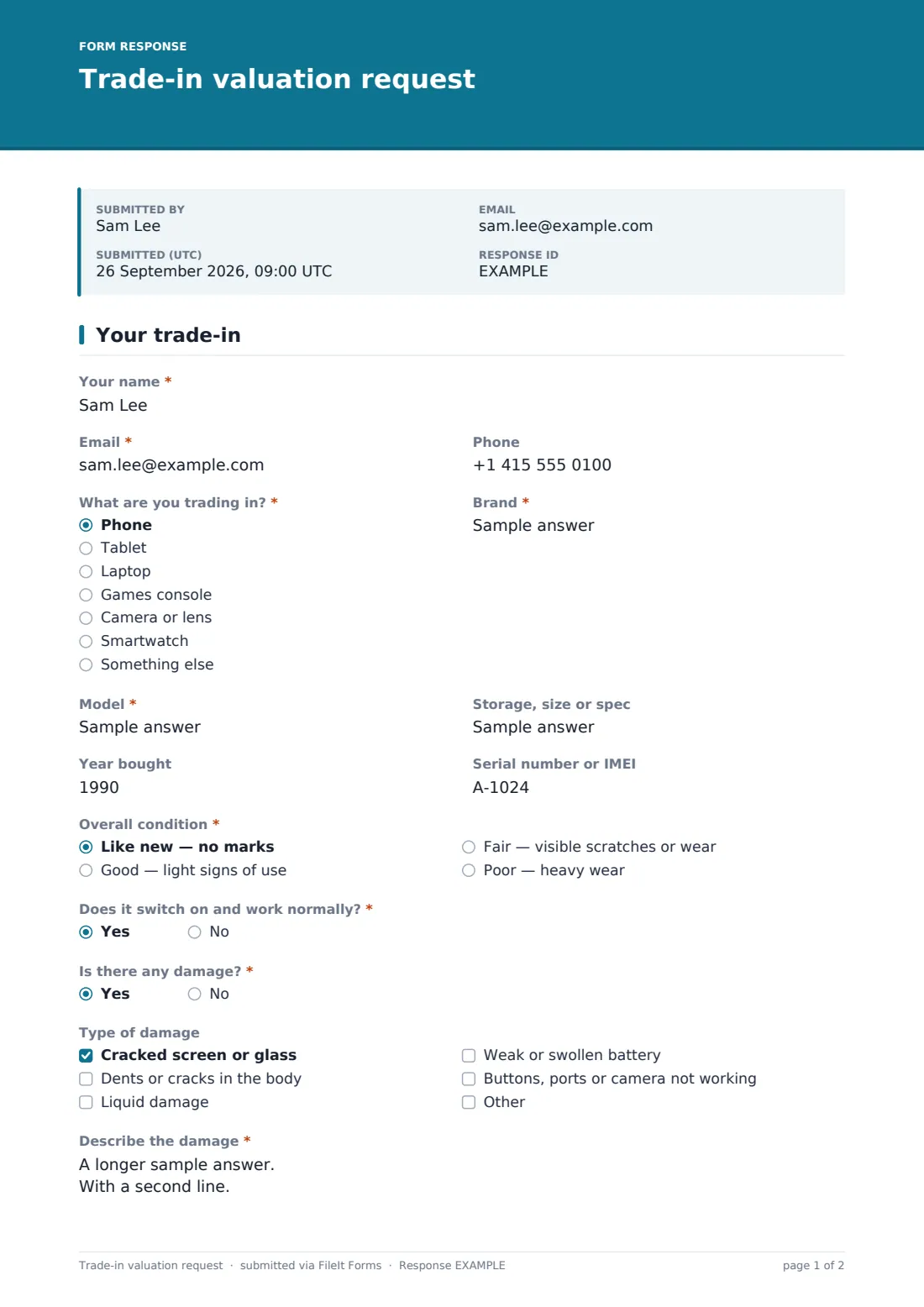
“What are you trading in?” covers phones, tablets, laptops, games consoles, cameras and lenses, smartwatches and something else. The customer adds the brand, model, storage or spec, the year it was bought and, if they can, the serial number or IMEI. “Overall condition” runs from like new to poor, each with a short description so people grade their items the same way.
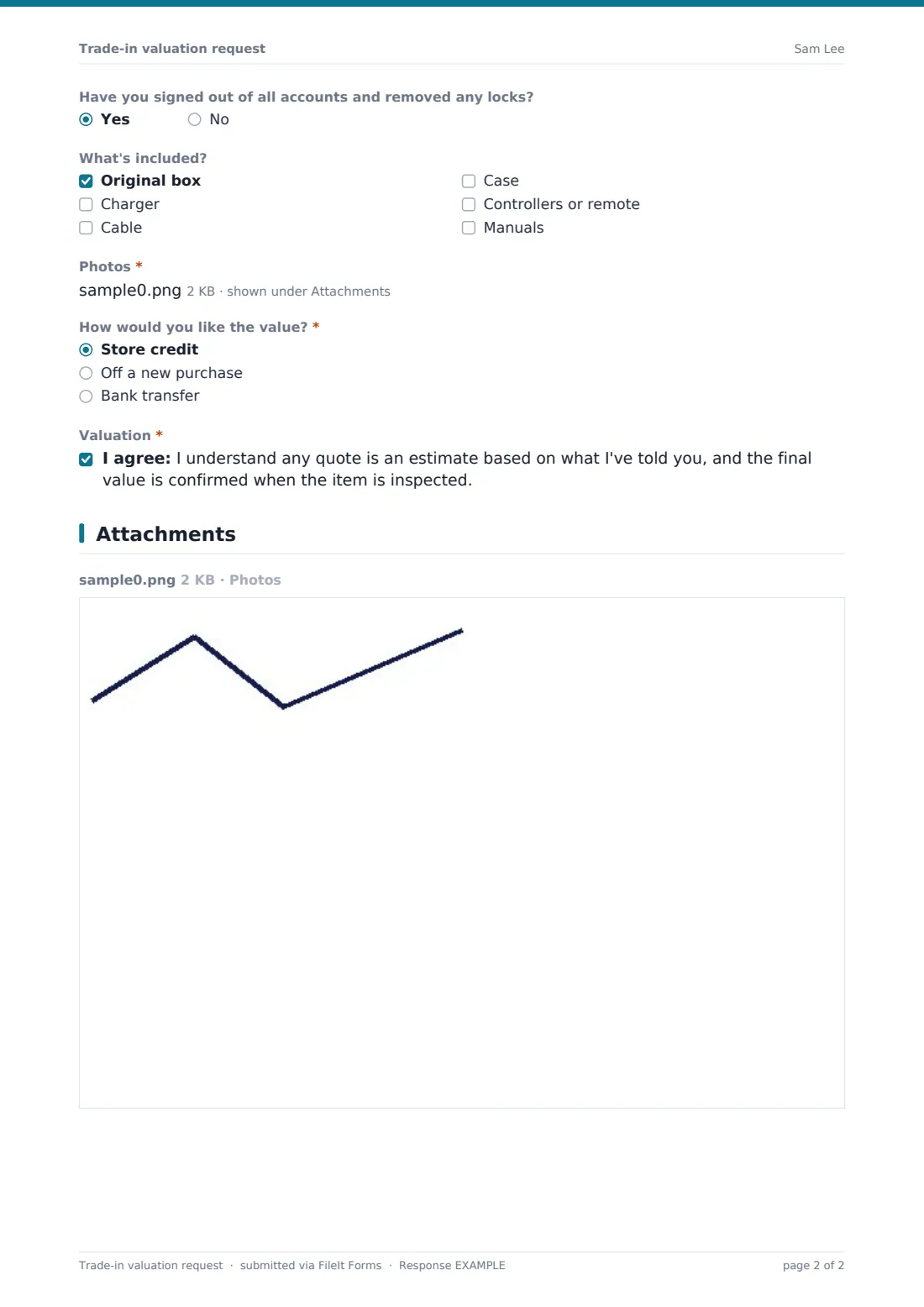
Then two direct questions: “Does it switch on and work normally?” and “Is there any damage?” Answering yes to damage reveals “Type of damage”, with options like a cracked screen, dents, liquid damage, a weak battery or faulty buttons, and a required “Describe the damage”. Photos are required, up to six. Every request is filed as a PDF in your FileIt vault with the photos attached.
- Best for
- Phone and electronics shops, camera dealers, game stores, refurbishers and buyback services
- Filled in by
- Customers wanting a trade-in or buyback quote
- Time to complete
- About 4 minutes, including photos
- Includes
- Item details and serial, condition grading, damage follow-up, account lock check, accessories, photos and payout preference
Who uses a trade-in valuation request form?
- A phone repair shop pricing trade-ins before customers come in to upgrade
- A camera dealer valuing lenses and bodies sent in from across the country
- A game store quoting on consoles with or without controllers
- A laptop refurbisher collecting details from business customers clearing old stock
- An electronics retailer running a seasonal trade-in promotion
Questions on this trade-in valuation request form
19 questions · includes file upload, conditional questions, consent checkbox.
1 Your trade-in
- Your name*
- Email*
- Phone
- What are you trading in?* Phone · Tablet · Laptop · Games console · Camera or lens · Smartwatch · Something else
- Brand*
- Model*
- Storage, size or spec
- Year bought
- Serial number or IMEI
- Overall condition* Like new — no marks · Good — light signs of use · Fair — visible scratches or wear · Poor — heavy wear
- Does it switch on and work normally?*
- Is there any damage?*
- Type of damage asked only when it applies Cracked screen or glass · Dents or cracks in the body · Liquid damage · Weak or swollen battery · Buttons, ports or camera not working
- Describe the damage* asked only when it applies
- Have you signed out of all accounts and removed any locks?
- What's included? Original box · Charger · Cable · Case · Controllers or remote · Manuals
- Photos*
- How would you like the value?* Store credit · Off a new purchase · Bank transfer
- Valuation*
The trade-in valuation request form, page by page
1 Your trade-in
The customer gives their name, email and phone, then the item type, brand and model, with examples like Galaxy S23 or MacBook Air M2. Optional fields take the spec, year bought and serial or IMEI, with help text saying it helps check the exact model.
After the condition and working questions, the damage answer decides whether the damage details appear. “Have you signed out of all accounts and removed any locks?” has help text saying items still linked to someone's account can't be accepted. “What's included?” lets them tick the original box, charger, cable, case, controllers or remote, and manuals.
Photos of the front, back and any damage are required. “How would you like the value?” offers store credit, money off a new purchase or a bank transfer. A final consent confirms that any quote is an estimate, and the final value is set when the item is inspected.
Make the template yours
- Replace the item types with the categories you actually buy
- Add model dropdowns for your most common trade-ins
- Remove bank transfer if you only offer store credit
- Make the serial or IMEI required if you check every device before quoting
- Say in the confirmation message how quickly you usually reply with an estimate
Tips for a better trade-in valuation request form
- Quote from the photos, not just the condition grade — people's idea of “good” varies
- Give a range rather than a single figure when photos are unclear
- Remind customers to back up and wipe their device before handing it over
- Note how long your estimate is valid for when you reply
- Check the damage description again at inspection so there are no surprises for either side
Every response becomes a PDF in your vault
FileIt files each request as a PDF in your vault, with every photo attached to the same document, and emails you straight away. The customer receives a copy of what they described, which helps if the final value is discussed at inspection.
From the Responses table you can search by model or item type, open each request's photos, and export to CSV to keep track of trade-in volume and the estimates you've given.
- Start from this template. It opens in the FileIt Forms designer — change any question, add pages, set the rules for when questions appear.
- Share it. Turn on a public link, or send it to people by email, each with their own link. They don’t need a FileIt account.
- Get the answers as PDFs. Each response is saved as a PDF in the vault folder you choose, with uploaded files attached — and listed in a Responses table you can export to CSV.
Trade-in valuation request form: frequently asked questions
Is this trade-in form free?
Yes. It's one of the starter templates in FileIt's Forms app, which comes with every account, including the free plan.
Does the form calculate a trade-in value?
No. It collects the details and photos. You work out the estimate and reply to the customer.
Are photos required?
Yes, at least one and up to six. You can change this in the designer.
What happens when a customer says there's damage?
The form asks what type of damage it is and requires a short description.
Is the quote binding?
The customer agrees that any quote is an estimate and that the final value is confirmed at inspection.
Can I use it for items other than electronics?
Yes. Change the item types and questions to suit bikes, instruments or anything else you take in trade.