What is the tip pool distribution sheet form template?
Tips are one of the quickest ways to upset a team if the split isn't clear. A distribution sheet filled in at the end of every shift shows the total, the method and what each person received, and having it in writing helps when someone has a question a week later.
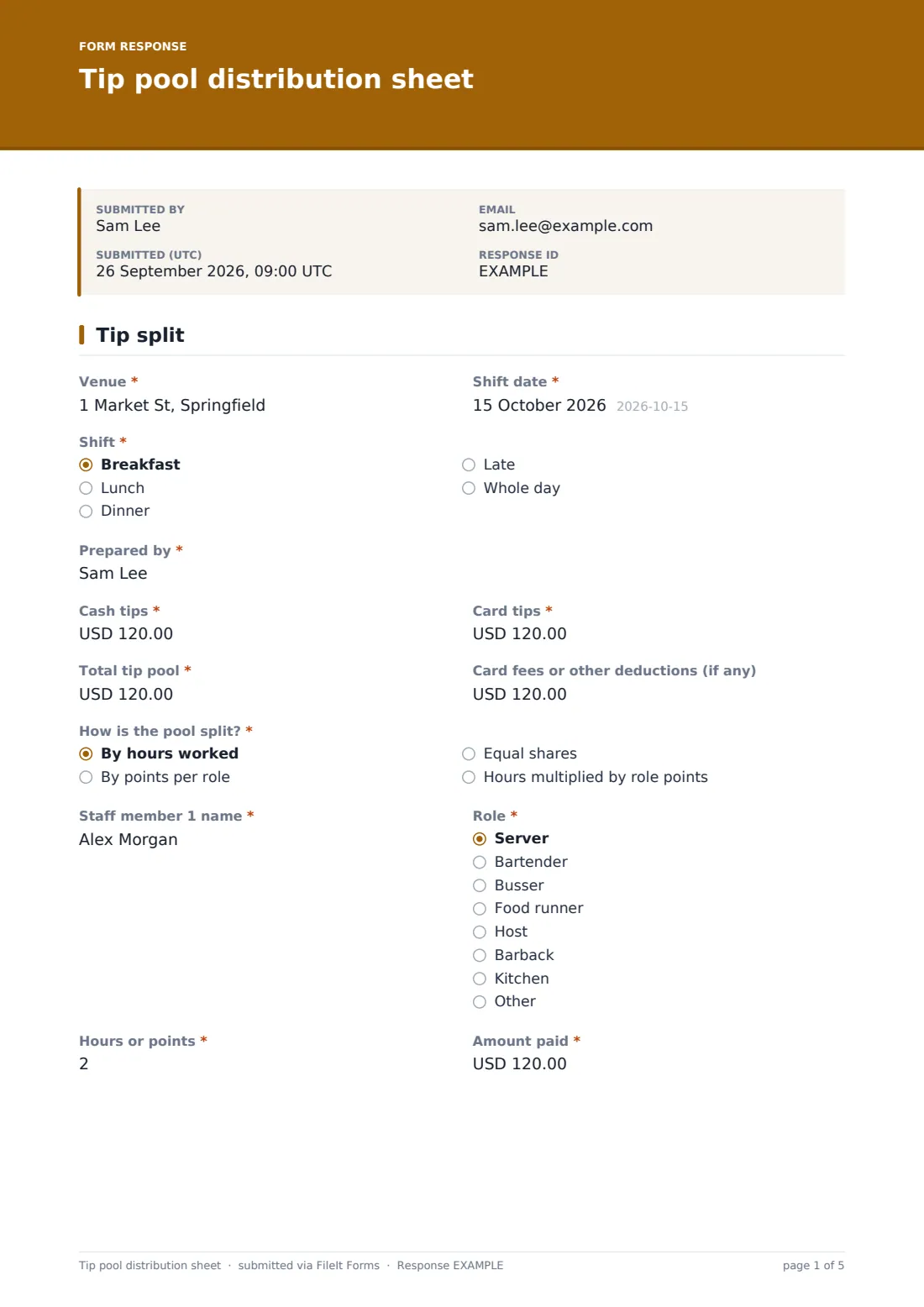
This one-page sheet starts with the venue, shift date, shift and who prepared it, then the cash tips, card tips, total pool and any deductions. "How is the pool split?" offers by hours worked, by points per role, equal shares, or hours multiplied by role points. Choosing either points method shows a points-per-role table where you set each role's points, from 0 to 3.
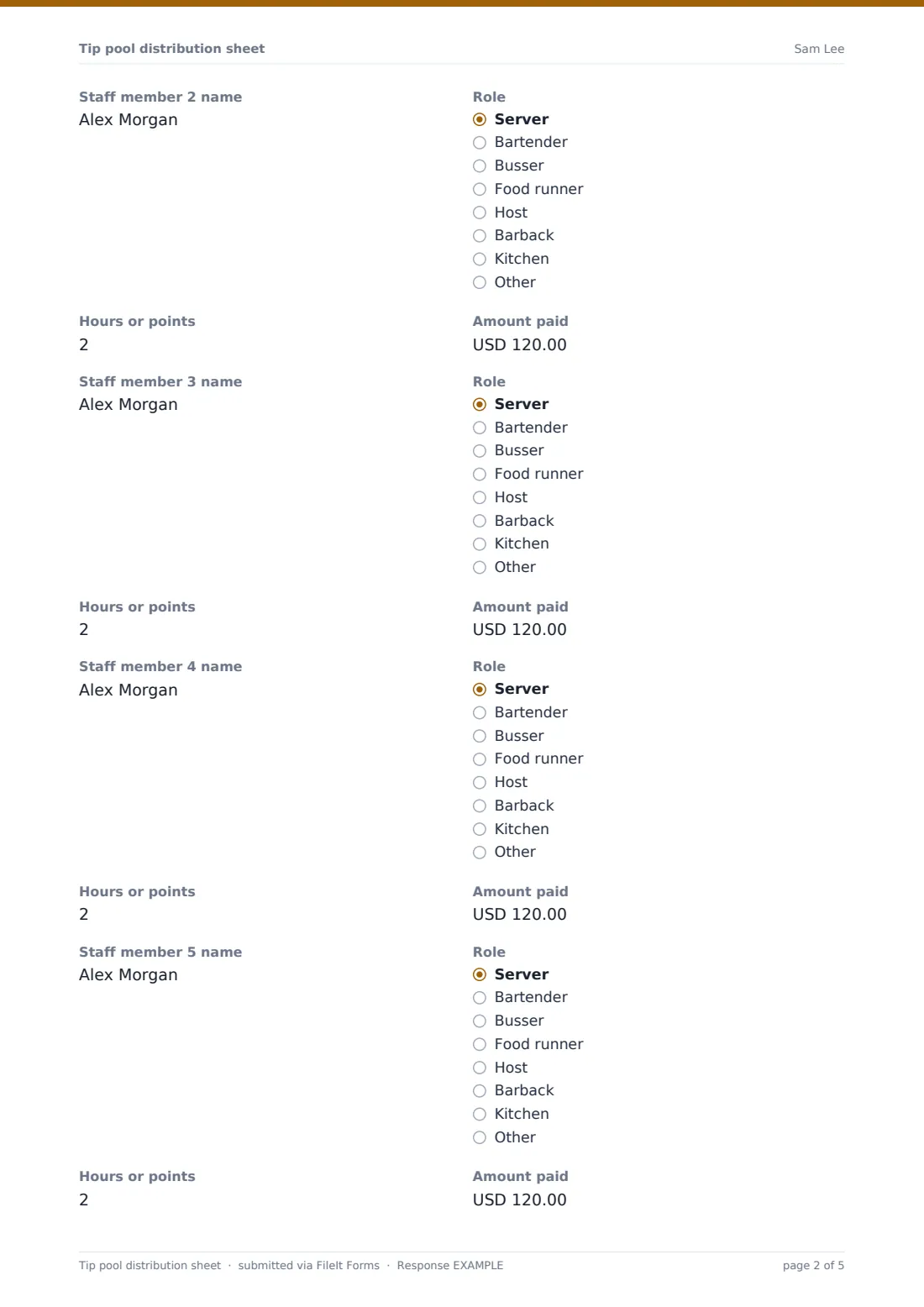
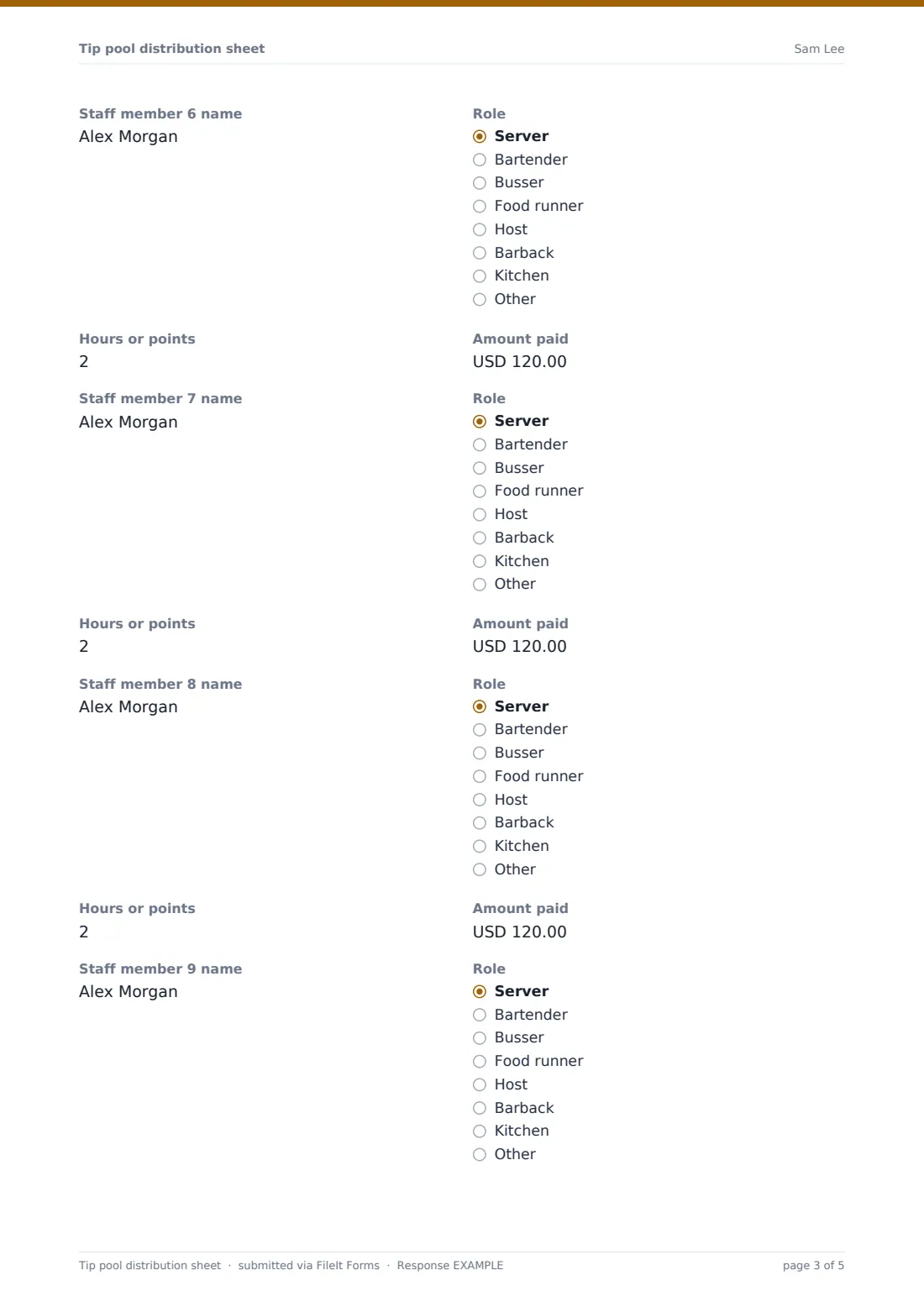
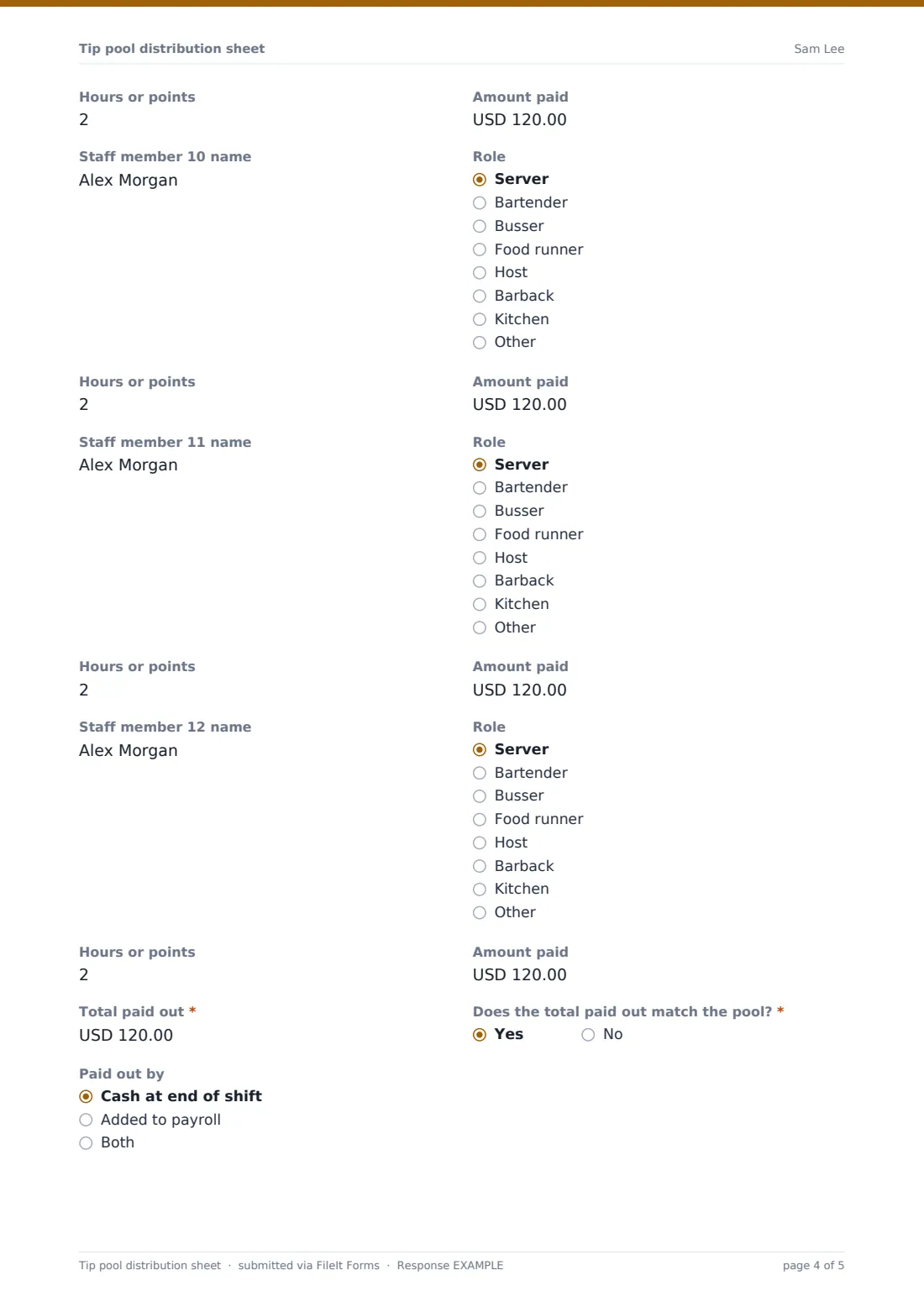
Below that, list each staff member with their role, hours or points and amount paid. The next row appears as soon as you enter a name, for up to twelve people. The sheet checks the total paid out against the pool, asks you to explain any difference and ends with the manager's signature. FileIt files it as a PDF.
- Best for
- Restaurants, bars, cafés, hotel outlets and catering teams that pool tips
- Filled in by
- The shift manager or supervisor
- Time to complete
- 3 to 5 minutes at the end of a shift
- Includes
- Cash and card totals, four split methods, a points-per-role table, up to 12 staff and a signed balance check
Who uses a tip pool distribution sheet form?
- A bar splitting tips by hours between bartenders and barbacks
- A restaurant using a points system where servers, runners and bussers get different shares
- A café sharing a tip jar equally between everyone on shift
- A manager answering a staff question about last Saturday's split
- Giving the payroll team a record of card tips to add to wages
- Seeing over several weeks whether the points table still feels fair
Questions on this tip pool distribution sheet form
65 questions · includes signature, conditional questions, ratings.
1 Tip split
- Venue*
- Shift date*
- Shift* Breakfast · Lunch · Dinner · Late · Whole day
- Prepared by*
- Cash tips*
- Card tips*
- Total tip pool*
- Card fees or other deductions (if any)
- How is the pool split?* By hours worked · By points per role · Equal shares · Hours multiplied by role points
- Points per role* asked only when it applies 0 · 0.5 · 1 · 1.5 · 2 · 2.5 · 3
- Anything unusual about the points tonight asked only when it applies
- Staff member 1 name*
- Role* asked only when it applies Server · Bartender · Busser · Food runner · Host · Barback · Kitchen · Other
- Hours or points* asked only when it applies
- Amount paid* asked only when it applies
- Staff member 2 name asked only when it applies
- Role asked only when it applies Server · Bartender · Busser · Food runner · Host · Barback · Kitchen · Other
- Hours or points asked only when it applies
- Amount paid asked only when it applies
- Staff member 3 name asked only when it applies
- Role asked only when it applies Server · Bartender · Busser · Food runner · Host · Barback · Kitchen · Other
- Hours or points asked only when it applies
- Amount paid asked only when it applies
- Staff member 4 name asked only when it applies
- Role asked only when it applies Server · Bartender · Busser · Food runner · Host · Barback · Kitchen · Other
- Hours or points asked only when it applies
- Amount paid asked only when it applies
- Staff member 5 name asked only when it applies
- Role asked only when it applies Server · Bartender · Busser · Food runner · Host · Barback · Kitchen · Other
- Hours or points asked only when it applies
- Amount paid asked only when it applies
- Staff member 6 name asked only when it applies
- Role asked only when it applies Server · Bartender · Busser · Food runner · Host · Barback · Kitchen · Other
- Hours or points asked only when it applies
- Amount paid asked only when it applies
- Staff member 7 name asked only when it applies
- Role asked only when it applies Server · Bartender · Busser · Food runner · Host · Barback · Kitchen · Other
- Hours or points asked only when it applies
- Amount paid asked only when it applies
- Staff member 8 name asked only when it applies
- Role asked only when it applies Server · Bartender · Busser · Food runner · Host · Barback · Kitchen · Other
- Hours or points asked only when it applies
- Amount paid asked only when it applies
- Staff member 9 name asked only when it applies
- Role asked only when it applies Server · Bartender · Busser · Food runner · Host · Barback · Kitchen · Other
- Hours or points asked only when it applies
- Amount paid asked only when it applies
- Staff member 10 name asked only when it applies
- Role asked only when it applies Server · Bartender · Busser · Food runner · Host · Barback · Kitchen · Other
- Hours or points asked only when it applies
- Amount paid asked only when it applies
- Staff member 11 name asked only when it applies
- Role asked only when it applies Server · Bartender · Busser · Food runner · Host · Barback · Kitchen · Other
- Hours or points asked only when it applies
- Amount paid asked only when it applies
- Staff member 12 name asked only when it applies
- Role asked only when it applies Server · Bartender · Busser · Food runner · Host · Barback · Kitchen · Other
- Hours or points asked only when it applies
- Amount paid asked only when it applies
- Total paid out*
- Does the total paid out match the pool?*
- Explain the difference* asked only when it applies
- Paid out by Cash at end of shift · Added to payroll · Both
- Notes
- Manager signature*
The tip pool distribution sheet form, page by page
1 Tip split
Enter the venue, the shift date, which shift and who prepared the sheet. Record cash tips, card tips and the total tip pool, plus any card fees or other deductions.
"How is the pool split?" has four answers: by hours worked, by points per role, equal shares, and hours multiplied by role points. If you pick either of the points options, a "Points per role" table appears with a row for each role (server, bartender, busser, food runner, host, barback and kitchen) and points from 0 to 3, plus a box for anything unusual about the points tonight.
Then list the team. Staff member 1 has a role, hours or points, and the amount paid. Typing a name opens the next row, up to Staff member 12. Finish with the total paid out and "Does the total paid out match the pool?". If not, the form asks you to explain the difference. Note whether tips were paid in cash or through payroll, add any notes and sign.
Make the template yours
- Change the currency to your own
- Edit the roles to match your team, such as sommelier or barista
- Change the points scale to the values your venue uses
- Remove the methods you don't use so managers can't pick the wrong one
- Send each sheet to the owner or payroll by email
- Add more staff rows in the designer for very large shifts
Tips for a better tip pool distribution sheet form
- Agree the split method with the team in advance and stick to it
- Record hours from the rota or time clock, not from memory
- Fill in the sheet before anyone leaves so questions can be answered on the spot
- Explain every difference between the pool and the payout, even small ones
- Rules on tip pooling differ by country and state, so check what applies to your venue
Every response becomes a PDF in your vault
Each sheet is saved as a signed PDF in your FileIt vault, titled with the date, and a copy goes to the manager who prepared it.
The Responses table lists every shift's totals. Export to CSV to give payroll the card tips or to check how much each role received over a month.
- Start from this template. It opens in the FileIt Forms designer — change any question, add pages, set the rules for when questions appear.
- Share it. Turn on a public link, or send it to people by email, each with their own link. They don’t need a FileIt account.
- Get the answers as PDFs. Each response is saved as a PDF in the vault folder you choose, with uploaded files attached — and listed in a Responses table you can export to CSV.
Tip pool distribution sheet form: frequently asked questions
Is this tip pool sheet free?
Yes. It's included in the Forms app on every FileIt account, including the free plan.
Does it calculate each person's share?
No. You enter the amounts. The sheet records the split and checks whether the total paid out matches the pool.
When does the points table appear?
When you choose "By points per role" or "Hours multiplied by role points".
How many staff can I list?
Up to 12 per sheet. Each new row appears when you fill in the one above it.
Does it tell me whether my tip pool is legal?
No. Tip pooling rules vary by place. Check the rules that apply to you and set the form up to match.
Can staff see the sheet?
You can share the PDF with them from your vault, or print it for the staff room.