What is the restaurant pre-shift briefing form template?
The pre-shift meeting is where a restaurant gets ready for service: what's on special, what's sold out, which tables are booked for birthdays and who the regulars are. It usually happens from memory or on the back of a ticket, and the server who arrived ten minutes late never hears it. This template gives the line-up a structure and keeps a copy.
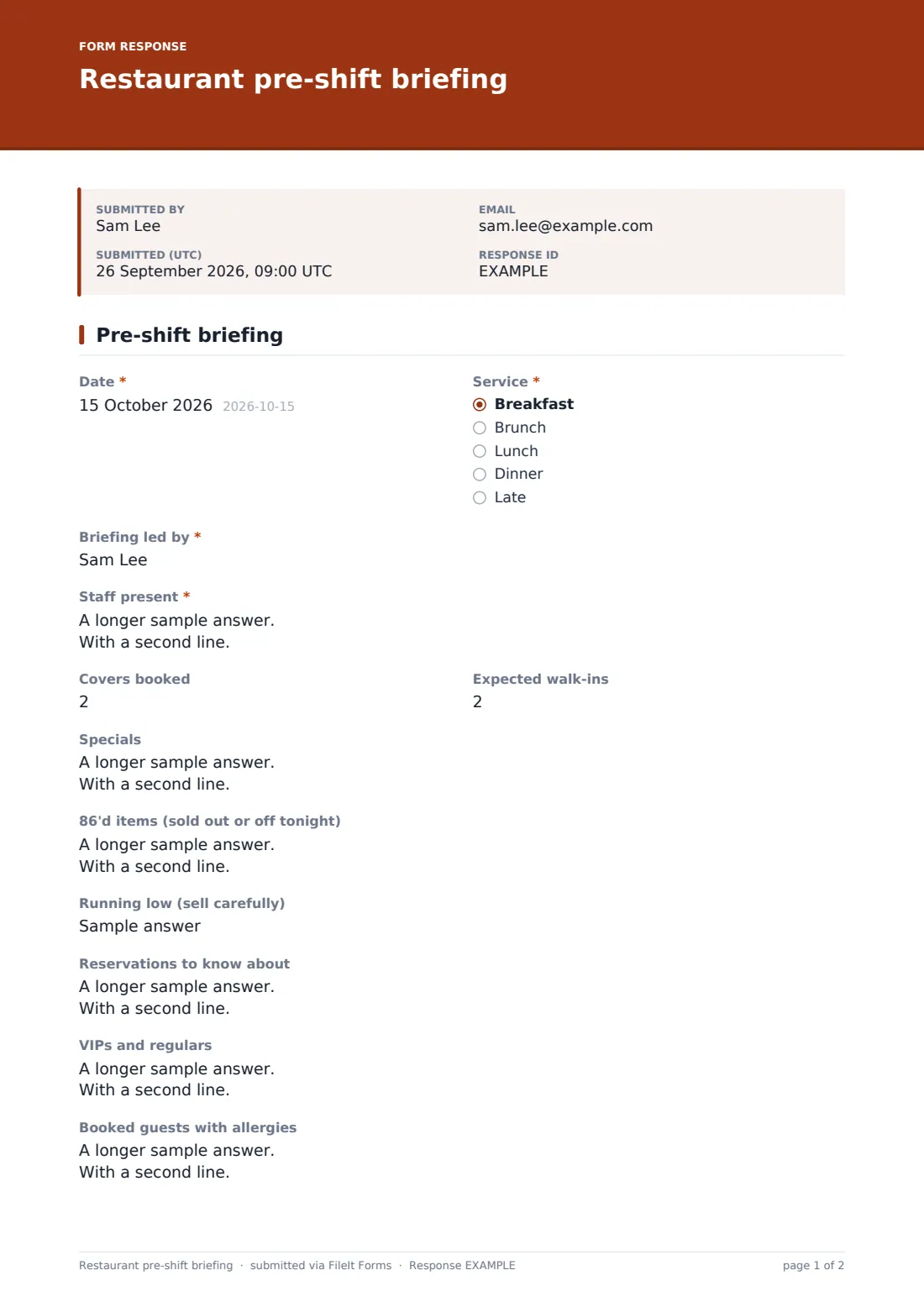
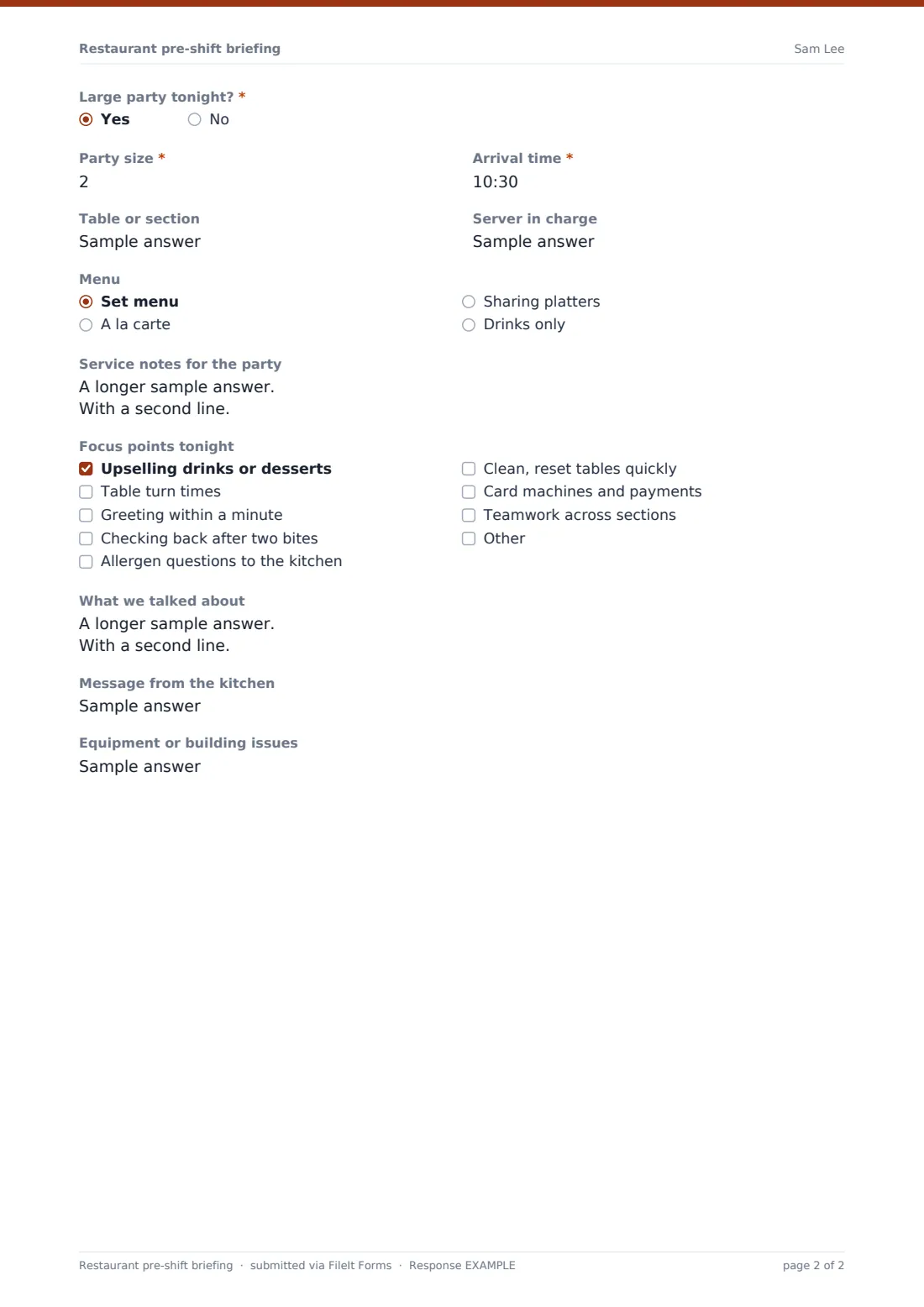
The manager records the date, service and who led the briefing, then the staff present, covers booked and expected walk-ins. The middle of the form is the service itself: specials, 86'd items, things running low, reservations to know about, VIPs and regulars, and booked guests with allergies. Answering yes to "Large party tonight?" adds party size, arrival time, table, the server in charge, the menu and service notes.
Focus points close the form, along with a message from the kitchen and any equipment issues. Each briefing is saved as a PDF in FileIt, so the late arrival can read it and you have a record of what was said before every service.
- Best for
- Restaurants, bistros, hotel restaurants, bars with food and banqueting teams
- Filled in by
- The manager or supervisor running the line-up
- Time to complete
- 5 minutes, during the meeting
- Includes
- Specials and 86 list, reservations and VIPs, large party details and focus points
Who uses a restaurant pre-shift briefing form?
- A busy bistro running a five-minute line-up before each dinner service
- A hotel restaurant handing over between breakfast and lunch teams
- A new manager making sure every briefing covers the same ground
- Giving staff who missed the meeting the details on their phone
- Preparing for a 20-person birthday party on a Saturday night
- Looking back over a month of briefings to see which focus points come up again and again
Questions on this restaurant pre-shift briefing form
23 questions · includes conditional questions.
1 Pre-shift briefing
- Date*
- Service* Breakfast · Brunch · Lunch · Dinner · Late
- Briefing led by*
- Staff present*
- Covers booked
- Expected walk-ins
- Specials
- 86'd items (sold out or off tonight)
- Running low (sell carefully)
- Reservations to know about
- VIPs and regulars
- Booked guests with allergies
- Large party tonight?*
- Party size* asked only when it applies
- Arrival time* asked only when it applies
- Table or section asked only when it applies
- Server in charge asked only when it applies
- Menu asked only when it applies Set menu · A la carte · Sharing platters · Drinks only
- Service notes for the party asked only when it applies
- Focus points tonight Upselling drinks or desserts · Table turn times · Greeting within a minute · Checking back after two bites · Allergen questions to the kitchen · Clean, reset tables quickly · Card machines and payments · Teamwork across sections
- What we talked about
- Message from the kitchen
- Equipment or building issues
The restaurant pre-shift briefing form, page by page
1 Pre-shift briefing
Start with the date, the service (breakfast, brunch, lunch, dinner or late) and who led the briefing. List the staff present with their sections, then covers booked and expected walk-ins.
The service details come next: specials with how to describe them, "86'd items (sold out or off tonight)", what's running low, reservations to know about, VIPs and regulars with their preferences, and booked guests with allergies. Then "Large party tonight?". A yes adds party size, arrival time, table or section, the server in charge, the menu (set menu, a la carte, sharing platters or drinks only) and service notes such as pre-orders, split bills and timings with the kitchen.
Tick tonight's focus points, such as upselling drinks or desserts, table turn times, greeting within a minute, checking back after two bites or sending allergen questions to the kitchen, and note what you talked about. A message from the kitchen and any equipment or building issues finish it off.
Make the template yours
- Swap the focus points for the standards your restaurant trains on
- Change the service names to your own ("Early bird", "Second seating")
- Add a wine or cocktail of the day field for the bar
- Send each briefing to the general manager's email
- Set the document title to include the service as well as the date
- Remove the large party section if you never take big groups
Tips for a better restaurant pre-shift briefing form
- Fill it in during the meeting, not after. It takes the same time and nothing is forgotten
- Keep focus points to one or two per service so they stick
- Read out the allergy bookings by table number
- Share the PDF in the staff chat for anyone who arrives after the line-up
- Look back at last week's briefings when planning training
Every response becomes a PDF in your vault
Each briefing is saved as a PDF in your FileIt vault, titled with the date, and a copy goes to the person who led it. You can also notify a general manager or owner.
The Responses table lists every briefing by date and service, so you can check what was on special last Friday or how often an item was 86'd, and export it all to CSV.
- Start from this template. It opens in the FileIt Forms designer — change any question, add pages, set the rules for when questions appear.
- Share it. Turn on a public link, or send it to people by email, each with their own link. They don’t need a FileIt account.
- Get the answers as PDFs. Each response is saved as a PDF in the vault folder you choose, with uploaded files attached — and listed in a Responses table you can export to CSV.
Restaurant pre-shift briefing form: frequently asked questions
Is this pre-shift briefing template free?
Yes. It's one of the ready-made templates in the Forms app on every FileIt account, including the free plan.
When do the large party questions appear?
Only when you answer yes to "Large party tonight?".
Can staff read the briefing on their phones?
Yes. Share the PDF from your vault, or send it in your staff group chat.
Does it connect to my reservations system?
No. You type in the reservations worth mentioning. It's a briefing record, not a booking system.
Can different managers use the same form?
Yes. Share the link, and each briefing records who led it.
Can I change the focus points?
Yes. Edit the list in the designer to match your service standards.