What is the test drive booking form template?
A test drive request that says only "I'd like to try the SUV" leaves a sales team guessing: which model, new or used, when, and is there a car to trade in? Calling back to fill in the gaps delays the appointment and sometimes loses the customer.
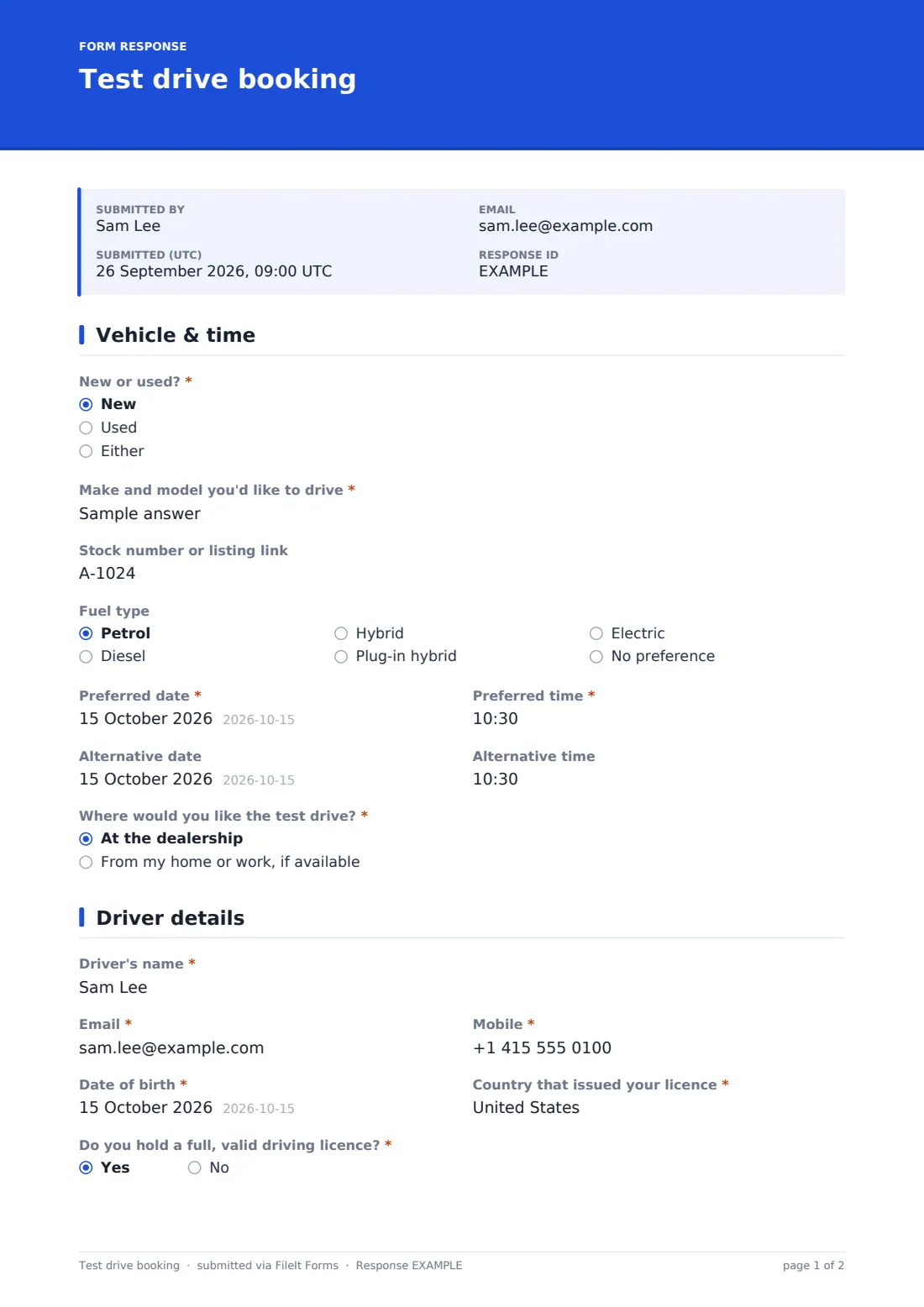
This test drive booking form gets the essentials in one go. The first page covers new or used, the make and model, a stock number or listing link, fuel type, preferred and alternative dates and times, and whether to start at the dealership or from the customer's home or work where that's offered. The second page collects the driver's name, contact details, date of birth, licence country and status, years held and whether the licence is automatic only, with a reminder to bring it along.
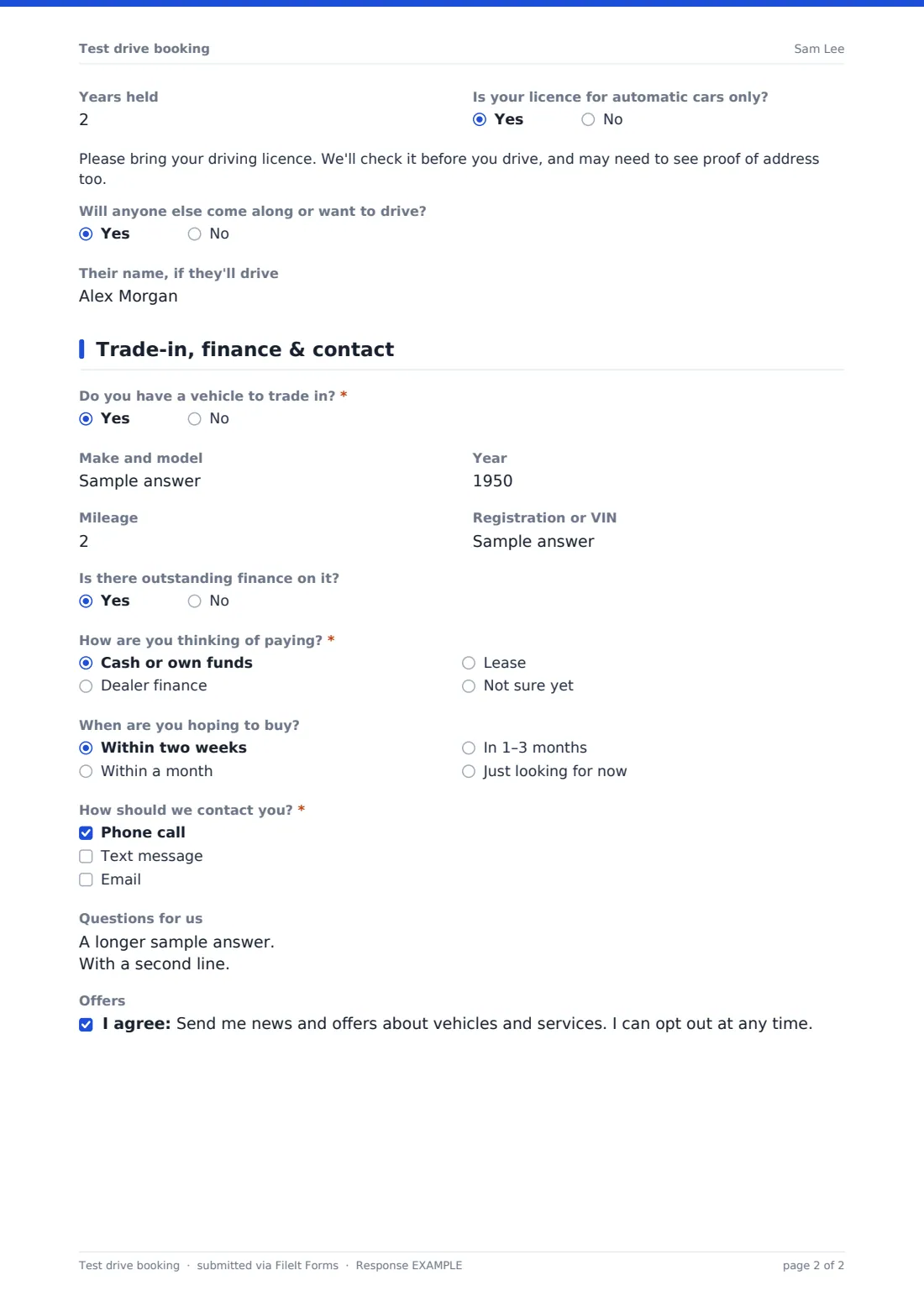
The final page asks about a trade-in — make, year, mileage, registration and outstanding finance — how the customer plans to pay, whether they'd like a quote, when they hope to buy and how to contact them, with an optional marketing opt-in. Every booking is saved as a PDF in your FileIt vault.
- Best for
- Franchised and independent car dealers, motorcycle dealers and EV showrooms
- Filled in by
- Customers booking a test drive on the dealer's website
- Time to complete
- About 4–6 minutes
- Includes
- Date and time choices, home test drive address, licence questions, trade-in follow-ups, finance interest and opt-in
Who uses a test drive booking form?
- A dealership website's Book a test drive button
- An EV showroom offering test drives from the customer's home
- A used car dealer taking bookings for specific stock
- Collecting trade-in details before the visit so a valuation is ready
- Motorcycle dealers booking demo rides
- A sales team handling test drive requests from a launch campaign
Questions on this test drive booking form
32 questions over 3 pages · includes conditional questions, multiple pages, consent checkbox.
1 Vehicle & time
- New or used?* New · Used · Either
- Make and model you'd like to drive*
- Stock number or listing link
- Fuel type Petrol · Diesel · Hybrid · Plug-in hybrid · Electric · No preference
- Preferred date*
- Preferred time*
- Alternative date
- Alternative time
- Where would you like the test drive?* At the dealership · From my home or work, if available
- Address to start from* asked only when it applies
2 Driver details
- Driver's name*
- Email*
- Mobile*
- Date of birth*
- Country that issued your licence*
- Do you hold a full, valid driving licence?*
- Years held asked only when it applies
- Is your licence for automatic cars only? asked only when it applies
- Will anyone else come along or want to drive?
- Their name, if they'll drive asked only when it applies
3 Trade-in, finance & contact
- Do you have a vehicle to trade in?*
- Make and model asked only when it applies
- Year asked only when it applies
- Mileage asked only when it applies
- Registration or VIN asked only when it applies
- Is there outstanding finance on it? asked only when it applies
- How are you thinking of paying?* Cash or own funds · Dealer finance · Lease · Not sure yet
- Would you like a finance or lease quote? asked only when it applies
- When are you hoping to buy? Within two weeks · Within a month · In 1–3 months · Just looking for now
- How should we contact you?* Phone call · Text message · Email
- Questions for us
- Offers
The test drive booking form, page by page
1 Vehicle & time
New or used? and the make and model are required, with an optional stock number or listing link for a specific car and a fuel type preference. Preferred date and time are required, with an alternative date and time as back-up.
Where would you like the test drive? offers the dealership or the customer's home or work, if available; choosing home or work asks for the address to start from.
2 Driver details
The driver gives their name, email, mobile, date of birth — with a note that dealers' insurance often has age rules — and the country that issued their licence. Do you hold a full, valid driving licence? is required; yes asks how many years it's been held and whether it's automatic only.
A note reminds the customer to bring their licence and that proof of address may be needed. The customer can say whether anyone else will come along or drive, and give their name.
3 Trade-in, finance & contact
Do you have a vehicle to trade in? is required; yes reveals make and model, year, mileage, registration or VIN, and whether there's outstanding finance. How are you thinking of paying? covers cash, dealer finance, lease or not sure, and any option other than cash asks whether they'd like a quote.
When they're hoping to buy, how they'd like to be contacted, any questions and an optional, unticked marketing opt-in complete the booking.
Make the template yours
- Replace the make and model text with a dropdown of the models you stock
- Remove the home test drive option if you don't offer it
- Change the licence wording to match the rules in your country
- Add a branch dropdown if you have several showrooms
- Notify the sales team inbox as each booking arrives
- Edit the confirmation message to say how quickly you'll confirm
Tips for a better test drive booking form
- Confirm every booking quickly by phone or text, using the contact method the customer chose
- Check the specific car is still in stock before confirming
- Have the trade-in valuation ready when the customer arrives
- Check the licence before every drive, and follow any conditions your insurer sets
- Only send marketing to customers who ticked the opt-in
- Follow up after the test drive while the experience is fresh
Every response becomes a PDF in your vault
Each booking is saved as a PDF in the vault folder you choose, with the vehicle, driver, trade-in and finance details together. Owner notifications email the sales team immediately, and the customer can receive a copy of their request.
The Responses table lists every booking by date, so the team can see what's coming up, and exports to CSV if you track leads elsewhere.
- Start from this template. It opens in the FileIt Forms designer — change any question, add pages, set the rules for when questions appear.
- Share it. Turn on a public link, or send it to people by email, each with their own link. They don’t need a FileIt account.
- Get the answers as PDFs. Each response is saved as a PDF in the vault folder you choose, with uploaded files attached — and listed in a Responses table you can export to CSV.
Test drive booking form: frequently asked questions
Is this template free?
Yes. It's included in the FileIt Forms app on every account, including the free plan, and every question can be edited, removed or added to.
Do customers need a FileIt account to book?
No. Anyone with the form's link can fill it in without creating a FileIt account.
Does the form check availability or confirm the booking automatically?
No. FileIt Forms doesn't connect to a calendar. The customer requests a date and time, and your team confirms it.
Why does it ask for date of birth?
Insurance for test drives often has age requirements. Remove the question if yours doesn't, or change the help text.
Does it collect a copy of the driving licence?
No. It asks customers to bring their licence so it can be checked in person. You can add an upload if your process needs one.
Can customers ask for a test drive from home?
Yes, if you offer it. Choosing home or work asks for the address to start from; remove the option if you don't provide it.
Is the marketing opt-in required?
No. It's optional and unticked by default.
Can I use it for motorcycles or vans?
Yes. Edit the wording and fuel types to suit the vehicles you sell.