What is the team health check form template?
A team health check is a regular conversation about how a team is working, not just what it's delivering. Each person rates a set of areas red, amber or green, and the team discusses the patterns. Collecting the ratings anonymously beforehand means quieter voices are counted, and the meeting goes straight to the areas that need attention.
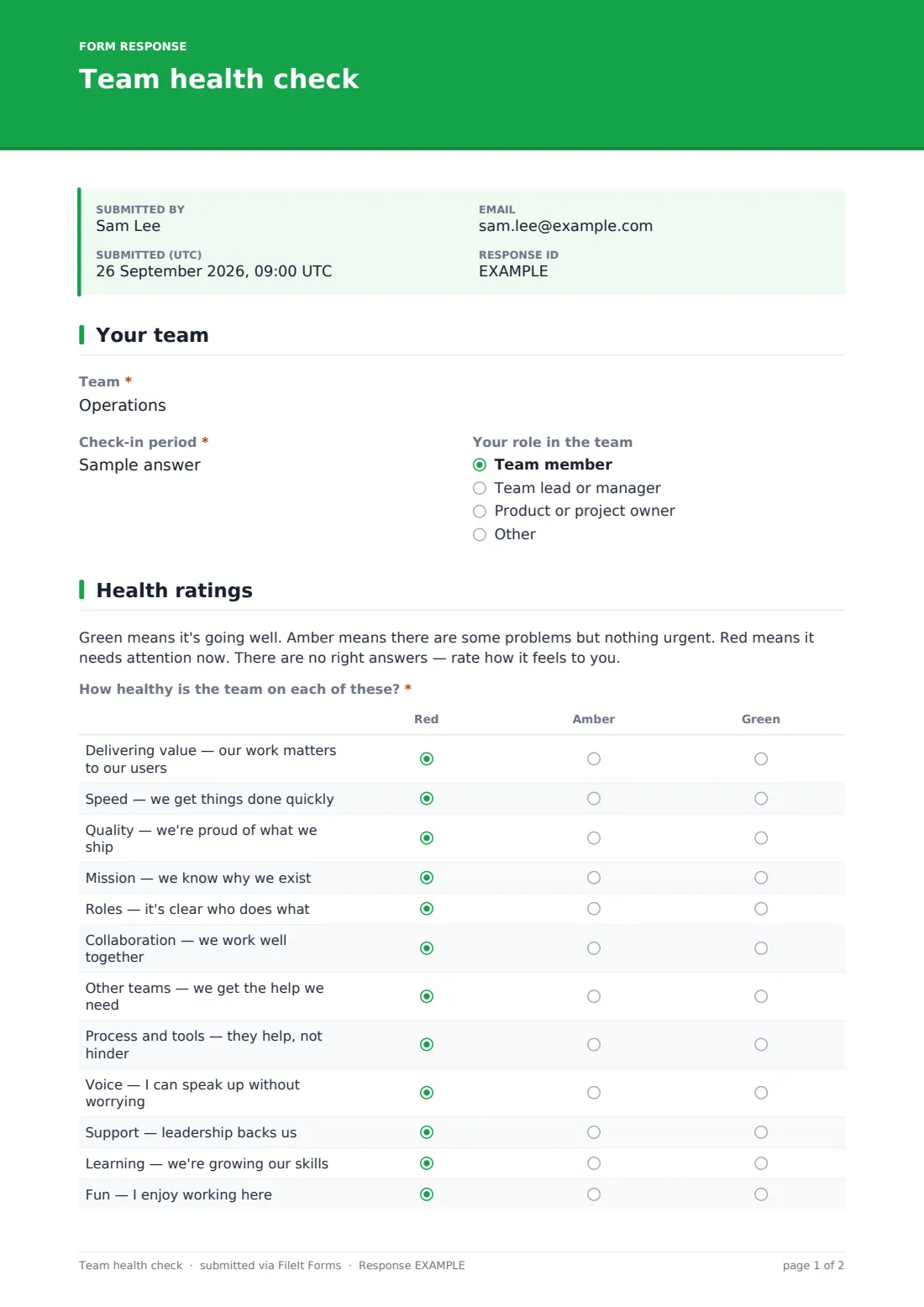
This template rates twelve areas, each with a short description: delivering value, speed, quality, mission, roles, collaboration, other teams, process and tools, voice, support, learning and fun. It asks whether the team is getting healthier, staying the same or getting worse since the last check-in.
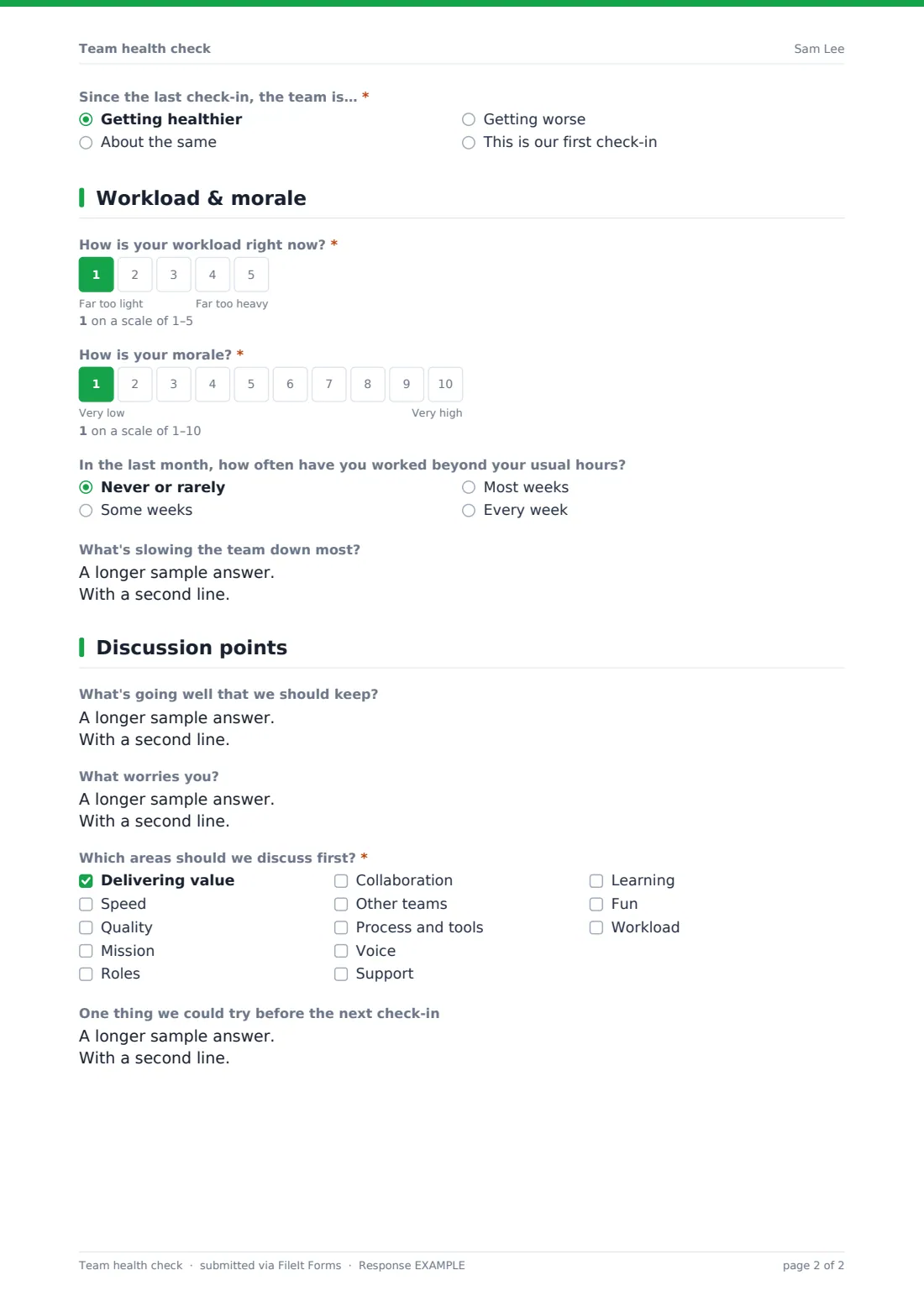
A third page asks about workload, morale and working beyond usual hours, and what's slowing the team down. The last page asks what to keep, what worries people, which three areas to discuss first, and one thing to try before next time. Each response is saved as a PDF in your FileIt vault.
- Best for
- Team leads, engineering managers, agile coaches and HR business partners
- Filled in by
- Team members, anonymously, before a health check discussion
- Time to complete
- About 4 minutes
- Includes
- 12-area red/amber/green grid, trend, workload and morale scales, extra hours, blockers, topic votes and one experiment
Who uses a team health check form?
- A monthly or quarterly team health check
- Comparing health across several squads with the same questions
- Checking in after a reorganisation, new leader or big launch
- Spotting workload problems early
- Preparing for a team offsite or away day
- Giving a new team a structured way to talk about how it works
Questions on this team health check form
13 questions over 4 pages · includes multiple pages, ratings.
1 Your team
- Team*
- Check-in period*
- Your role in the team Team member · Team lead or manager · Product or project owner · Other
2 Health ratings
- How healthy is the team on each of these?* Red · Amber · Green
- Since the last check-in, the team is…* Getting healthier · About the same · Getting worse · This is our first check-in
3 Workload & morale
- How is your workload right now?*
- How is your morale?*
- In the last month, how often have you worked beyond your usual hours? Never or rarely · Some weeks · Most weeks · Every week
- What's slowing the team down most?
4 Discussion points
- What's going well that we should keep?
- What worries you?
- Which areas should we discuss first?* Delivering value · Speed · Quality · Mission · Roles · Collaboration · Other teams · Process and tools · Voice · Support · Learning · Fun
- One thing we could try before the next check-in
The team health check form, page by page
1 Your team
The team name and check-in period, such as 'Q4 2026', are required. Role (team member, lead, product or project owner, or other) is optional, with a note to skip it in a small team to stay anonymous.
2 Health ratings
A short note explains the colours: green is going well, amber has some problems, red needs attention now. The grid then asks how healthy the team is on twelve areas, from 'Delivering value — our work matters to our users' to 'Fun — I enjoy working here', each rated red, amber or green. A required question asks whether the team is getting healthier, staying the same or getting worse, or whether this is the first check-in.
3 Workload & morale
Workload is rated on a 1–5 scale from far too light to far too heavy, and morale on a 1–10 scale. An optional question asks how often in the last month the person worked beyond their usual hours, and an optional box asks what's slowing the team down most.
4 Discussion points
Optional boxes ask what's going well and what worries people. A required question asks which three areas to discuss first, from the twelve health areas plus workload. A final box asks for one thing the team could try before the next check-in.
Make the template yours
- Rename or replace health areas to suit your team, such as 'Customer focus' or 'On-call'
- Swap the traffic-light columns for a five-point scale if you prefer
- Make one copy per team so each team's results stay in its own folder
- Remove the role question for small teams
- Add a question about a current change, such as a new tool or process
- Set the form to close the day before your discussion
Tips for a better team health check form
- Share the combined results, not individual responses, at the discussion
- Focus the conversation on the areas with the most red and amber, and on any change in trend
- Agree one or two experiments, not a long list, and check on them next time
- Use the same areas each time so you can compare from one check-in to the next
- Treat it as a conversation for the team, not a scorecard for managers
- If workload answers are consistently heavy, take that seriously even if other areas are green
Every response becomes a PDF in your vault
Each response is saved as a PDF in your FileIt vault. Responses are anonymous — the form doesn't ask for names.
Export the responses to a CSV from the Responses table to count reds, ambers and greens for each area, and to group the topic votes ahead of the discussion.
- Start from this template. It opens in the FileIt Forms designer — change any question, add pages, set the rules for when questions appear.
- Share it. Turn on a public link, or send it to people by email, each with their own link. They don’t need a FileIt account.
- Get the answers as PDFs. Each response is saved as a PDF in the vault folder you choose, with uploaded files attached — and listed in a Responses table you can export to CSV.
Team health check form: frequently asked questions
Is this template free?
Yes. It's included in the FileIt Forms app on every account, including the free plan, and you can edit, add or remove any question.
Do team members need a FileIt account?
No. Anyone with the link can respond without signing in.
Is it anonymous?
Yes. It doesn't ask for names. In very small teams, the role question could identify someone, so it's optional.
How is this different from a retrospective?
A retrospective looks back at a sprint or project. A health check looks at how the team is working overall, across areas like morale, clarity and workload, usually monthly or quarterly. FileIt has a separate sprint retrospective template.
Can several teams use the same form?
Yes. Each person enters their team name, and you can group the exported CSV by team. Separate copies per team keep results apart.
Can we change the areas?
Yes. Edit the grid rows in the designer. If you change them, update the topic-vote list to match.
How often should we run it?
Many teams run a health check monthly or quarterly. Choose a rhythm that leaves time to act on the results between check-ins.