
What is the student council candidate application form template?
Running for student council is many students' first taste of standing up and asking people to trust them. A good application helps them think it through before the posters go up: why they're running, what they'd actually work on, and who's backing them.
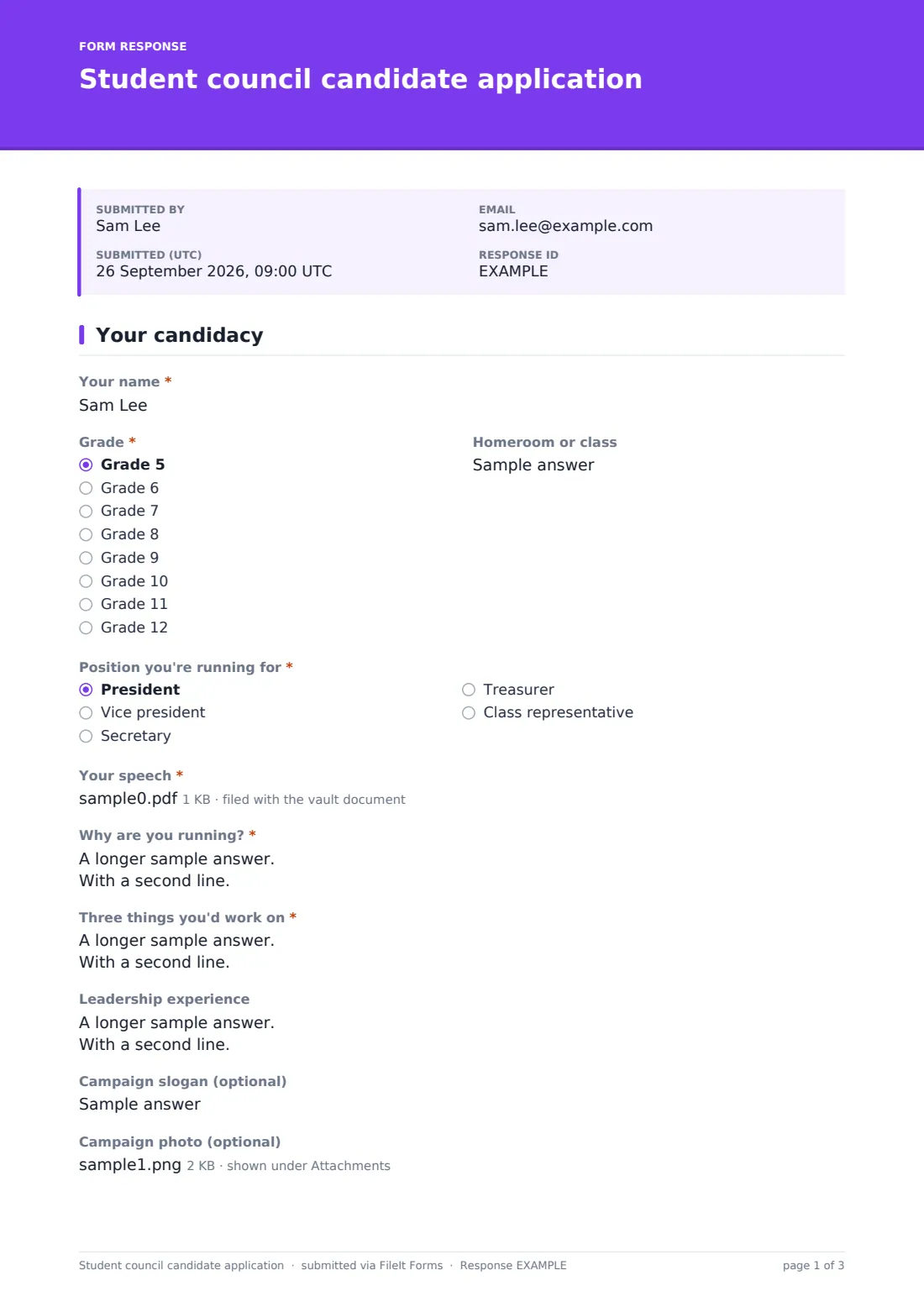
This template puts the candidacy on two short pages. The student gives their name, grade and homeroom, picks a position and writes why they're running and three things they'd work on, with room for leadership experience, a slogan and a campaign photo. Choosing President opens a speech upload so the advisor can read the draft ahead of the assembly. The student signs a campaign promise. Page two collects an endorsing teacher's name, comments and signature, then a parent or guardian's contact details, acknowledgement and signature.
Every application is saved as a PDF in your FileIt vault, and a copy goes to the parent's email, so the advisor has a tidy, signed set of candidates before the election.
- Best for
- Middle and high schools, student council advisors and activities coordinators
- Filled in by
- The student, with a teacher and a parent signing
- Time to complete
- About 10 minutes
- Includes
- Position, platform, speech upload for president, teacher endorsement, parent acknowledgement
Who uses a student council candidate application form?
- Opening nominations for the fall student council election
- A class representative election in every homeroom
- Collecting presidential speeches ahead of a campaign assembly
- A middle school introducing a more formal candidacy process
- Mid-year elections to fill a vacant treasurer's post
- Keeping a record of each year's candidates and their platforms
Questions on this student council candidate application form
20 questions over 2 pages · includes signature, file upload, conditional questions, multiple pages, consent checkbox.
1 Your candidacy
- Your name*
- Grade* Grade 5 · Grade 6 · Grade 7 · Grade 8 · Grade 9 · Grade 10 · Grade 11 · Grade 12
- Homeroom or class
- Position you're running for* President · Vice president · Secretary · Treasurer · Class representative
- Your speech* asked only when it applies
- Why are you running?*
- Three things you'd work on*
- Leadership experience
- Campaign slogan (optional)
- Campaign photo (optional)
- Campaign promise*
- Your signature*
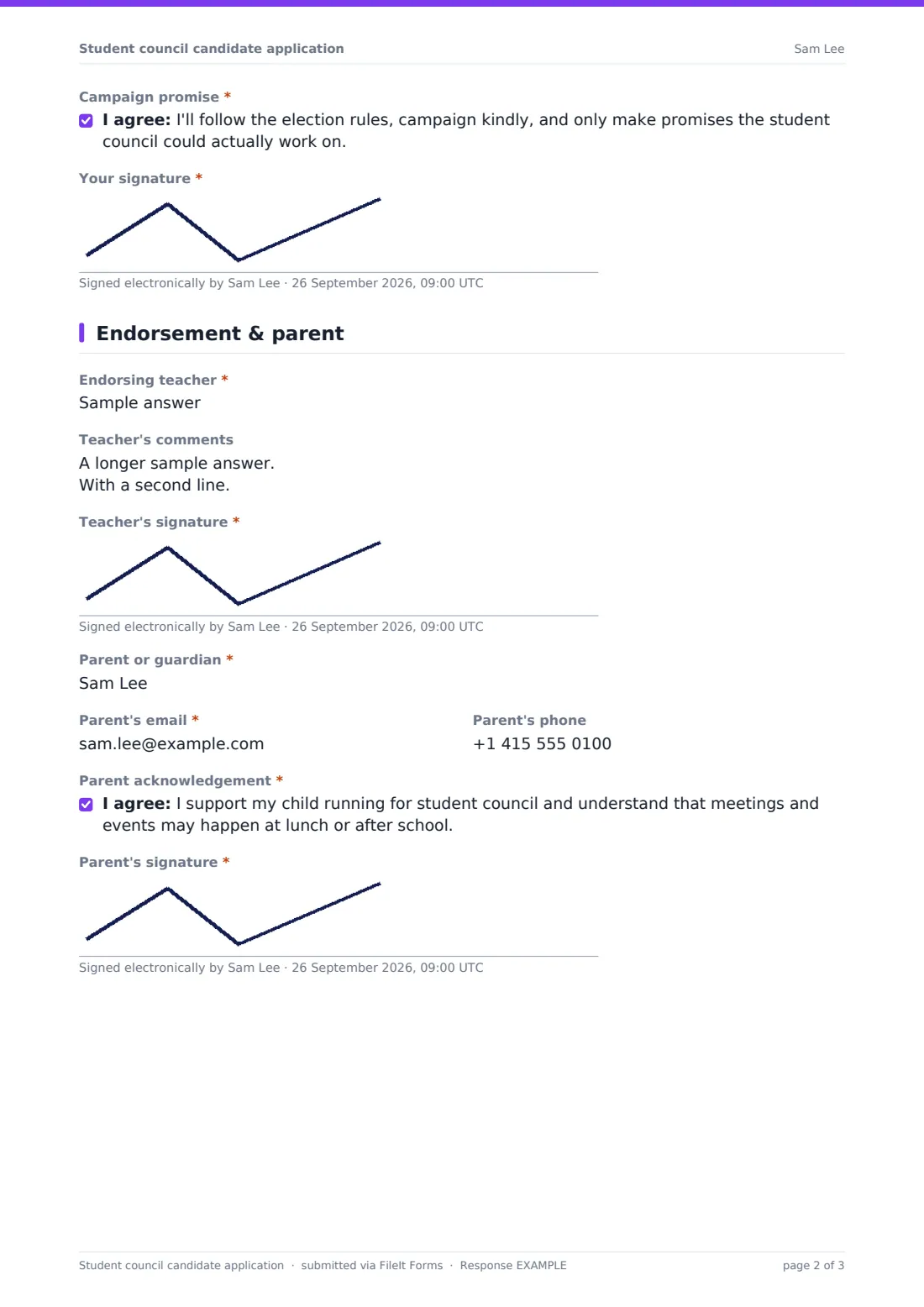
2 Endorsement & parent
- Endorsing teacher*
- Teacher's comments
- Teacher's signature*
- Parent or guardian*
- Parent's email*
- Parent's phone
- Parent acknowledgement*
- Parent's signature*
The student council candidate application form, page by page
1 Your candidacy
Students give Your name, Grade and Homeroom or class, then choose the Position you're running for: president, vice president, secretary, treasurer or class representative. Choosing President opens Your speech, a required upload of the draft in PDF or Word.
"Why are you running?" and "Three things you'd work on" are required; Leadership experience, a Campaign slogan (optional) and a Campaign photo (optional) let students show more. The page ends with a campaign promise to follow the rules and campaign kindly, and the student's signature.
2 Endorsement & parent
The Endorsing teacher's name is required, with optional Teacher's comments, then the Teacher's signature. A Parent or guardian adds Parent's email and Parent's phone, confirms the Parent acknowledgement that meetings and events may happen at lunch or after school, and signs.
Make the template yours
- Change the grades and positions to match your school's council
- Open the speech upload for every position, not just president, if all candidates speak
- Set a close date so nominations stop on time
- Rewrite the campaign promise using your own election rules
- Add the advisor's email to the notifications so they see every new candidate
- Remove the teacher endorsement if your school uses student nominations instead
Tips for a better student council candidate application form
- Share the election rules before the form opens
- Encourage students to make their three ideas specific and doable
- Give students time to find a teacher who knows them well
- Read every president's speech before the assembly, not the morning of
- Ask candidates to choose a clear, friendly campaign photo
- Let every candidate know how and when results will be announced
Every response becomes a PDF in your vault
Each application is filed in your FileIt vault as a PDF named with the student's name, including all three signatures and the speech upload for presidential candidates. The account owner is notified, and the parent receives a copy at the email they entered.
Advisors often use the Responses table to see candidates by position and export a list to CSV for ballots, posters and the assembly running order.
- Start from this template. It opens in the FileIt Forms designer — change any question, add pages, set the rules for when questions appear.
- Share it. Turn on a public link, or send it to people by email, each with their own link. They don’t need a FileIt account.
- Get the answers as PDFs. Each response is saved as a PDF in the vault folder you choose, with uploaded files attached — and listed in a Responses table you can export to CSV.
Student council candidate application form: frequently asked questions
Is this student council application template free?
Yes. It's included in the Forms app on every FileIt account, including the free plan.
Why does only the president get a speech upload?
That's the default because many schools ask presidential candidates to give a speech. You can change the rule in the designer so every position uploads one.
Can the teacher and parent sign on different devices?
The form is filled in as one response, so the signatures are usually gathered on the same device. Students can bring a tablet to their teacher and take it home for a parent.
Do students need an email address?
No. The parent's email is the one the form asks for, and the copy of the application goes there.
Can I run an election with FileIt?
This form collects candidacies. For the vote itself, many schools use a separate form or their usual voting method.
Can I keep past years' candidates?
Yes. Every application stays in your vault as a PDF, so you can file each year's candidates in their own folder.