What is the street maintenance report form template?
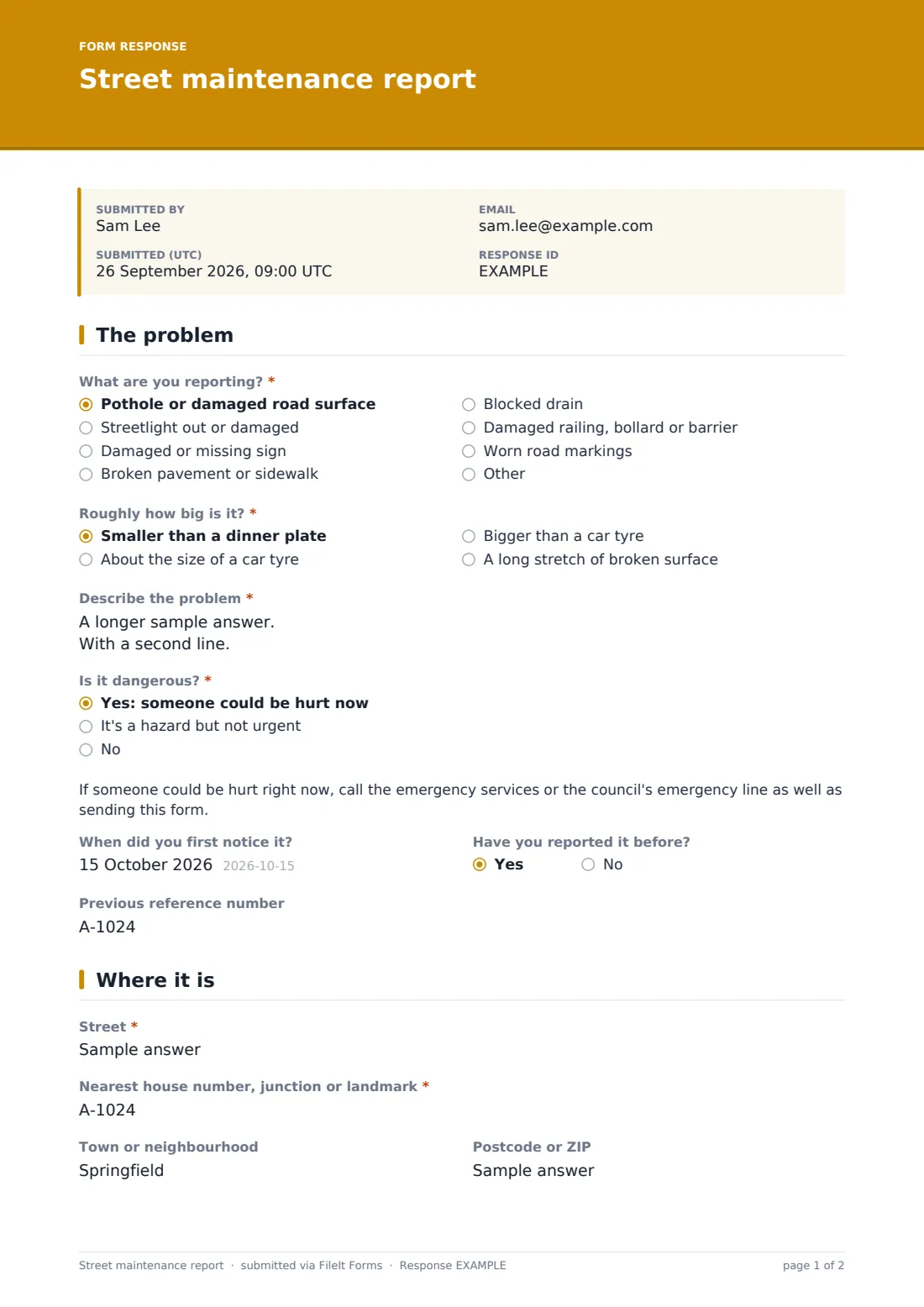
Street reports are only useful if a crew can find the problem. This form asks what's wrong, how dangerous it is and exactly where, with a nearest house number or junction, the part of the street it's on, an optional map link and photos.
Each type of problem asks its own follow-up. A pothole asks roughly how big it is. A streetlight asks what's wrong with it and the number on the post. A sign asks which sign. If someone could be hurt now, a note tells the resident to call the emergency services or the council's emergency line as well.
Contact details are optional, so residents can report without giving their name. Each report is saved as a PDF in FileIt with the photos attached.
- Best for
- Councils, cities, highways teams, town and parish councils and residents' associations
- Filled in by
- Residents and passers-by
- Time to complete
- About 3 minutes
- Includes
- Problem type, pothole size, light fault and post number, sign, description, danger level, first noticed, previous report, street, nearest landmark, position, map link, photos, optional contact
Who uses a street maintenance report form?
- A pothole on a residential street
- A streetlight that's been out for a week
- A stop sign knocked over in a collision
- Paving slabs lifted by tree roots
- A blocked drain flooding the road after rain
Questions on this street maintenance report form
21 questions over 3 pages · includes file upload, conditional questions, multiple pages.
1 The problem
- What are you reporting?* Pothole or damaged road surface · Streetlight out or damaged · Damaged or missing sign · Broken pavement or sidewalk · Blocked drain · Damaged railing, bollard or barrier · Worn road markings
- Roughly how big is it?* asked only when it applies Smaller than a dinner plate · About the size of a car tyre · Bigger than a car tyre · A long stretch of broken surface
- What's wrong with the light?* asked only when it applies Out at night · On during the day · Flickering · Post damaged or leaning · Wiring exposed
- Number on the lamp post asked only when it applies
- Which sign? asked only when it applies
- Describe the problem*
- Is it dangerous?* Yes: someone could be hurt now · It's a hazard but not urgent · No
- When did you first notice it?
- Have you reported it before?
- Previous reference number asked only when it applies
2 Where it is
- Street*
- Nearest house number, junction or landmark*
- Town or neighbourhood
- Postcode or ZIP
- Where on the street?* In the road · On the pavement or sidewalk · In a cycle lane · On a grass verge · On a footpath or in a car park
- Map link or coordinates
- Photos
3 Your details
- Your name
- Phone
- Would you like updates on this report? asked only when it applies
The street maintenance report form, page by page
1 The problem
"What are you reporting?" lists potholes and road surfaces, streetlights, signs, pavements, drains, railings and barriers, and road markings, or something else. Potholes ask "Roughly how big is it?", streetlights ask what's wrong and the number on the post, and signs ask which sign. The resident describes the problem and answers "Is it dangerous?", which shows the emergency note if someone could be hurt now. They can add when they first noticed it and a previous reference number.
2 Where it is
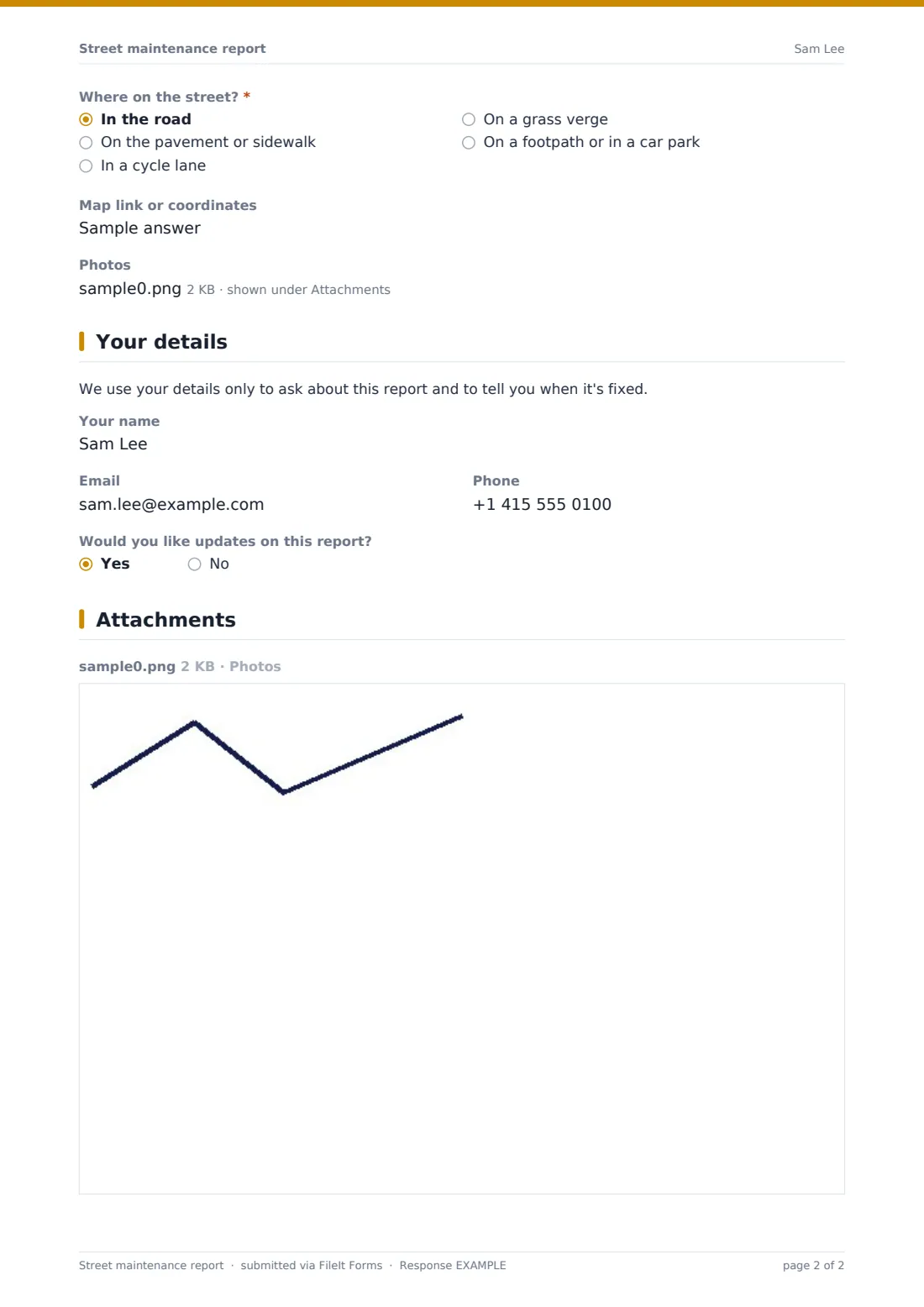
"Street", "Nearest house number, junction or landmark", town and postcode, "Where on the street?" (road, pavement, cycle lane, verge, footpath or car park), an optional map link and up to five photos.
3 Your details
A privacy note, then an optional name, email and phone. If an email is given, the resident can ask for updates.
Make the template yours
- Put your emergency phone number in the danger note
- Add the problem types your teams handle, such as graffiti or fly-tipping
- Notify the right team by email, such as highways or street lighting
- Change sidewalk or pavement wording to match local usage
- Make photos required if your crews rely on them
Tips for a better street maintenance report form
- Triage by the danger answer before anything else
- Use the map link or landmark to check for duplicate reports
- Reply to residents who asked for updates when a job is booked and when it's fixed
- Export reports to CSV to spot streets that keep coming up
- Pass streetlight post numbers straight to your lighting contractor
Every response becomes a PDF in your vault
Each report is saved as a PDF in the folder you choose, with photos attached, and the team on the notification list is emailed.
The Responses table lists reports with search by street or problem type. Export to CSV to load reports into your works system.
- Start from this template. It opens in the FileIt Forms designer — change any question, add pages, set the rules for when questions appear.
- Share it. Turn on a public link, or send it to people by email, each with their own link. They don’t need a FileIt account.
- Get the answers as PDFs. Each response is saved as a PDF in the vault folder you choose, with uploaded files attached — and listed in a Responses table you can export to CSV.
Street maintenance report form: frequently asked questions
Is this street maintenance template free?
Yes. It's one of the starter templates in the Forms app, included on every FileIt account, and you can edit any question.
Can residents report anonymously?
Yes. Name, email and phone are all optional. The council can't send updates without an email.
Does the form send jobs to our works system?
No. Reports are saved as PDFs and in the Responses table. Copy them across or import the CSV.
Do residents need a FileIt account?
No. Residents open your link, answer the questions and submit. No account is needed.
Is this form suitable for emergencies?
No. The form tells residents to call the emergency services or your emergency line if someone could be hurt now.