What is the pre-event expectations survey form template?
Feedback after an event tells you what you could have done better. A short survey before it gives you time to act: to adjust the level of a workshop, add a Q&A on a topic everyone is asking about, arrange introductions, or sort out access and catering needs.
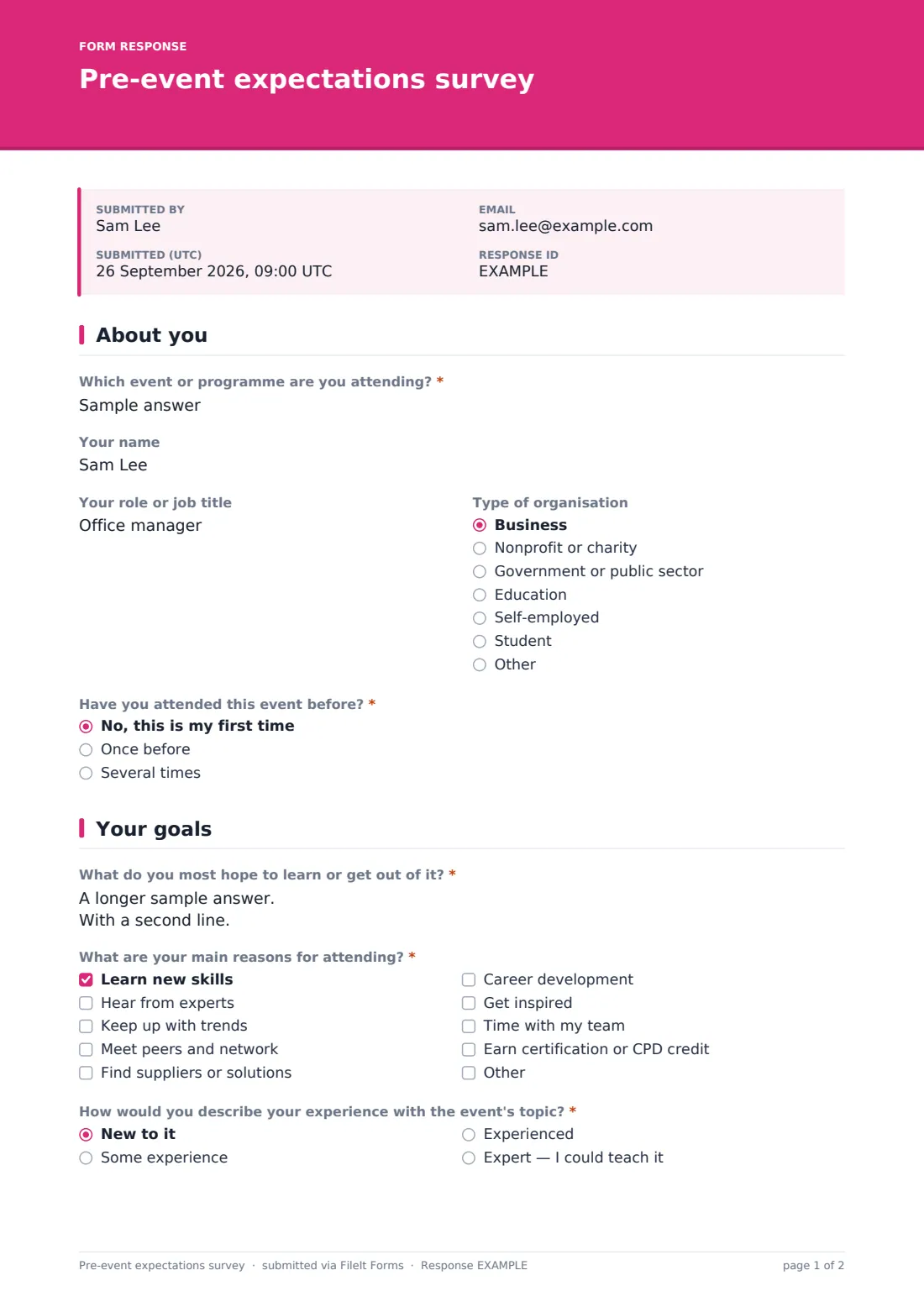
This template asks which event the person is attending, their role and type of organisation, and whether they've been before. It then asks what they most hope to get out of it, their top three reasons for attending, their experience with the topic, and any questions they'd like speakers to answer.
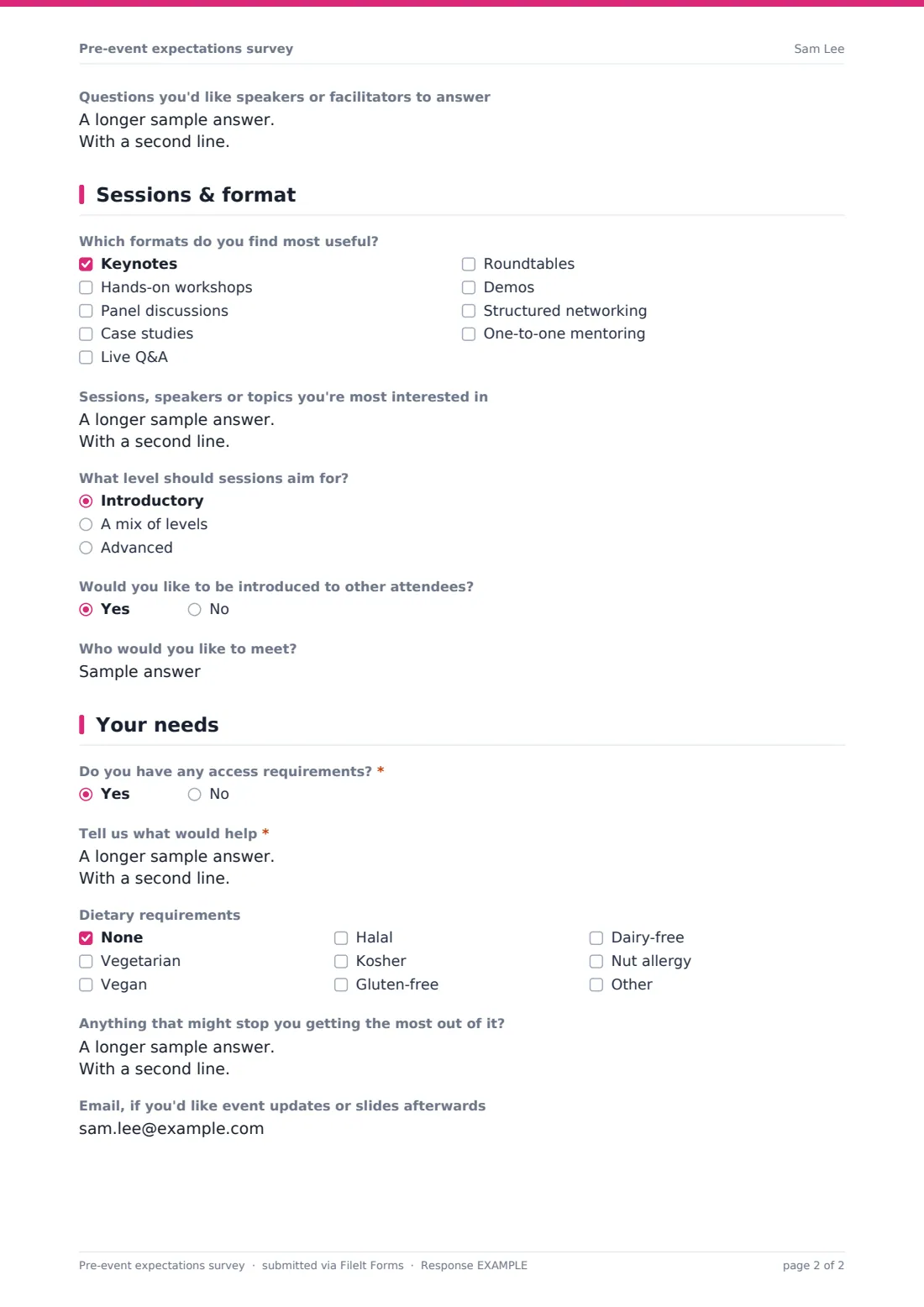
A page on sessions and format asks which formats they find useful, which sessions or topics interest them, what level sessions should aim for and whether they'd like introductions to other attendees. The last page covers access requirements, dietary needs and anything that might get in the way. Each response is saved as a PDF in your FileIt vault.
- Best for
- Conference, workshop and training organisers, event agencies and programme leads
- Filled in by
- Registered attendees, a week or two before the event
- Time to complete
- About 4 minutes
- Includes
- Attendee profile, hopes and top-three reasons, experience level, format and session interests, networking, access and dietary needs
Who uses a pre-event expectations survey form?
- Sending to registered attendees a fortnight before a conference
- Pitching a training course or workshop at the right level
- Collecting questions in advance for a panel or keynote
- Planning networking introductions or matchmaking
- Checking expectations before a leadership programme or bootcamp
- Gathering access and dietary needs for people who registered without them
Questions on this pre-event expectations survey form
19 questions over 4 pages · includes conditional questions, multiple pages.
1 About you
- Which event or programme are you attending?*
- Your name
- Your role or job title
- Type of organisation Business · Nonprofit or charity · Government or public sector · Education · Self-employed · Student · Other
- Have you attended this event before?* No, this is my first time · Once before · Several times
2 Your goals
- What do you most hope to learn or get out of it?*
- What are your main reasons for attending?* Learn new skills · Hear from experts · Keep up with trends · Meet peers and network · Find suppliers or solutions · Career development · Get inspired · Time with my team · Earn certification or CPD credit
- How would you describe your experience with the event's topic?* New to it · Some experience · Experienced · Expert — I could teach it
- Questions you'd like speakers or facilitators to answer
3 Sessions & format
- Which formats do you find most useful? Keynotes · Hands-on workshops · Panel discussions · Case studies · Live Q&A · Roundtables · Demos · Structured networking · One-to-one mentoring
- Sessions, speakers or topics you're most interested in
- What level should sessions aim for? Introductory · A mix of levels · Advanced
- Would you like to be introduced to other attendees?
- Who would you like to meet? asked only when it applies
4 Your needs
- Do you have any access requirements?*
- Tell us what would help* asked only when it applies
- Dietary requirements None · Vegetarian · Vegan · Halal · Kosher · Gluten-free · Dairy-free · Nut allergy
- Anything that might stop you getting the most out of it?
- Email, if you'd like event updates or slides afterwards
The pre-event expectations survey form, page by page
1 About you
Attendees name the event or programme they're attending. Their name is optional. Role and type of organisation sit side by side, and a required question asks whether this is their first time, they've attended once or several times.
2 Your goals
A required open question asks what they most hope to learn or get out of it. They choose up to three reasons for attending, such as learning new skills, hearing from experts, networking, finding suppliers, career development or earning CPD credit. They describe their experience with the topic, from new to expert, and can add questions for speakers or facilitators.
3 Sessions & format
Attendees tick the formats they find most useful (keynotes, hands-on workshops, panels, case studies, live Q&A, roundtables, demos, structured networking, one-to-one mentoring) and name sessions, speakers or topics from the agenda. They say whether sessions should be introductory, mixed or advanced. Anyone who'd like introductions to other attendees is asked who they'd like to meet.
4 Your needs
A required yes/no asks about access requirements; a yes opens a box for what would help, such as step-free seating, live captions, a quiet room or materials in advance. A dietary checklist, a box for anything that might stop them getting the most out of the event, and an optional email for updates or slides complete the form.
Make the template yours
- Change the event question to a dropdown if you run several events at once
- Replace the sessions box with a checklist of your actual agenda
- Add a topic-specific question, such as which tools attendees already use
- Remove the dietary question for online events
- Send personal links to registered attendees so answers are linked to their registration
- Set a closing date a few days before the event so you have time to act
Tips for a better pre-event expectations survey form
- Send it soon after registration closes, while there's still time to adjust sessions
- Share the questions attendees want answered with speakers ahead of time
- Use the experience answers to split workshops into beginner and advanced groups
- Contact everyone with access needs before the event to confirm the arrangements
- Compare answers with your post-event feedback to see whether expectations were met
- Keep it short — attendees are more likely to answer if it takes a few minutes
Every response becomes a PDF in your vault
Each response is saved as a PDF in your FileIt vault. Notifications let the organising team see access needs and speaker questions as they arrive.
Export responses to a CSV from the Responses table to count session interest, see the mix of experience levels and collect dietary and access needs for venue and catering partners.
- Start from this template. It opens in the FileIt Forms designer — change any question, add pages, set the rules for when questions appear.
- Share it. Turn on a public link, or send it to people by email, each with their own link. They don’t need a FileIt account.
- Get the answers as PDFs. Each response is saved as a PDF in the vault folder you choose, with uploaded files attached — and listed in a Responses table you can export to CSV.
Pre-event expectations survey form: frequently asked questions
Is this template free?
Yes. It's included in the FileIt Forms app on every account, including the free plan, and you can edit, add or remove any question.
Do respondents need a FileIt account?
No. Anyone with the form's link can respond without signing up or signing in.
Is this the same as a registration form?
No. It's sent after people register, to find out what they hope for. Use an event registration form to take bookings.
Do attendees have to give their name?
No. Name and email are optional, though a name helps you follow up on access needs.
Can we link answers to registrations?
Yes. Email personal links to registered attendees, prefilled with their details, instead of sharing one public link.
Can we use it for online events?
Yes. Remove the dietary question and adjust access options, for example to captions and recordings.
Can we share results with speakers?
Yes. Export the responses to a CSV, or copy out the questions and session interests for each speaker.
Can we close the survey before the event?
Yes. Set a closing date in the form's settings.