What is the patient transport booking form template?
Non-emergency patient transport gets people to hospital appointments, dialysis, outpatient clinics and discharge when they can't travel another way. Sending the right vehicle and crew depends on details: how the patient moves, whether they stay in their own wheelchair, need oxygen or an escort, and how to get them out of the house.
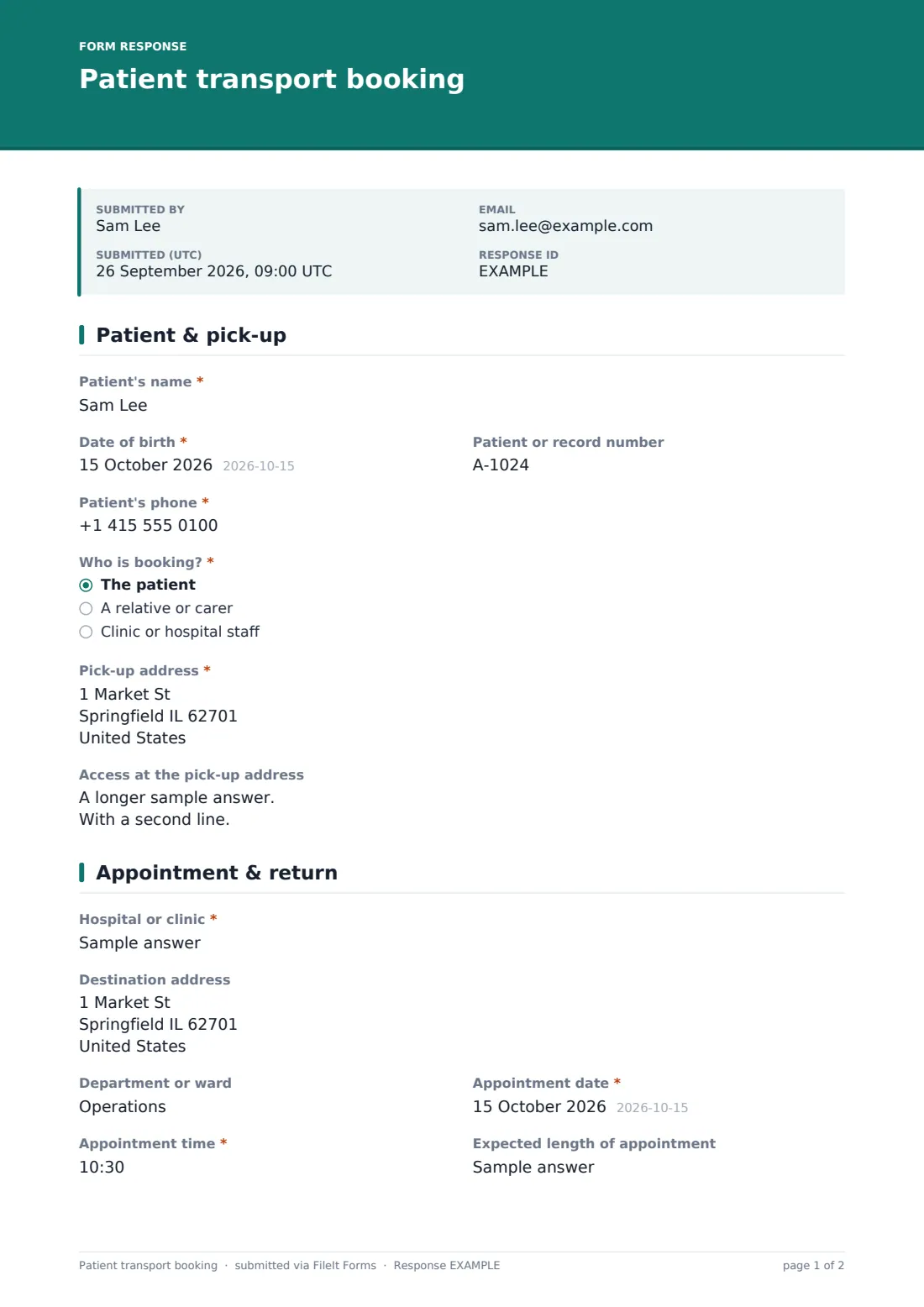
This template can be booked by the patient, a relative or carer, or clinic staff. It records the patient, the pick-up address and access notes, then the destination, department, appointment date, time and expected length, and whether a return journey is needed the same day, on another day or not at all.
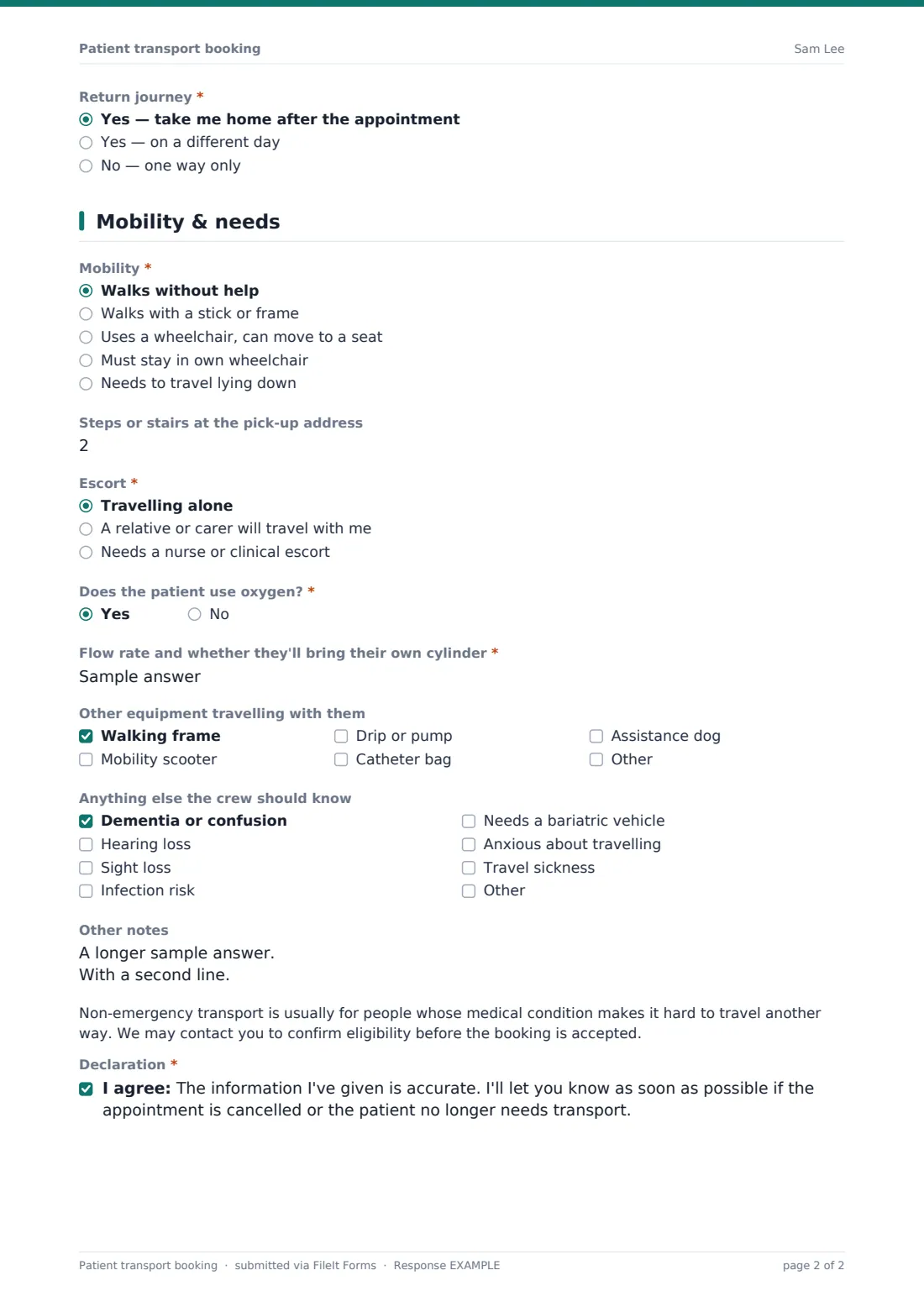
The mobility page covers how the patient moves — from walking unaided to staying in their own wheelchair or travelling lying down — steps at the pick-up, escorts, oxygen with flow rate, equipment travelling with them and needs such as dementia, hearing or sight loss, infection risk or a bariatric vehicle. A short note explains eligibility checks. Each booking is saved as a PDF in FileIt.
- Best for
- Patient transport services, community transport schemes, hospitals, dialysis units and clinics
- Filled in by
- The patient, a relative or carer, or clinic staff
- Time to complete
- About 4 minutes
- Includes
- Pick-up access notes, appointment and return journey, mobility and wheelchair type, escort, oxygen, equipment, crew notes and declaration
Who uses a patient transport booking form?
- Booking transport to outpatient appointments
- Regular trips to dialysis or chemotherapy
- Community transport schemes for older or disabled people
- Clinic staff arranging transport for a patient
- Families booking transport for a relative with dementia
- Planning a return journey after a day procedure
Questions on this patient transport booking form
28 questions over 3 pages · includes conditional questions, multiple pages, consent checkbox.
1 Patient & pick-up
- Patient's name*
- Date of birth*
- Patient or record number
- Patient's phone*
- Who is booking?* The patient · A relative or carer · Clinic or hospital staff
- Your name and phone* asked only when it applies
- Pick-up address*
- Access at the pick-up address
2 Appointment & return
- Hospital or clinic*
- Destination address
- Department or ward
- Appointment date*
- Appointment time*
- Expected length of appointment
- Return journey* Yes — take me home after the appointment · Yes — on a different day · No — one way only
- Return date* asked only when it applies
- Return pick-up time asked only when it applies
3 Mobility & needs
- Mobility* Walks without help · Walks with a stick or frame · Uses a wheelchair, can move to a seat · Must stay in own wheelchair · Needs to travel lying down
- Wheelchair type* asked only when it applies Manual · Powered · Tilt-in-space or specialist
- Steps or stairs at the pick-up address
- Escort* Travelling alone · A relative or carer will travel with me · Needs a nurse or clinical escort
- Why an escort is needed asked only when it applies
- Does the patient use oxygen?*
- Flow rate and whether they'll bring their own cylinder* asked only when it applies
- Other equipment travelling with them Walking frame · Mobility scooter · Drip or pump · Catheter bag · Assistance dog
- Anything else the crew should know Dementia or confusion · Hearing loss · Sight loss · Infection risk · Needs a bariatric vehicle · Anxious about travelling · Travel sickness
- Other notes
- Declaration*
The patient transport booking form, page by page
1 Patient & pick-up
Record the patient's name, date of birth, record number and phone, and who is booking — the patient, a relative or carer, or staff, who give their own name and phone. Enter the pick-up address and access notes such as steps, lifts, parking, which door or a key safe.
2 Appointment & return
Enter the hospital or clinic, its address and department, the appointment date and time, and how long it's expected to last. Choose whether the patient needs taking home after the appointment, a return on a different day — which asks for the date and, if known, a pick-up time — or one way only.
3 Mobility & needs
Choose how the patient moves: walking unaided, with a stick or frame, using a wheelchair but able to move to a seat, staying in their own wheelchair — which asks whether it's manual, powered or specialist — or travelling lying down. Record steps at the pick-up, whether an escort is travelling and why, oxygen use with flow rate and cylinder, equipment such as a frame, scooter, drip or assistance dog, and needs like dementia, hearing or sight loss, infection risk, a bariatric vehicle, anxiety or travel sickness. A short eligibility note and declaration complete the booking.
Make the template yours
- Replace the eligibility note with your service's own criteria
- Add eligibility questions if your service asks them at booking
- Add a dropdown of the hospitals and clinics you serve
- Send bookings to your transport control inbox
- Prefill clinic details with personal links for each referring clinic
- File bookings by date or by destination in vault folders
Tips for a better patient transport booking form
- Book as early as you can, especially for regular appointments
- Describe access at the pick-up carefully — it decides the crew and vehicle
- Tell the service about oxygen and powered wheelchairs at booking, not on the day
- Have the patient ready well before the pick-up window
- Let the service know straight away if an appointment is cancelled
- For a medical emergency, call the emergency services instead
Every response becomes a PDF in your vault
Each booking is saved as a PDF in the vault folder you choose, and the account owner and any extra addresses, such as your transport control desk, can be emailed as it arrives. The booker can receive a copy.
In Responses, filter by appointment date to plan journeys, or export to CSV to schedule vehicles and crews.
- Start from this template. It opens in the FileIt Forms designer — change any question, add pages, set the rules for when questions appear.
- Share it. Turn on a public link, or send it to people by email, each with their own link. They don’t need a FileIt account.
- Get the answers as PDFs. Each response is saved as a PDF in the vault folder you choose, with uploaded files attached — and listed in a Responses table you can export to CSV.
Patient transport booking form: frequently asked questions
Is this patient transport booking template free?
Yes. It's part of the Forms app, included with every FileIt account, the free plan too.
Does FileIt schedule the vehicles?
No. The form collects the booking. Your service plans journeys and confirms pick-up times in the usual way.
Can staff book on behalf of a patient?
Yes. Choose clinic or hospital staff as the booker and add your name and phone.
Does it check eligibility?
It shows a short eligibility note and collects the details your team needs. You can add eligibility questions in the designer.
Can I book a return on another day?
Yes. Choose a return on a different day and enter the date and, if you know it, the pick-up time.
Is this for emergencies?
No. It's for planned, non-emergency journeys. In an emergency, call the emergency services.