What is the parental consent for a child's online account form template?
If your app, game, learning platform or club website lets young children have an account, you'll usually want a parent's permission first — and a record of exactly what they agreed to. A single "I agree" checkbox doesn't tell you whether the parent was happy for their child to chat with strangers, post pictures or spend money.
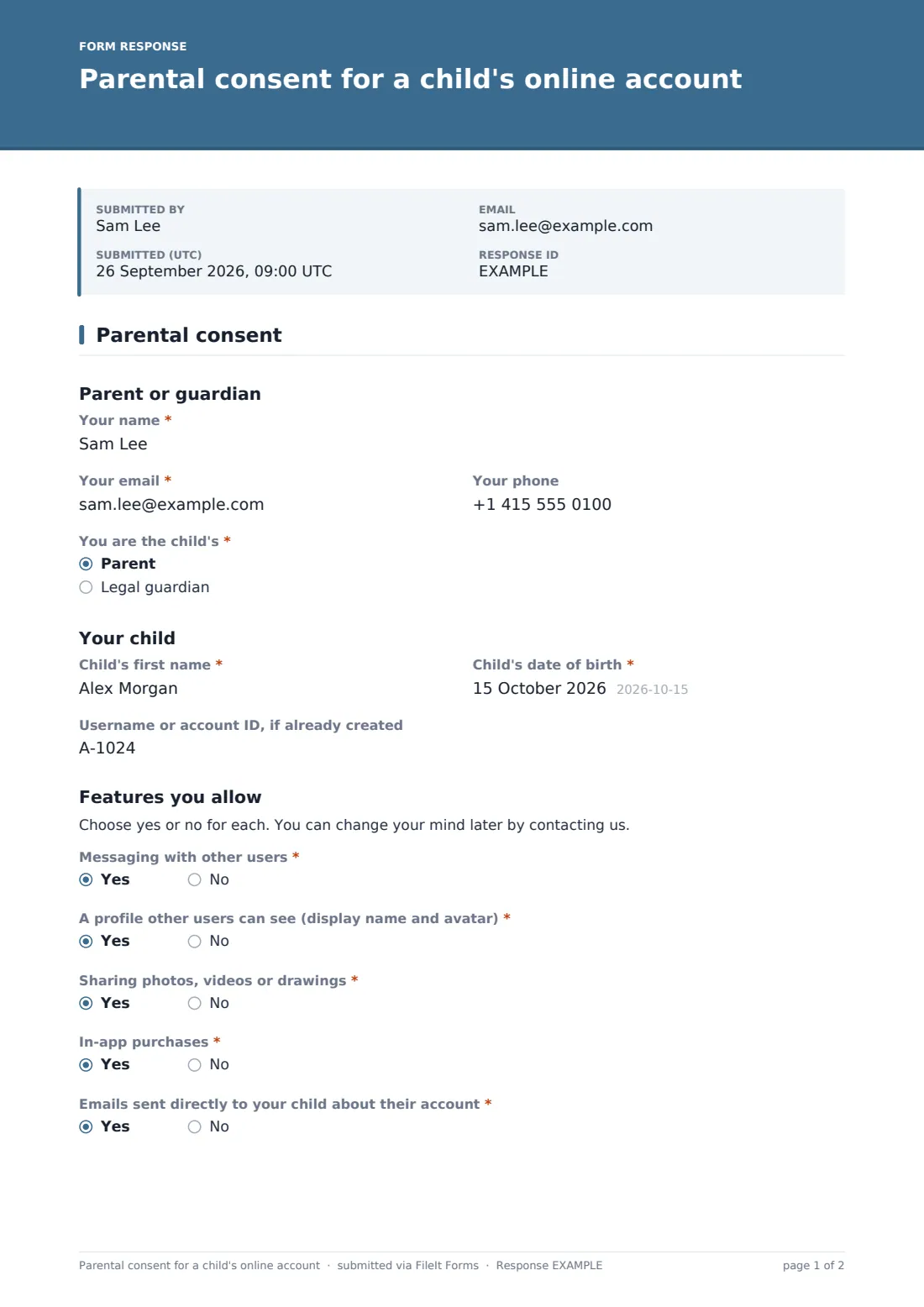
This template asks feature by feature. The parent answers yes or no to messaging, a visible profile, sharing photos or drawings, in-app purchases and direct emails to the child. Every no reveals a short note explaining what will be switched off, so the parent knows what to expect before they sign.
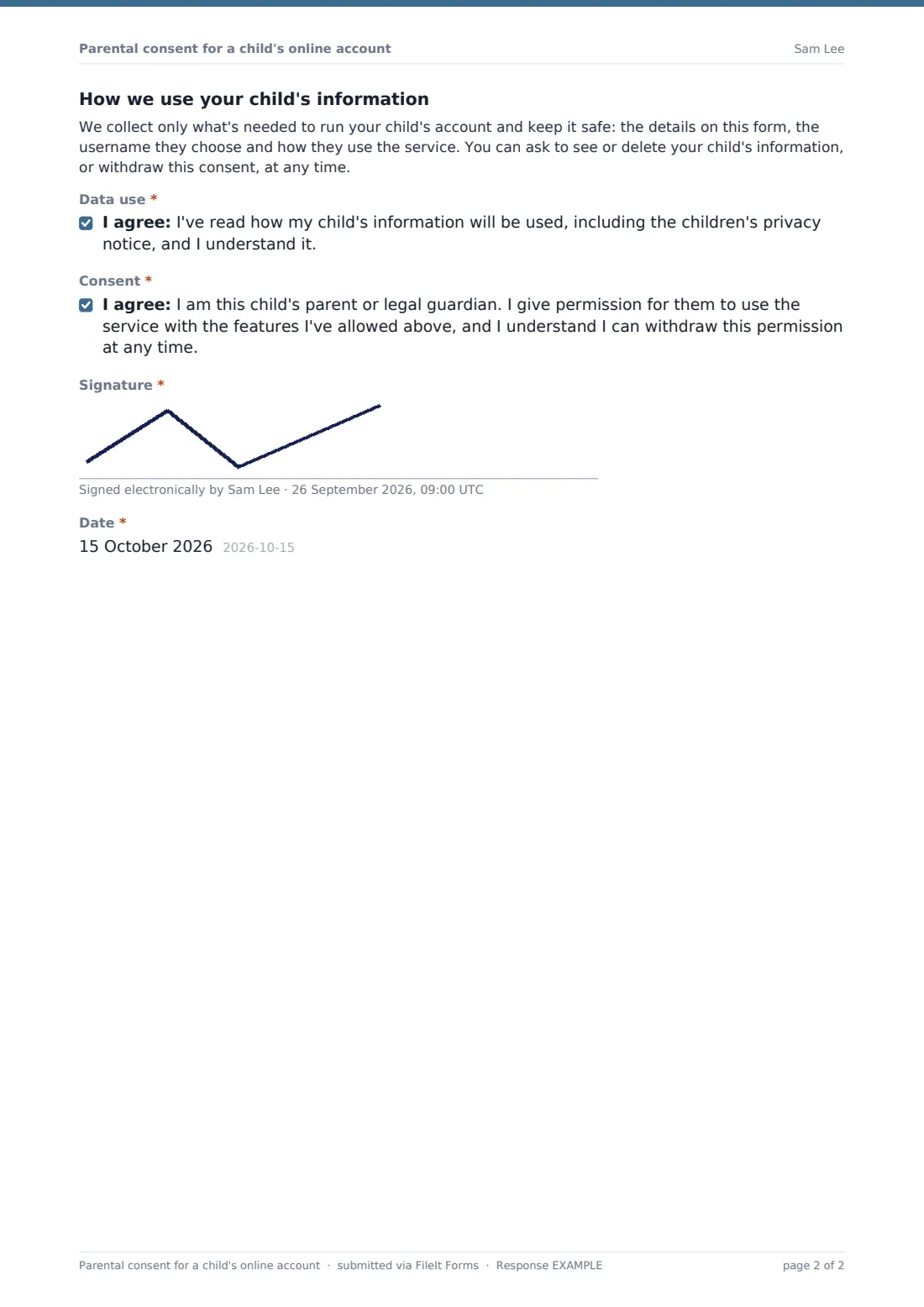
It also includes a plain-language paragraph on how the child's information is used, an acknowledgement, the consent itself and a drawn signature. Each signed form is filed as a PDF in your FileIt vault, so you can show what was agreed, by whom and when.
- Best for
- Apps, games, ed-tech, kids' clubs and schools offering online accounts
- Filled in by
- A parent or legal guardian
- Time to complete
- About 3 minutes
- Includes
- Parent and child details, five feature choices with explanations, data-use acknowledgement, consent, signature
Who uses a parental consent for a child's online account form?
- A consent step before activating a child's account in an app or game
- Schools collecting permission for pupils to use an online learning tool
- Coding clubs and libraries giving children their own logins
- Youth sports clubs setting up accounts in a team messaging app
- Re-confirming consent when you add a new feature such as chat
- Keeping a signed record of each parent's choices
Questions on this parental consent for a child's online account form
16 questions · includes signature, conditional questions, consent checkbox.
1 Parental consent
- Your name*
- Your email*
- Your phone
- You are the child's* Parent · Legal guardian
- Child's first name*
- Child's date of birth*
- Username or account ID, if already created
- Messaging with other users*
- A profile other users can see (display name and avatar)*
- Sharing photos, videos or drawings*
- In-app purchases*
- Emails sent directly to your child about their account*
- Data use*
- Consent*
- Signature*
- Date*
The parental consent for a child's online account form, page by page
1 Parent and child
The parent gives their name, email, optional phone, and whether they're the parent or legal guardian. Then the child's first name, date of birth and, if already created, their username or account ID. Only the child's first name is asked for.
2 Features you allow
Five yes-or-no questions: "Messaging with other users", "A profile other users can see (display name and avatar)", "Sharing photos, videos or drawings", "In-app purchases" and "Emails sent directly to your child about their account". Each no shows a one-line note — for example, that messaging will be switched off or account emails will go to the parent.
3 Data use and signature
A short paragraph explains what's collected and that the parent can ask to see or delete the information, or withdraw consent. The parent ticks a data-use acknowledgement and the main consent, then signs and dates the form.
Make the template yours
- Rewrite the data paragraph so it matches your own privacy notice exactly, and link to that notice
- Rename or replace the five features to match what your service really offers
- Remove the purchases question if your service has nothing for sale
- Add a question about a learning group, class or team the child should join
- File signed consents in a restricted folder for your safeguarding or privacy lead
- Set the confirmation message to say how long account set-up takes
Tips for a better parental consent for a child's online account form
- Make the switches real: whatever a parent declines must actually be turned off on the account
- Collect no more about the child than you need — the template asks only for a first name and date of birth
- Think about how you'll confirm the person signing really is the parent; a signed form alone may not be enough
- Check the children's privacy rules where you operate, such as COPPA in the US, and get advice if you're unsure
- Ask for new consent when you add a feature parents haven't agreed to
Every response becomes a PDF in your vault
The signed form is saved as a PDF in the vault folder you choose and you get an email. The parent receives a copy of exactly what they agreed to.
The Responses table lets you check each family's choices at a glance, and export them to CSV to match against accounts in your own system. FileIt records the consent; turning features on or off in your service is up to you.
- Start from this template. It opens in the FileIt Forms designer — change any question, add pages, set the rules for when questions appear.
- Share it. Turn on a public link, or send it to people by email, each with their own link. They don’t need a FileIt account.
- Get the answers as PDFs. Each response is saved as a PDF in the vault folder you choose, with uploaded files attached — and listed in a Responses table you can export to CSV.
Parental consent for a child's online account form: frequently asked questions
Is this parental consent template free?
Yes. Every FileIt plan, including free, comes with the Forms app and its templates.
Does it make my service COPPA compliant?
No form can do that on its own. It helps you record a parent's choices, but you should check the rules that apply to you and take advice.
Do parents need a FileIt account?
No. They open the link, fill it in and sign on their phone or computer.
Why ask about each feature separately?
Parents often want to allow some things and not others. Separate answers give you a clear instruction for each one.
Can a parent change their mind later?
The form tells them they can. You could send them a fresh copy of the form to record new choices.
How is this different from the general parental consent template?
The general one covers trips and activities. This one is built for a child's account in an online service.