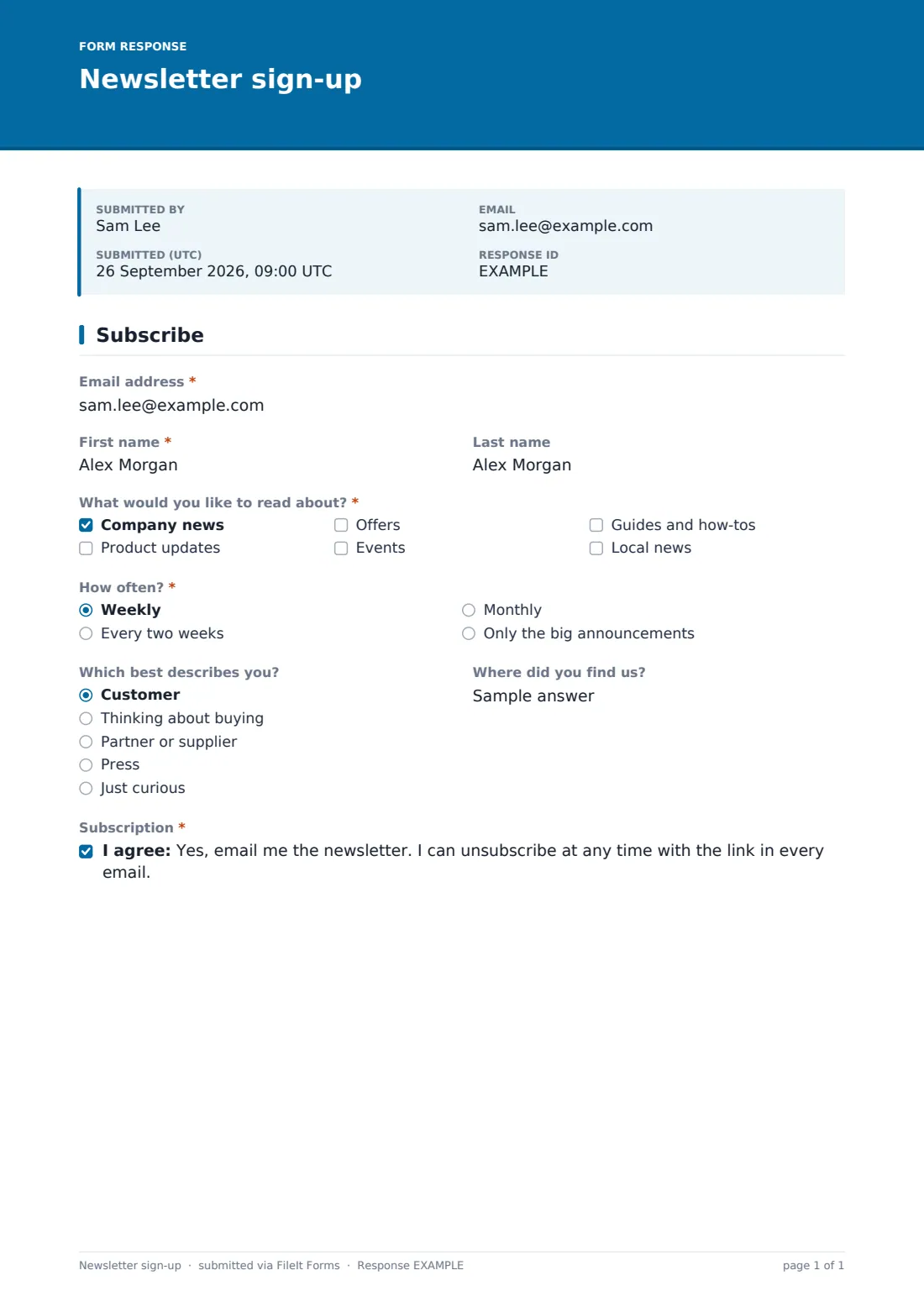
What is the newsletter sign-up form template?
Most newsletter sign-ups ask for an email address and nothing else, then send everyone the same thing every week. Subscribers drift away because half of it isn't relevant. This template asks two extra questions that make a real difference: which topics someone cares about, and how often they want to hear from you.
“What would you like to read about?” offers company news, product updates, offers, events, guides and how-tos, and local news. Ticking local news reveals “Your region”, a dropdown with North, South, East, West and Central that you can swap for your own areas, so regional updates only go to people nearby. “How often?” lets subscribers choose weekly, every two weeks, monthly, or only the big announcements.
Two optional questions, “Which best describes you?” and “Where did you find us?”, help you understand who's signing up. The form ends with a clear, required opt-in. Each subscription is filed as a PDF in your FileIt vault, so you have a dated record of who opted in and what they asked for.
- Best for
- Small businesses, local publishers, community groups, clubs, makers and consultants
- Filled in by
- Website visitors, customers and event attendees
- Time to complete
- Under a minute
- Includes
- Topic choices, a region picker for local news, frequency preference, audience type and opt-in consent
Who uses a newsletter sign-up form?
- A local news site offering regional editions alongside a general digest
- A software company letting customers choose product updates without the offers
- A craft brewery collecting sign-ups at a market stall on a tablet
- A consultant growing a monthly email of guides and how-tos
- A venue that only wants to email people about events near them
- A charity sending supporters a monthly update, with event news only for those who ask for it
Questions on this newsletter sign-up form
9 questions · includes conditional questions, consent checkbox.
1 Subscribe
- Email address*
- First name*
- Last name
- What would you like to read about?* Company news · Product updates · Offers · Events · Guides and how-tos · Local news
- Your region* asked only when it applies North · South · East · West · Central
- How often?* Weekly · Every two weeks · Monthly · Only the big announcements
- Which best describes you? Customer · Thinking about buying · Partner or supplier · Press · Just curious
- Where did you find us?
- Subscription*
The newsletter sign-up form, page by page
1 Subscribe
“Email address” comes first, then a required “First name” and an optional “Last name”, so you can personalise emails without demanding a surname. Subscribers tick at least one topic, and ticking local news brings up “Your region”, with help text saying it keeps local news about where they live. They pick a frequency.
“Which best describes you?” offers customer, thinking about buying, partner or supplier, press, or just curious. “Where did you find us?” is free text. The last question is the subscription consent: “Yes, email me the newsletter. I can unsubscribe at any time with the link in every email.”
Make the template yours
- Replace the topics with the sections your newsletter actually has
- Swap the region options for your own towns, districts or branches
- Remove frequency choices you can't offer, such as weekly
- Change the confirmation message to say when the next issue goes out
- Turn off owner notifications if you'd rather review sign-ups in batches
Tips for a better newsletter sign-up form
- Only offer topics and frequencies you'll keep up, or subscribers will notice
- Make sure every email you send has a working unsubscribe link, as the consent promises
- Export new subscribers regularly and add them to your email tool's matching lists
- Use the “Where did you find us?” answers to see which promotions bring sign-ups
- Share the form's link at the end of blog posts and in your email signature
Every response becomes a PDF in your vault
Every new subscription is saved in your vault as a PDF with its topics, region and frequency, and you're notified by email unless you turn that off. The template doesn't email the subscriber a copy, so their first message from you can be the welcome email.
The Responses table shows each subscriber's choices at a glance. Export to CSV and import into your mailing tool, using the topics and region columns to build segments.
- Start from this template. It opens in the FileIt Forms designer — change any question, add pages, set the rules for when questions appear.
- Share it. Turn on a public link, or send it to people by email, each with their own link. They don’t need a FileIt account.
- Get the answers as PDFs. Each response is saved as a PDF in the vault folder you choose, with uploaded files attached — and listed in a Responses table you can export to CSV.
Newsletter sign-up form: frequently asked questions
Is this newsletter sign-up template free?
Yes. It's part of FileIt's Forms app, available on every account including the free plan.
Does FileIt send the newsletter?
No. FileIt collects and files the sign-ups. You send the newsletter from your own email tool, using the exported list.
Can I put the form on my website?
Yes. Link to it from your site, social profiles or email signature. Anyone can subscribe without an account.
How does the region question work?
It only appears when someone ticks local news, and it's then required, so every local-news subscriber has a region.
Can subscribers change their preferences later?
They can submit the form again with new choices. The newest response shows their latest preferences.
Is the consent required?
Yes. The opt-in must be ticked before the form can be submitted.
Where are the sign-ups stored?
Each one is filed as a PDF in your FileIt vault, in the Inbox or a folder you choose in the form's settings, and listed in the form's Responses table, where you can search and export them to CSV whenever you're ready.