What is the location release form template?
Whether it's a feature shooting in a kitchen for three days or a photographer borrowing a garden for an afternoon, a production needs the owner's permission in writing before anyone unloads a van. Owners want something too: a clear record of who is coming, when, how many people, which rooms are in and which are off limits, and what they're being paid.
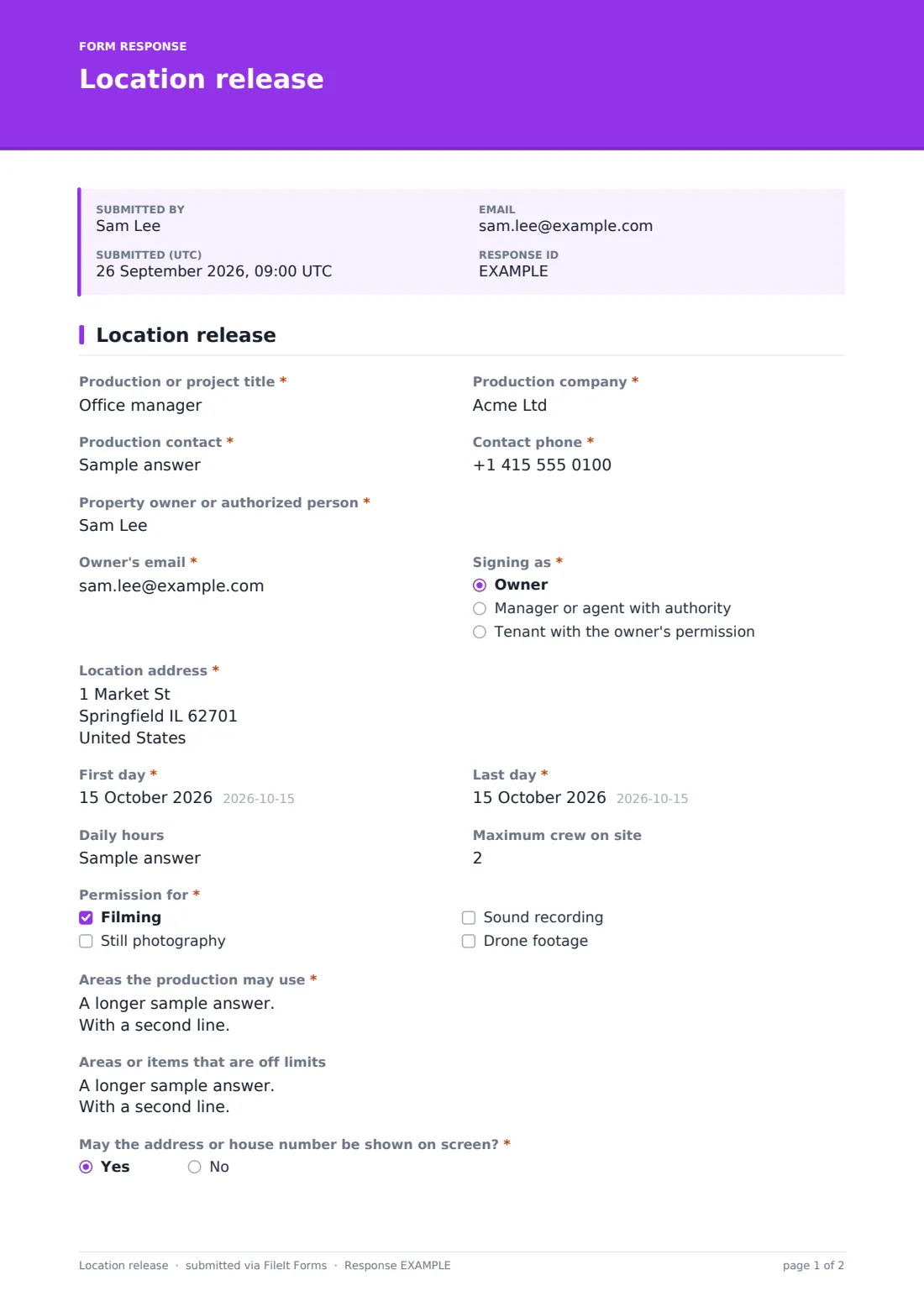
This one-page release covers both sides. The production gives its title, company, contact and phone. The owner, or someone signing on their behalf, gives their name and email and says whether they're signing as the owner, a manager or agent, or a tenant with the owner's permission. The shoot itself is set out with the location address, first and last day, "Daily hours", "Maximum crew on site" and "Permission for" — filming, still photography, sound recording or drone footage.
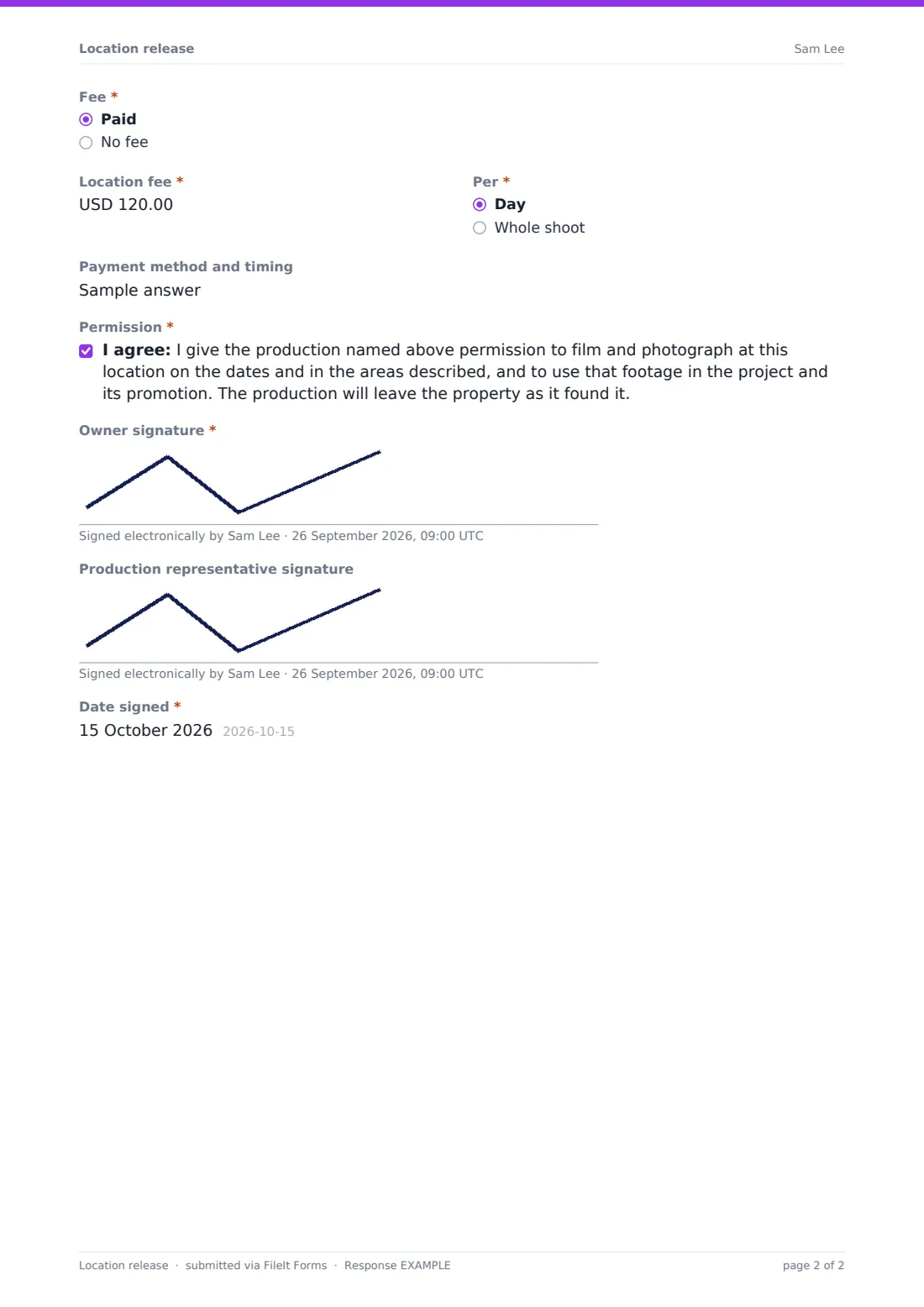
"Areas the production may use" and "Areas or items that are off limits" spell out the boundaries, and "May the address or house number be shown on screen?" answers a question owners often care about. Choose "Paid" under "Fee" and the form asks for the location fee, whether it's per day or for the whole shoot, and the payment method and timing. The owner ticks the permission statement and signs, and the production representative can sign too. The signed release is filed as a PDF in your FileIt vault.
- Best for
- Film, TV and video productions, photographers and content creators
- Filled in by
- The production and the property owner together
- Time to complete
- About 6 minutes
- Includes
- Production and owner details, dates and hours, crew size, permitted uses, allowed and off-limits areas, fee follow-ups and two signatures
Who uses a location release form?
- A short film shooting in a private home over a weekend
- A brand photo shoot in a café before opening hours
- Real estate or architecture photography for a portfolio
- Drone footage over a farm or private land
- A YouTube or podcast crew recording in someone's studio
- Student productions that need a signed release for their school
Questions on this location release form
24 questions · includes signature, conditional questions, consent checkbox.
1 Location release
- Production or project title*
- Production company*
- Production contact*
- Contact phone*
- Property owner or authorized person*
- Owner's email*
- Signing as* Owner · Manager or agent with authority · Tenant with the owner's permission
- Location address*
- First day*
- Last day*
- Daily hours
- Maximum crew on site
- Permission for* Filming · Still photography · Sound recording · Drone footage
- Areas the production may use*
- Areas or items that are off limits
- May the address or house number be shown on screen?*
- Fee* Paid · No fee
- Location fee* asked only when it applies
- Per* asked only when it applies Day · Whole shoot
- Payment method and timing asked only when it applies
- Permission*
- Owner signature*
- Production representative signature
- Date signed*
The location release form, page by page
1 Location release
"Production or project title", "Production company", the production contact and phone. "Property owner or authorized person", the owner's email and "Signing as". Then the location address, first and last day, daily hours and maximum crew. "Permission for" needs at least one use ticked. The areas the production may use are required; off-limits areas are optional. The on-screen address question is a required yes or no. "Fee" is paid or no fee; paid opens the location fee, "Per" (day or whole shoot), and payment method and timing. The owner ticks the permission statement, which covers filming, using the footage in the project and its promotion, and leaving the property as it was found. The owner signs, the production representative can add a signature, and the date signed completes the release.
Make the template yours
- Add a question about insurance the production carries
- Add a security deposit or damage terms to the fee section
- List the specific rooms as checkboxes instead of a text box
- Edit the permission statement to match your production's standard wording
- Set the currency to the one you pay in
- File releases into a vault folder per project
Tips for a better location release form
- Walk the location with the owner and agree off-limits areas in person
- Photograph each room before the shoot so its condition is on record
- Agree parking for crew vehicles before the first day
- Tell neighbours about early starts or lighting at night
- Have your production's lawyer review the release wording for bigger shoots
Every response becomes a PDF in your vault
The signed release is filed in your vault as a PDF, and the owner's email receives a copy of what they signed. You're notified so the location manager can confirm the booking.
Search the Responses table by address or production title to find a release when the edit team asks for it months later.
- Start from this template. It opens in the FileIt Forms designer — change any question, add pages, set the rules for when questions appear.
- Share it. Turn on a public link, or send it to people by email, each with their own link. They don’t need a FileIt account.
- Get the answers as PDFs. Each response is saved as a PDF in the vault folder you choose, with uploaded files attached — and listed in a Responses table you can export to CSV.
Location release form: frequently asked questions
Is this location release template free?
Yes. It's a starter template in FileIt's Forms app, available on every plan including free.
Is the release legally sufficient for my production?
That depends on your project and where it's distributed. The template gives a clear starting point; have the wording checked if you need a particular standard.
Can a tenant sign it?
The form lets them sign as a tenant with the owner's permission. Many productions also ask for the owner's own signature.
What if the location is free?
Choose "No fee" and the payment questions don't appear.
Can both sides sign on one phone?
Yes. The owner signs first, then the production representative signs on the same screen.