What is the resort kids club registration form template?
Parents arrive at a resort kids club wanting to drop off and get to the pool. Staff, meanwhile, need to know about allergies, how well the child swims, who may collect them and how to reach a parent in a hurry. This resort kids club registration form template covers all of it on a single page that a parent can fill in on their phone before they even reach the club desk.
It works for hotels, all-inclusive resorts, holiday parks, ski resorts and cruise ships. The form adapts to the child: choosing the 3 to 5 years age group asks whether the child is fully toilet trained, and the 13 to 17 group asks whether teens may sign themselves out. Answering yes to Does your child have any allergies? opens two required questions, what they're allergic to and whether they'll have an adrenaline auto-injector with them.
Each registration is saved as a signed PDF in your FileIt vault and lands with your team by email, so the club has a clear record for every child, every stay.
- Best for
- Resorts, hotels, holiday parks, ski schools and cruise lines running a children's club
- Filled in by
- A parent or guardian, one form per child
- Time to complete
- About 4 minutes
- Includes
- Age-group logic, allergy details, food needs, swimming ability, pick-up people and password, photo permission, signature
Who uses a resort kids club registration form?
- A family resort registering children at check-in, from a QR code at the front desk
- A cruise line collecting registrations before guests board
- A ski resort's children's club checking ages and allergies
- A holiday park running daily activity sessions in the school holidays
- A hotel babysitting or evening club that needs a pick-up password
- Collecting a fresh registration for returning guests each stay
Questions on this resort kids club registration form
22 questions · includes signature, conditional questions, consent checkbox.
1 Kids club registration
- Child's name*
- Date of birth*
- Age group* 3 to 5 years · 6 to 8 years · 9 to 12 years · 13 to 17 years
- Is your child fully toilet trained?* asked only when it applies
- Room or cabin number*
- Last day of your stay
- Languages your child speaks
- Does your child have any allergies?*
- What are they allergic to, and what happens if they're exposed?* asked only when it applies
- Will they have an adrenaline auto-injector with them?* asked only when it applies
- Medical conditions, medicines or extra support we should know about
- Food needs Vegetarian · Vegan · Halal · Kosher · No pork · Gluten-free · Dairy-free
- Swimming ability* Can't swim yet · Swims with armbands or a float · Swims a short way without help · Confident swimmer
- Who else may collect your child?
- Pick-up password
- May your child sign themselves out of the club?* asked only when it applies
- Your name*
- Mobile phone you'll keep switched on*
- May staff photograph your child during activities to share with you?
- Agreement*
- Parent or guardian signature*
The resort kids club registration form, page by page
1 Kids club registration
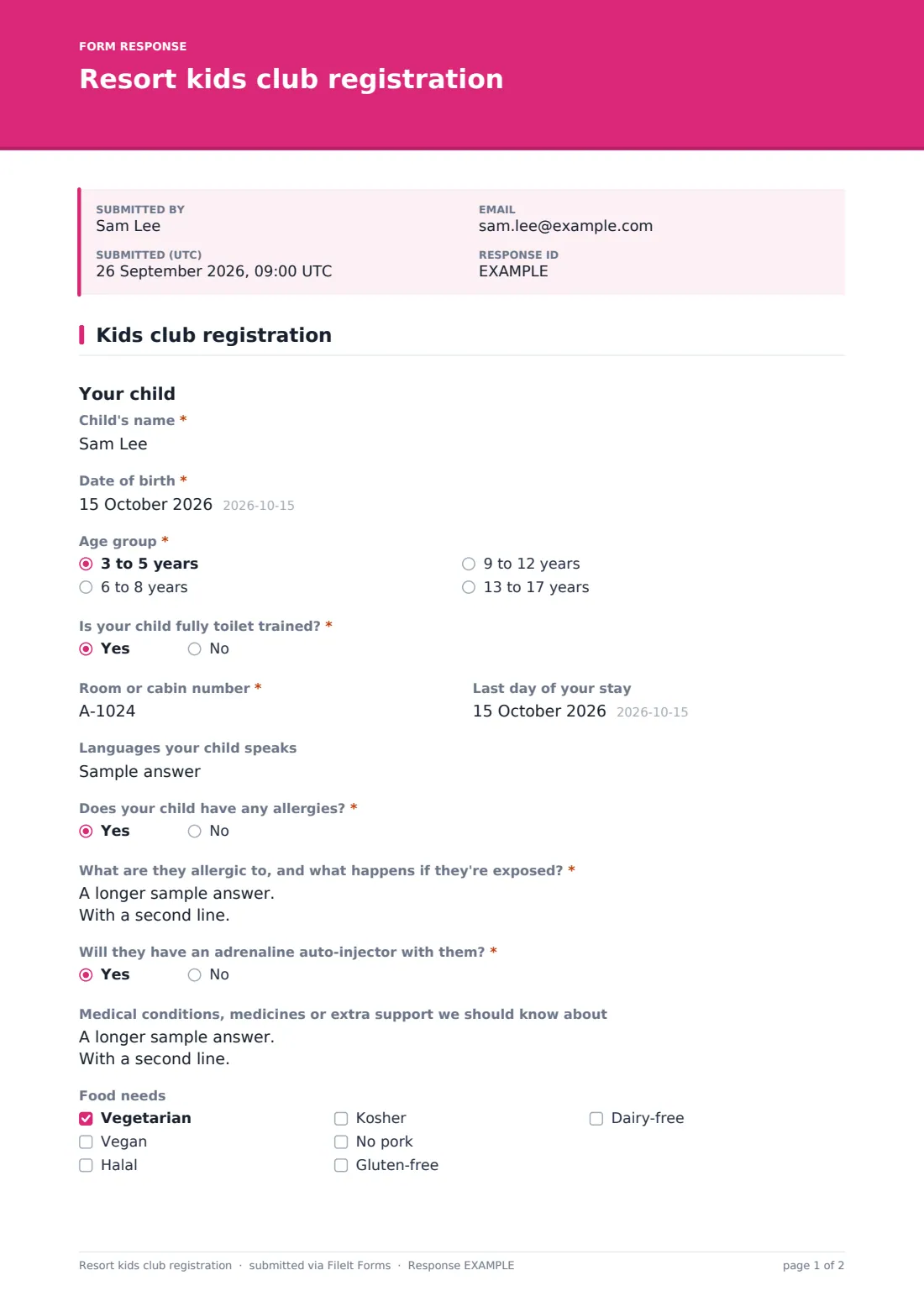
Under Your child, the parent enters the child's name and date of birth and picks an age group: 3 to 5, 6 to 8, 9 to 12 or 13 to 17 years. For the youngest group, Is your child fully toilet trained? appears and must be answered. The parent adds the room or cabin number, the last day of the stay and the languages the child speaks.
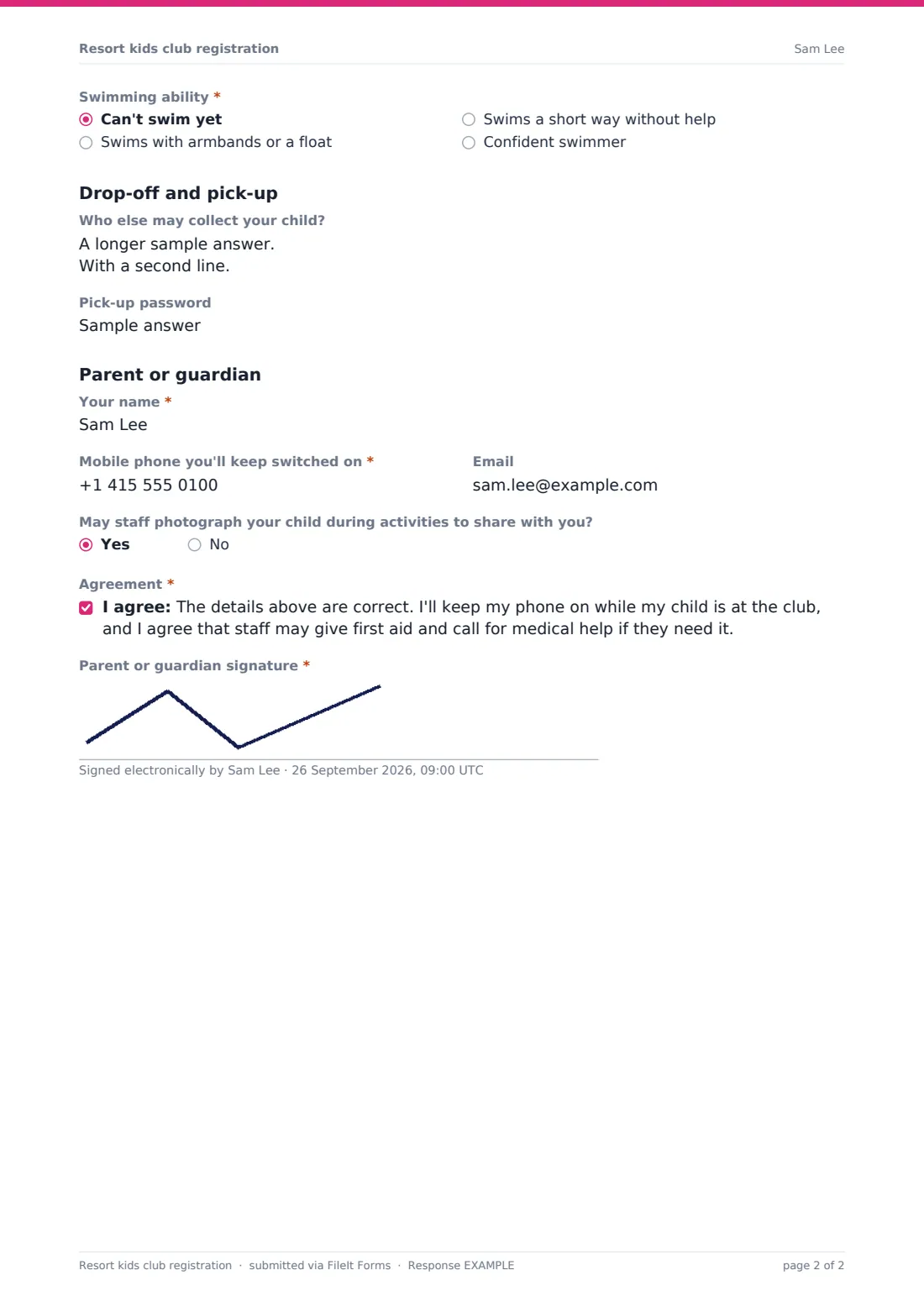
Does your child have any allergies? is required. A yes asks what they're allergic to and what happens if they're exposed, and whether they'll have an adrenaline auto-injector with them. A free-text question covers medical conditions, medicines or extra support, and Food needs offers vegetarian, vegan, halal, kosher, no pork, gluten-free and dairy-free. Swimming ability runs from Can't swim yet to Confident swimmer, so pool and beach activities can be planned safely.
Drop-off and pick-up asks who else may collect the child, one name and relationship per line, and a pick-up password. For teens, the form asks whether they may sign themselves out of the club. The Parent or guardian section asks for the parent's name, a mobile phone they'll keep switched on, and email. A yes or no question covers photos during activities, and the parent agrees that staff may give first aid and call for medical help, then signs.
Make the template yours
- Rename the age groups to match your club's own groups and names
- Add a dropdown of session times or days if children book specific sessions
- Add a question about nap times or comfort items for the youngest group
- Change the photo question to match your property's photography policy
- Add the club's phone number and opening hours to the cover text
- Set the vault folder to one per season so registrations stay easy to find
Tips for a better resort kids club registration form
- Read each allergy answer with the parent at drop-off, not just on screen
- Ask anyone collecting a child for the pick-up password, every time
- Check the parent's phone number by calling it once at registration
- Put a QR code for the form at check-in so families can register before they reach the club
- Keep registrations for the length of the stay, then review what you need to keep
Every response becomes a PDF in your vault
Each registration is filed as a signed PDF in the vault folder you choose, titled with the child's name and date. The club team gets an email with every new registration, and parents can be sent a copy.
The Responses table shows every child registered, so staff can search by name or room number at drop-off. Export to CSV for a daily list of children with allergies, food needs and swimming ability.
- Start from this template. It opens in the FileIt Forms designer — change any question, add pages, set the rules for when questions appear.
- Share it. Turn on a public link, or send it to people by email, each with their own link. They don’t need a FileIt account.
- Get the answers as PDFs. Each response is saved as a PDF in the vault folder you choose, with uploaded files attached — and listed in a Responses table you can export to CSV.
Resort kids club registration form: frequently asked questions
Is this kids club registration template free?
Yes. It's a starter template in FileIt's Forms app, on every plan including free.
Can parents register more than one child?
Yes. Multiple responses are allowed, so a parent fills in the form once per child from the same link.
What does the form ask about allergies?
Every parent must answer whether the child has allergies. A yes opens required questions on what they're allergic to, the reaction, and whether they'll carry an adrenaline auto-injector.
Is this a medical or legal consent form?
No. It records the parent's details and agreement in your own words. Check the wording with your own advisers and change it to suit your club.
Do parents need a FileIt account?
No. They open the link or scan a QR code and fill it in without signing up.
Can I add session bookings to it?
Yes. Add a dropdown or checkboxes for sessions in the form designer, and they'll appear on every registration PDF.