What is the focus group screener form template?
A focus group is only as good as the people in the room. Without a screener you end up with friends of the team, people who work in the industry, or professional participants who join every study. A few well-placed questions filter them out before anyone books a slot.
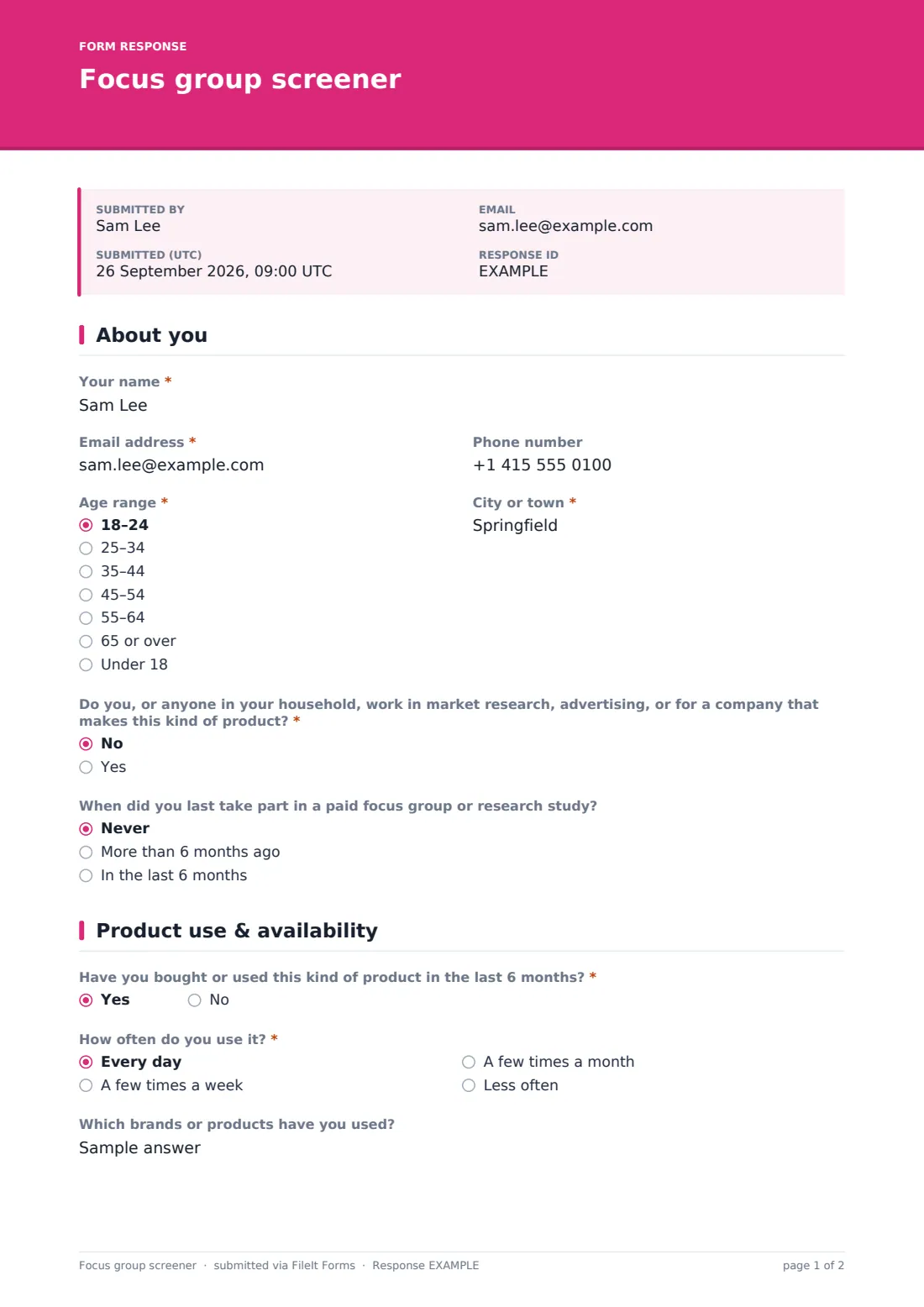
This screener has two pages. The first collects contact details, age range and city, then asks two classic screening questions: whether anyone in the household works in market research, advertising or a competing company, and when they last joined a paid study. The second page checks recent product use. Only people who pass both checks see the session times, format, recording question and thank-you gift choice.
People who don't qualify see a friendly note and can still submit, so you keep their details for future studies. Every response is saved as a PDF in your FileIt vault under the person's name, and respondents get a copy by email.
- Best for
- UX researchers, market research teams, agencies and product teams
- Filled in by
- People interested in joining a session
- Time to complete
- About 3 minutes
- Includes
- Contact details, industry and recent-study screeners, product use, session time picker, recording and incentive questions
Who uses a focus group screener form?
- Recruiting current customers for a product focus group
- Screening sign-ups from a social media ad for a research panel
- Finding participants for remote user interviews
- Filtering out people with industry connections before a concept test
- Letting qualified people pick from several session times
- Building a list of future research participants from people who don't qualify today
Questions on this focus group screener form
16 questions over 2 pages · includes conditional questions, multiple pages.
1 About you
- Your name*
- Email address*
- Phone number
- Age range* 18–24 · 25–34 · 35–44 · 45–54 · 55–64 · 65 or over · Under 18
- City or town*
- Do you, or anyone in your household, work in market research, advertising, or for a company that makes this kind of product?* asked only when it applies No · Yes
- When did you last take part in a paid focus group or research study? asked only when it applies Never · More than 6 months ago · In the last 6 months
2 Product use & availability
- Have you bought or used this kind of product in the last 6 months?* asked only when it applies
- How often do you use it?* asked only when it applies Every day · A few times a week · A few times a month · Less often
- Which brands or products have you used? asked only when it applies
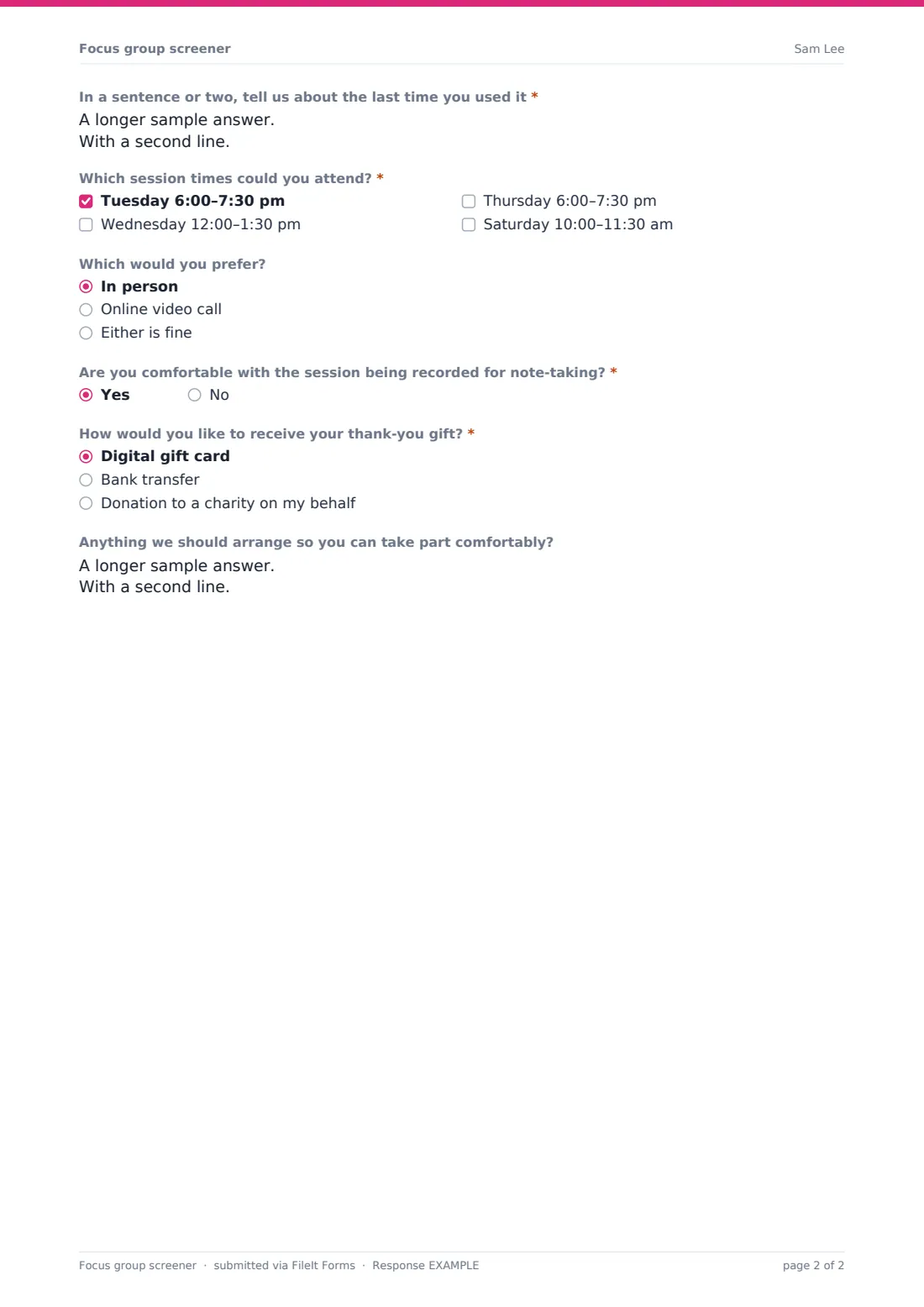
- In a sentence or two, tell us about the last time you used it* asked only when it applies
- Which session times could you attend?* asked only when it applies Tuesday 6:00–7:30 pm · Wednesday 12:00–1:30 pm · Thursday 6:00–7:30 pm · Saturday 10:00–11:30 am
- Which would you prefer? asked only when it applies In person · Online video call · Either is fine
- Are you comfortable with the session being recorded for note-taking?* asked only when it applies
- How would you like to receive your thank-you gift?* asked only when it applies Digital gift card · Bank transfer · Donation to a charity on my behalf
- Anything we should arrange so you can take part comfortably? asked only when it applies
The focus group screener form, page by page
1 About you
Required name, email address, age range and city or town, plus an optional phone number used only to confirm or reschedule. Choosing "Under 18" shows a short note that sessions are for adults only, and skips the rest of the screening. Adults then answer "Do you, or anyone in your household, work in market research, advertising, or for a company that makes this kind of product?" and say when they last took part in a paid focus group or research study: never, more than six months ago, or in the last six months.
2 Product use & availability
Anyone with an industry connection sees a thank-you note explaining they can't be included this time. Everyone else is asked "Have you bought or used this kind of product in the last 6 months?". A no shows a note that the session is for current users. A yes opens the rest: how often they use it, which brands they've used, and "In a sentence or two, tell us about the last time you used it", which helps you spot people who can describe their experience clearly. They tick "Which session times could you attend?" from four example slots, choose in person, online or either, say whether they're comfortable with the session being recorded for note-taking, and pick how they'd like their thank-you gift: a digital gift card, bank transfer or a donation to charity. A last box asks if there's anything you should arrange so they can take part comfortably.
Make the template yours
- Replace "this kind of product" with your product category in the screening questions
- Edit the four session times to your real dates and times
- Change the incentive options to what you can actually offer
- Add questions for quotas you need to fill, such as household size or region
- Reword the cover text to describe the session length and gift amount
- Set a maximum number of responses or a close date once you have enough applicants
Tips for a better focus group screener form
- Don't reveal on the cover exactly who you're looking for, or people may answer to fit
- Filter the Responses table by the recent-study question to avoid frequent participants
- Read the open "last time you used it" answers before inviting anyone
- Invite a few more people than you need, as some won't show up
- Send a consent form to the people you select before the session
- Thank people who didn't qualify and keep their details only if they'd like to hear about future studies
Every response becomes a PDF in your vault
Each response is saved as a PDF titled with the person's name in the vault folder you choose, and you get an email notification. Respondents are emailed a copy of their answers.
Use the Responses table to filter for qualified applicants and session times, and export to CSV to plan who goes into which group.
- Start from this template. It opens in the FileIt Forms designer — change any question, add pages, set the rules for when questions appear.
- Share it. Turn on a public link, or send it to people by email, each with their own link. They don’t need a FileIt account.
- Get the answers as PDFs. Each response is saved as a PDF in the vault folder you choose, with uploaded files attached — and listed in a Responses table you can export to CSV.
Focus group screener form: frequently asked questions
Is this focus group screener template free?
Yes. It's a starter template in the FileIt Forms app, and you can edit every question.
How does it screen people out?
Questions only appear when earlier answers allow them. People under 18, people with industry ties and people who haven't used the product recently never see the session times or incentive questions.
Can people who don't qualify still submit?
Yes. They see a short thank-you note and can submit, so you have their details for future studies.
Does FileIt schedule the sessions?
No. The form records which times each person can attend. You confirm sessions with them yourself.
Does FileIt pay the incentive?
No. The form only records how each person would like to receive it.
Do applicants need a FileIt account?
No. They open the link you share.