What is the beta tester application form template?
A good beta programme needs the right mix of testers: different devices and platforms, people who'll actually use the product for real work, and people who'll take the time to report what goes wrong. A plain email signup list tells you none of that.
This application form asks applicants which devices and browsers they'd test on, how comfortable they are with unfinished software, whether they've tested before, what they'd use the product for, how much time they could give each week and how they're happy to give feedback. Companies get two extra questions about their name and size.
Applicants agree to keep the beta confidential before they submit. Each application is filed as a PDF in your FileIt vault, and the CSV export lets you pick a balanced group of testers in a spreadsheet.
- Best for
- Software companies, app makers and product teams running a beta or pilot
- Filled in by
- Customers or members of the public applying to test
- Time to complete
- About 5 minutes
- Includes
- Platform and feedback checklists, a comfort scale, company follow-ups and a confidentiality agreement
Who uses a beta tester application form?
- Opening an early access programme for a new app or feature
- Recruiting testers across Windows, Mac, iPhone and Android
- Finding business customers for a pilot of a new product tier
- Including testers who use assistive technology
- Building a panel of users for interviews and research sessions
Questions on this beta tester application form
21 questions over 4 pages · includes conditional questions, multiple pages, consent checkbox, ratings.
1 About you
- Your name*
- Email*
- Country*
- Are you already a customer?* Yes, I use it today · I used to · No, not yet
- Applying as* An individual · Part of a company or team
- Company name* asked only when it applies
- Company size asked only when it applies Just me · 2–10 · 11–50 · 51–250 · 251–1,000 · More than 1,000
- Your role
2 Your set-up
- Which devices or platforms would you test on?* Windows · macOS · Linux · iPhone or iPad · Android phone or tablet · Chrome · Safari · Firefox · Edge
- Your usual internet connection Fast and reliable · Average · Slow or patchy · Mostly mobile data
- How comfortable are you trying unfinished software?*
- Have you been a beta tester before?*
- Which products? asked only when it applies
3 How you'd test
- What would you use it for?*
- Which areas are you most interested in testing? New features · Performance and speed · Ease of use · Integrations · Accessibility · Mobile experience
- How much time could you give each week?* Under an hour · 1–3 hours · 3–5 hours · More than 5 hours
- How are you happy to give feedback?* Short surveys · Bug reports · A video call interview · Screen-recorded sessions · A community chat channel
- Do you use any assistive technology we should know about?
4 Agreement
- Confidentiality*
- Contact*
- Would you also like product news after the beta?
The beta tester application form, page by page
1 About you
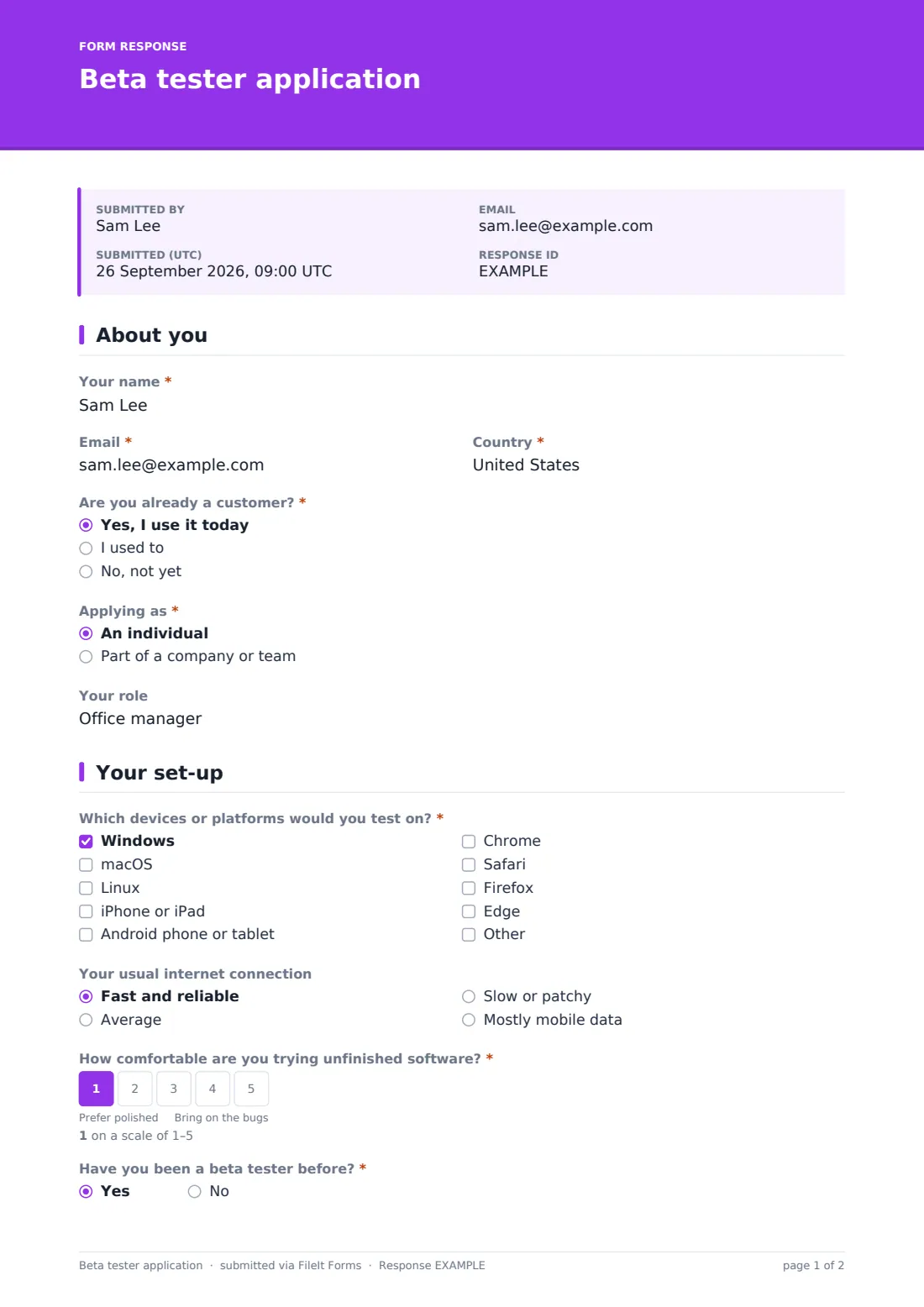
The applicant gives their name, email and country, says whether they're already a customer, and whether they're applying as an individual or as part of a company or team. Company applicants are asked for the company name and size. An optional question asks for their role.
2 Your set-up
Which devices or platforms would you test on? lists Windows, macOS, Linux, iPhone or iPad, Android, and the main browsers. At least one is required. The applicant describes their usual internet connection, then rates how comfortable they are trying unfinished software on a 1–5 scale from Prefer polished to Bring on the bugs. A Yes to Have you been a beta tester before? asks which products.
3 How you'd test
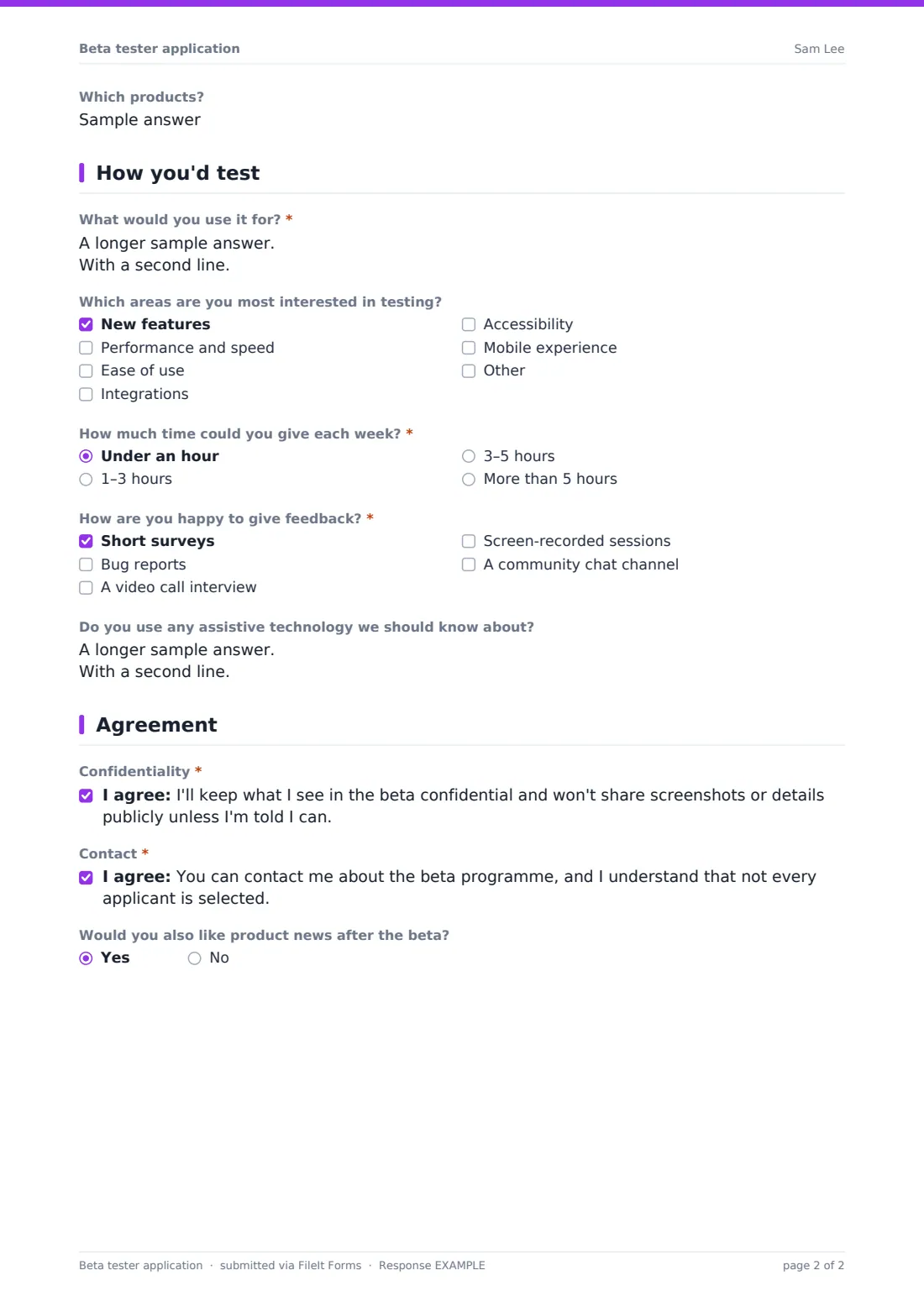
What would you use it for? is the most useful answer on the form, so it's required, with help text asking for a real task or problem. Applicants tick the areas they'd most like to test, such as new features, performance, ease of use, integrations, accessibility or mobile.
They say how much time they could give each week and how they're happy to give feedback: short surveys, bug reports, a video call interview, screen-recorded sessions or a community chat channel. An optional question invites testers who use assistive technology to tell you about it.
4 Agreement
Two consent statements close the form: one to keep the beta confidential, and one agreeing to be contacted about the programme on the understanding that not everyone is selected. A last question asks whether they'd like product news after the beta.
Make the template yours
- Replace the platform list with the ones your product actually supports
- Rename the interest areas after the features you're testing
- Set a maximum number of responses to cap the applicant pool
- Add a close date for a fixed recruitment window
- Ask for a username or account ID if testers must already be customers
Tips for a better beta tester application form
- Pick testers for variety of devices and use cases, not just enthusiasm
- Tell selected testers exactly what you want from them each week
- Let unsuccessful applicants know, and keep them in mind for the next round
- Thank testers publicly at launch, if they agree
- Keep the confidentiality wording short and clear
Every response becomes a PDF in your vault
Each application is filed as a PDF in the vault folder you chose, titled with the applicant's name. You can be emailed each time someone applies, or turn notifications off for a busy launch.
When it's time to choose, export the Responses table to CSV. Every checkbox and scale becomes a column, so you can filter for Android users who give three to five hours a week, or for company applicants above a certain size.
- Start from this template. It opens in the FileIt Forms designer — change any question, add pages, set the rules for when questions appear.
- Share it. Turn on a public link, or send it to people by email, each with their own link. They don’t need a FileIt account.
- Get the answers as PDFs. Each response is saved as a PDF in the vault folder you choose, with uploaded files attached — and listed in a Responses table you can export to CSV.
Beta tester application form: frequently asked questions
Is this beta tester application form free?
Yes. It's a starter template in FileIt's Forms app, and you can change any question.
Is the confidentiality agreement a legal NDA?
It's a plain-language confidentiality statement the applicant ticks. If you need a formal non-disclosure agreement, check with whoever handles your contracts.
Can I limit the number of applicants?
Yes. Set a maximum number of responses or a close date, and the form closes itself.
Do applicants need a FileIt account?
No. Share the public link on your website, newsletter or social channels.
How do I choose testers from the applications?
Export the responses to CSV and filter by platform, time available, feedback preferences or company size.
Can I invite specific customers instead of using a public link?
Yes. Send the form by email to a list of customers, each with their own link, and track who has replied.