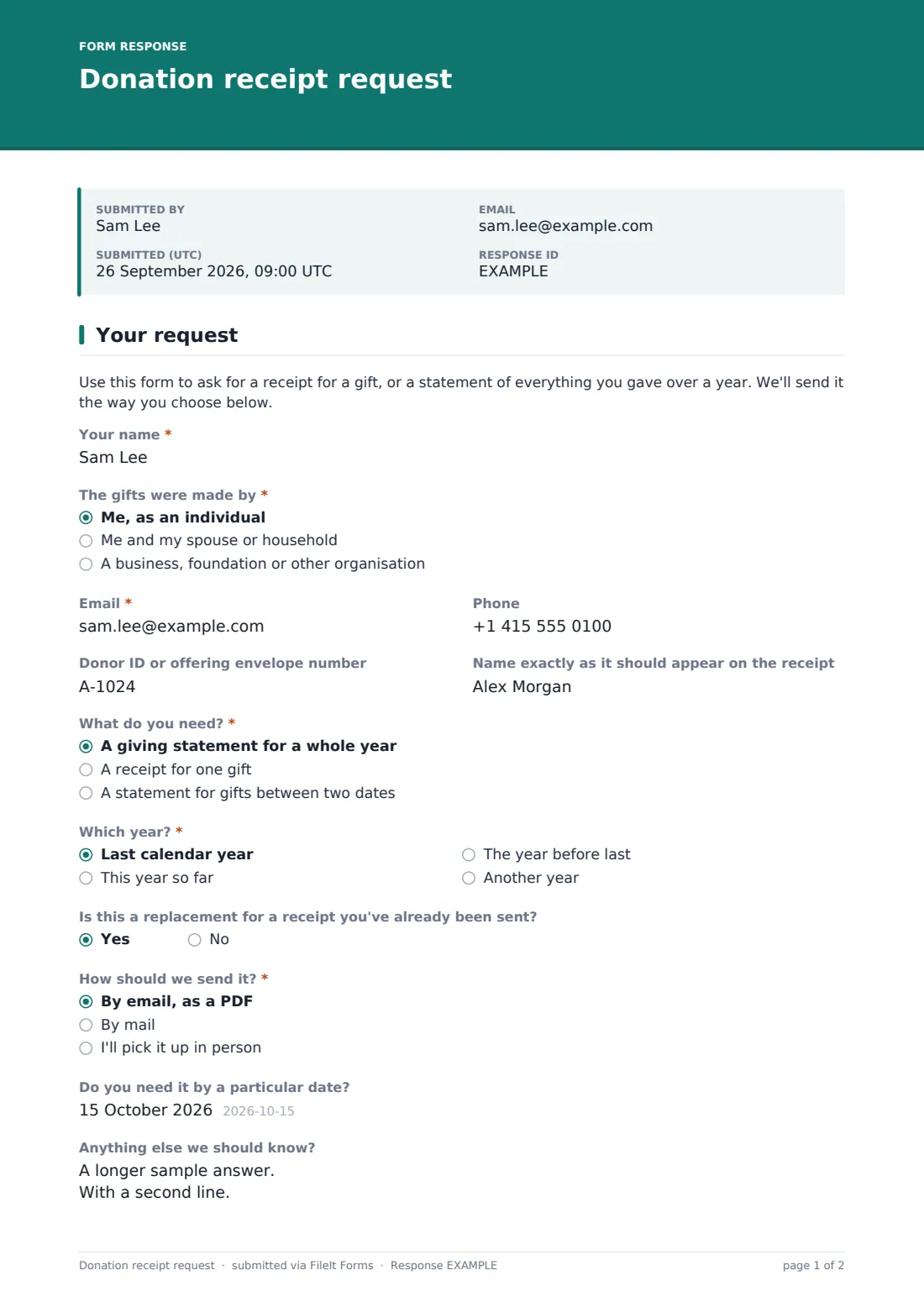

What is the donation receipt request form template?
Every January the requests arrive: a member who misplaced their annual statement, a couple who need one receipt for a large gift in March, a small business that gave through its own account and wants the paperwork in the company's name. Answering them by email means asking follow-up questions about which year, which gift and where to send it. This donation receipt request form collects all of that in one short page.
The donor gives their name and says whether the gifts were theirs, their household's or an organisation's — the last choice asks for the organisation's name. A donor ID or offering envelope number is optional but saves your finance team a search. The donor then picks a whole-year statement, a single gift or a date range, and only the questions for that choice appear. Choosing "By mail" reveals a postal address; email and in-person pickup don't ask for one.
Each request lands as a tidy PDF in your FileIt vault and in the Responses table, so whoever prepares receipts can work through the list and see at a glance what each donor needs.
- Best for
- Churches, mosques, synagogues, charities and community nonprofits that issue gift receipts
- Filled in by
- Donors — individuals, households or organisations
- Time to complete
- About 2 minutes
- Includes
- Whole-year, single-gift or date-range requests, donor ID, delivery choice with postal address when needed
Who uses a donation receipt request form?
- A congregation fielding year-end giving statement requests from members
- A charity replacing receipts donors have lost or never received
- A family business asking for a receipt in the company's name rather than the owner's
- A donor who gave stock or goods and needs written acknowledgement of the gift
- A finance volunteer who wants every request in one list instead of scattered emails
Questions on this donation receipt request form
21 questions · includes conditional questions.
1 Your request
- Your name*
- The gifts were made by* Me, as an individual · Me and my spouse or household · A business, foundation or other organisation
- Organisation name* asked only when it applies
- Email*
- Phone
- Donor ID or offering envelope number
- Name exactly as it should appear on the receipt
- What do you need?* A giving statement for a whole year · A receipt for one gift · A statement for gifts between two dates
- Which year?* asked only when it applies Last calendar year · This year so far · The year before last · Another year
- Which year exactly?* asked only when it applies
- Date of the gift* asked only when it applies
- Amount asked only when it applies
- How was it given? asked only when it applies Cash · Check · Card · Bank transfer · Online giving page · Stock or securities · Goods or in-kind donation
- Fund, appeal or purpose (if any) asked only when it applies
- From* asked only when it applies
- To* asked only when it applies
- Is this a replacement for a receipt you've already been sent?
- How should we send it?* By email, as a PDF · By mail · I'll pick it up in person
- Postal address* asked only when it applies
- Do you need it by a particular date?
- Anything else we should know?
The donation receipt request form, page by page
1 Your request
A short paragraph explains what the form is for. The donor enters "Your name" and answers "The gifts were made by": me as an individual, me and my spouse or household, or a business, foundation or other organisation — the last asks for the "Organisation name". Email is required and phone is optional. Two optional fields help you get the paperwork right: "Donor ID or offering envelope number" and "Name exactly as it should appear on the receipt".
"What do you need?" has three answers. A giving statement for a whole year asks "Which year?" — last calendar year, this year so far, the year before last, or another year, which asks the exact year. A receipt for one gift asks for the "Date of the gift", the amount, "How was it given?" (from cash and check to stock or securities and goods given in kind) and any fund or appeal it went to. A statement for gifts between two dates asks for From and To.
The donor then says whether this replaces a receipt they were already sent, and answers "How should we send it?": by email as a PDF, by mail, or picked up in person. Only "By mail" shows the "Postal address" question. An optional date for when they need it and a free-text note finish the page.
Make the template yours
- Change the payment methods in "How was it given?" to match the ways your community actually gives
- Swap "Fund, appeal or purpose" for a dropdown listing your own funds
- Rename "offering envelope number" to the term your donor database uses
- Add a line to the opening paragraph saying when year-end statements are normally sent
- Send the requests to your treasurer or bookkeeper by adding their email to the notification list
- Set a close date if you only want to take requests during a busy season
Tips for a better donation receipt request form
- Link the form from your online giving page and your January newsletter, where donors look first
- Treat a replacement request as a prompt to check that the original went to the right address
- Ask your accountant what your receipts need to say — this form only collects the request
- Keep a note of when each receipt was sent so a second request is easy to answer
- Reply even when there's no record of the gift, so the donor can check their bank statement
Every response becomes a PDF in your vault
Each request is saved as a PDF in the vault folder you choose, and an email goes to the form owner and anyone else on the notification list. If the donor's email is on the form, they get a copy of what they asked for.
The Responses table lists every request with its date, so the person who issues receipts can sort by delivery method, search by name and export the list to CSV to match against your giving records.
- Start from this template. It opens in the FileIt Forms designer — change any question, add pages, set the rules for when questions appear.
- Share it. Turn on a public link, or send it to people by email, each with their own link. They don’t need a FileIt account.
- Get the answers as PDFs. Each response is saved as a PDF in the vault folder you choose, with uploaded files attached — and listed in a Responses table you can export to CSV.
Donation receipt request form: frequently asked questions
Is this donation receipt request form free?
Yes. It's one of the starter templates in the Forms app, available on every FileIt account including the free plan.
Does FileIt create the receipt itself?
No. The form collects the donor's request. Your team prepares and sends the receipt or statement from your own giving records.
Can I use it for a statement from a past year?
Yes. "Which year?" includes last calendar year, this year so far, the year before last and another year, which asks for the exact year.
Why is the postal address hidden at first?
Most donors want an email or will pick the receipt up. The address question appears only when someone chooses "By mail", which keeps the form short for everyone else.
Can a business ask for a receipt in its own name?
Yes. Choosing a business, foundation or other organisation asks for the organisation's name, and the donor can spell out exactly how the name should be printed.
Will this tell donors whether their gift is tax-deductible?
No. The form doesn't give tax advice. If donors ask, point them to their own tax adviser.