What is the customer onboarding feedback form template?
The first weeks with a new product decide a lot. Customers who reach real value quickly tend to stay; customers who get stuck on setup, can't find the right guide or never hear back from their contact often don't, and they rarely say why.
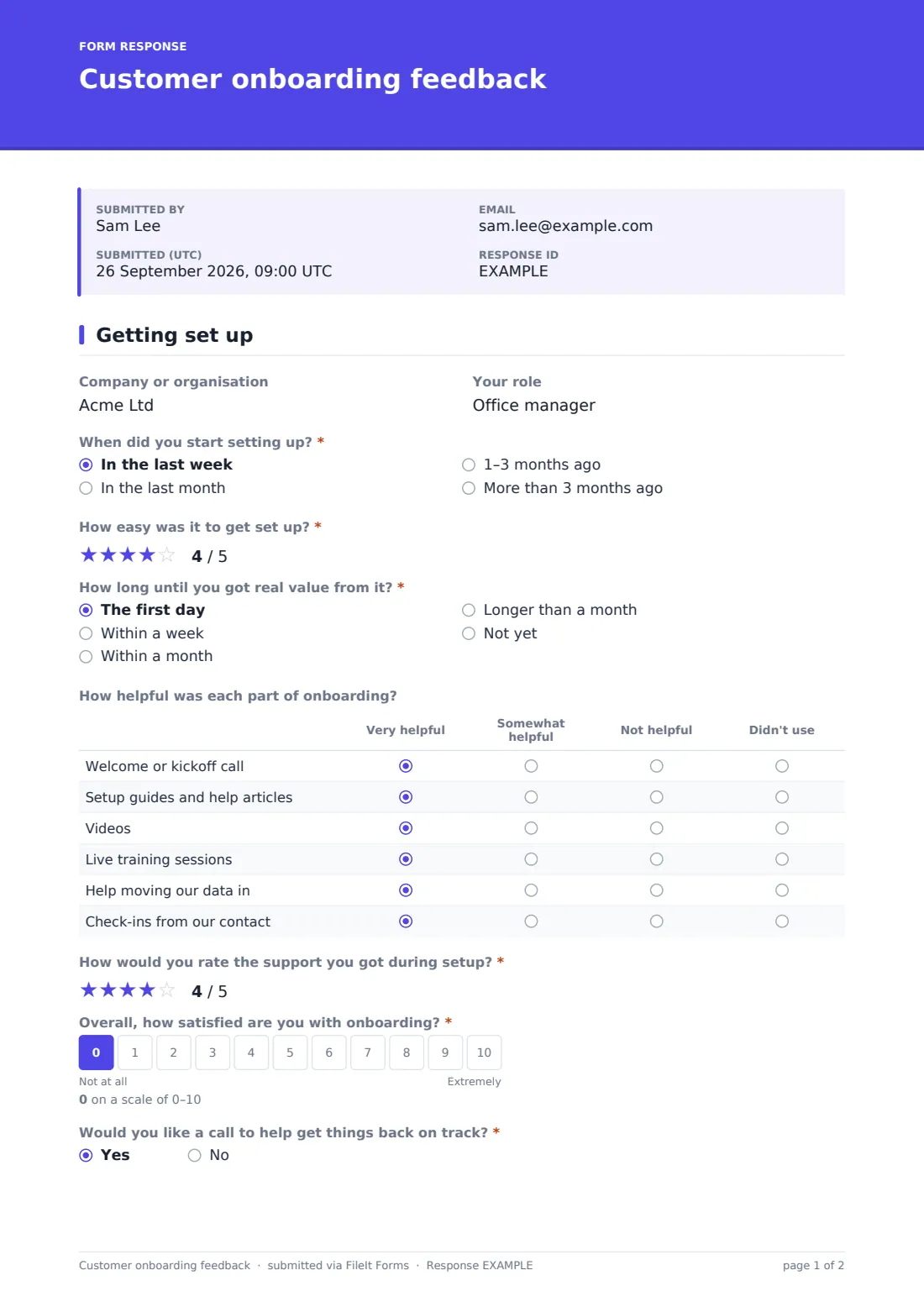
This onboarding survey asks them directly. The first page covers when they started, how easy setup was, how long it took to get real value, how helpful each part of onboarding was, and how they'd rate support. It finishes with an overall satisfaction score from 0 to 10.
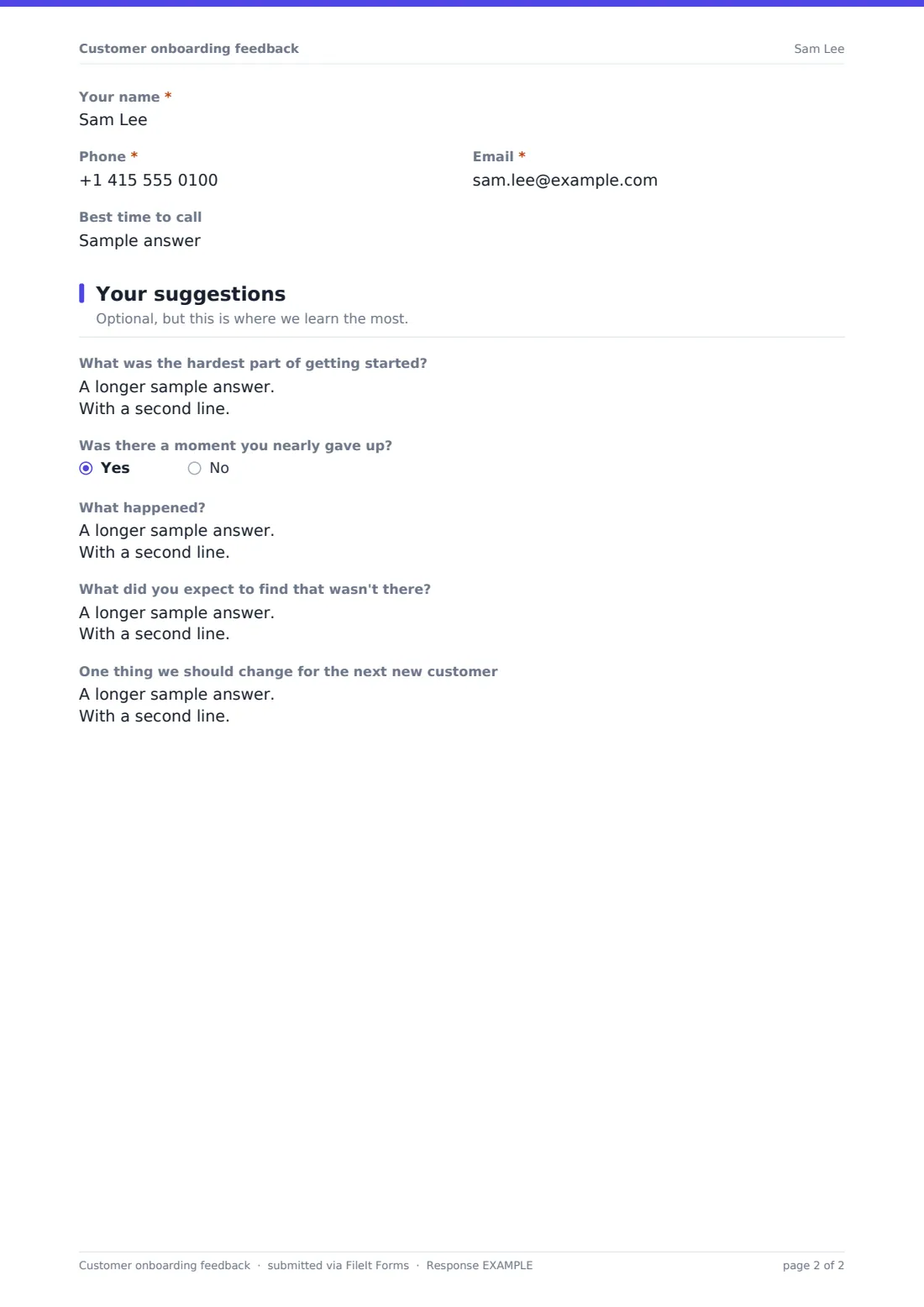
A score below 6 brings up a single question: Would you like a call to help get things back on track? Saying yes asks for a name, phone, email and the best time to call, so your customer success team can step in. Customers who haven't got value yet are asked what's stopping them. The second page invites suggestions, including the hardest part of getting started and the moment they nearly gave up. Every response is filed as a PDF in FileIt.
- Best for
- SaaS companies, agencies, customer success and implementation teams
- Filled in by
- New customers, a few weeks after they start
- Time to complete
- About 3 minutes
- Includes
- Ease and support ratings, time to value, a training grid, 0–10 satisfaction, callback logic, suggestions and testimonial consent
Who uses a customer onboarding feedback form?
- A software company surveys every account 30 days after signup
- An implementation team checks in at the end of a rollout project
- A customer success manager spots accounts that need a rescue call
- A product team learns which setup steps cause the most friction
- A training team finds out whether live sessions are worth the time
- An agency asks new clients how the first month went
Questions on this customer onboarding feedback form
20 questions over 2 pages · includes conditional questions, multiple pages, consent checkbox, ratings.
1 Getting set up
- Company or organisation
- Your role
- When did you start setting up?* In the last week · In the last month · 1–3 months ago · More than 3 months ago
- How easy was it to get set up?*
- How long until you got real value from it?* The first day · Within a week · Within a month · Longer than a month · Not yet
- What's stopping you getting value so far? asked only when it applies
- How helpful was each part of onboarding? Very helpful · Somewhat helpful · Not helpful · Didn't use
- How would you rate the support you got during setup?*
- Overall, how satisfied are you with onboarding?*
- Would you like a call to help get things back on track?* asked only when it applies
- Your name* asked only when it applies
- Phone* asked only when it applies
- Email* asked only when it applies
- Best time to call asked only when it applies
2 Your suggestions
- What was the hardest part of getting started?
- Was there a moment you nearly gave up?
- What happened? asked only when it applies
- What did you expect to find that wasn't there?
- One thing we should change for the next new customer
- Testimonial asked only when it applies
The customer onboarding feedback form, page by page
1 Getting set up
Company and role are optional. When did you start setting up? is required, as are the star rating How easy was it to get set up? and How long until you got real value from it? Picking not yet reveals What's stopping you getting value so far?
A grid asks how helpful each part of onboarding was: the welcome or kickoff call, setup guides and help articles, videos, live training, help moving data in, and check-ins from their contact, each rated very helpful, somewhat helpful, not helpful or didn't use. A required star rating covers support during setup, then Overall, how satisfied are you with onboarding? on a 0–10 scale.
Scores below 6 reveal the callback question; a yes asks for name, phone, email and the best time to call.
2 Your suggestions
This page is optional. It asks for the hardest part of getting started, whether there was a moment they nearly gave up (and what happened), what they expected to find that wasn't there, and one thing you should change for the next new customer. Customers who scored 9 or 10 can agree to be quoted in your marketing.
Make the template yours
- Rename the grid rows to match your own onboarding steps
- Change the callback threshold, or show it to everyone
- Add a question about which plan or package the customer bought
- Send personal emailed requests so each response is tied to an account
- Add your customer success team's address to the extra notification emails
- Set the survey to close at the end of each quarter for a clean snapshot
Tips for a better customer onboarding feedback form
- Send the survey at a consistent point, such as 30 days after signup
- Call back anyone who asks within one working day
- Read the 'nearly gave up' answers as a list; they point at your weakest steps
- Share the training grid results with whoever runs onboarding sessions
- Compare time-to-value answers before and after you change the setup process
- Thank customers who leave suggestions and tell them what you changed
Every response becomes a PDF in your vault
Each response becomes a PDF in the vault folder you choose. The account owner is emailed, and you can add extra addresses, such as a customer success inbox, so callback requests reach the right people.
Filter responses by score or export them to CSV to spot trends across a quarter's new customers.
- Start from this template. It opens in the FileIt Forms designer — change any question, add pages, set the rules for when questions appear.
- Share it. Turn on a public link, or send it to people by email, each with their own link. They don’t need a FileIt account.
- Get the answers as PDFs. Each response is saved as a PDF in the vault folder you choose, with uploaded files attached — and listed in a Responses table you can export to CSV.
Customer onboarding feedback form: frequently asked questions
Is this onboarding feedback template free?
Yes. It's included with the Forms app on every FileIt account, including the free plan.
Who sees the callback request?
The account owner gets an email for each response, and you can add up to ten more addresses in the form's settings.
Can I tie responses to specific customers?
Yes. Send personal emailed requests from the Share tab, or ask for the company name on the first page.
Can I change the satisfaction scale?
Yes. Edit the scale's range and labels in the designer, and update the callback threshold to match.
Is the second page required?
No. Every question on it is optional, so customers can submit after the first page's required questions.
Can I quote customers' comments?
Only from customers who tick the testimonial consent, which appears when they score 9 or 10.