
What is the customer effort score survey form template?
Satisfaction scores tell you whether customers liked an interaction. Effort tells you something more practical: how much work they had to do to get their problem sorted. Repeating themselves, being passed between teams or contacting you three times about the same thing all show up in an effort score long before they show up in churn.
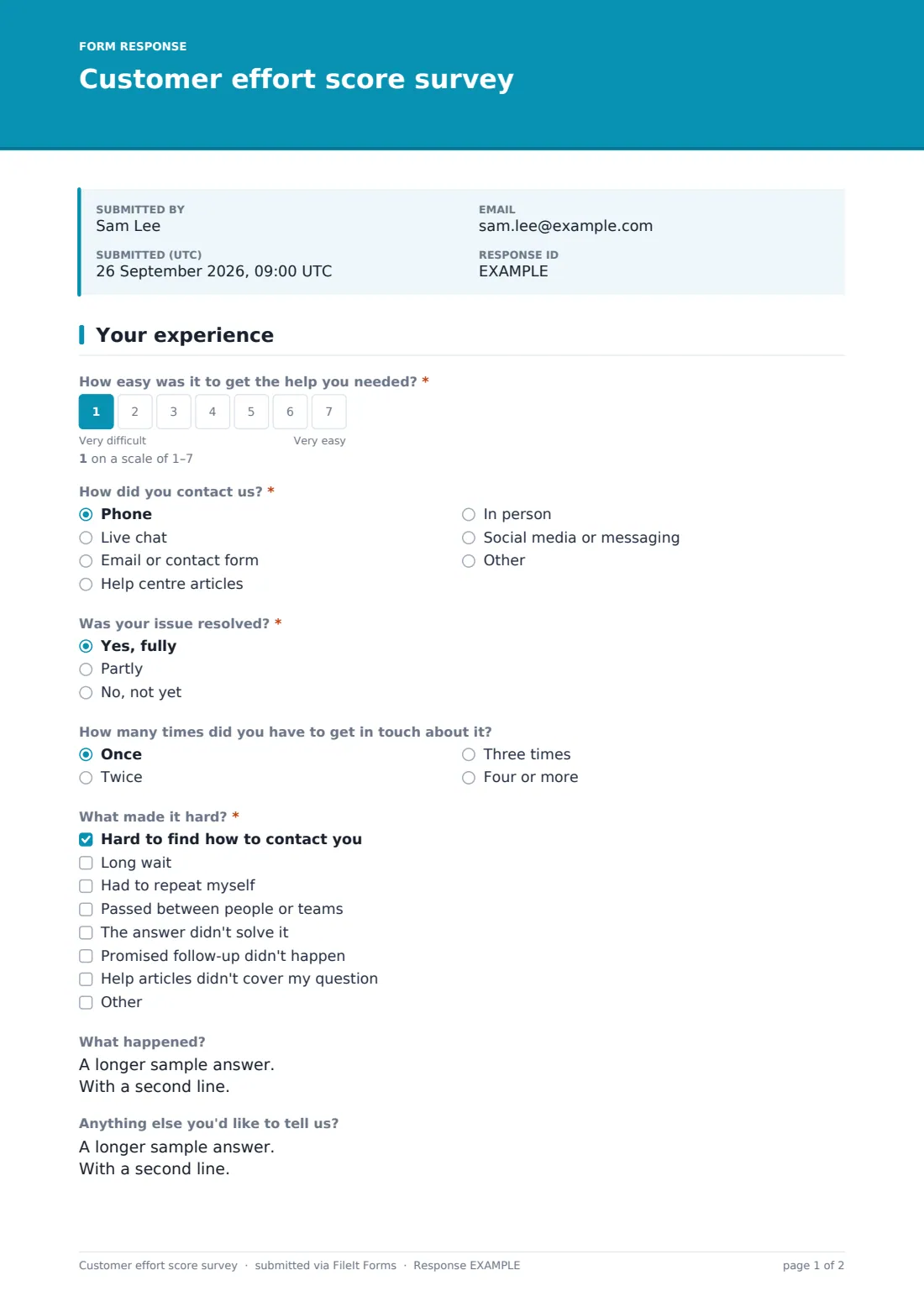
This template asks the core question first: How easy was it to get the help you needed? on a scale from 1 (very difficult) to 7 (very easy). It then asks how the customer contacted you, whether the issue was resolved, and how many times they had to get in touch about it.
The follow-ups depend on the score. A rating of 1 to 3 brings up What made it hard? with options such as a long wait, having to repeat myself or a promised follow-up that didn't happen, plus a box to describe what happened. A rating of 6 or 7 asks what made it easy. Customers can add a ticket number and ask for someone to follow up. Every response is saved as a PDF in FileIt.
- Best for
- Customer support teams, help desks, contact centres and service businesses
- Filled in by
- Customers, shortly after a support contact
- Time to complete
- About a minute
- Includes
- 1–7 effort scale, channel, resolution, contact count, score-based follow-ups, ticket reference and optional follow-up details
Who uses a customer effort score survey form?
- Sending a link in the email that closes a support ticket
- Comparing effort across phone, chat, email and in-person help
- Testing whether a new help centre reduces repeat contacts
- Measuring effort after an order, refund or returns process
- Spotting handoffs between teams that frustrate customers
- Giving support agents specific feedback beyond a thumbs up
Questions on this customer effort score survey form
13 questions · includes conditional questions, ratings.
1 Your experience
- How easy was it to get the help you needed?*
- How did you contact us?* Phone · Live chat · Email or contact form · Help centre articles · In person · Social media or messaging
- Was your issue resolved?* Yes, fully · Partly · No, not yet
- How many times did you have to get in touch about it? Once · Twice · Three times · Four or more
- What made it hard?* asked only when it applies Hard to find how to contact you · Long wait · Had to repeat myself · Passed between people or teams · The answer didn't solve it · Promised follow-up didn't happen · Help articles didn't cover my question
- What happened? asked only when it applies
- What made it easy? asked only when it applies
- Anything else you'd like to tell us?
- Ticket or case number, if you have it
- Would you like someone to follow up with you?
- Your name* asked only when it applies
- Email* asked only when it applies
- Phone asked only when it applies
The customer effort score survey form, page by page
1 Your experience
The page starts with the required effort question on a 1–7 scale. How did you contact us? is required and lists phone, live chat, email or contact form, help centre articles, in person and social media or messaging, with an other option. Was your issue resolved? is also required: yes, fully; partly; or no, not yet. How many times did you have to get in touch about it? is an optional dropdown from once to four or more.
Scores below 4 reveal What made it hard?, which needs at least one tick, and What happened? for the details. Scores above 5 reveal What made it easy? Everyone sees Anything else you'd like to tell us? and an optional ticket or case number. Answering yes to Would you like someone to follow up with you? asks for a name and email (both required) and an optional phone number.
Make the template yours
- Change the scale to 1–5 if that matches the rest of your reporting
- Reword the main question as an agreement statement, such as 'The company made it easy to handle my issue'
- Edit the channel list to match how customers actually reach you
- Add a question naming the agent or team who helped
- Change the score thresholds for the follow-up questions in the designer
- Turn off the follow-up contact questions if responses should stay anonymous
Tips for a better customer effort score survey form
- Send the survey as soon as the issue closes, while the experience is fresh
- Look at the 'what made it hard' answers together; patterns matter more than single scores
- Compare effort by channel before deciding where to invest
- Follow up quickly with customers who ask for it, especially after a low score
- Track the average score over time, not just individual responses
- Keep the survey to one page; effort surveys that take effort get fewer answers
Every response becomes a PDF in your vault
Each response is filed as a PDF in the vault folder you choose, and the account owner is emailed so low scores and follow-up requests can be picked up the same day.
Export the Responses table to CSV to calculate your average effort score, or the share of customers scoring 5 or above, and to break results down by channel.
- Start from this template. It opens in the FileIt Forms designer — change any question, add pages, set the rules for when questions appear.
- Share it. Turn on a public link, or send it to people by email, each with their own link. They don’t need a FileIt account.
- Get the answers as PDFs. Each response is saved as a PDF in the vault folder you choose, with uploaded files attached — and listed in a Responses table you can export to CSV.
Customer effort score survey form: frequently asked questions
Is this customer effort score survey free?
Yes. It's one of the ready-made templates in the Forms app, included with every FileIt account, including the free plan.
Does FileIt calculate the CES for me?
No. Export responses to CSV and calculate the average or percentage in a spreadsheet.
Is the survey anonymous?
Yes, unless the customer asks for a follow-up and gives their name and email, or you send personal emailed requests.
Can I attach it to support ticket emails?
Yes. Publish the form and paste the link into your closing email or help desk signature.
How is CES different from CSAT or NPS?
CSAT asks how satisfied someone is, and NPS asks whether they'd recommend you. CES asks how easy it was to get something done, which points more directly at process problems.
Can I change which scores show the follow-ups?
Yes. Edit the logic on those questions in the designer to use any threshold you like.