
What is the customer health check form template?
Accounts rarely churn without warning. Usage drifts down, the executive sponsor moves on, support tickets pile up, or regular meetings quietly stop. The signs are usually there — they just aren't written down in one place where a manager can see them across the book.
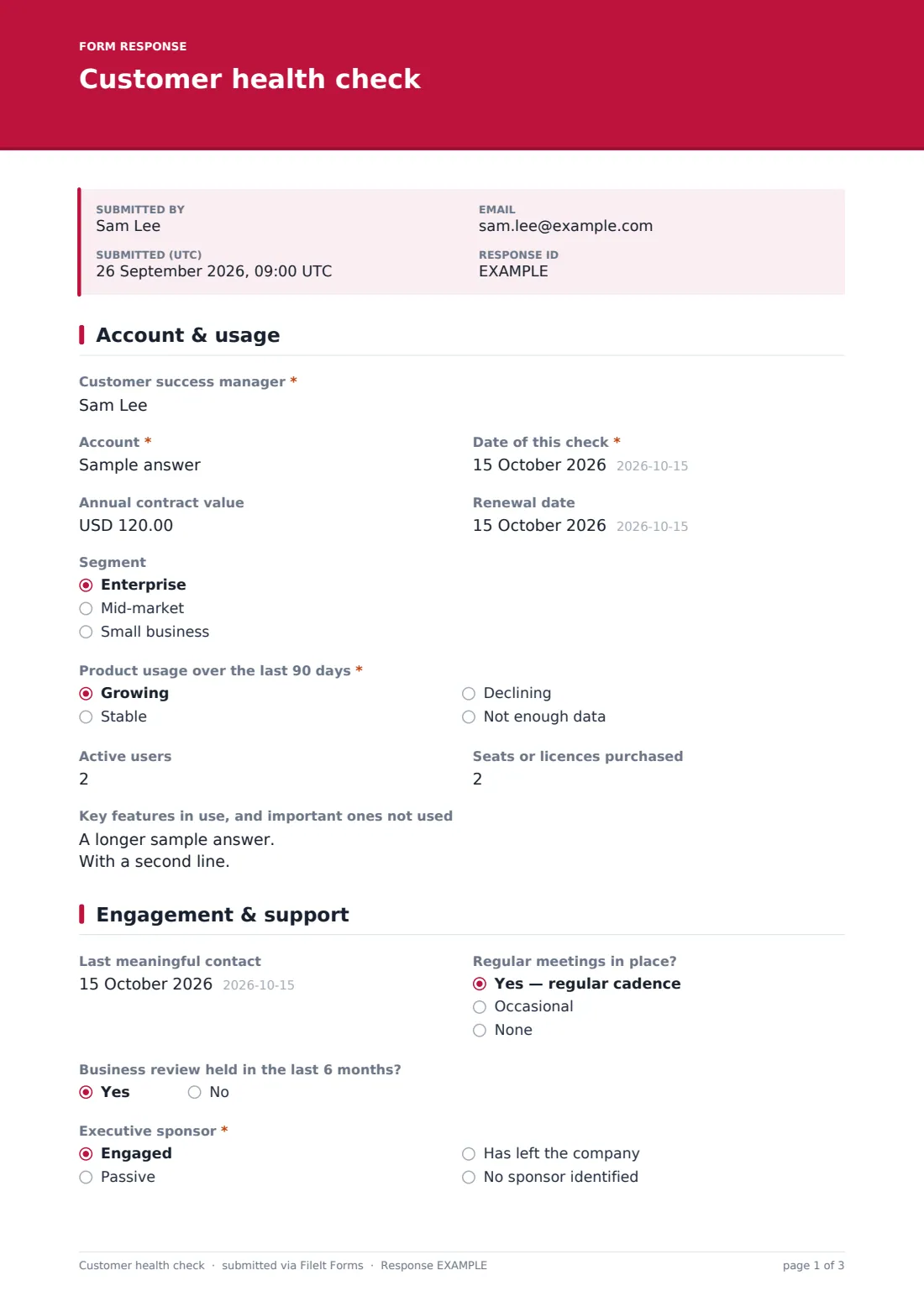
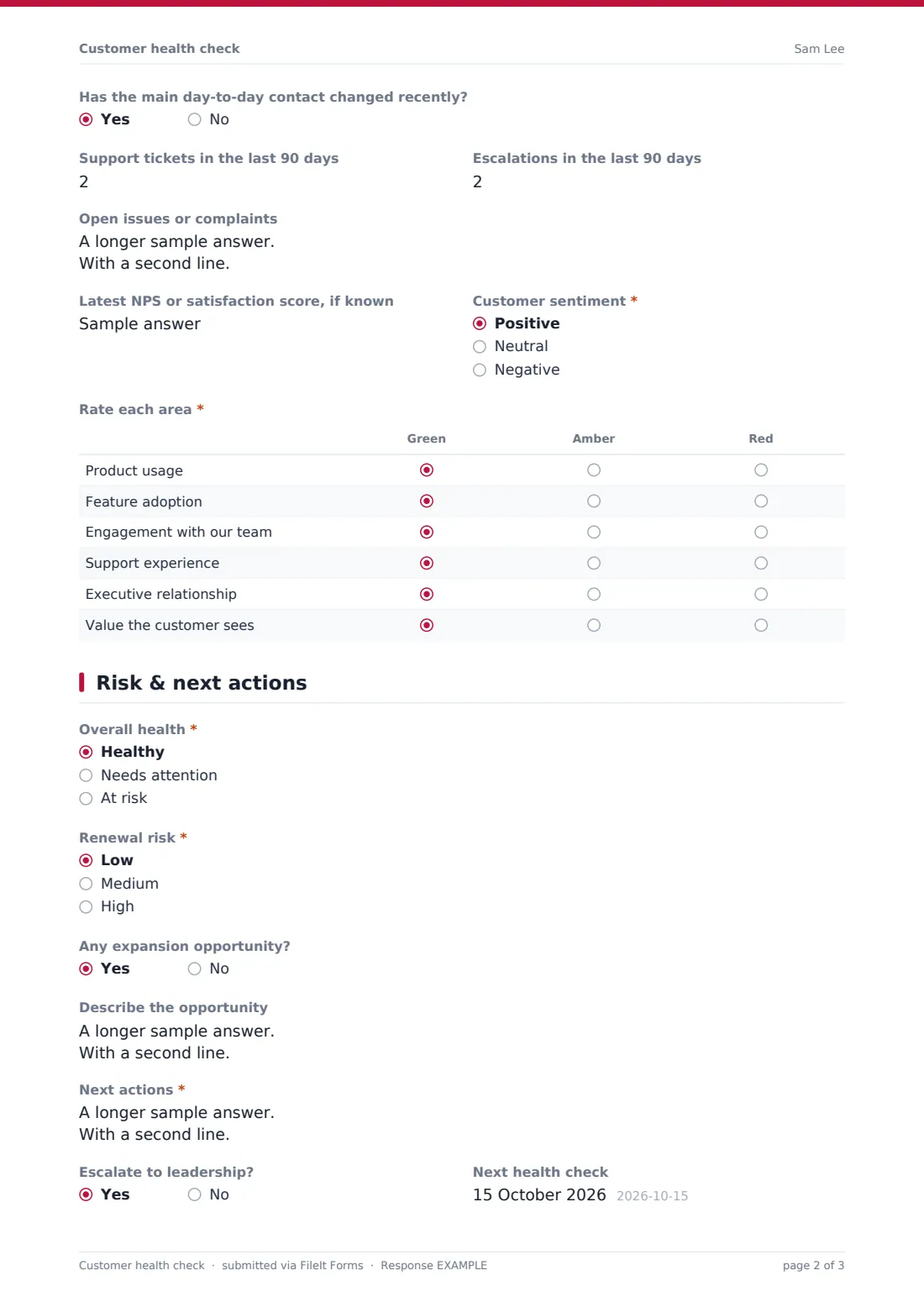
This customer health check collects them consistently. The first page covers the account, contract value, renewal date, segment, the usage trend over the last 90 days, active users against seats purchased, and which key features are and aren't used. The second page records the last meaningful contact, meeting cadence, recent business reviews, executive sponsor status, contact changes, ticket and escalation counts, open issues, the latest satisfaction score, overall sentiment, and a green-amber-red grid across six areas.
The final page sets an overall health rating and renewal risk; any risk above low asks what's driving it. The CSM records expansion opportunities, next actions with owners and dates, whether to escalate, and when to check again. Each check is saved as a PDF in your FileIt vault, building a history for the account.
- Best for
- Customer success teams, account managers and SaaS businesses
- Filled in by
- The customer success manager responsible for the account
- Time to complete
- About 10 minutes
- Includes
- Usage and engagement questions, red-amber-green grid, renewal risk drivers and next actions
Who uses a customer health check form?
- Monthly health checks across a CSM's book of accounts
- Preparing for a renewal conversation 90 days out
- Teams without a customer success platform tracking health manually
- Handing an account to a new CSM with a current snapshot
- Flagging at-risk accounts for a leadership review
- Spotting expansion opportunities in healthy accounts
Questions on this customer health check form
29 questions over 3 pages · includes conditional questions, multiple pages, ratings.
1 Account & usage
- Customer success manager*
- Account*
- Date of this check*
- Annual contract value
- Renewal date
- Segment Enterprise · Mid-market · Small business
- Product usage over the last 90 days* Growing · Stable · Declining · Not enough data
- Active users
- Seats or licences purchased
- Key features in use, and important ones not used
2 Engagement & support
- Last meaningful contact
- Regular meetings in place? Yes — regular cadence · Occasional · None
- Business review held in the last 6 months?
- Executive sponsor* Engaged · Passive · Has left the company · No sponsor identified
- Has the main day-to-day contact changed recently?
- Support tickets in the last 90 days
- Escalations in the last 90 days
- Open issues or complaints
- Latest NPS or satisfaction score, if known
- Customer sentiment* Positive · Neutral · Negative
- Rate each area* Green · Amber · Red
3 Risk & next actions
- Overall health* Healthy · Needs attention · At risk
- Renewal risk* Low · Medium · High
- What's driving the risk?* asked only when it applies Low usage · Sponsor has left · Budget pressure · Unresolved support issues · Evaluating a competitor · Product gaps · Merger or reorganisation · Poor onboarding
- Any expansion opportunity?
- Describe the opportunity asked only when it applies
- Next actions*
- Escalate to leadership?
- Next health check
The customer health check form, page by page
1 Account & usage
The CSM names the account and the date of the check, with optional contract value, renewal date and segment. Product usage over the last 90 days is required — growing, stable, declining or not enough data.
Active users and seats purchased sit side by side so under-used licences stand out, followed by a box for key features in use and important ones not used.
2 Engagement & support
Last meaningful contact, meeting cadence and whether a business review was held in the last 6 months show how engaged the customer is. Executive sponsor status — engaged, passive, left the company or none identified — is required, and a yes/no flags a recent change of day-to-day contact.
Support tickets and escalations in the last 90 days, open issues, the latest NPS or satisfaction score and overall sentiment follow. A required grid rates product usage, feature adoption, engagement, support experience, executive relationship and perceived value as green, amber or red.
3 Risk & next actions
Overall health and renewal risk are required. Any renewal risk above low reveals a required checklist of drivers, from low usage and a departed sponsor to competitor evaluation and poor onboarding.
A yes to expansion opens a box to describe the opportunity. Next actions are required, one per line with an owner and due date, followed by whether to escalate to leadership and the date of the next health check.
Make the template yours
- Change the grid rows to the health factors your team tracks
- Swap green-amber-red for a 1–5 score if you prefer numbers
- Change the usage window from 90 days to match your reporting
- Add a question on onboarding status for newer accounts
- File checks in a vault folder per account to keep each account's history together
- Notify a customer success lead by email whenever a check is submitted
Tips for a better customer health check form
- Score from evidence such as usage data and ticket counts, not just how the last call felt
- Treat a sponsor who has left as urgent — find and engage a new one quickly
- Run checks on a fixed rhythm so changes in health show up early
- Start renewal conversations early for any account rated at risk
- Give every next action an owner and a date, and review them at the next check
- Compare checks across the book to see which risk drivers keep recurring
Every response becomes a PDF in your vault
Each health check is saved as a PDF in the vault folder you choose, so an account's checks build into a dated history. Owner notifications can email a team lead when a check is submitted.
The Responses table lets managers filter checks, open any one in full and export to CSV to build a portfolio view of overall health and renewal risk.
- Start from this template. It opens in the FileIt Forms designer — change any question, add pages, set the rules for when questions appear.
- Share it. Turn on a public link, or send it to people by email, each with their own link. They don’t need a FileIt account.
- Get the answers as PDFs. Each response is saved as a PDF in the vault folder you choose, with uploaded files attached — and listed in a Responses table you can export to CSV.
Customer health check form: frequently asked questions
Is this template free?
Yes. It's included in the FileIt Forms app on every account, including the free plan, and every question can be edited, removed or added to.
Does the form calculate a health score?
No. The CSM sets the overall health and renewal risk based on the answers. Export the Responses table to CSV if you want to build a scoring model.
Does it pull usage data from our product?
No. FileIt Forms doesn't connect to product analytics. The CSM enters the usage trend and user counts from your own reports.
How often should a health check be done?
Many teams do one monthly or quarterly, and again before renewal conversations. The form allows as many submissions as you need.
Can I change the areas in the rating grid?
Yes. Edit the rows and columns of the grid in the designer.
Is this form shared with the customer?
No — it's for your internal team. Share the link only with CSMs and managers.
Can it flag at-risk accounts to a manager?
Owner notifications email you on every submission. Overall health and renewal risk are in the Responses table, so at-risk accounts are easy to find.
Can a new CSM see an account's history?
Yes, if checks are filed in the same vault folder; each PDF is dated and kept.