What is the club officer election ballot form template?
Plenty of clubs still elect officers by paper ballot at the annual meeting, which leaves out everyone who couldn't make it. This ballot form lets every member vote from wherever they are. Each office — president, vice president, secretary, treasurer and member at large — is one question with the candidates listed, a write-in choice and an abstain option.
Choosing write-in for an office opens a box for the name, so write-in votes are recorded against the right office instead of scrawled in a margin. Every ballot asks for the member's name and membership number, which is what you'll use to check eligibility and spot duplicates, and ends with a short confirmation that the voter is a member in good standing casting one ballot for themselves.
Each ballot is filed as a PDF in your FileIt vault, and the Responses table gives the election committee one row per voter to check against the membership list and count.
- Best for
- Clubs, societies, associations, PTAs, alumni groups and small nonprofits
- Filled in by
- Members eligible to vote
- Time to complete
- About 2 minutes
- Includes
- Member number, five offices with candidates, write-in and abstain on each, comments, confirmation statement
Who uses a club officer election ballot form?
- A garden club or book club electing its committee
- A sports club's annual general meeting
- A PTA electing officers for the school year
- An alumni association's board election
- A hobby society with members spread across the country
Questions on this club officer election ballot form
15 questions · includes conditional questions, consent checkbox.
1 Your ballot
- Your name*
- Membership number*
- President* Jordan Ellis · Priya Nair · Write-in · Abstain
- Write-in for president* asked only when it applies
- Vice president* Marcus Bell · Ana Torres · Write-in · Abstain
- Write-in for vice president* asked only when it applies
- Secretary* Helen Cho · Write-in · Abstain
- Write-in for secretary* asked only when it applies
- Treasurer* David Okafor · Ruth Lindqvist · Write-in · Abstain
- Write-in for treasurer* asked only when it applies
- Member at large* Sam Whitaker · Leila Haddad · Tom Brennan · Write-in · Abstain
- Write-in for member at large* asked only when it applies
- Comments for the incoming board
- Confirmation*
The club officer election ballot form, page by page
1 Your ballot
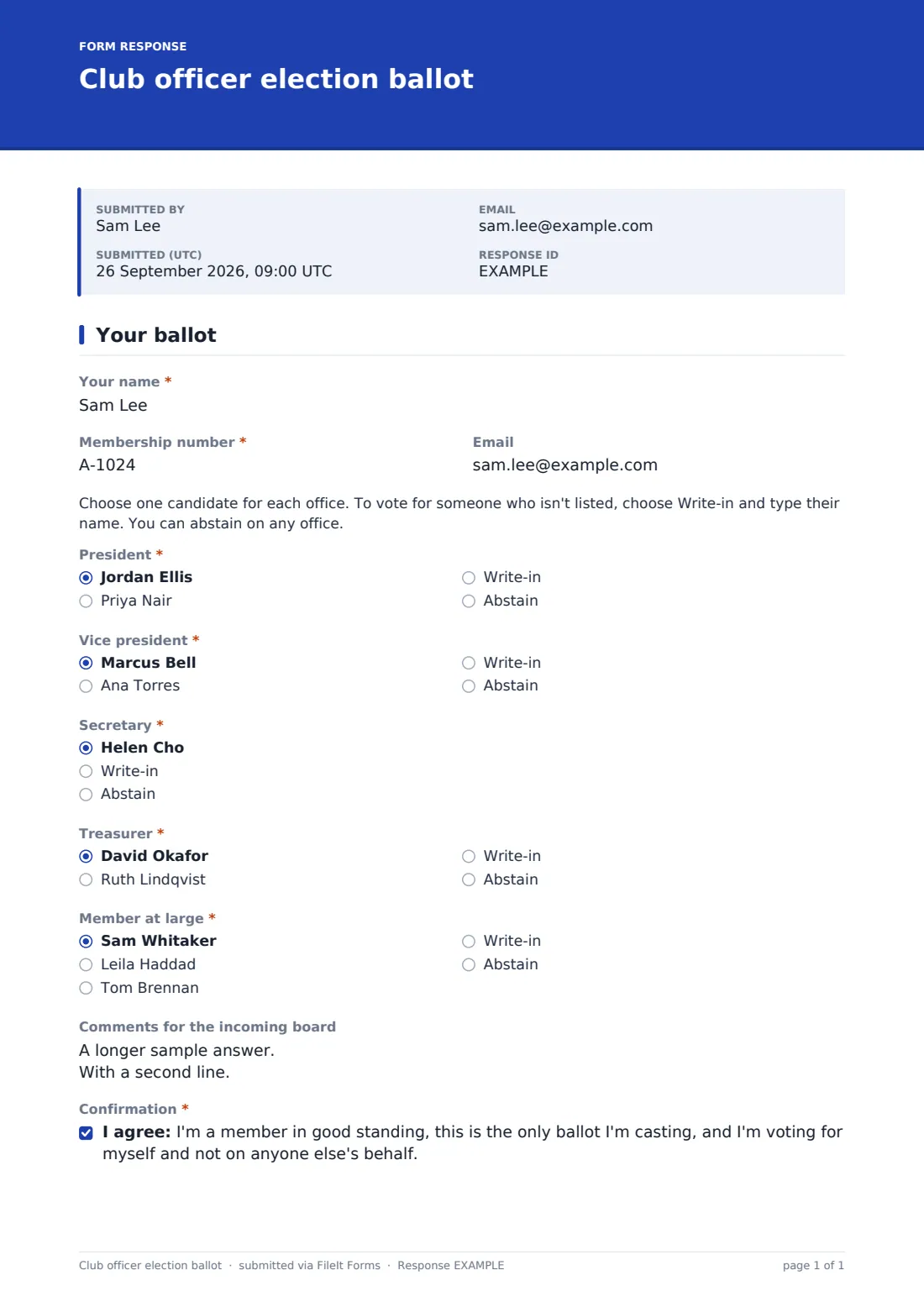
The voter gives their name, "Membership number" (help text says where to find it) and an optional email. A short note explains the rules: one candidate per office, write-in for someone not listed, and abstaining is allowed. Each office — President, Vice president, Secretary, Treasurer and Member at large — lists the candidates followed by "Write-in" and "Abstain", and write-in opens "Write-in for president" (or whichever office). The example has two candidates for most offices and one for secretary, so you can see an uncontested race too. After an optional comments box for the incoming board, the voter ticks the confirmation.
Make the template yours
- Replace the sample candidates with your own, and add or remove offices
- Link to candidate statements in the cover text
- Set a close date and time for the end of voting
- Send the ballot by email so each member gets their own link that can be used once
- Add a question for a bylaw change or other motion if it's on the same ballot
Tips for a better club officer election ballot form
- Send ballots by email, one request per member, if you need each person to vote once — a used request link can't be submitted again
- Check membership numbers against your list before counting
- Export the Responses table to CSV and count each office with a simple pivot table
- Have two people count independently and compare
- Keep the ballot PDFs until the time for challenges has passed
- Announce the results in the same channel you used to send the ballot, with the vote count for each office if your bylaws require it
Every response becomes a PDF in your vault
Each ballot is saved as a PDF in the vault folder you choose. Copies to voters are off by default for this template, so ballots aren't sitting in inboxes. You can be emailed as ballots arrive, or turn notices off until voting closes.
The Responses table lists every voter. Export to CSV to check eligibility and tally each office.
- Start from this template. It opens in the FileIt Forms designer — change any question, add pages, set the rules for when questions appear.
- Share it. Turn on a public link, or send it to people by email, each with their own link. They don’t need a FileIt account.
- Get the answers as PDFs. Each response is saved as a PDF in the vault folder you choose, with uploaded files attached — and listed in a Responses table you can export to CSV.
Club officer election ballot form: frequently asked questions
Is this election ballot template free?
Yes. It's included in the Forms app on every FileIt account.
Is the vote secret?
No. Each ballot records the voter's name and membership number, and anyone who can see the form's responses can see how they voted. Keep responses with your election committee, or use a dedicated voting service if your rules require a secret ballot.
How do I stop people voting twice?
Send the ballot by email so each member gets their own link, which can be submitted once. With a public link, check membership numbers for duplicates when you count.
Does FileIt count the votes?
No. Export the responses to CSV and count them, or read them in the Responses table.
Is an online ballot allowed under our bylaws?
That depends on your bylaws. Check them before you run the vote, and change them if they need to allow it.