What is the blood pressure log form template?
Home readings give a much fuller picture than the single number taken in a clinic, where nerves can push it up. They're only useful, though, if they're written down consistently: which arm, what time, whether the medicine had been taken, and whether you'd just had a coffee or climbed the stairs.
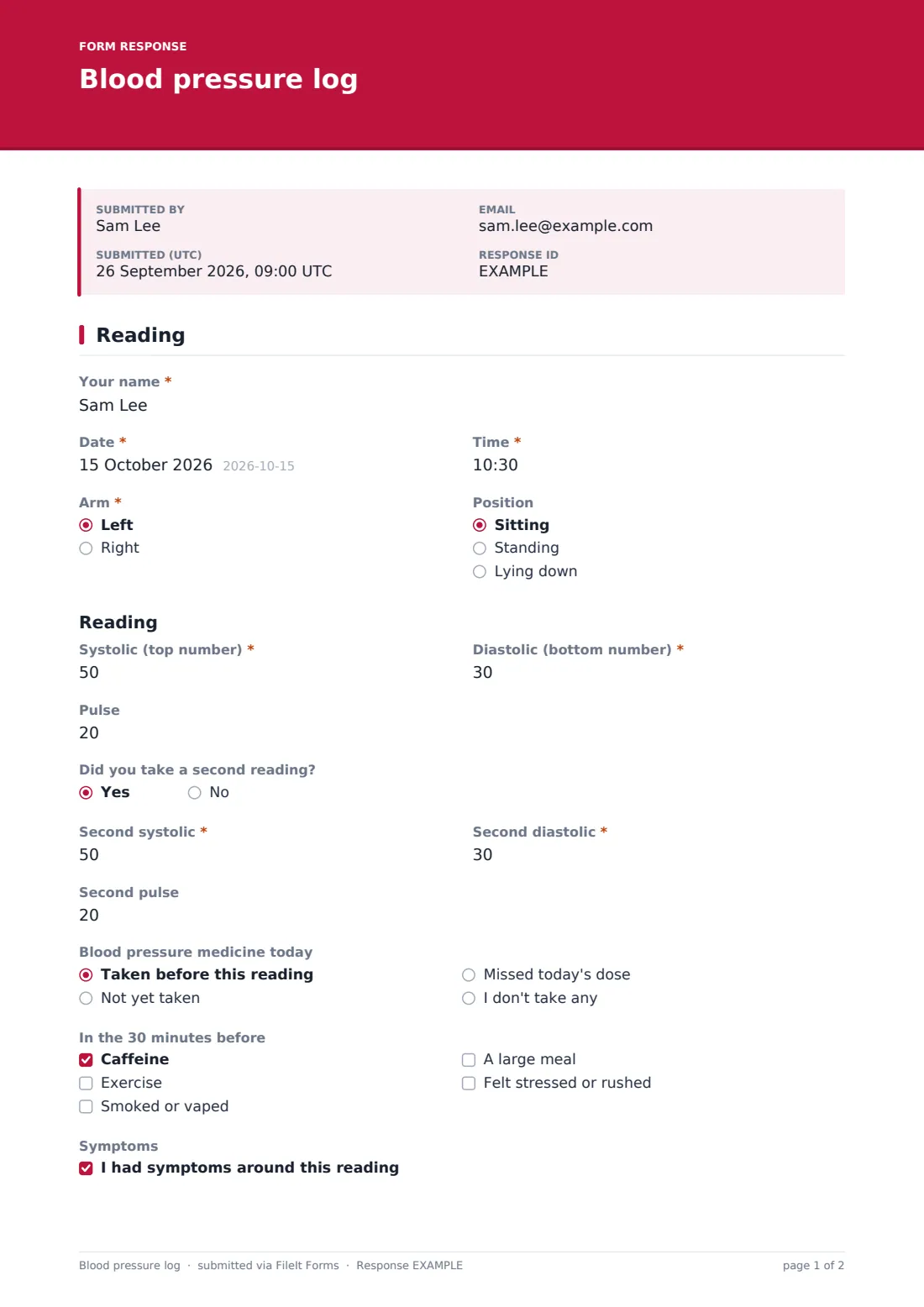
This one-page log records one sitting. You enter the "Date", "Time", "Arm" and "Position", then the "Systolic (top number)", "Diastolic (bottom number)" and "Pulse". If you take a second reading a minute or two later, as many clinicians suggest, a yes opens three more boxes for it. Short questions follow about when you last took your blood pressure medicine and what you did in the half hour before.
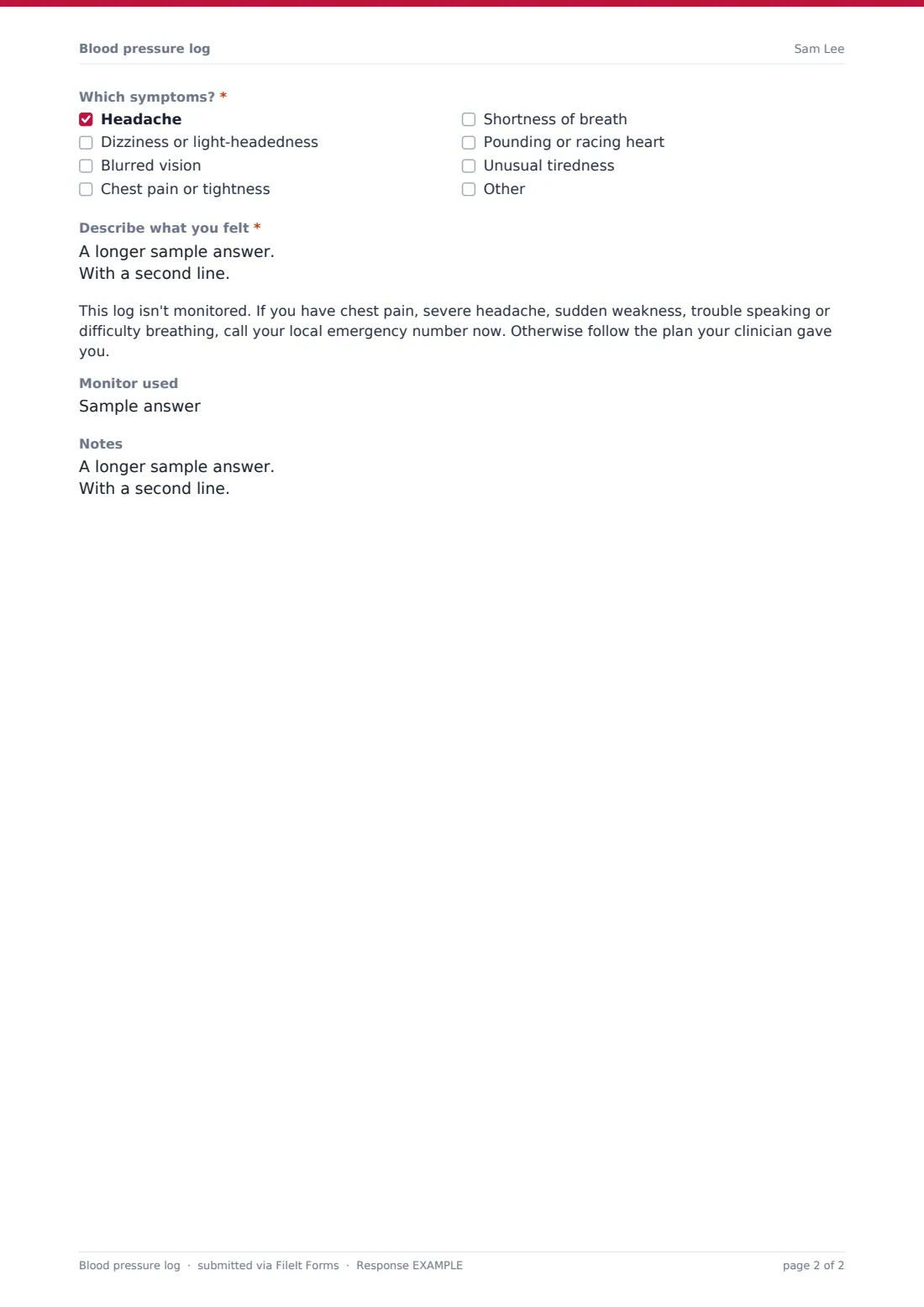
Ticking "I had symptoms around this reading" asks which symptoms and what you felt, and shows a reminder that the log isn't monitored. Each entry is saved as a PDF in your FileIt vault, and the Responses table builds into a running record you can export for your next appointment.
- Best for
- Anyone checking their blood pressure at home, and clinics that ask them to
- Filled in by
- The patient, or a family member or carer
- Time to complete
- Under a minute per reading
- Includes
- Systolic, diastolic and pulse, optional second reading, medicine timing, symptoms
Who uses a blood pressure log form?
- A week of morning and evening readings before a check-up
- Tracking readings after a change in blood pressure medicine
- A pregnancy clinic asking for home readings between visits
- A carer recording an older parent's readings from a home cuff
- A pharmacy blood pressure service keeping a record for each client
Questions on this blood pressure log form
19 questions · includes conditional questions.
1 Reading
- Your name*
- Date*
- Time*
- Arm* Left · Right
- Position Sitting · Standing · Lying down
- Systolic (top number)*
- Diastolic (bottom number)*
- Pulse
- Did you take a second reading?
- Second systolic* asked only when it applies
- Second diastolic* asked only when it applies
- Second pulse asked only when it applies
- Blood pressure medicine today Taken before this reading · Not yet taken · Missed today's dose · I don't take any
- In the 30 minutes before Caffeine · Exercise · Smoked or vaped · A large meal · Felt stressed or rushed
- Symptoms I had symptoms around this reading
- Which symptoms?* asked only when it applies Headache · Dizziness or light-headedness · Blurred vision · Chest pain or tightness · Shortness of breath · Pounding or racing heart · Unusual tiredness
- Describe what you felt* asked only when it applies
- Monitor used
- Notes
The blood pressure log form, page by page
1 Reading
"Your name", "Date", "Time" and "Arm" are required, and "Position" (sitting, standing or lying down) is optional. Under the "Reading" heading, systolic and diastolic are required numbers in mmHg, with limits that catch obvious typos. "Pulse" is optional. "Did you take a second reading?" opens "Second systolic", "Second diastolic" and "Second pulse". "Blood pressure medicine today" records whether the dose was taken before the reading, not yet taken, missed, or not applicable. "In the 30 minutes before" lists caffeine, exercise, smoking or vaping, a large meal and stress. "Symptoms" is a single tick box. Ticking it opens a required list of symptoms, such as headache, dizziness, blurred vision, chest pain, breathlessness and a racing heart, plus a required description and an urgent-care reminder. "Monitor used" and "Notes" finish the entry.
Make the template yours
- Put your clinic's own advice and phone number into the symptom reminder
- Make "Position" required if your clinician wants all readings taken sitting
- Add a third reading if your protocol averages three
- Remove the medicine question for people who don't take any
- Send it as an emailed request so each patient's readings come in under their name
- File each patient's log in their own vault folder
Tips for a better blood pressure log form
- Follow the instructions that came with your monitor, which usually include resting quietly for a few minutes first
- Use the same arm each time unless your clinician says otherwise
- Measure at the same times each day, such as before breakfast and before bed
- Avoid caffeine, exercise and smoking for 30 minutes beforehand, or note it if you didn't
- Bring a CSV export or a few PDFs to your appointment rather than a summary from memory
Every response becomes a PDF in your vault
Each reading becomes a PDF titled with your name and the date, filed in the vault folder you've chosen. If a clinic set up the form, the clinic is emailed with each entry. You can receive your own copy too.
The Responses table shows one row per sitting. Export it as a CSV to sort readings by date or time of day, or to share a week's readings with your clinician in one file.
- Start from this template. It opens in the FileIt Forms designer — change any question, add pages, set the rules for when questions appear.
- Share it. Turn on a public link, or send it to people by email, each with their own link. They don’t need a FileIt account.
- Get the answers as PDFs. Each response is saved as a PDF in the vault folder you choose, with uploaded files attached — and listed in a Responses table you can export to CSV.
Blood pressure log form: frequently asked questions
Does the log tell me if my blood pressure is high?
No. It records your readings for you and your clinician to review. FileIt doesn't interpret readings or give medical advice.
Can I record two readings at once?
Yes. Answer yes to "Did you take a second reading?" and boxes open for a second systolic, diastolic and pulse.
Does anyone watch the readings as they come in?
No. The log isn't monitored, and the form says so when symptoms are ticked. Use your local emergency number if you need urgent help.
Do I need a FileIt account to use it?
Not if a clinic sends you the link. To keep your own log, create the form from this template on your FileIt account.
Is it free?
Yes. It's a starter template in the FileIt Forms app, included on every plan.