What is a watersports waiver?
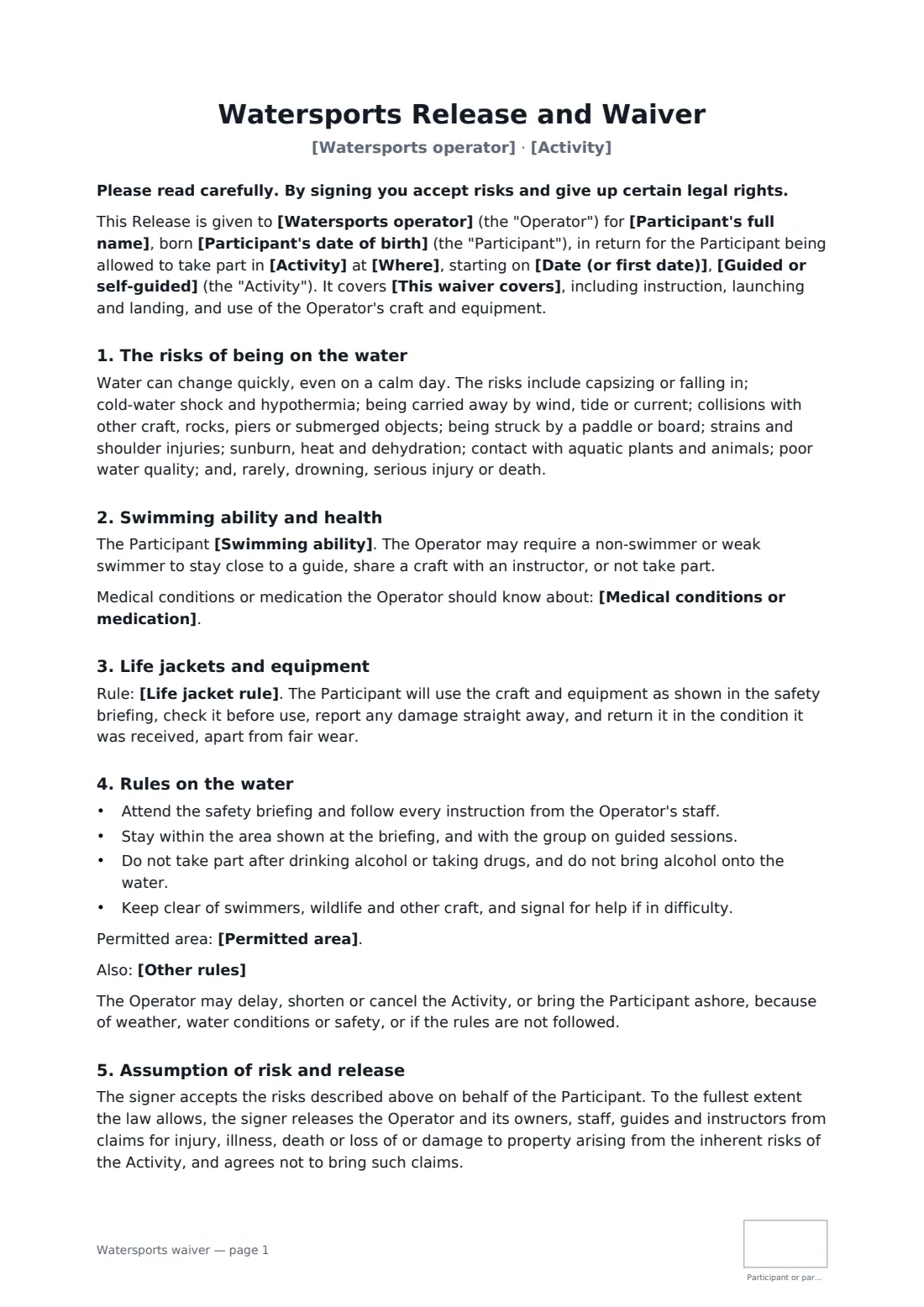
Water is where a calm afternoon can change in minutes: an offshore breeze, a capsize in cold water, a passing motor boat. A general activity waiver rarely mentions any of it. This one is written for paddle sports and similar activities, so the person signing knows about cold-water shock, currents and collisions, and tells you honestly whether they can swim.
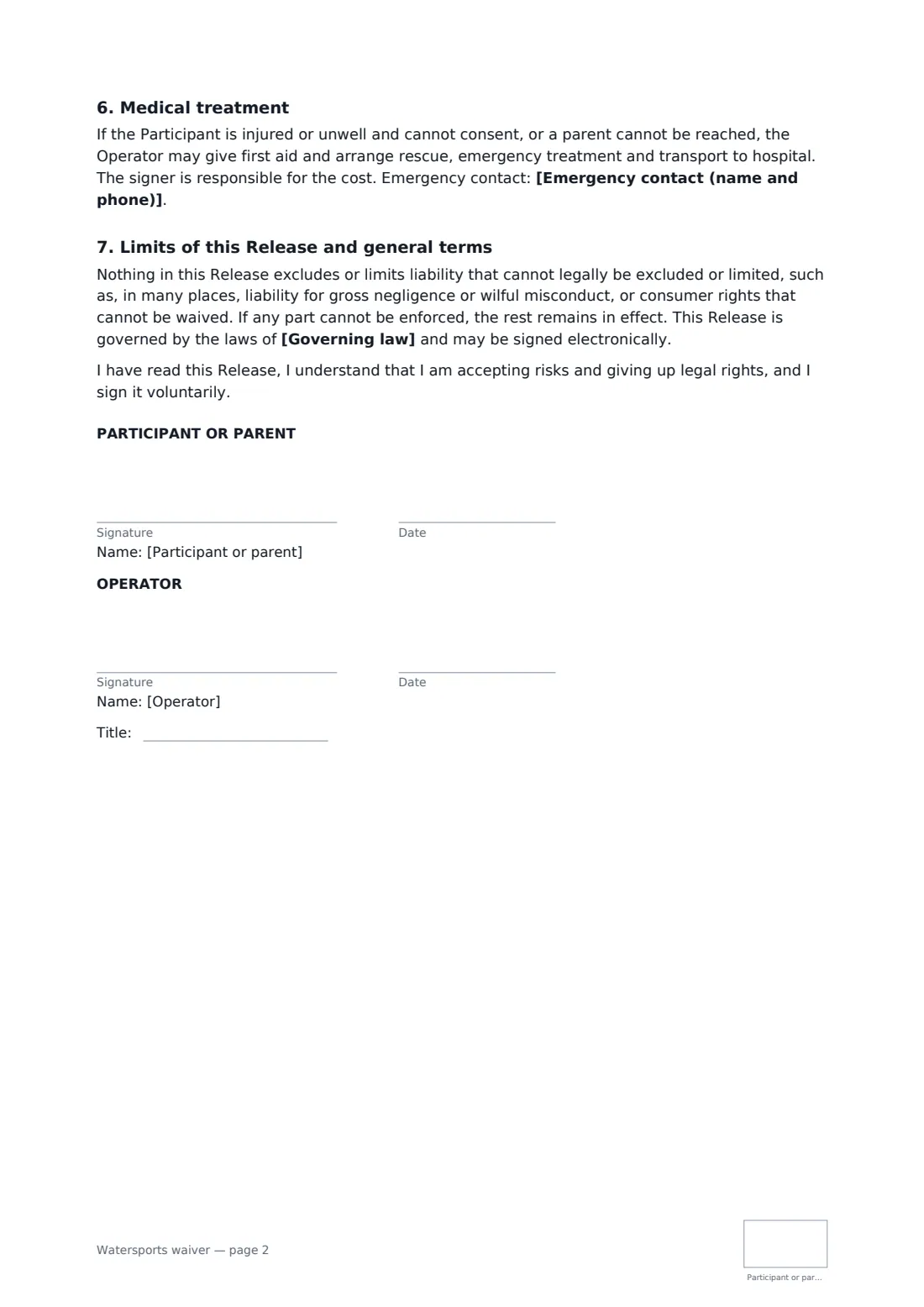
You fill in the activity, the launch site, the date and whether it's guided or self-guided hire, with an optional permitted area for hirers. The participant records their swimming ability, any medical conditions and an emergency contact on shore. They agree to your life jacket rule (editable), to the briefing, to stay with the group and away from alcohol, and to look after the craft. You keep the right to cancel or call people in for weather. Adults sign for themselves; a parent can sign for someone under 18. The release is limited to what the law allows, and the participant initials every page.
- Best for
- Kayak and canoe tours, SUP schools and hire, lake and beach rental huts
- Signed by
- The participant or a parent, and the operator
- Records
- Swimming ability, medical notes, shore-side emergency contact
- Covers
- One day, 12 months, or until withdrawn
- Length
- 2 pages, initialled on every page
When to use a watersports waiver
- Guided sea kayak tours for visitors
- Paddleboard hire by the hour from a beach hut
- Canoe trips on a river or lake
- Kids' paddle sports sessions in the school holidays
- Members of a club borrowing craft through the season
What you fill in
17 blanks, then the name and email of each person who signs: participant or parent, operator.
1 The activity
- Watersports operator*
- Activity*
- Where*
- Date (or first date)*
- Guided or self-guided* guided, with an instructor or guide on the water · self-guided hire, without a guide on the water
- Permitted area
- This waiver covers* the activity on the date above · all sessions and hires for 12 months from signing · all sessions and hires until withdrawn in writing
2 The participant
- Participant's full name*
- Participant's date of birth*
- Who signs* The participant (18 or over) · A parent or guardian of a participant under 18
- Parent or guardian's name
- Swimming ability* can swim at least 50 metres in light clothing and float unaided · can swim a short distance but is not a confident swimmer · cannot swim
- Medical conditions or medication
- Emergency contact (name and phone)*
3 Rules
- Life jacket rule*
- Other rules
- Governing law*
4 Who signs
- Participant or parent signature and date, initials on every page · The adult taking part, or a parent or legal guardian signing for a participant under 18.
- Operator signature and date, job title, initials on every page
What the watersports waiver covers
- The risks of being on the water
- Swimming ability and health
- Life jackets and equipment
- Rules on the water
- Assumption of risk and release
- Medical treatment
- Limits of this Release and general terms
Using the watersports waiver, step by step
1 Describe the activity
Your business name fills in. Enter the activity, launch site and date, choose guided or self-guided, and add the permitted area for hirers.
2 Set your rules
Edit the life jacket rule to match your kit, add rules such as leashes or distance from motor boats, and set the governing law.
3 Send it before booking day
The participant, or a parent, enters swimming ability, medical notes and an emergency contact on shore, then signs and initials each page.
4 Countersign and file
You countersign, and the signed waiver goes into your FileIt vault, ready to check on the beach.
Tips before you send it
- Ask about swimming ability on the day too — people sometimes overstate it on a form.
- Keep the emergency contact on shore; a partner paddling alongside can't call for help.
- Use a waiver with good safety practice, trained staff and insurance, not instead of them.
- Check local boating and hire rules — some places require specific equipment or registration.
Sign it online in minutes
- Fill in the blanks. Names, dates and amounts go straight into the agreement — the preview shows exactly where.
- Name who signs. Tick “This is me” for your own part. FileIt builds the PDF with every signature, date and initials box on the right line, and you can check or move anything before sending.
- Send it. Each signer gets a secure link and signs from any device — no account needed. The signed PDF, with an audit trail and a Certificate of Completion, is filed in your vault and emailed to everyone.
Watersports waiver: frequently asked questions
Can non-swimmers take part?
The form lets you record that someone can't swim, and says you may keep them close to a guide, put them in a craft with an instructor, or decline. That decision stays with you.
Does this cover self-guided hire?
Yes. Choose self-guided hire and enter the permitted area, such as inside the marker buoys.
Can a parent sign for a teenager?
Yes. Choose the parent option. The form explains that a parent often can't give up a child's own claims, and that it then works as the parent's own acceptance of risk.
Does the waiver protect me from every claim?
No. It applies to the extent the law allows and expressly leaves out liability that can't be excluded, such as gross negligence in many places.
Can people sign at the launch site?
Yes. Send the link by email or open it on a tablet; signers don't need a FileIt account.