What is a pre-employment medical examination consent?
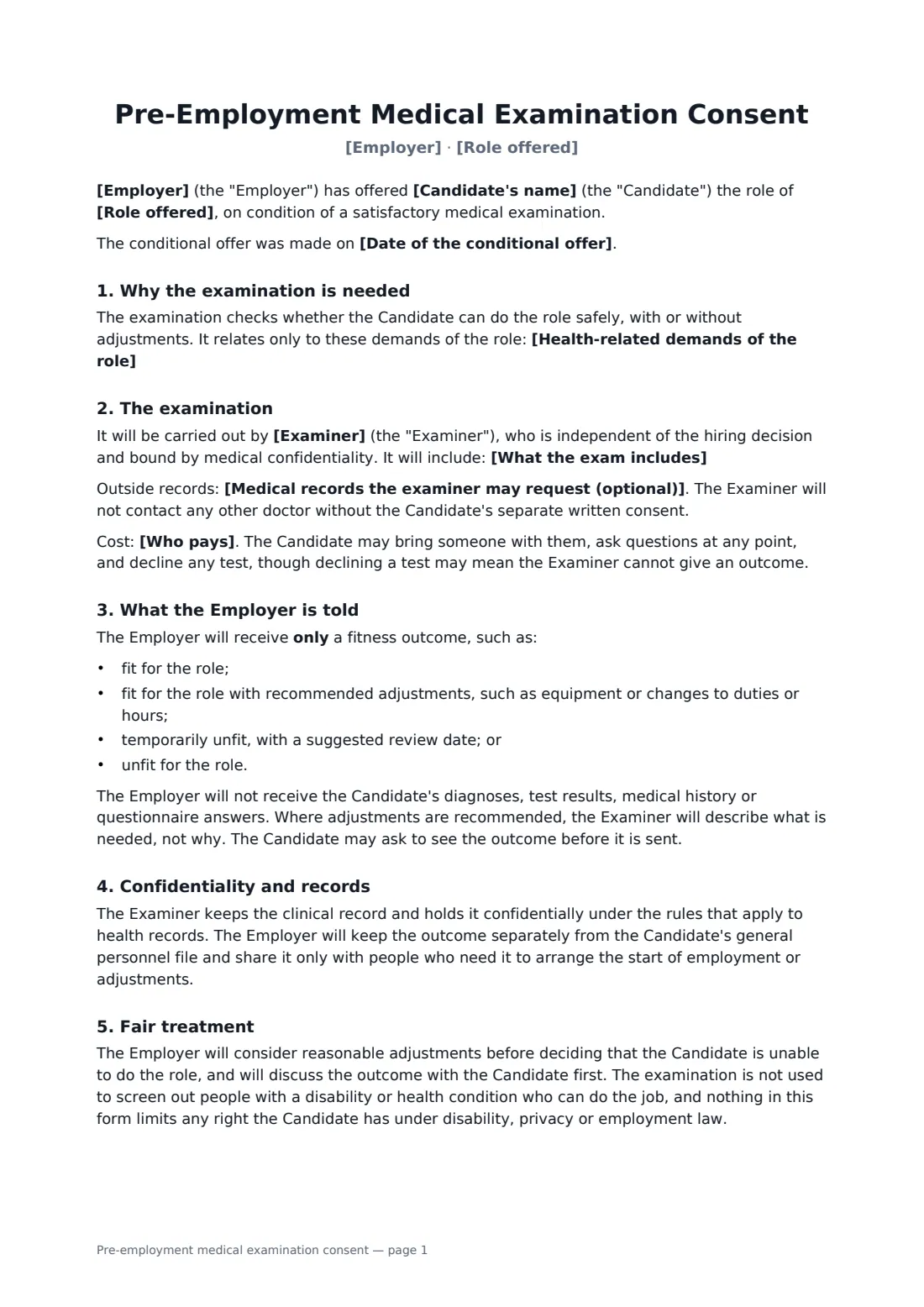
When a role has real physical demands, such as heavy lifting, driving, night shifts or work at height, a medical after the job offer helps everyone start safely. Candidates often worry about what an employer will learn. This form answers that up front.
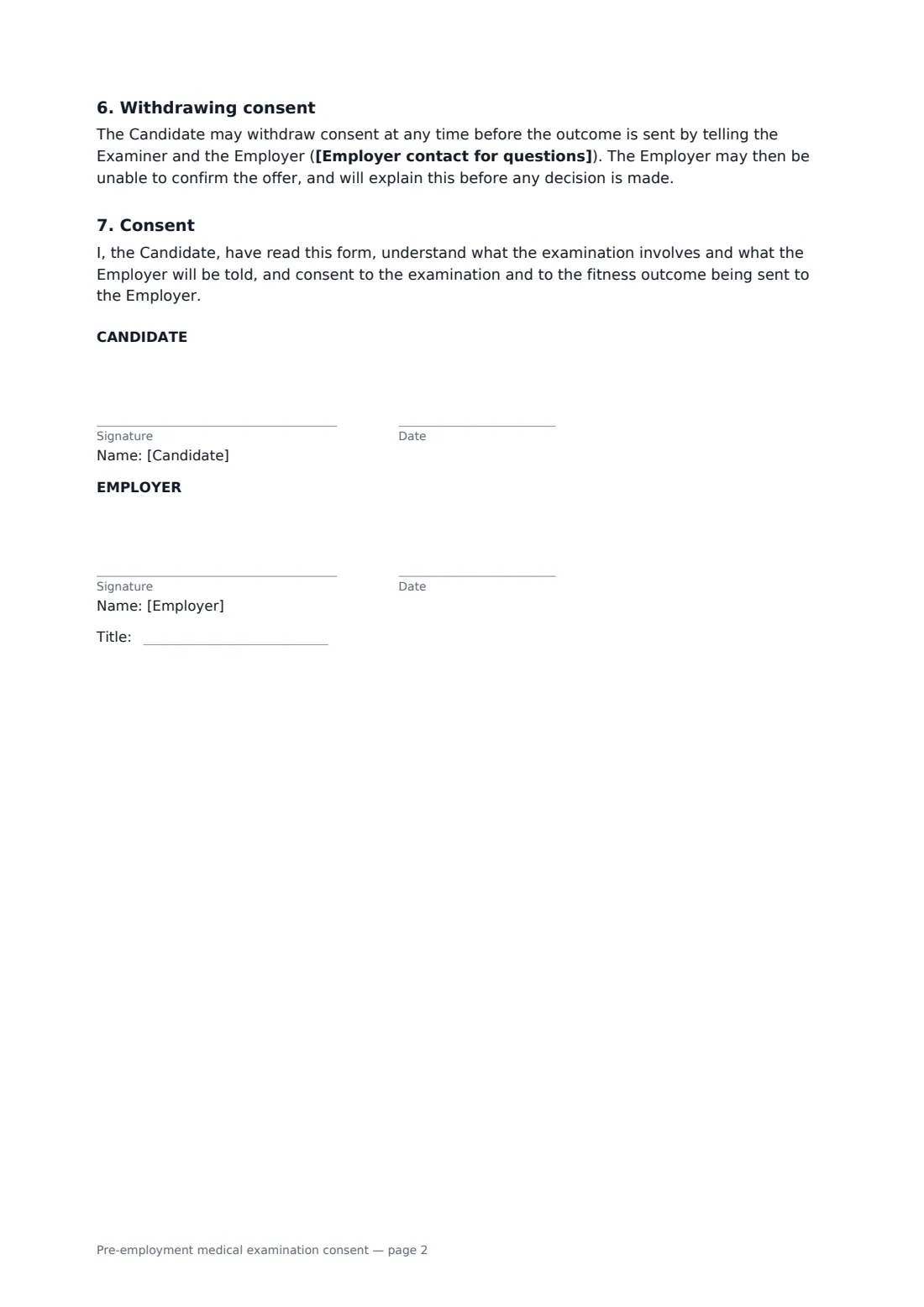
It records the conditional offer and the role's health-related demands, names an independent examiner, and lists what the exam includes, plus any outside records, which need separate consent. It says who pays, lets the candidate decline any test, and limits what the employer receives to a fitness outcome: fit, fit with adjustments, temporarily unfit or unfit. Diagnoses and results stay with the examiner. The employer commits to considering adjustments and discussing the outcome first, keeps it apart from the personnel file, and the candidate can withdraw before the outcome is sent.
- Best for
- Employers hiring for physically demanding or safety-critical roles
- Signed by
- The candidate and the employer
- Employer told
- A fitness outcome only — no diagnoses or results
- Length
- 2 pages
When to use a pre-employment medical examination consent
- Warehouse and logistics roles with lifting
- Delivery drivers and fleet staff
- Night-shift healthcare and care workers
- Construction and work-at-height roles
- Food handlers where a health screen is part of hiring
What you fill in
10 blanks, then the name and email of each person who signs: candidate, employer.
1 The role
- Employer*
- Candidate's name*
- Role offered*
- Date of the conditional offer
- Health-related demands of the role*
2 The examination
- Examiner*
- What the exam includes*
- Medical records the examiner may request (optional)
- Who pays*
- Employer contact for questions*
3 Who signs
- Candidate signature and date
- Employer signature and date, job title
What the pre-employment medical examination consent covers
- Why the examination is needed
- The examination
- What the Employer is told
- Confidentiality and records
- Fair treatment
- Withdrawing consent
- Consent
Using the pre-employment medical examination consent, step by step
1 The role
Your company fills in from your account. Add the candidate, the role, the date of the offer and the specific demands the exam relates to.
2 The examiner
Name the occupational health provider or doctor and list what the exam covers. Add outside records only if the examiner may ask the candidate's own doctor for a report.
3 Cost and contact
Say who pays and who the candidate can contact with questions or to withdraw.
4 Send with the offer
Send it alongside the conditional offer. The candidate signs on any device, you countersign, and the signed consent is filed with the hiring record in FileIt.
Tips before you send it
- In many places medicals can only be required after a job offer, and only where they relate to the job. Check your rules.
- Keep the exam scope tied to the role's genuine demands.
- Plan for adjustments before you plan for refusals.
- Store the fitness outcome separately from the general personnel file.
Sign it online in minutes
- Fill in the blanks. Names, dates and amounts go straight into the agreement — the preview shows exactly where.
- Name who signs. Tick “This is me” for your own part. FileIt builds the PDF with every signature, date box on the right line, and you can check or move anything before sending.
- Send it. Each signer gets a secure link and signs from any device — no account needed. The signed PDF, with an audit trail and a Certificate of Completion, is filed in your vault and emailed to everyone.
Pre-employment medical examination consent: frequently asked questions
What will the employer find out?
Only a fitness outcome and, where relevant, what adjustments are needed, not why. Diagnoses, results and history stay with the examiner.
Can the candidate refuse a test?
Yes. They may decline any test or withdraw consent before the outcome is sent, though the examiner may then be unable to give an outcome and the offer may not be confirmed.
Can this be used before a job offer?
The form is written for after a conditional offer, which is what many places require. Check local law before using it at another stage.
Is this a drug test consent?
No. Use the drug and alcohol test consent for that, which covers sample collection, labs and result sharing for testing.