What is a corporate training agreement?
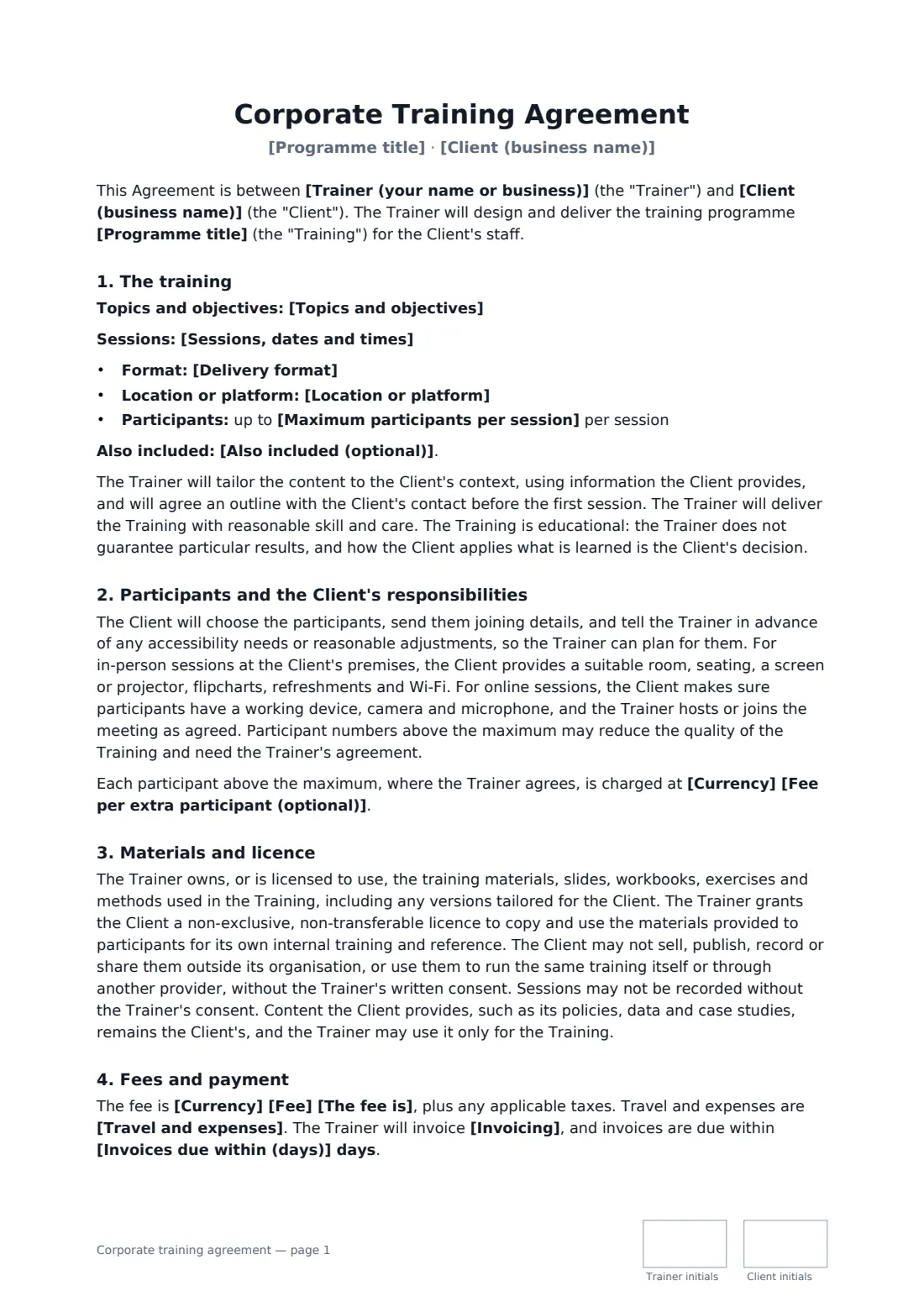
A corporate training agreement sets out what a trainer will deliver to a client's team and, just as importantly, what the client may do with the training materials afterwards — use them internally, but not resell them or run the course themselves.
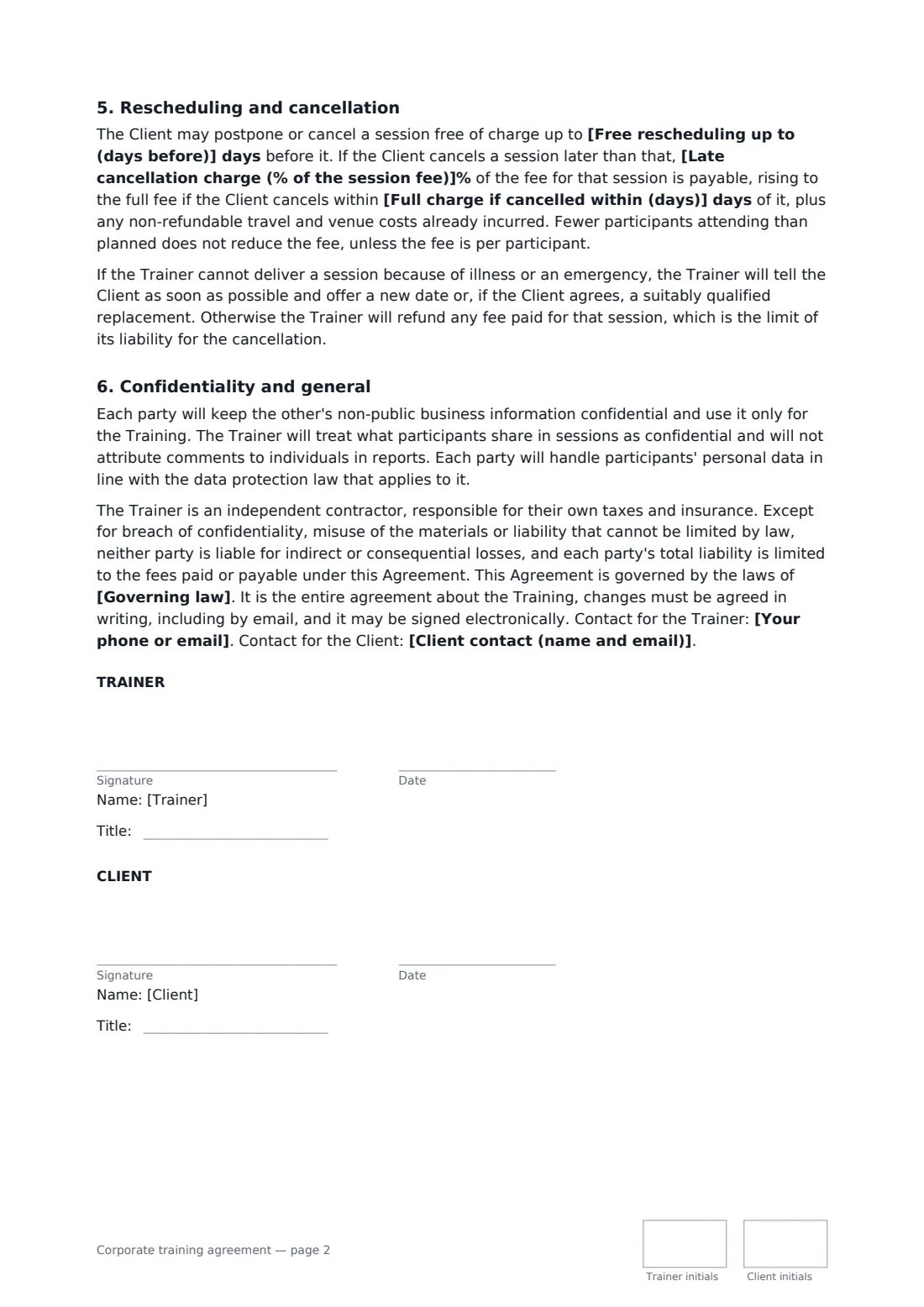
This template covers the programme title, topics and objectives, sessions and dates, in-person, online or blended delivery, the maximum participants and any extra-participant fee, the client's room and equipment duties, accessibility needs, ownership of materials and a limited internal-use licence, recording only with consent, fees and their basis, travel and expenses, invoicing, rescheduling and tiered cancellation charges, trainer illness, confidentiality of what participants share, data protection and a liability cap. FileIt places the signature, date, job-title and initials boxes for both parties.
- Best for
- Freelance trainers, facilitators and training companies
- Signed by
- The trainer and the client business
- Format
- In person at the client's or a venue, live online, or a mix
- Length
- About 2 pages, initialled on every page
When to use a corporate training agreement
- Leadership or management workshops for a client's team leaders
- Live online sessions on a software tool or process
- A sales or customer service training day
- A wellbeing, communication or inclusion workshop series
- A train-the-trainer programme with workbooks
What you fill in
22 blanks, then the name and email of each person who signs: trainer, client.
1 The parties
- Trainer (your name or business)*
- Your phone or email*
- Client (business name)*
- Client contact (name and email)*
2 The training
- Programme title*
- Topics and objectives*
- Sessions, dates and times*
- Delivery format* in person at the Client's premises · in person at a venue the Trainer arranges · live online · a mix of in-person and live online sessions
- Location or platform*
- Maximum participants per session*
- Also included (optional)
3 Fees
- Currency*
- Fee*
- The fee is* for the whole programme · per day of training · per session · per participant
- Fee per extra participant (optional)
- Travel and expenses* charged at cost, with travel and accommodation approved by the Client in advance · included in the fee · not applicable (online delivery)
- Invoicing* 50% on signing and 50% after the last session · in full after the last session · in full before the first session · after each session
- Invoices due within (days)*
4 Cancellation and terms
- Free rescheduling up to (days before)*
- Late cancellation charge (% of the session fee)*
- Full charge if cancelled within (days)*
- Governing law*
5 Who signs
- Trainer signature and date, job title, initials on every page · The trainer or training company delivering the sessions.
- Client signature and date, job title, initials on every page · The business booking the training for its staff.
What the corporate training agreement covers
- The training
- Participants and the Client's responsibilities
- Materials and licence
- Fees and payment
- Rescheduling and cancellation
- Confidentiality and general
Using the corporate training agreement, step by step
1 Describe the training
Enter the programme title, topics and objectives, the sessions with dates and times, the delivery format and location, and the maximum participants per session.
2 Set the fee
Enter the fee and choose whether it's for the whole programme, per day, per session or per participant. Choose how travel and invoicing work.
3 Cancellation terms
Set the free rescheduling window, the late cancellation percentage and the window in which the full fee applies.
4 Send for signature
Add the client as a signer. Both sides sign, add their job title and initial each page.
Tips before you send it
- Agree the outline with the client's contact before the first session — the template requires it.
- If the client wants to record the sessions, agree it and any fee in writing first.
- The materials licence is for internal use only; mention it if the client plans to roll the training out widely.
- Ask about accessibility needs early so you can plan adjustments.
Sign it online in minutes
- Fill in the blanks. Names, dates and amounts go straight into the agreement — the preview shows exactly where.
- Name who signs. Tick “This is me” for your own part. FileIt builds the PDF with every signature, date and initials box on the right line, and you can check or move anything before sending.
- Send it. Each signer gets a secure link and signs from any device — no account needed. The signed PDF, with an audit trail and a Certificate of Completion, is filed in your vault and emailed to everyone.
Corporate training agreement: frequently asked questions
Can the client reuse the training materials?
For internal training and reference, yes. They can't sell, publish or share them outside their organisation, or use them to run the same training themselves or through another provider, without the trainer's written consent.
What if fewer people attend?
The fee isn't reduced, unless it is charged per participant.
Does the trainer guarantee results?
No. The training is delivered with reasonable skill and care, but how the client applies what is learned is the client's decision.
Is it valid if signed online?
In most countries, including the US (ESIGN Act and UETA), the UK, the EU (eIDAS) and Canada, an electronic signature is generally valid for an ordinary services contract like this one. FileIt keeps an audit trail and a Certificate of Completion with the signed PDF as evidence of who signed and when.
Can I change the wording?
You fill in the blanks and choose the options on the setup page; optional clauses appear only when you fill them in. If you need different clauses, draft your own document and upload it to FileIt eSignature instead — you can still place the signature boxes in the editor.
Is this template free?
Yes. The template is free to use with the eSignature app in FileIt. The person you send it to doesn't need a FileIt account to sign.