What is UI-2.8 UIF banking details authorisation?
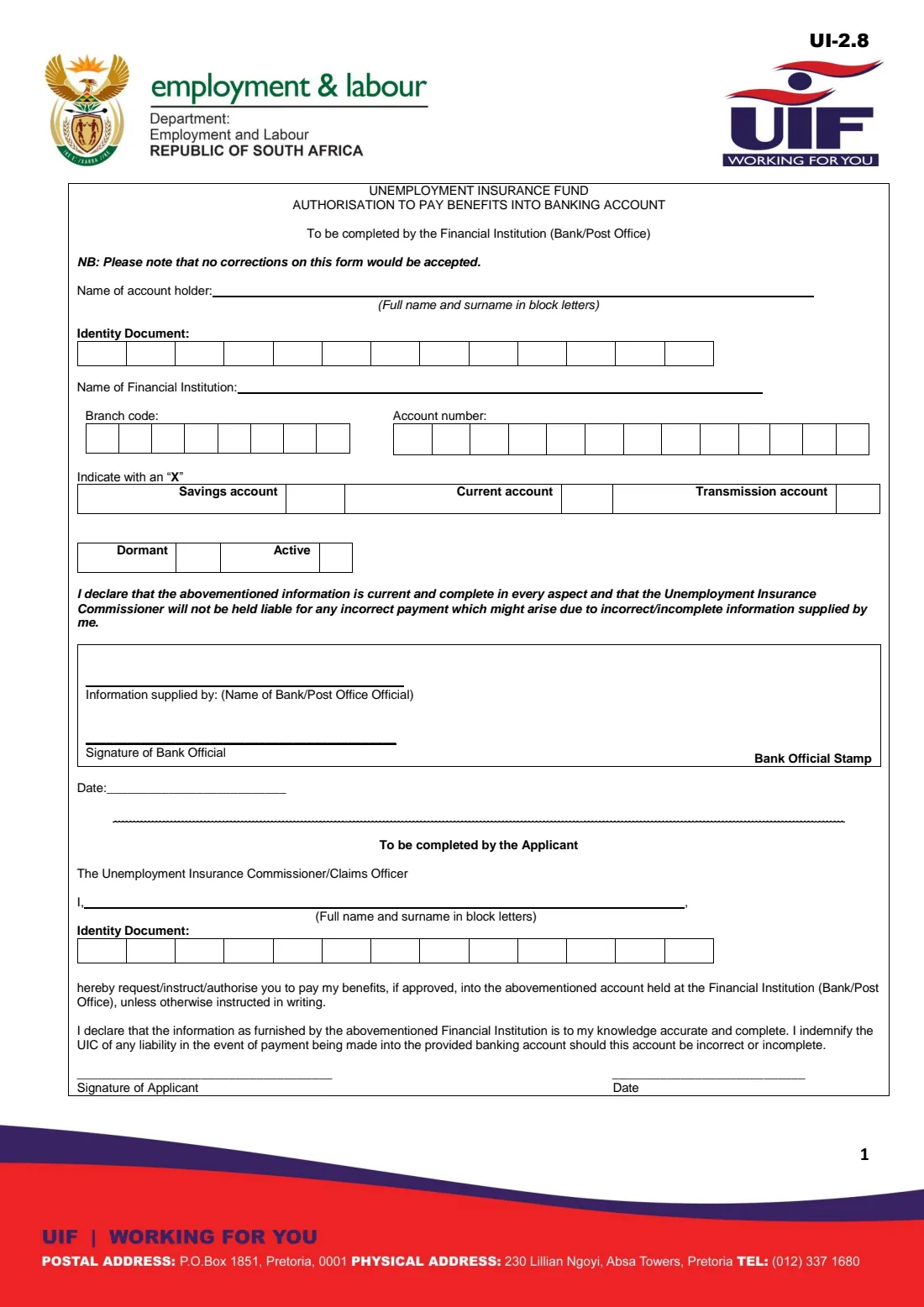
The UI-2.8 is a one-page Unemployment Insurance Fund form in two halves. The top half is completed by your financial institution (a bank or the Post Office): the name and ID number of the account holder, the institution, branch code, account number, the type of account (savings, current or transmission) and whether it is dormant or active. A bank official signs it, dates it and stamps it, and the form warns that no corrections will be accepted.
The bottom half is yours. You instruct the Unemployment Insurance Commissioner or claims officer to pay your benefits, if approved, into that account unless you instruct otherwise in writing, and you declare that the bank's information is accurate and indemnify the Fund if the account details turn out to be wrong. Claimants lodge the UI-2.8 together with their benefit claim, such as the UI-2.1 for unemployment benefits.
FileIt fills in the applicant's part for you: your name in block letters, your ID number one digit per box, and the date. If your bank asks you to type the account details for them to confirm, you can switch on that part too. The filled official PDF is saved in your FileIt vault; you print it, have the bank confirm and stamp it, sign it by hand and lodge it with your claim. FileIt never submits anything to the UIF.
- Who fills it
- The bank or Post Office (top half) and the applicant (bottom half)
- Given to
- The UIF, lodged with your benefit claim
- When
- When you claim UIF benefits and need them paid into a bank or Post Office account
- Signatures
- A bank official signs and stamps the top half; the applicant signs the bottom half by hand
- Account types on the form
- Savings, current or transmission account
- Edition
- UI-2.8 as published by the Department (no edition date printed; file dated November 2019)
Who needs to fill out UI-2.8 UIF banking details authorisation?
- Anyone claiming unemployment benefits on the UI-2.1 who wants the money paid into a bank account.
- Employees claiming illness, maternity, adoption or parental benefits from the UIF.
- Dependants claiming benefits after a contributor's death.
- Claimants whose bank account has changed since an earlier claim.
When to use UI-2.8 UIF banking details authorisation
- When you put together your UIF claim documents.
- When the labour centre asks you for confirmed banking details.
- When you open a new account and want future benefits paid into it.
What you need before you start
- Your full name and 13-digit ID number (or passport number).
- An account in your name at a bank or the Post Office.
- A visit to, or contact with, your bank so an official can confirm the details, sign and stamp the form.
- If your bank asks you to type the details: the institution's name, branch code, account number, account type and status.
What’s on UI-2.8 UIF banking details authorisation
The 2019 edition has 1 page. FileIt asks for it in 2 parts:
- To be completed by the applicantApplicant
- Account details (completed by the bank / Post Office)Financial institution
How to fill out UI-2.8 UIF banking details authorisation, step by step
1 Top half: the financial institution
The bank or Post Office fills in the account holder's name and ID number, the name of the institution, the branch code, the account number, and marks with an X whether it is a savings, current or transmission account and whether it is dormant or active. A bank official writes their name, signs, dates and stamps it. The form says no corrections will be accepted, so leave this half to the bank unless they ask you to type it.
2 Bottom half: your instruction
Write your full name and surname in block letters after 'I,' and your identity document number, one digit per box. By signing you ask the Unemployment Insurance Commissioner or claims officer to pay your benefits, if approved, into the account above unless you instruct otherwise in writing.
3 Your declaration
You declare that the information given by the financial institution is accurate and complete to your knowledge, and you indemnify the UIC if a payment is made into the account because the details are incorrect or incomplete. Sign and date it.
Common mistakes to avoid
- Crossing out or correcting details: the form says no corrections will be accepted. Start again on a clean copy instead.
- Using an account that isn't in your own name, or a dormant account.
- Forgetting the bank official's signature and stamp.
- Writing your ID number with a typing mistake. FileIt checks a South African ID number's date of birth and check digit.
After you fill it out
Print the filled UI-2.8 from your FileIt vault and take it to your bank or Post Office to have the top half confirmed, signed and stamped.
Sign the applicant's part by hand and lodge the form with your claim, for example at a labour centre with your UI-2.1.
Keep a copy. If your account changes later, complete a new UI-2.8.
Fill out UI-2.8 UIF banking details authorisation online with FileIt
- Pick the person. Choose someone from People and FileIt fills in their name, date of birth, address and other details it already knows.
- Answer plain-language questions. One part of the form at a time, with the official help text beside each question — 10 fields in all. Your answers save as you go.
- Check the live preview. Watch your answers land on the real Unemployment Insurance Fund (UIF), Department of Employment and Labour form, and let FileIt do any worksheet arithmetic.
- Generate the official PDF. FileIt prints your answers into the agency’s own PDF and files it in that person’s folder in your vault.
FileIt fills the form — it never files or submits anything for you. Deliver the finished form to whoever asked for it, the way the form’s instructions say.
Start UI-2.8 UIF banking details authorisation now — it’s freeUI-2.8 UIF banking details authorisation: frequently asked questions
What is the UI-2.8 form?
It is the Unemployment Insurance Fund's authorisation to pay benefits into a banking account. The bank confirms your account details at the top, and you authorise the Fund to pay your approved benefits into that account at the bottom.
Who completes the top part of the UI-2.8?
The form says the top part is to be completed by the financial institution (bank or Post Office), and a bank official signs and stamps it.
Can I use the UI-2.8 with any type of account?
The form lists savings, current and transmission accounts, and asks the bank to say whether the account is dormant or active.
Can I fill in the UI-2.8 online with FileIt?
Yes. FileIt fills in your part of the official PDF, and the bank's part too if your bank asks you to type it. You print it, have the bank stamp it, sign it by hand and lodge it with your claim. FileIt does not submit it to the UIF.
What if I make a mistake on the form?
The form says no corrections will be accepted, so print a fresh copy rather than crossing anything out.
Official sources
- Blank form (PDF), published by Unemployment Insurance Fund (UIF), Department of Employment and Labour: https://www.labour.gov.za/DocumentCenter/Forms/Unemployment%20Insurance%20Fund/UI-2_8-authorisation-pay-benefits-into-banking-account.pdf
- Official instructions and guidance: https://www.labour.gov.za/DocumentCenter/Pages/Forms.aspx
- Edition shown on this page: UI-2.8 (no edition date printed; the Department's file is dated 27 November 2019) (checked 2026-10-01).
FileIt is not affiliated with or endorsed by Unemployment Insurance Fund (UIF), Department of Employment and Labour or any government. This page explains the form in general terms and is not legal, tax or immigration advice. Always read the official instructions, and check that you are using the edition the recipient accepts. Page last reviewed 2026-10-01.