What is Wisconsin Form W-221?
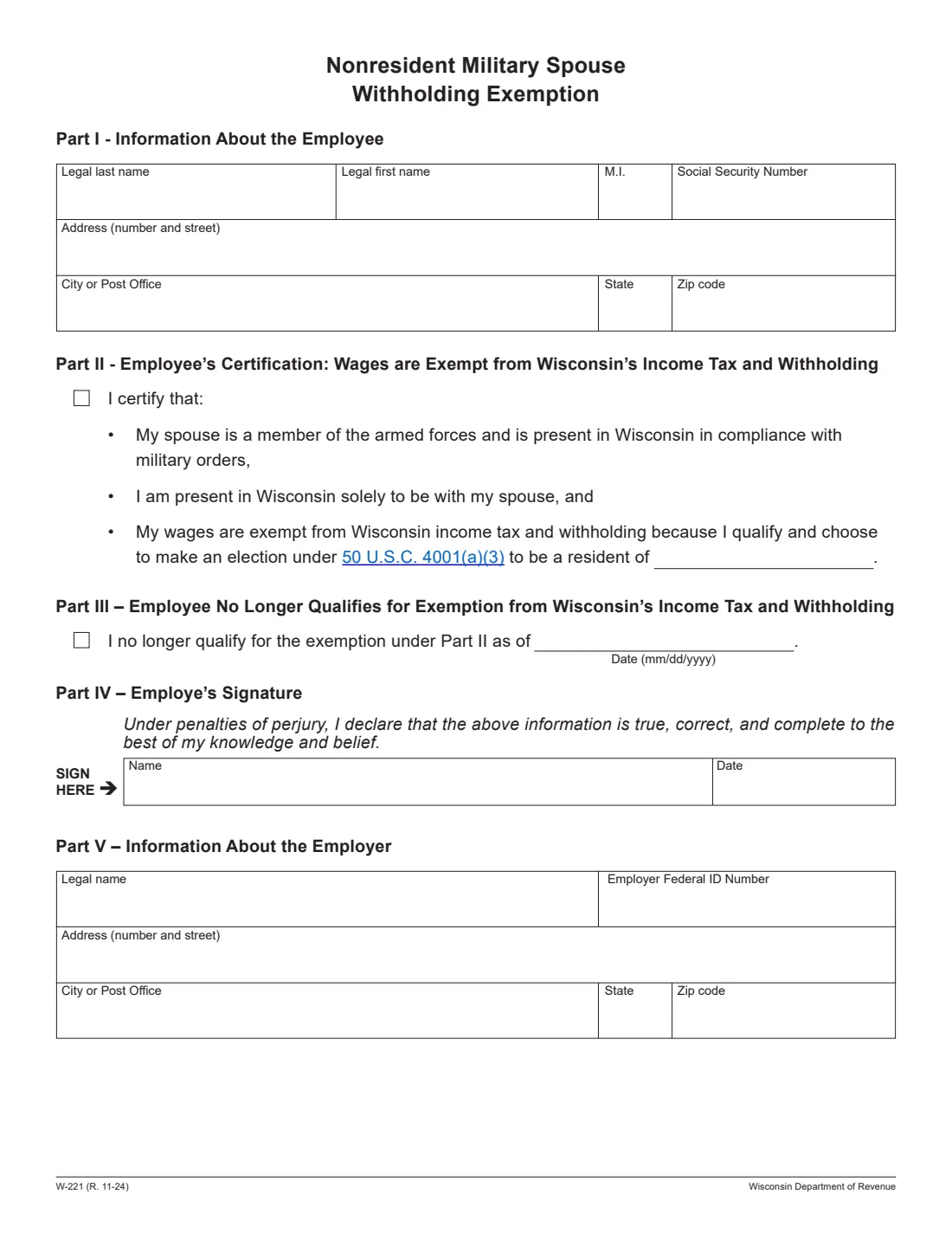
Form W-221, the Nonresident Military Spouse Withholding Exemption, is how the spouse of a servicemember stationed in Wisconsin tells an employer that their wages are exempt from Wisconsin income tax and withholding. It's issued by the Wisconsin Department of Revenue, and the current edition is R. 11-24. The exemption rests on 50 U.S.C. 4001(a)(3), which lets a military spouse choose to be a resident of the servicemember's residence or domicile, their own, or the servicemember's permanent duty station.
The form has five parts. Part I is your name, Social Security number and address. Part II is the certification that your wages are exempt, with the state you choose to be a resident of. Part III is for telling your employer you no longer qualify, with the date. Part IV is your signature, and Part V is for the employer, who then sends a copy to the department.
FileIt lets you fill out Form W-221 online in a guided form. It pre-fills your name from the People records in your vault, shows only the part you need, checks that the state you elect isn't Wisconsin, and prints everything into the department's official PDF. The finished form is saved in your vault and can be sent for e-signature. FileIt never submits anything to the department or your employer: you give the form to your employer yourself.
- Who fills it
- The employee (Parts I to IV). The employer completes Part V.
- Given to
- Your employer, who sends a copy to the Wisconsin Department of Revenue.
- When
- When you qualify for the exemption, and again when you no longer qualify.
- Signatures
- The employee signs Part IV under penalties of perjury.
- Edition
- W-221 (R. 11-24).
- Cost
- Free to fill out on any FileIt account.
Who needs to fill out Wisconsin Form W-221?
- Spouses of servicemembers on active duty or active service who are present in Wisconsin under military orders.
- Spouses who are in Wisconsin solely to be with the servicemember and choose a residence other than Wisconsin.
- Spouses who claimed the exemption before and no longer qualify, for example after moving their residence to Wisconsin or separating.
- Employers who must complete Part V and send a copy to the department.
When to use Wisconsin Form W-221
- When you start working in Wisconsin and meet all the conditions: complete Parts I, II and IV.
- When you no longer qualify: complete Parts I, III and IV so your employer starts withholding again.
- If the residence you choose is Illinois, Indiana, Kentucky or Michigan, also give your employer Form W-220, as the instructions say.
- Not if you choose to be a resident of Wisconsin: the instructions say you don't need Form W-221 then.
What you need before you start
- Your legal name, Social Security number and address.
- The state you choose to be a resident of under 50 U.S.C. 4001(a)(3): your servicemember's residence or domicile, your own, or the permanent duty station.
- If you no longer qualify, the date you stopped qualifying.
- For Part V: the employer's legal name, federal ID number and address.
What’s on Wisconsin Form W-221
The 2024 edition has 1 page. FileIt asks for it in 4 parts, and it is signed by Employee:
- What you are telling your employerEmployee
- Part I: Information about the employeeEmployee
- Part IV: Employee's signatureEmployee
- Part V: Information about the employerEmployer
How to fill out Wisconsin Form W-221, step by step
1 Part I: Information about the employee
Enter your legal last name, first name and middle initial, your Social Security number and your address, city or post office, state and ZIP code. FileIt pre-fills your name from the person's record in your vault.
2 Part II: Wages are exempt
Check the box to certify that your spouse is a member of the armed forces present in Wisconsin under military orders, that you are in Wisconsin solely to be with your spouse, and that your wages are exempt because you qualify and choose to be a resident of another state under 50 U.S.C. 4001(a)(3). Write that state. The instructions say the choice must not be Wisconsin, and that for National Guard members, active service includes certain calls of more than 30 consecutive days under 32 U.S.C. 502(f).
3 Part III: No longer qualify
If you claimed the exemption before and no longer qualify, check this box instead and enter the date (mm/dd/yyyy). The instructions note you may also need to give your employer Form WT-4 so the right amount of Wisconsin tax is withheld.
4 Part IV: Signature
You declare under penalties of perjury that the information is true, correct and complete. FileIt prints the date; you sign in the Name box by hand or by e-signature.
5 Part V: Employer
The employer enters its legal name, federal ID number and address, and sends a copy of the form to the department by mail or fax. With Parts I, II and IV completed, the employer should not withhold Wisconsin income tax; with Parts I, III and IV, it should withhold the appropriate amount.
Common mistakes to avoid
- Electing Wisconsin as your residence: then the exemption doesn't apply and you don't need this form.
- Checking both Part II and Part III: complete one or the other.
- Forgetting Form W-220 when the residence you choose is Illinois, Indiana, Kentucky or Michigan.
- Not telling your employer about a change: the instructions say it's your responsibility to report changes to your residency, domicile or exemptions.
After you fill it out
Sign Form W-221 and give it to your employer, who completes Part V and sends a copy to the Wisconsin Department of Revenue.
If Wisconsin tax was withheld while you qualified, the instructions say you should file Form 1NPR during the regular filing season to ask for a refund.
FileIt saves the finished PDF in the person's folder in your vault. Fill out a new W-221 with Part III if you stop qualifying.
Fill out Wisconsin Form W-221 online with FileIt
- Pick the person. Choose someone from People and FileIt fills in their name, date of birth, address and other details it already knows.
- Answer plain-language questions. One part of the form at a time, with the official help text beside each question — 18 fields in all. Your answers save as you go.
- Check the live preview. Watch your answers land on the real Wisconsin Department of Revenue form, and let FileIt do any worksheet arithmetic.
- Generate the official PDF. FileIt prints your answers into the agency’s own PDF and files it in that person’s folder in your vault. Sign it, or send it for e-signature.
FileIt fills the form — it never files or submits anything for you. Deliver the finished form to whoever asked for it, the way the form’s instructions say.
Start Wisconsin Form W-221 now — it’s freeWisconsin Form W-221: frequently asked questions
What is Wisconsin Form W-221?
It's the Nonresident Military Spouse Withholding Exemption. The spouse of a servicemember stationed in Wisconsin gives it to an employer to say their wages are exempt from Wisconsin income tax and withholding, or that they no longer qualify.
Which state can I choose to be a resident of?
The instructions list three choices under 50 U.S.C. 4001(a)(3): the servicemember's residence or domicile, your own residence or domicile, or the servicemember's permanent duty station. The exemption applies only when your choice is not Wisconsin.
Do I need Form W-220 too?
If the state you choose is Illinois, Indiana, Kentucky or Michigan, the instructions say you should also complete Form W-220 and give it to your employer.
Where do I send Form W-221?
Give it to your employer. The employer completes Part V and sends a copy to the department. FileIt doesn't submit it for you.
Can I fill out Form W-221 online?
Yes. FileIt lets you fill it out online free and prints your answers into the department's official PDF. You can download, print or e-sign it before giving it to your employer.
Official sources
- Blank form (PDF), published by Wisconsin Department of Revenue: https://www.revenue.wi.gov/TaxForms2017through2019/w-221f.pdf
- Official instructions and guidance: https://www.revenue.wi.gov/TaxForms2017through2019/w-221instr.pdf
- Edition shown on this page: W-221 (R. 11-24) (checked 2026-10-25).
FileIt is not affiliated with or endorsed by Wisconsin Department of Revenue or any government. This page explains the form in general terms and is not legal, tax or immigration advice. Always read the official instructions, and check that you are using the edition the recipient accepts. Page last reviewed 2026-10-25.