What is Maryland Form MWH-M?
Form MWH-M is how the civilian spouse of an active duty U.S. armed forces servicemember tells a Maryland employer to stop withholding Maryland income tax. It's issued by the Comptroller of Maryland, and the 2026 edition is headed "Maryland Form MWH-M" (the file is still named mw507m). It rests on the Military Spouses Residency Relief Act, which lets a civilian spouse who keeps a domicile in another state be exempt from tax on wages earned where the servicemember is stationed.
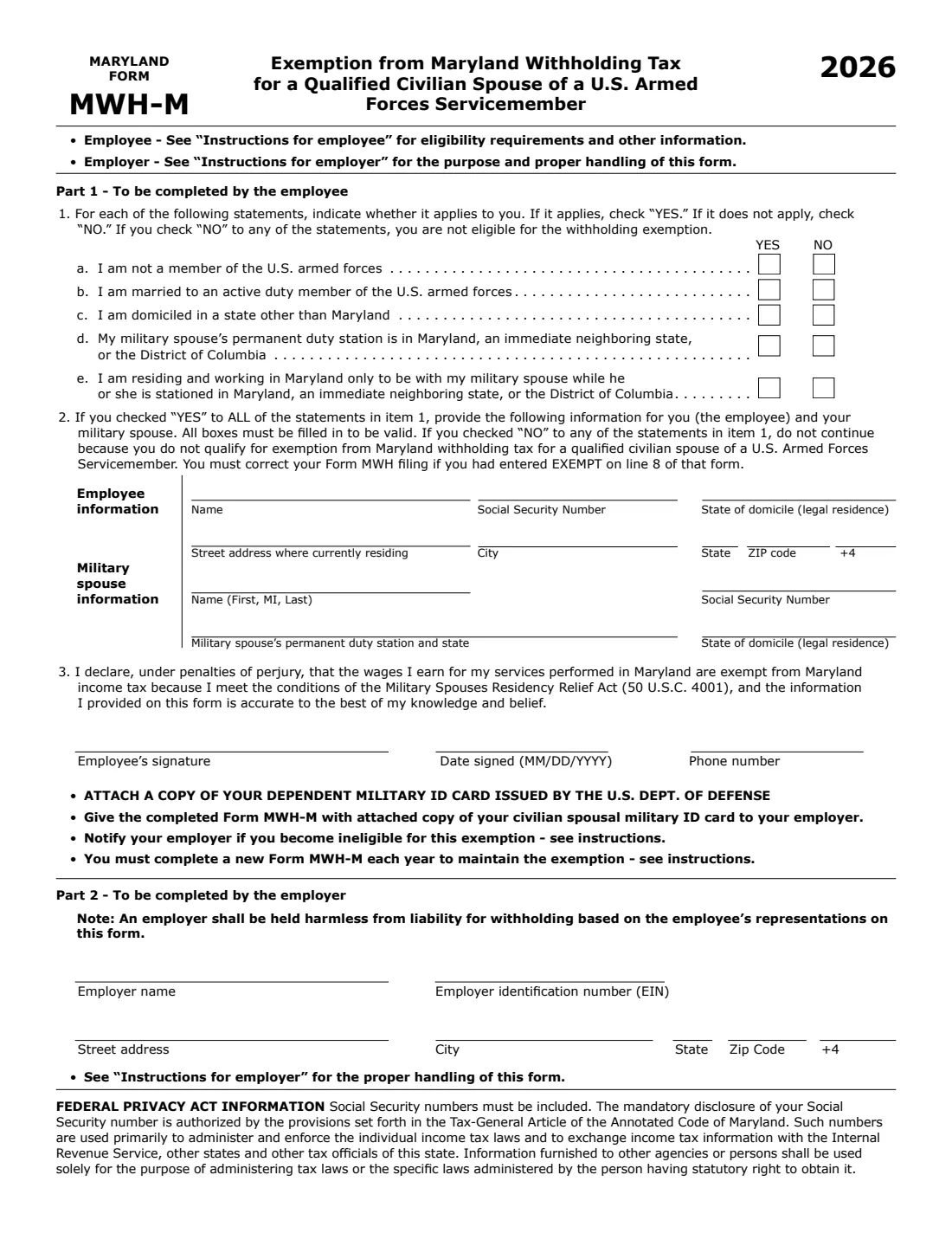
The form is a short test and a declaration. You answer five YES / NO statements, and you qualify only if every answer is YES. Then you give your name, SSN, state of domicile and Maryland address, your spouse's name, SSN, permanent duty station and state of domicile, and sign under penalties of perjury. You attach a copy of your dependent military ID card and give the form to your employer with Form MWH. It's valid for one calendar year, so you file a new one each year.
FileIt lets you fill out Form MWH-M online in a guided form. It pre-fills your name from the People records in your vault, checks the eligibility answers and the duty station state as you go, and prints everything into the Comptroller's official PDF, with Part 2 ready for your employer. The finished form is saved in your vault and can be sent for e-signature. FileIt never submits anything to the Comptroller or your employer: you give the form to your employer yourself.
- Who fills it
- The employee (Part 1). The employer completes Part 2.
- Given to
- Your employer, with Form MWH and a copy of your dependent military ID card.
- When
- Each calendar year you want the exemption. The instructions give February 15 as the renewal due date.
- Signatures
- The employee signs item 3 under penalties of perjury.
- Edition
- 2026.
- Cost
- Free to fill out on any FileIt account.
Who needs to fill out Maryland Form MWH-M?
- Civilian spouses of active duty U.S. armed forces servicemembers who work in Maryland.
- Spouses who keep their domicile (legal residence) in a state other than Maryland.
- Spouses whose servicemember's permanent duty station is in Maryland, Delaware, Pennsylvania, Virginia, West Virginia or the District of Columbia.
- Spouses who are in Maryland only to be with the servicemember.
- Employers who need to keep the signed form in payroll records and mail a copy to the Comptroller.
When to use Maryland Form MWH-M
- When you start working in Maryland and meet all the conditions, together with Form MWH.
- Every year you want to continue the exemption, since the form is valid only for the calendar year it's completed for.
- Not when any statement in item 1 is NO: the form says not to continue, and to correct Form MWH if you entered EXEMPT on its line 8.
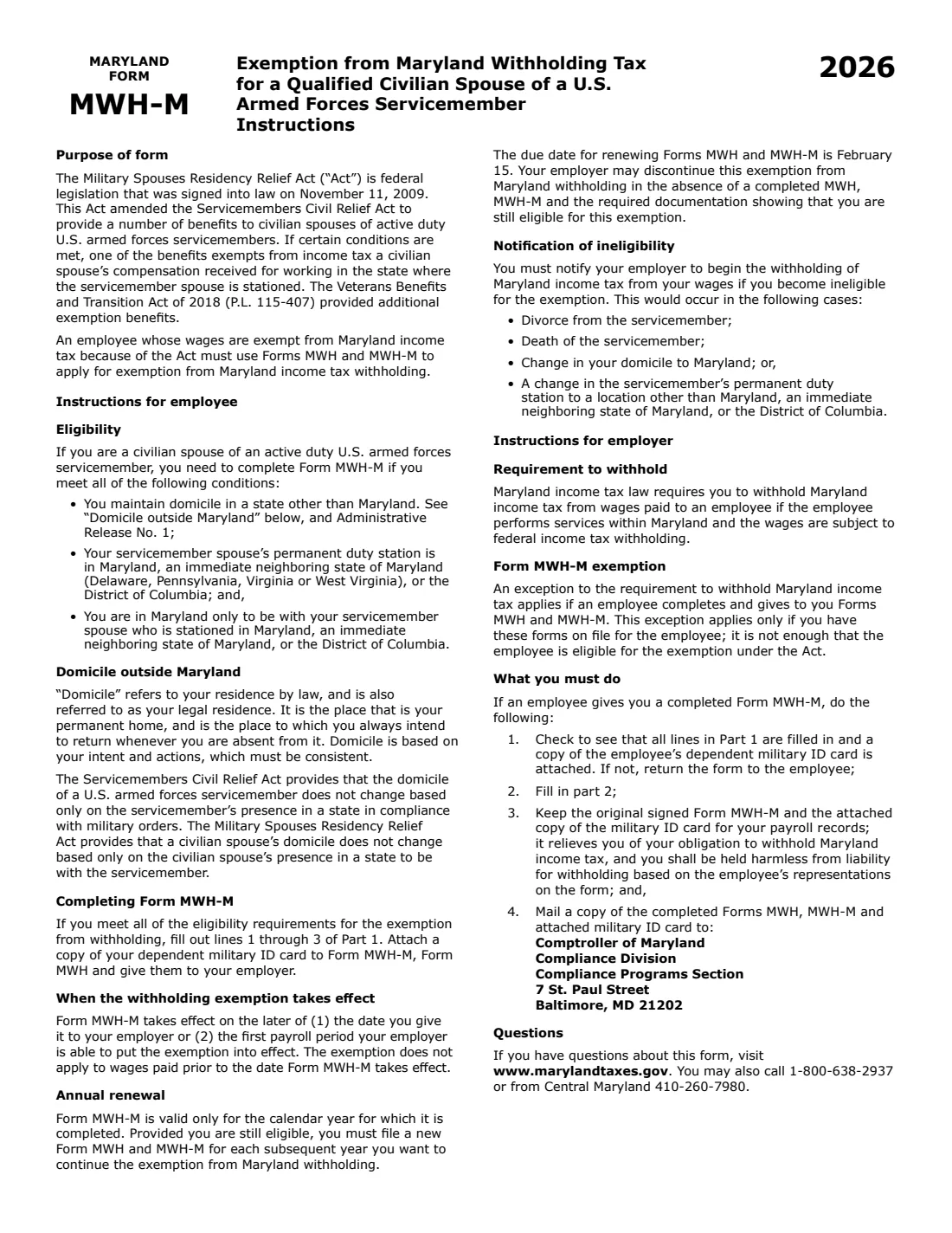
- If you become ineligible (divorce, the servicemember's death, your domicile changing to Maryland, or a new duty station outside Maryland, its neighboring states and DC), notify your employer to begin withholding instead.
What you need before you start
- Your name, Social Security number, state of domicile and the address where you currently live.
- Your phone number.
- Your servicemember spouse's name, Social Security number, permanent duty station and its state, and state of domicile.
- A copy of your dependent military ID card issued by the U.S. Department of Defense, to attach.
- Form MWH, which you give your employer with it.
- For Part 2: the employer's name, EIN and address.
What’s on Maryland Form MWH-M
The 2026 edition has 2 pages. FileIt asks for it in 5 parts, and it is signed by Employee:
- Part 1, item 1: EligibilityEmployee
- Part 1, item 2: Employee informationEmployee
- Part 1, item 2: Military spouse informationEmployee
- Part 1, item 3: Declaration and signatureEmployee
- Part 2: EmployerEmployer
How to fill out Maryland Form MWH-M, step by step
1 Item 1: The eligibility statements
Check YES or NO for each of five statements: you are not a member of the armed forces; you are married to an active duty member; you are domiciled outside Maryland; your spouse's permanent duty station is in Maryland, a neighboring state or DC; and you are in Maryland only to be with your spouse. You qualify only if all five are YES. FileIt stops you from generating the form if any answer is NO.
2 Item 2: Employee information
Enter your name, Social Security number, state of domicile (legal residence), the street address where you currently live, and its city, state and ZIP code. The form says all boxes must be filled in to be valid.
Domicile is your permanent home, the place you always intend to return to. The Act says it doesn't change only because you are in Maryland to be with your spouse.
3 Item 2: Military spouse information
Enter your spouse's name (first, middle initial, last), Social Security number, permanent duty station and its state, and state of domicile. FileIt checks that the duty station state is Maryland, Delaware, Pennsylvania, Virginia, West Virginia or DC.
4 Item 3: Declaration, signature, date and phone
You declare under penalties of perjury that your Maryland wages are exempt because you meet the conditions of the Military Spouses Residency Relief Act (50 U.S.C. 4001). FileIt prints the date (MM/DD/YYYY) and your phone number; you sign by hand or by e-signature.
5 Part 2: Employer
The employer enters its name, EIN and address. The employer instructions say to check that Part 1 is complete and the ID copy attached (or return the form), keep the signed original with the ID copy for payroll records, and mail a copy of Forms MWH, MWH-M and the ID card to the Comptroller's Compliance Programs Section in Baltimore.
Common mistakes to avoid
- Filing when one of the five statements is NO: you don't qualify for this exemption.
- Leaving a box empty: the form says all boxes must be filled in to be valid.
- Forgetting the copy of your dependent military ID card, which the employer must have before relying on the form.
- Giving only Form MWH-M: the instructions say to use it with Form MWH.
- Not renewing each year: the exemption lasts only for the calendar year on the form.
- Not telling your employer when you stop qualifying, for example after a move of your domicile to Maryland.
After you fill it out
Sign Form MWH-M, attach a copy of your dependent military ID card, and give it with Form MWH to your employer.
Your employer completes Part 2, keeps the signed original, and mails a copy to the Comptroller of Maryland. The exemption takes effect on the later of the date you give it to your employer or the first payroll period your employer can put it into effect; it doesn't apply to wages paid before that.
FileIt saves the finished PDF in the person's folder in your vault. Fill out a new one for each year you want the exemption to continue.
Fill out Maryland Form MWH-M online with FileIt
- Pick the person. Choose someone from People and FileIt fills in their name, date of birth, address and other details it already knows.
- Answer plain-language questions. One part of the form at a time, with the official help text beside each question — 29 fields in all. Your answers save as you go.
- Check the live preview. Watch your answers land on the real Comptroller of Maryland form, and let FileIt do any worksheet arithmetic.
- Generate the official PDF. FileIt prints your answers into the agency’s own PDF and files it in that person’s folder in your vault. Sign it, or send it for e-signature.
FileIt fills the form — it never files or submits anything for you. Deliver the finished form to whoever asked for it, the way the form’s instructions say.
Start Maryland Form MWH-M now — it’s freeMaryland Form MWH-M: frequently asked questions
What is Maryland Form MWH-M?
It's the Comptroller of Maryland's exemption from Maryland withholding tax for a qualified civilian spouse of a U.S. armed forces servicemember. A spouse who meets the conditions of the Military Spouses Residency Relief Act gives it to a Maryland employer to stop Maryland income tax withholding.
Is MWH-M the same as Form MW507M?
The 2026 file is still named 2026-mw507m.pdf, but the form now reads "Maryland Form MWH-M". Its instructions pair it with Form MWH, the Maryland withholding certificate with the EXEMPT line 8.
Who qualifies for the Maryland military spouse exemption?
A civilian spouse of an active duty servicemember who keeps a domicile outside Maryland, whose spouse's permanent duty station is in Maryland, Delaware, Pennsylvania, Virginia, West Virginia or DC, and who is in Maryland only to be with the servicemember. All five statements in item 1 must be YES.
Do I need to file MWH-M every year?
Yes. The form is valid only for the calendar year it's completed for. The instructions give February 15 as the due date for renewing Forms MWH and MWH-M.
What do I attach to Form MWH-M?
A copy of your dependent military ID card issued by the U.S. Department of Defense. The employer is told to return the form if the copy isn't attached.
Can I fill out Form MWH-M online?
Yes. FileIt lets you fill it out online free and prints your answers into the Comptroller's official PDF. You can download, print or e-sign it, then give it to your employer. FileIt doesn't submit it for you.
Official sources
- Blank form (PDF), published by Comptroller of Maryland: https://www.marylandcomptroller.gov/content/dam/mdcomp/md/state-payroll/forms/withholding/2026-mw507m.pdf
- Official instructions and guidance: https://www.marylandcomptroller.gov/content/dam/mdcomp/md/state-payroll/forms/withholding/2026-mw507m.pdf
- Edition shown on this page: 2026 (checked 2026-10-25).
FileIt is not affiliated with or endorsed by Comptroller of Maryland or any government. This page explains the form in general terms and is not legal, tax or immigration advice. Always read the official instructions, and check that you are using the edition the recipient accepts. Page last reviewed 2026-10-25.