What is Wisconsin Form W-220?
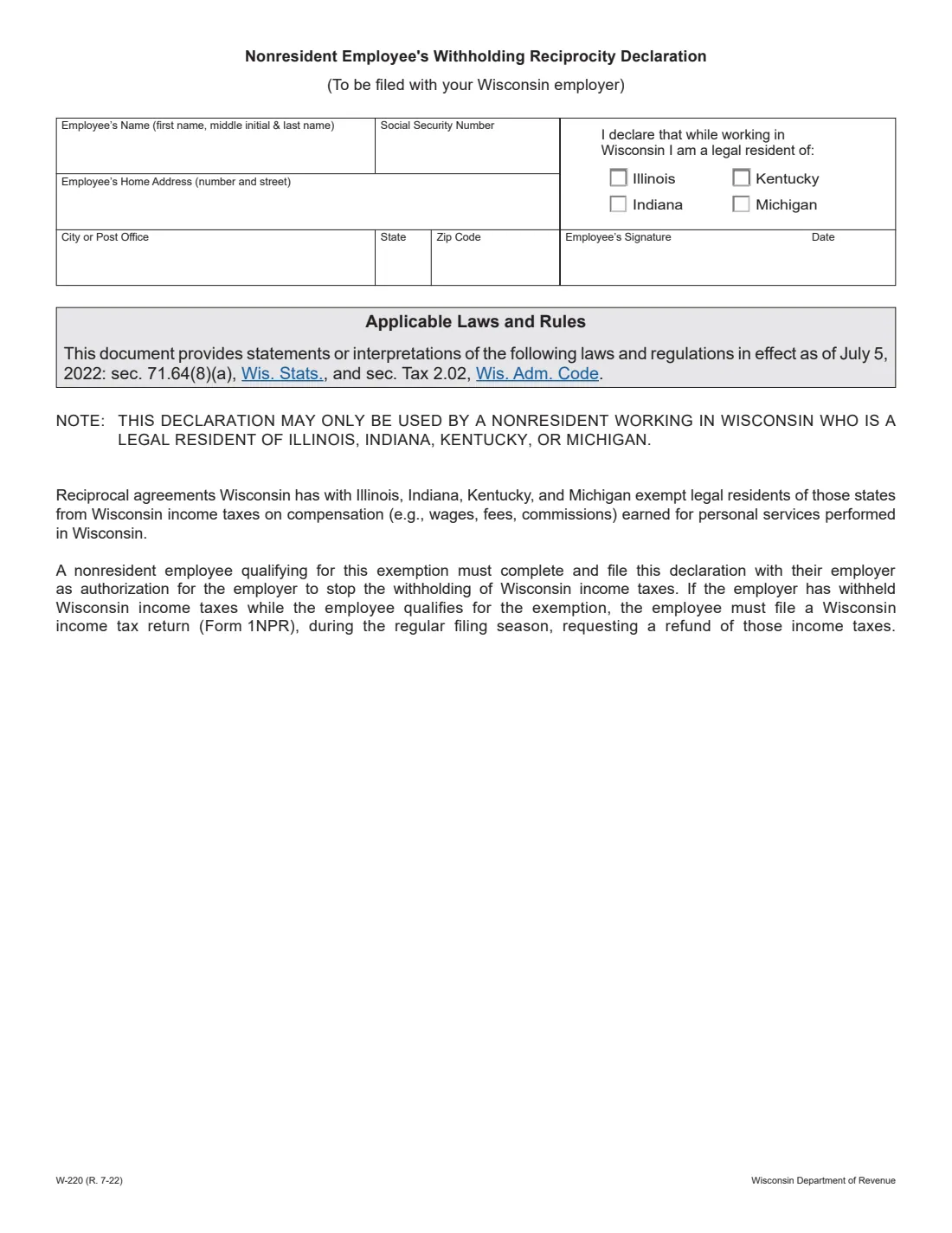
Form W-220, the Nonresident Employee's Withholding Reciprocity Declaration, is for people who live in Illinois, Indiana, Kentucky or Michigan and work in Wisconsin. Wisconsin has reciprocal agreements with those four states, so their legal residents don't pay Wisconsin income tax on compensation such as wages, fees and commissions for personal services performed in Wisconsin. The form is issued by the Wisconsin Department of Revenue, and the edition it links is R. 7-22.
It's a one-box declaration: your name, Social Security number, home address, and a tick for the state you are a legal resident of, then your signature and the date. Filing it with your employer authorizes the employer to stop withholding Wisconsin income tax. The form says it may only be used by a nonresident working in Wisconsin who is a legal resident of one of the four states.
FileIt lets you fill out Form W-220 online in a guided form. It pre-fills your name from the People records in your vault, checks that your home address matches the state you tick, and prints everything into the department's official PDF. The finished form is saved in your vault and can be sent for e-signature. FileIt never submits anything to the department or your employer: you give the form to your employer yourself.
- Who fills it
- The employee.
- Given to
- Your Wisconsin employer.
- Who can use it
- Legal residents of Illinois, Indiana, Kentucky or Michigan who work in Wisconsin.
- Signatures
- The employee signs and dates it.
- Edition
- W-220 (R. 7-22).
- Cost
- Free to fill out on any FileIt account.
Who needs to fill out Wisconsin Form W-220?
- Residents of Illinois, Indiana, Kentucky or Michigan who work for an employer in Wisconsin.
- Cross-border commuters, for example from northern Illinois or Michigan's Upper Peninsula, whose Wisconsin employer is withholding Wisconsin tax.
- Military spouses who elect Illinois, Indiana, Kentucky or Michigan as their residence and file Form W-221, since its instructions say to file W-220 as well.
When to use Wisconsin Form W-220
- When you start a job in Wisconsin while living in one of the four reciprocal states.
- When your Wisconsin employer is withholding Wisconsin income tax and you qualify for the exemption.
- Not if you live in any other state: the reciprocity applies only to Illinois, Indiana, Kentucky and Michigan.
What you need before you start
- Your name and Social Security number.
- Your home address (number and street, city or post office, state and ZIP code).
- Which of the four states you are a legal resident of.
What’s on Wisconsin Form W-220
The 2022 edition has 1 page. FileIt asks for it in 2 parts, and it is signed by Employee:
- Employee and state of legal residenceEmployee
- SignatureEmployee
How to fill out Wisconsin Form W-220, step by step
1 Name and Social Security number
Enter your first name, middle initial and last name, and your Social Security number. FileIt pre-fills your name from the person's record in your vault.
2 Home address
Enter your home address in the state you are a legal resident of, with the city or post office, state and ZIP code.
3 State of legal residence
Tick Illinois, Indiana, Kentucky or Michigan: the state you are a legal resident of while working in Wisconsin.
4 Signature and date
FileIt prints the date; you sign by hand or by e-signature, then give the declaration to your employer.
Common mistakes to avoid
- Using it as a resident of a state other than Illinois, Indiana, Kentucky or Michigan.
- Giving a home address in a different state from the one you tick.
- Waiting for a refund instead of filing: if Wisconsin tax was already withheld while you qualified, the form says you must file Form 1NPR during the regular filing season to get it back.
After you fill it out
Sign the declaration and give it to your Wisconsin employer, which can then stop withholding Wisconsin income tax.
If Wisconsin tax was withheld while you qualified, file a Wisconsin income tax return (Form 1NPR) during the regular filing season to ask for a refund.
FileIt saves the finished PDF in the person's folder in your vault.
Fill out Wisconsin Form W-220 online with FileIt
- Pick the person. Choose someone from People and FileIt fills in their name, date of birth, address and other details it already knows.
- Answer plain-language questions. One part of the form at a time, with the official help text beside each question — 10 fields in all. Your answers save as you go.
- Check the live preview. Watch your answers land on the real Wisconsin Department of Revenue form, and let FileIt do any worksheet arithmetic.
- Generate the official PDF. FileIt prints your answers into the agency’s own PDF and files it in that person’s folder in your vault. Sign it, or send it for e-signature.
FileIt fills the form — it never files or submits anything for you. Deliver the finished form to whoever asked for it, the way the form’s instructions say.
Start Wisconsin Form W-220 now — it’s freeWisconsin Form W-220: frequently asked questions
What is Wisconsin Form W-220?
It's the Nonresident Employee's Withholding Reciprocity Declaration. A legal resident of Illinois, Indiana, Kentucky or Michigan who works in Wisconsin files it with the employer to stop Wisconsin income tax withholding.
Which states have reciprocity with Wisconsin?
The form names Illinois, Indiana, Kentucky and Michigan. Their legal residents are exempt from Wisconsin income tax on compensation for personal services performed in Wisconsin.
Where do I send Form W-220?
To your Wisconsin employer. FileIt doesn't submit it for you.
What if Wisconsin tax was already withheld?
The form says that if your employer withheld Wisconsin income tax while you qualified, you must file a Wisconsin income tax return (Form 1NPR) during the regular filing season to request a refund.
Can I fill out Form W-220 online?
Yes. FileIt lets you fill it out online free and prints your answers into the department's official PDF. You can download, print or e-sign it before giving it to your employer.
Official sources
- Blank form (PDF), published by Wisconsin Department of Revenue: https://www.revenue.wi.gov/TaxForms2017through2019/w-220f.pdf
- Official instructions and guidance: https://www.revenue.wi.gov/Pages/Form/with-home.aspx
- Edition shown on this page: W-220 (R. 7-22) (checked 2026-10-25).
FileIt is not affiliated with or endorsed by Wisconsin Department of Revenue or any government. This page explains the form in general terms and is not legal, tax or immigration advice. Always read the official instructions, and check that you are using the edition the recipient accepts. Page last reviewed 2026-10-25.