What is Form MW-4?
Form MW-4, the Montana Employee's Withholding and Exemption Certificate, is how you tell your employer how much Montana income tax to take out of your pay. It's issued by the Montana Department of Revenue; FileIt fills the 2026 edition (V1 7/2025). Montana doesn't use the federal Form W-4 for state withholding, and it doesn't recognise the federal 'exempt' status.
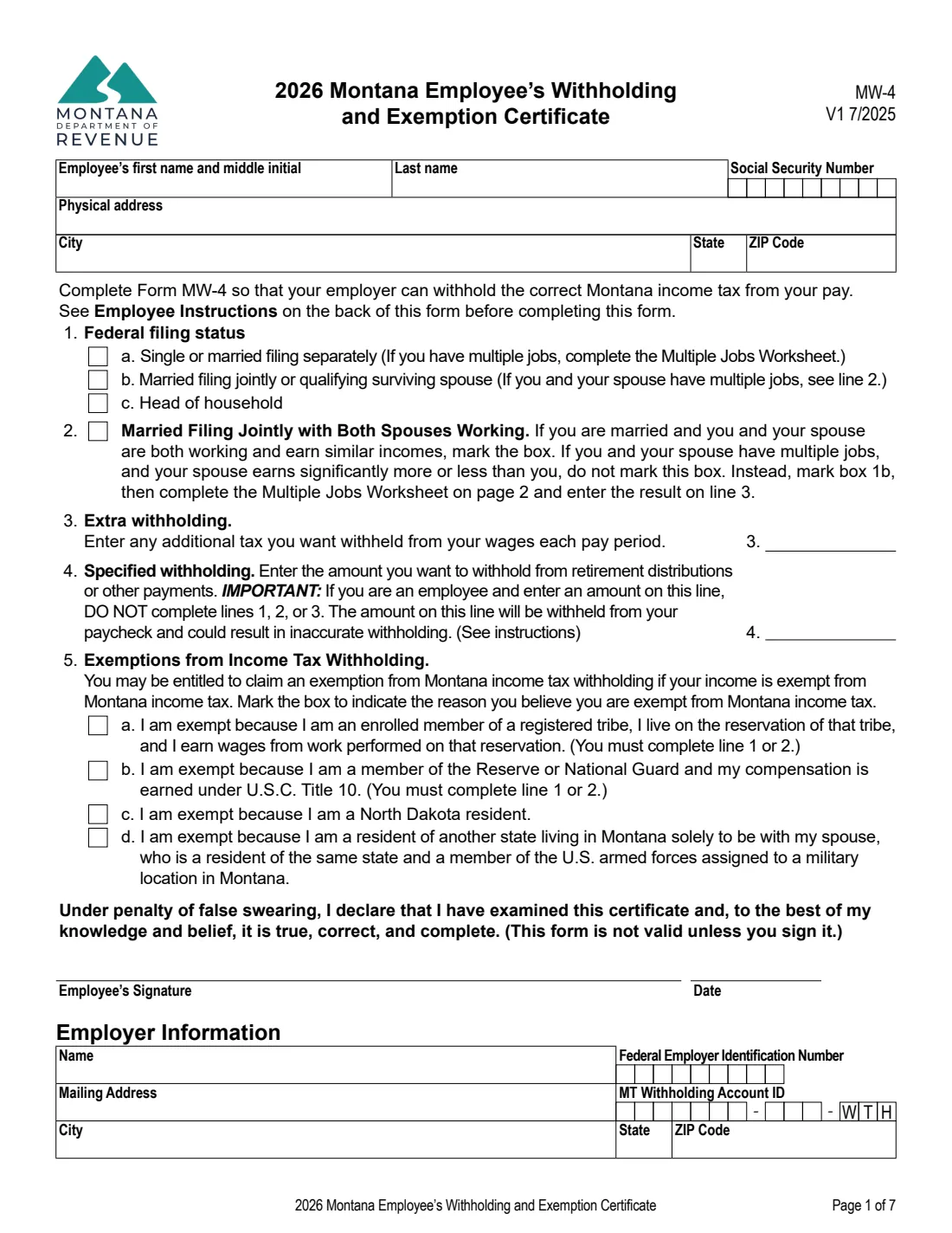
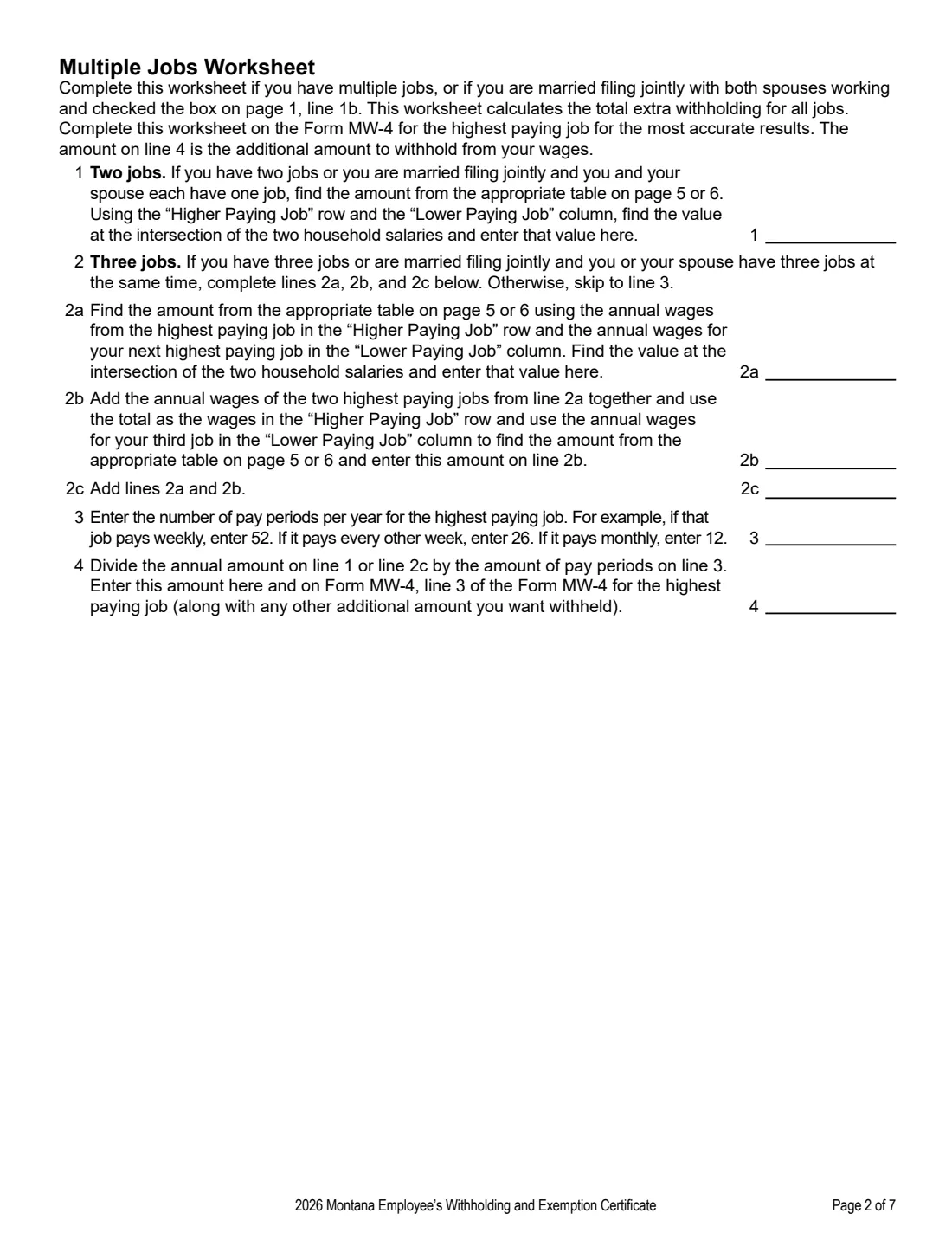
The MW-4 works much like the current federal W-4. You pick your federal filing status, mark a box if you're married filing jointly and both spouses earn similar amounts, and can add extra withholding. A Multiple Jobs Worksheet on page 2 works out extra withholding when you have more than one job. Line 4 lets pension, annuity or IRA recipients name an exact amount, and line 5 lists four specific exemptions. If you don't complete the form, your employer withholds as if you were single.
FileIt lets you fill out the MW-4 online in a guided form. It pre-fills your name from the People records in your vault, does the worksheet arithmetic, and prints your answers into the Department's official PDF. The finished form is saved in your vault and can be sent for e-signature. FileIt never submits anything — you give the form to your employer yourself.
- Who fills it
- The employee or payee. The employer completes the Employer Information section.
- Given to
- Your employer or payer. Employers file exemption claims with the Department online through TAP.
- When
- When you start a new job or claim an exemption; exemptions must be renewed each year.
- Signatures
- The employee signs under penalty of false swearing. The form is not valid unless signed.
- Edition
- 2026 Form MW-4 (V1 7/2025).
- Cost
- Free to fill out on any FileIt account.
Who needs to fill out Form MW-4?
- Employees starting a new job with wages subject to Montana withholding.
- Employees who want to claim an exemption from Montana withholding.
- People receiving a pension, annuity or IRA distribution who want a specific amount of Montana tax withheld.
- People who want Montana tax withheld from unemployment compensation.
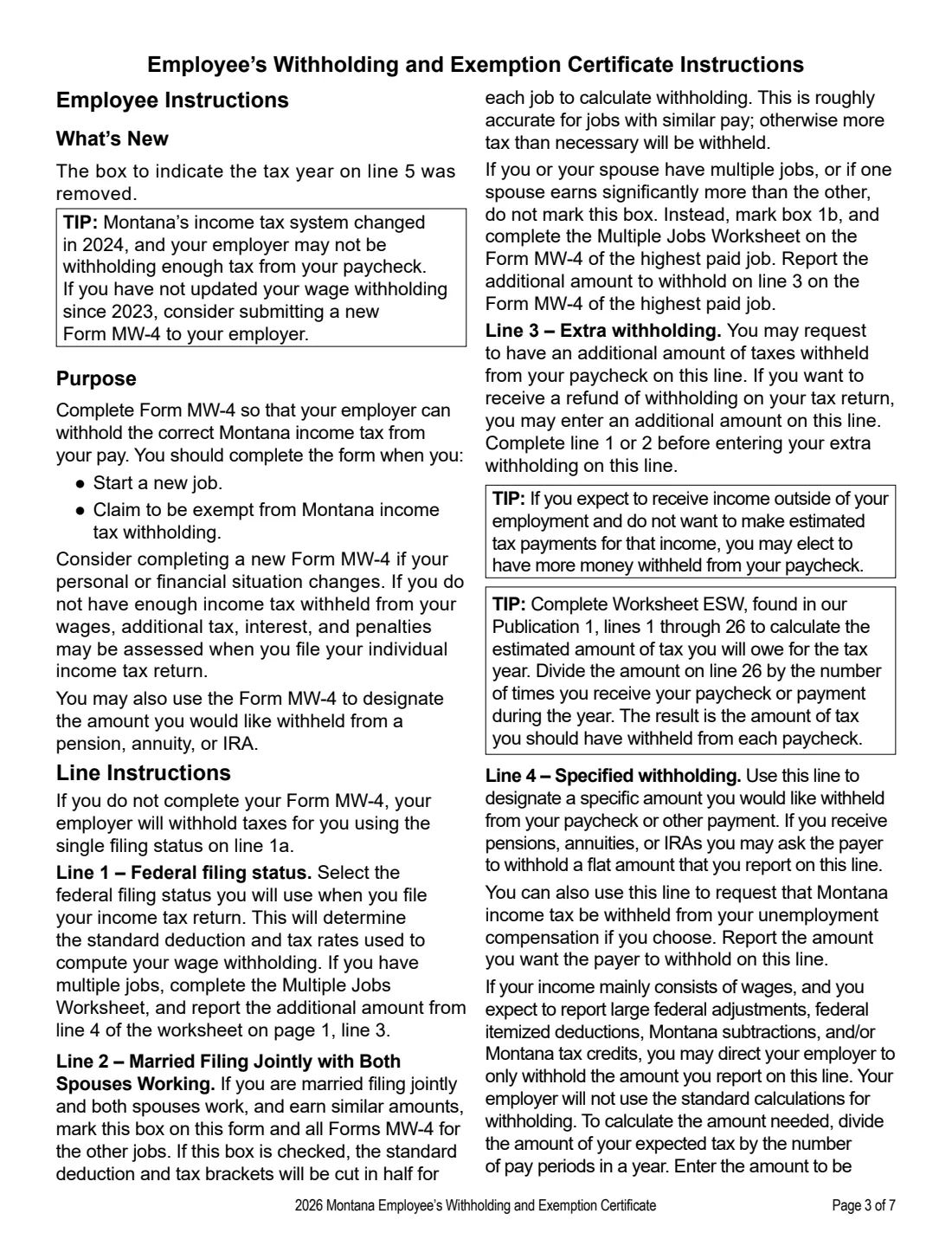
- Employees whose personal or financial situation has changed — the instructions note that Montana's income tax system changed in 2024 and suggest a new MW-4 if you haven't updated it since 2023.
When to use Form MW-4
- When you start a new job.
- When you claim to be exempt from Montana income tax withholding, and again before the start of each following year to keep the exemption.
- When your personal or financial situation changes.
- When your exemption no longer applies — you must then give your employer a new MW-4 with line 1 or 2 completed.
What you need before you start
- Your name, Social Security number and physical address.
- The federal filing status you'll use on your income tax return.
- If you have more than one job (or both spouses work): the annual wages for each job and the Multiple Jobs Wage Tables at the end of the form.
- The number of pay periods per year for your highest paying job.
- If you're claiming an exemption: which of the four line 5 statements applies to you.
- For the employer section: the employer's name, address, FEIN and Montana withholding account ID.
What’s on Form MW-4
The 2026 edition has 7 pages. FileIt asks for it in 6 parts, and it is signed by Employee:
- Your detailsEmployee
- Lines 1–4: How much to withholdEmployee
- Line 5: Exemption from Montana withholdingEmployee
- Multiple Jobs Worksheet (page 2)Employee
- SignatureEmployee
- Employer informationEmployer
How to fill out Form MW-4, step by step
1 Your details
Enter your first name and middle initial, last name, Social Security number and physical address. FileIt pre-fills your name from the person's record in your vault and stores your SSN encrypted.
2 Line 1: Federal filing status
Choose Single or married filing separately, Married filing jointly or qualifying surviving spouse, or Head of household — the status you'll use on your income tax return. It sets the standard deduction and tax rates used for your withholding.
3 Line 2: Married filing jointly with both spouses working
Mark this if you're married, you both work and earn similar incomes; mark it on the MW-4 for the other job too. The standard deduction and brackets are then cut in half for each job. If either of you has multiple jobs, or one spouse earns significantly more, don't mark it — mark 1b and complete the Multiple Jobs Worksheet instead.
4 Line 3: Extra withholding
Enter any additional tax you want withheld each pay period, after completing line 1 or 2. When you use the Multiple Jobs Worksheet, FileIt puts worksheet line 4, plus any other extra amount you enter, on this line.
5 Multiple Jobs Worksheet
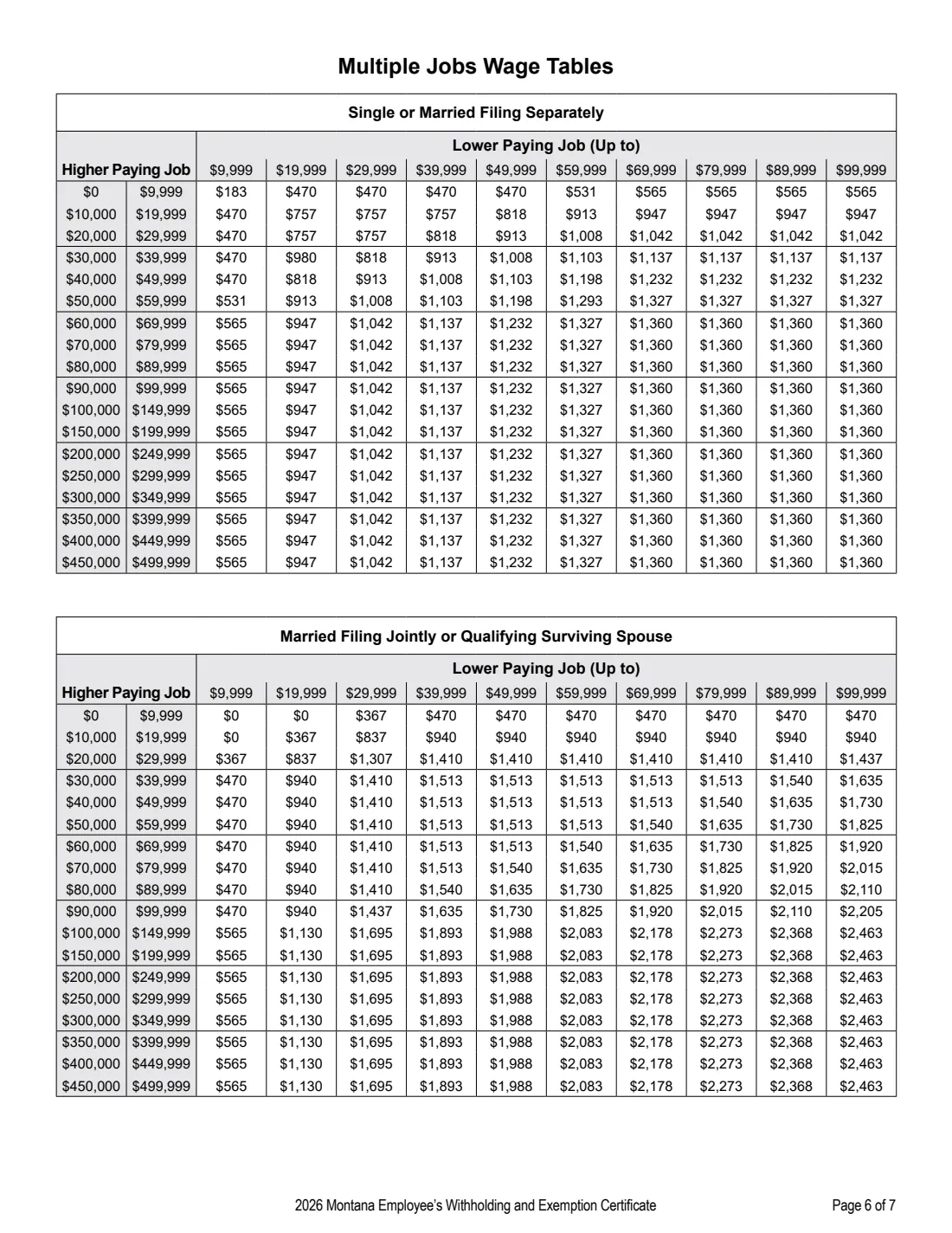
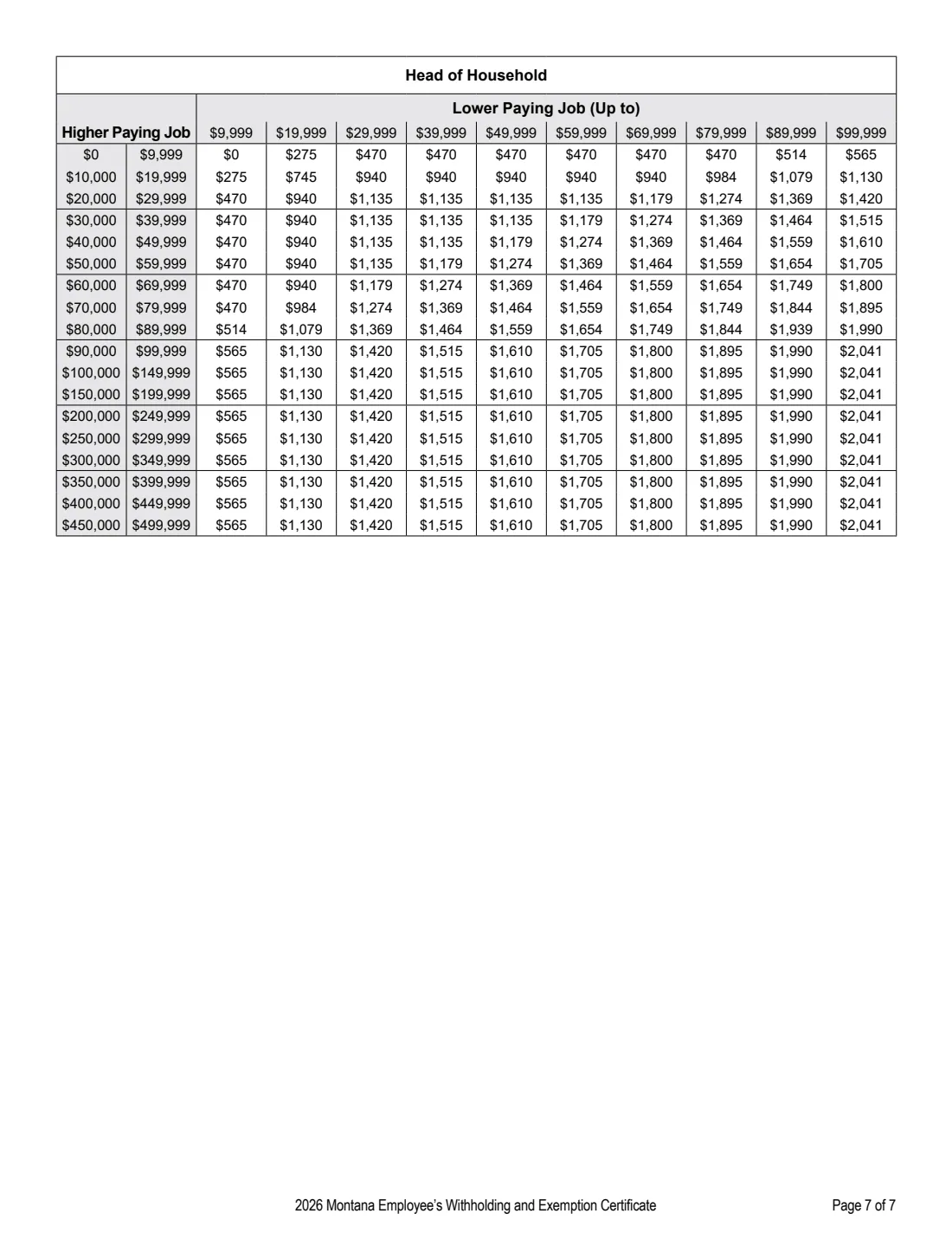
Complete it on the MW-4 for your highest paying job. For two jobs, look up the value where the 'Higher Paying Job' row meets the 'Lower Paying Job' column in the table for your filing status. For three jobs, use lines 2a and 2b; FileIt adds them on line 2c. Enter your pay periods per year, and FileIt divides to get the amount per pay period on line 4.
6 Line 4: Specified withholding
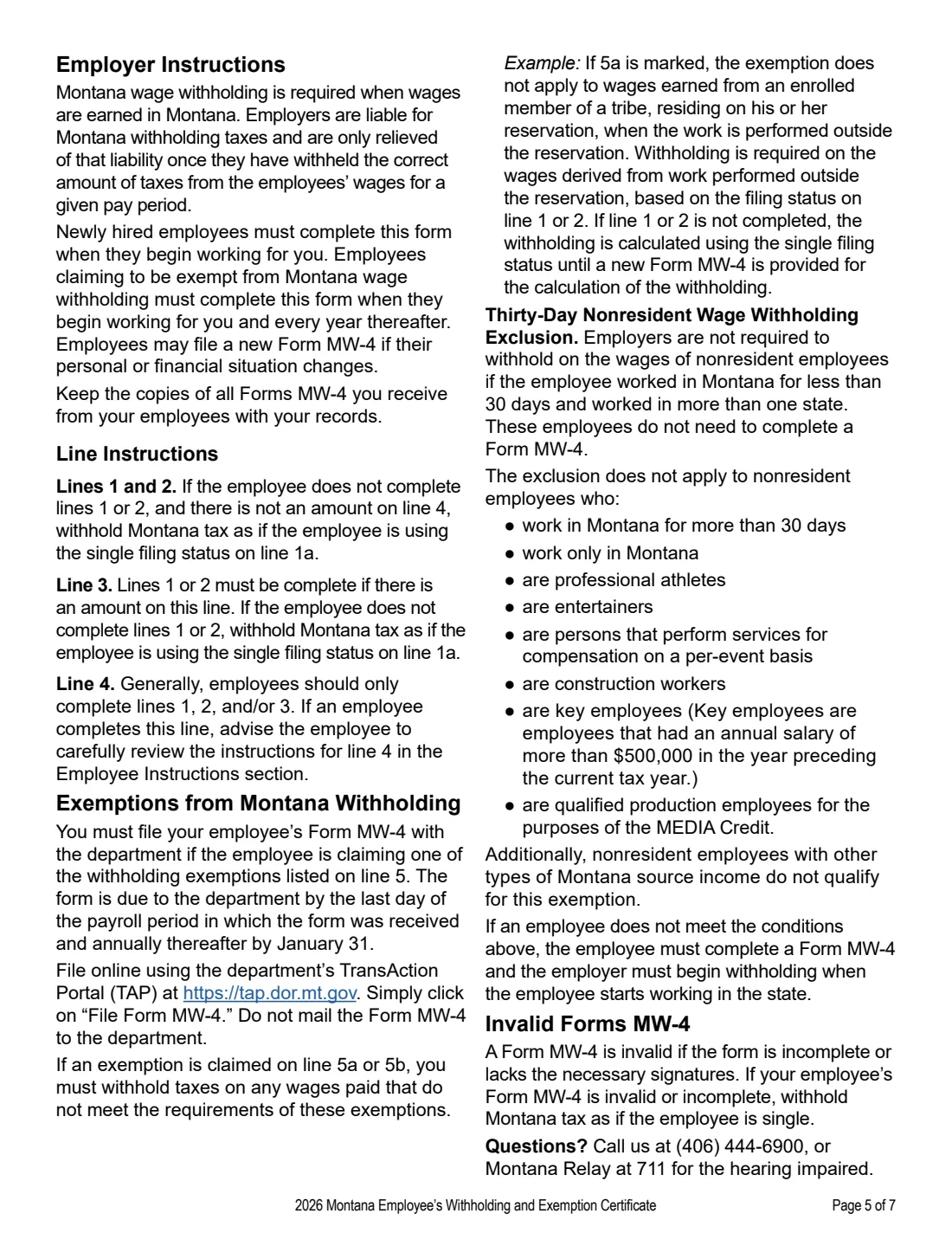
Use this to have a flat amount withheld — for example from a pension, annuity, IRA or unemployment compensation. If you're an employee and use this line, do not complete lines 1, 2 or 3; your employer then withholds just this amount instead of using the standard calculation, which may leave you owing tax.
7 Line 5: Exemptions
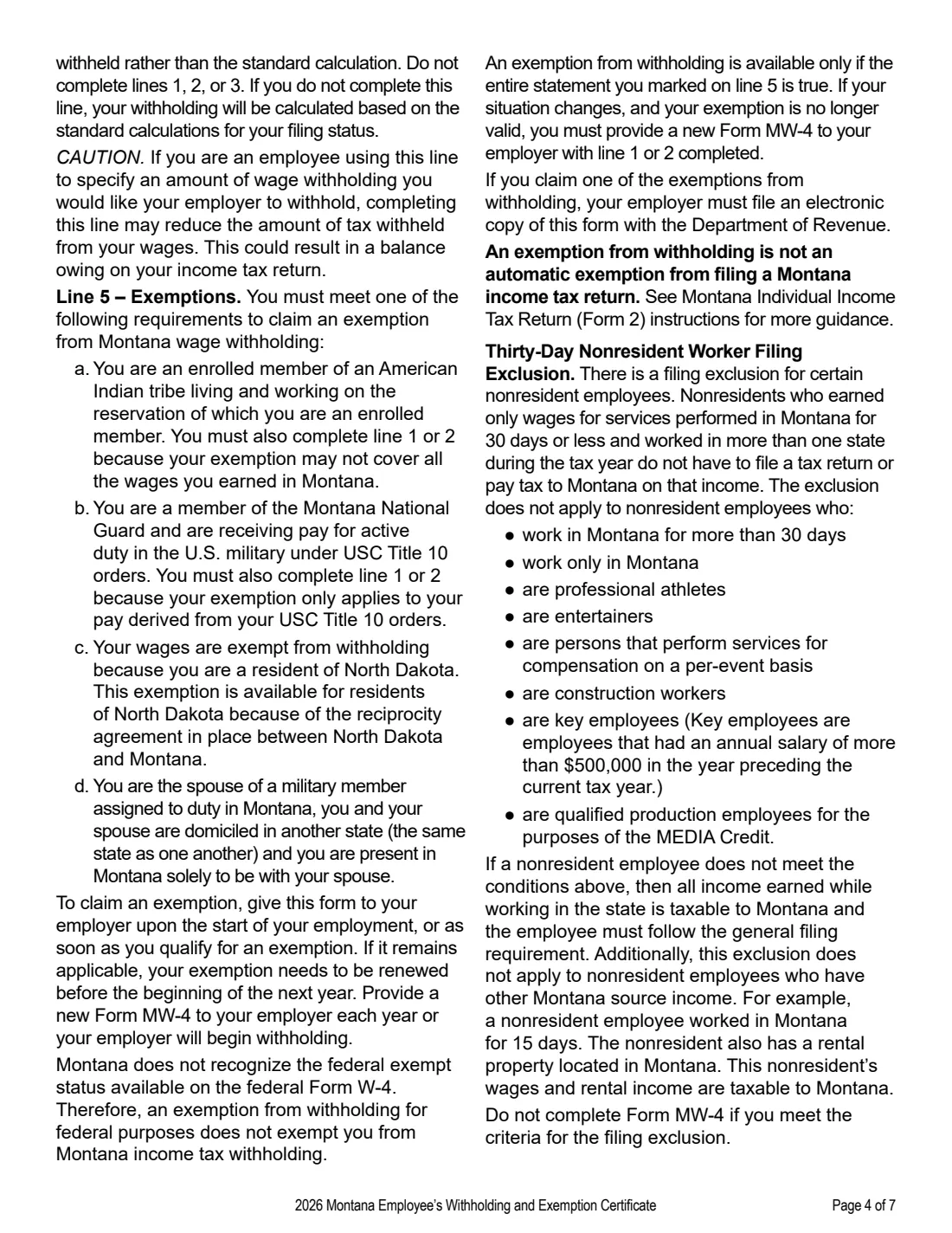
Mark the one that applies: (a) an enrolled member of a registered tribe living on that tribe's reservation and earning wages for work performed there; (b) a member of the Reserve or National Guard with pay earned under U.S.C. Title 10; (c) a North Dakota resident; or (d) a resident of another state living in Montana solely to be with your spouse, a resident of the same state and a U.S. armed forces member assigned to a military location in Montana. For (a) and (b) you must also complete line 1 or 2.
8 Signature and employer information
Sign under penalty of false swearing — the form isn't valid unless you sign it. FileIt prints the date. Your employer completes its name, address, FEIN and MT withholding account ID.
Common mistakes to avoid
- Using the federal W-4 instead — Montana requires its own MW-4.
- Assuming federal 'exempt' status carries over — Montana doesn't recognise it.
- Filling in line 4 as an employee and also completing lines 1, 2 or 3.
- Marking line 2 when one spouse earns significantly more or either of you has multiple jobs.
- Forgetting to renew an exemption before the start of the next year — your employer will begin withholding.
- Leaving the form unsigned or incomplete — the employer then withholds as if you were single.
After you fill it out
Sign the MW-4 and give it to your employer or payer. FileIt saves the finished PDF in the person's folder in your vault.
If you claimed an exemption on line 5, your employer must file the form with the Department of Revenue online through the TransAction Portal (TAP) — the instructions say not to mail it.
Give your employer a new MW-4 each year to keep an exemption, and whenever your situation changes.
Fill out Form MW-4 online with FileIt
- Pick the person. Choose someone from People and FileIt fills in their name, date of birth, address and other details it already knows.
- Answer plain-language questions. One part of the form at a time, with the official help text beside each question — 31 fields in all. Your answers save as you go.
- Check the live preview. Watch your answers land on the real Montana Department of Revenue form, and let FileIt do any worksheet arithmetic.
- Generate the official PDF. FileIt prints your answers into the agency’s own PDF and files it in that person’s folder in your vault. Sign it, or send it for e-signature.
FileIt fills the form — it never files or submits anything for you. Deliver the finished form to whoever asked for it, the way the form’s instructions say.
Start Form MW-4 now — it’s freeForm MW-4: frequently asked questions
What is Form MW-4?
It's the Montana Employee's Withholding and Exemption Certificate. It tells your employer how much Montana income tax to withhold from your pay, or why you're exempt.
Can I fill out the MW-4 online?
Yes. FileIt lets you fill it out online free, does the Multiple Jobs Worksheet arithmetic, and prints your answers into the Department of Revenue's official PDF.
Can I use my federal W-4 for Montana?
No. Montana withholding uses the MW-4, and the instructions say an exemption from federal withholding doesn't exempt you from Montana withholding.
What happens if I don't fill out an MW-4?
Your employer withholds Montana tax as if you were single (line 1a). An invalid or unsigned form is treated the same way.
I live in North Dakota and work in Montana. Do I pay Montana withholding?
Line 5c lets North Dakota residents claim an exemption because of the reciprocity agreement between the two states. You need to renew it with a new MW-4 each year.
How long does an MW-4 exemption last?
An exemption needs to be renewed before the beginning of the next year. Give your employer a new MW-4 each year or your employer will begin withholding.
Where does the MW-4 go?
To your employer or payer. The employer files it with the Department through TAP only when you claim an exemption on line 5. FileIt doesn't submit it for you.
Official sources
- Blank form (PDF), published by Montana Department of Revenue: https://revenuefiles.mt.gov/files/Forms/Montana_Employee_Withholding_Allowance_and_Exemption_Certificate_Form_MW-4.pdf
- Official instructions and guidance: https://revenue.mt.gov/taxes/withholding-tax/form-mw-4
- Edition shown on this page: 2026 MW-4 (V1 7/2025) (checked 2026-09-28).
FileIt is not affiliated with or endorsed by Montana Department of Revenue or any government. This page explains the form in general terms and is not legal, tax or immigration advice. Always read the official instructions, and check that you are using the edition the recipient accepts. Page last reviewed 2026-09-28.