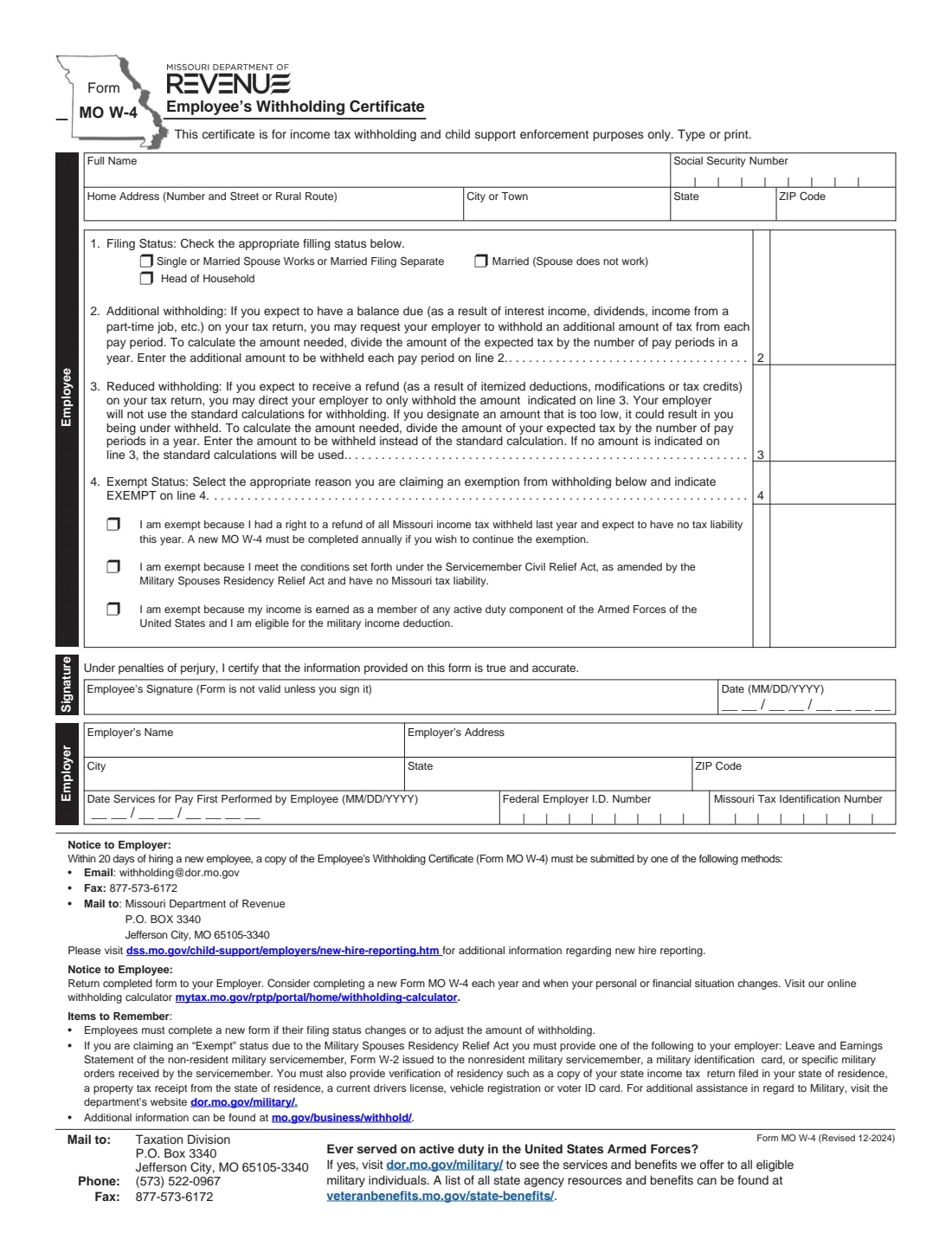
What is Form MO W-4?
Form MO W-4, the Employee's Withholding Certificate, is Missouri's own state withholding form. Your federal Form W-4 controls federal income tax withholding only, so a Missouri employer also uses the MO W-4 to work out how much Missouri income tax to withhold from each paycheck. The current edition is Form MO W-4 (Revised 12-2024), published by the Missouri Department of Revenue.
Missouri's certificate is short. There are no allowances and no worksheets on it: you pick a filing status, and then you can ask for an additional amount each pay period, set a reduced amount to be withheld instead of the standard calculation, or claim exemption for one of three printed reasons. The form also doubles as a new hire report — it says it is for income tax withholding and child support enforcement purposes, and your employer must send a copy to the Department of Revenue within 20 days of hiring you.
FileIt lets you fill out the MO W-4 online in a guided form. It pre-fills your name from the People records in your vault, writes EXEMPT on line 4 for you when you pick an exemption reason, checks that an exempt certificate doesn't also ask for extra or reduced withholding, and prints everything into the Department of Revenue's own official PDF. The finished form is saved in your vault, and you can send it for e-signature if you like. FileIt never submits anything to the Department of Revenue or your employer — you hand the completed form to your employer yourself.
- Who fills it
- The employee fills in the top part and signs; the employer completes the Employer section at the bottom.
- Given to
- Your employer. The employer then sends a copy to the Missouri Department of Revenue for new hire reporting.
- When
- When you start a job, when your filing status changes, when you want to adjust withholding, and each year if you claim the no-tax-liability exemption.
- Signatures
- The employee signs and dates it under penalties of perjury. The form is not valid unless you sign it.
- Edition
- Form MO W-4 (Revised 12-2024).
- Cost
- Free to fill out on any FileIt account.
Who needs to fill out Form MO W-4?
- New employees starting a job where Missouri income tax will be withheld from their pay.
- Current employees whose filing status has changed, for example after marriage, divorce or a spouse starting or stopping work.
- Anyone who expects to owe tax at filing time because of interest, dividends or a part-time job, and wants extra tax withheld on line 2.
- Anyone who expects a refund because of itemized deductions, modifications or tax credits, and wants a smaller fixed amount withheld on line 3.
- People who had a right to a refund of all Missouri tax withheld last year and expect no Missouri tax liability this year.
- Military spouses covered by the Military Spouses Residency Relief Act, and active duty service members eligible for Missouri's military income deduction.
When to use Form MO W-4
- During onboarding with a Missouri employer, together with the federal Form W-4 and Form I-9.
- Whenever your filing status changes — the form's own reminder says employees must complete a new form if it does.
- Whenever you want to raise or lower the amount withheld, for example after checking a few paychecks against your expected Missouri tax.
- Every year if you claim the exemption for having no Missouri tax liability — the form says a new MO W-4 must be completed annually to continue it.
- The Department of Revenue also suggests considering a new MO W-4 each year and whenever your personal or financial situation changes.
What you need before you start
- Your full name, Social Security number and home address.
- The filing status you expect to use: Single or Married Spouse Works or Married Filing Separate; Married (Spouse does not work); or Head of Household.
- An estimate of any Missouri tax you expect to owe (for line 2) or the tax you actually expect for the year (for line 3), and the number of pay periods in your year.
- If you claim exemption, the reason that applies to you.
- For the military spouse exemption: proof of the servicemember's status (a Leave and Earnings Statement, their Form W-2, a military ID card or their military orders) and proof of your residency in your home state, as listed on the form.
- If you're the employer: the business name and address, the employee's first day of work for pay, your federal EIN and your Missouri tax identification number.
What’s on Form MO W-4
The 2024 edition has 1 page. FileIt asks for it in 5 parts, and it is signed by Employee:
- Employee informationEmployee
- Lines 1–3: Filing status and withholding amountEmployee
- Line 4: Exempt statusEmployee
- SignatureEmployee
- EmployerEmployer
How to fill out Form MO W-4, step by step
1 Employee details
Enter your full name, Social Security number, and home address with city, state and ZIP code. The form asks you to type or print. FileIt fills the single Full Name box from your first, middle and last name, and puts your SSN into the numbered boxes for you.
2 1. Filing Status
Check one box. The first choice, Single or Married Spouse Works or Married Filing Separate, covers single people and married couples where both spouses work or who file separately. Married (Spouse does not work) is for one-income married couples. Head of Household is the third option.
Missouri doesn't use allowances, so your filing status is the main thing that drives the standard withholding calculation. If your status changes during the year, give your employer a new form.
3 2. Additional withholding
If you expect a balance due on your Missouri return — the form mentions interest income, dividends and income from a part-time job — you can ask your employer to withhold an extra amount from each paycheck. The form's method is simple: divide the tax you expect to owe by the number of pay periods in a year, and enter the result on line 2.
This amount is added on top of the standard calculation.
4 3. Reduced withholding
Line 3 works the other way. If you expect a refund because of itemized deductions, modifications or tax credits, you can tell your employer to withhold only the amount on line 3 each pay period. Your employer then stops using the standard calculation for you.
The form warns that setting this too low can leave you under-withheld. To work it out, divide your expected Missouri tax for the year by the number of pay periods. If you leave line 3 empty, the standard calculation is used.
5 4. Exempt Status
Choose a reason only if one applies, and write EXEMPT on line 4 (FileIt does this for you). The three printed reasons are: you had a right to a refund of all Missouri income tax withheld last year and expect no tax liability this year; you meet the conditions of the Servicemember Civil Relief Act, as amended by the Military Spouses Residency Relief Act, and have no Missouri tax liability; or your income is earned as a member of an active duty component of the US Armed Forces and you are eligible for the military income deduction.
If you claim the military spouse exemption, the form lists the documents you must give your employer. If you claim the first reason, remember it only lasts for the year — a new form is needed each year to keep it.
6 Signature
Sign and date the form. By signing you certify, under penalties of perjury, that the information is true and accurate. The form says it is not valid unless you sign it. In FileIt you can print the finished PDF and sign it, or use the optional e-signature step if your employer accepts it.
7 Employer section
The bottom block is for the employer: the employer's name and address, the date services for pay were first performed by the employee, the federal employer identification number and the Missouri tax identification number. Employees can leave it blank. If you're filling it in as an employer, FileIt can pre-fill your business name from your vault.
Common mistakes to avoid
- Assuming your federal W-4 covers Missouri. The MO W-4 is a separate state certificate.
- Filling in both line 3 and an exemption, or line 2 and an exemption. If you're exempt, leave lines 2 and 3 empty.
- Setting line 3 too low. The form warns that a designated amount that is too low can leave you under-withheld.
- Choosing Married (Spouse does not work) when your spouse does work. Two-earner couples use the first filing status box.
- Forgetting to renew a no-tax-liability exemption. The form says a new MO W-4 must be completed annually to continue it.
- Claiming the military spouse exemption without the supporting documents the form lists for your employer.
- Not signing. The form is not valid unless you sign it.
After you fill it out
Sign and date the form and give it to your employer — the form's notice to employees says to return the completed form to your employer. Your employer then has to send a copy to the Missouri Department of Revenue within 20 days of hiring you, using one of the methods printed on the form. That reporting is the employer's job, not yours.
Keep a copy. FileIt saves the finished, flattened PDF in your vault folder, so you can see which filing status and amounts you chose if a paycheck looks wrong.
Check a few paychecks, and consider a new MO W-4 each year and whenever your situation changes. The Department of Revenue also offers an online withholding calculator if you want help working out an amount for line 2 or line 3.
Fill out Form MO W-4 online with FileIt
- Pick the person. Choose someone from People and FileIt fills in their name, date of birth, address and other details it already knows.
- Answer plain-language questions. One part of the form at a time, with the official help text beside each question — 22 fields in all. Your answers save as you go.
- Check the live preview. Watch your answers land on the real Missouri Department of Revenue (DOR) form, and let FileIt do any worksheet arithmetic.
- Generate the official PDF. FileIt prints your answers into the agency’s own PDF and files it in that person’s folder in your vault. Sign it, or send it for e-signature.
FileIt fills the form — it never files or submits anything for you. Deliver the finished form to whoever asked for it, the way the form’s instructions say.
Start Form MO W-4 now — it’s freeForm MO W-4: frequently asked questions
What is Form MO W-4?
It is the Missouri Employee's Withholding Certificate from the Missouri Department of Revenue. It tells your employer how much Missouri income tax to withhold from your pay. It is separate from the federal Form W-4.
Does the MO W-4 use allowances?
No. The current edition asks only for your filing status, plus an optional additional amount (line 2), an optional reduced amount (line 3), or an exemption (line 4). There are no allowance worksheets on the form.
What's the difference between line 2 and line 3?
Line 2 adds an extra amount on top of the standard withholding, for people who expect to owe tax. Line 3 replaces the standard calculation with a fixed amount, for people who expect a refund. The form suggests working both out by dividing the relevant tax by the number of pay periods in a year.
Can I claim exempt on the MO W-4?
Only if one of the three printed reasons applies: no Missouri tax liability last year and this year, the military spouse exemption with no Missouri tax liability, or active duty military income eligible for the military income deduction. You choose the reason and write EXEMPT on line 4.
Where do I send the MO W-4?
Give it to your employer. The employer is the one who sends a copy to the Missouri Department of Revenue for new hire reporting within 20 days of hiring you.
Can I fill out the MO W-4 online?
Yes. With FileIt you answer a guided form and FileIt prints your answers into the official Department of Revenue PDF, saves it in your vault and can send it for e-signature. You then hand it to your employer yourself — FileIt doesn't submit it anywhere.
What proof do military spouses need?
The form lists one proof of the servicemember's status (a Leave and Earnings Statement, their Form W-2, a military ID card or specific military orders) and one proof of your residency in your home state (such as that state's income tax return, a property tax receipt, a current driver's license, vehicle registration or voter ID card).
How often should I update my MO W-4?
Whenever your filing status changes or you want to adjust withholding, and each year if you claim the no-tax-liability exemption. The Department suggests considering a new one every year.
Official sources
- Blank form (PDF), published by Missouri Department of Revenue (DOR): https://dor.mo.gov/forms/MO%20W-4.pdf
- Official instructions and guidance: https://dor.mo.gov/business/withhold/
- Edition shown on this page: Form MO W-4 (Revised 12-2024) (checked 2026-09-26).
FileIt is not affiliated with or endorsed by Missouri Department of Revenue (DOR) or any government. This page explains the form in general terms and is not legal, tax or immigration advice. Always read the official instructions, and check that you are using the edition the recipient accepts. Page last reviewed 2026-09-26.