What is Form 2827?
Form 2827 is the Missouri Department of Revenue's Power of Attorney. A person or business uses it to appoint up to four representatives for the Missouri tax types and periods it chooses, from income and sales tax to withholding, motor fuel, tobacco, marijuana and the pass-through entity tax. The current edition is Form 2827 (Revised 03-2025).
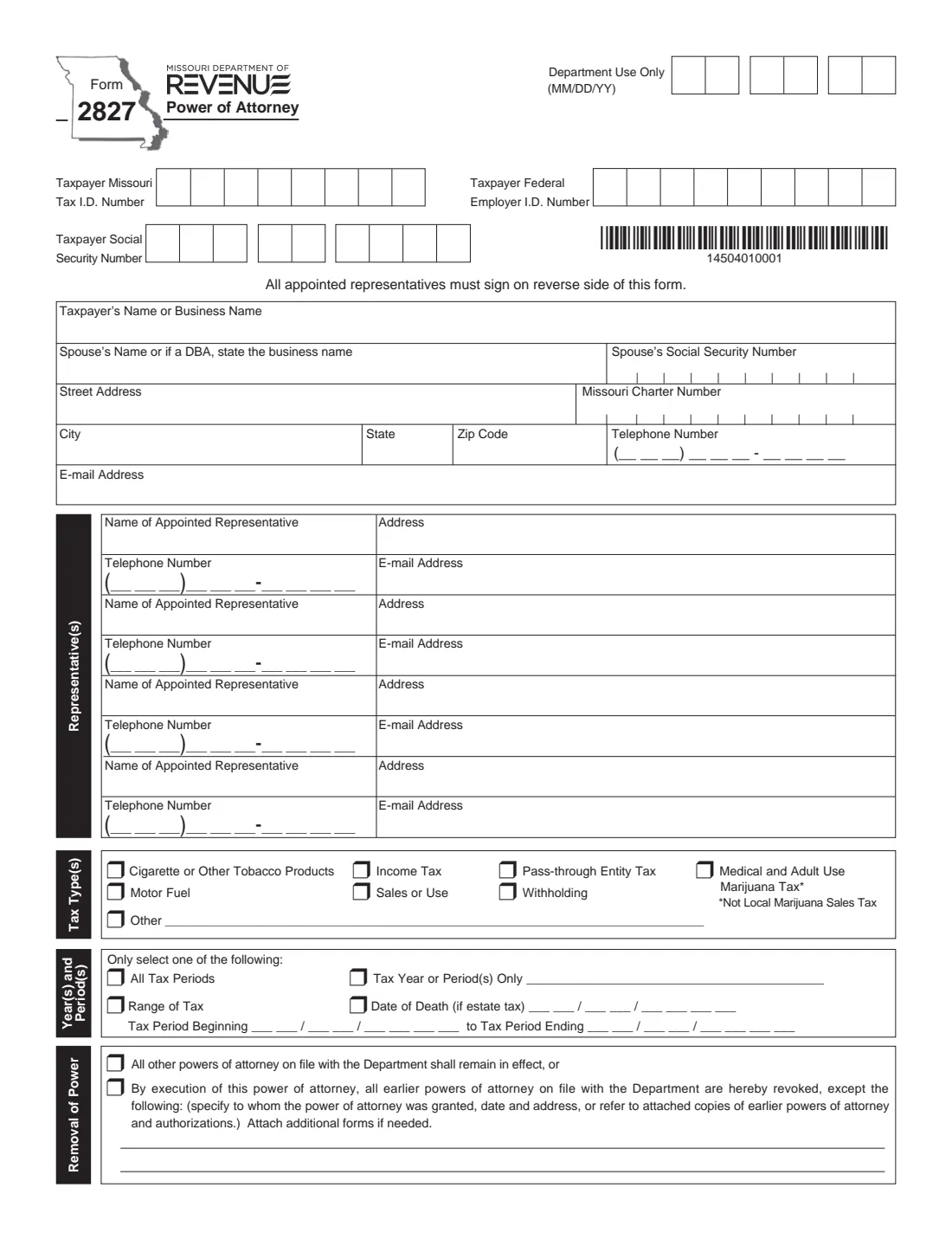
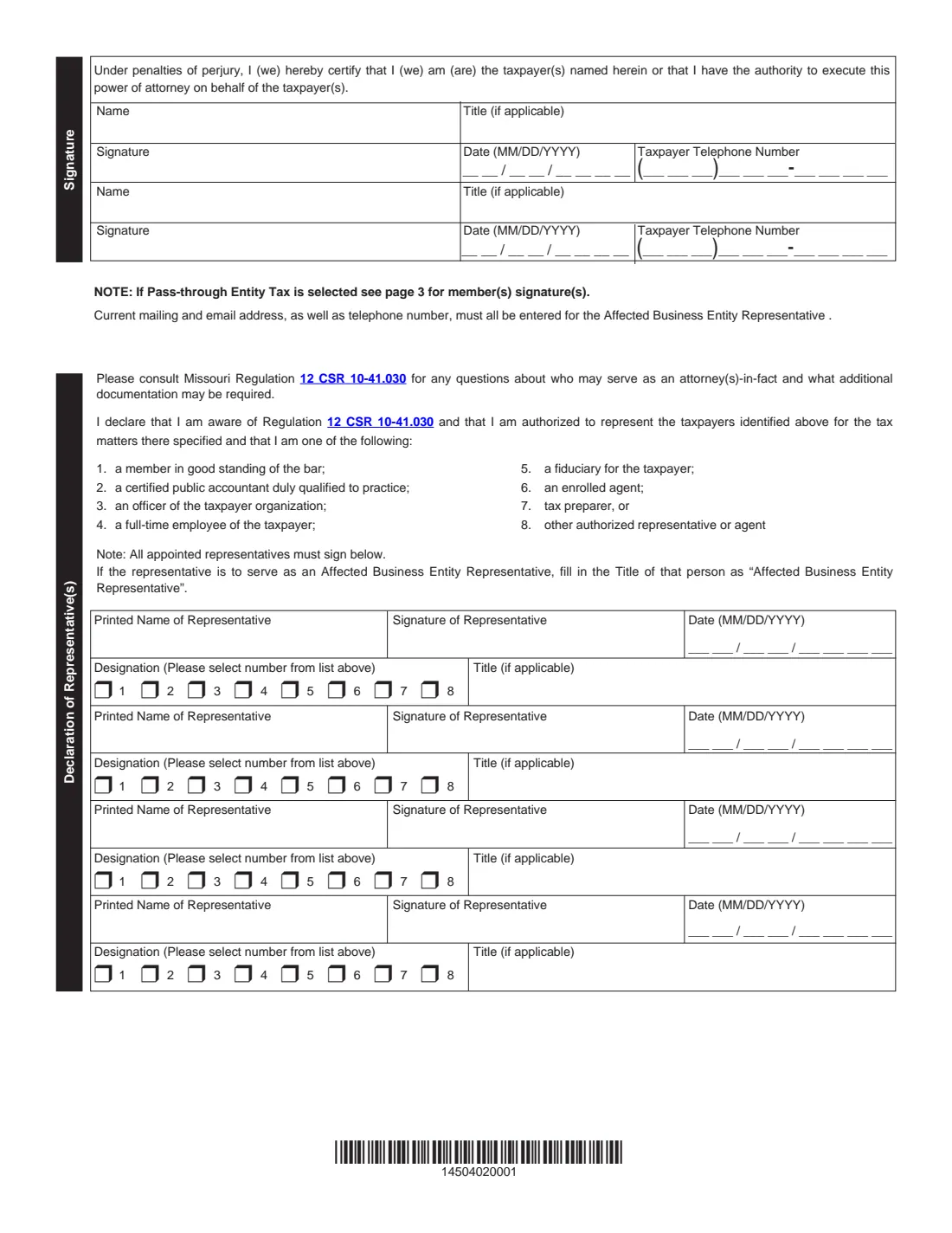
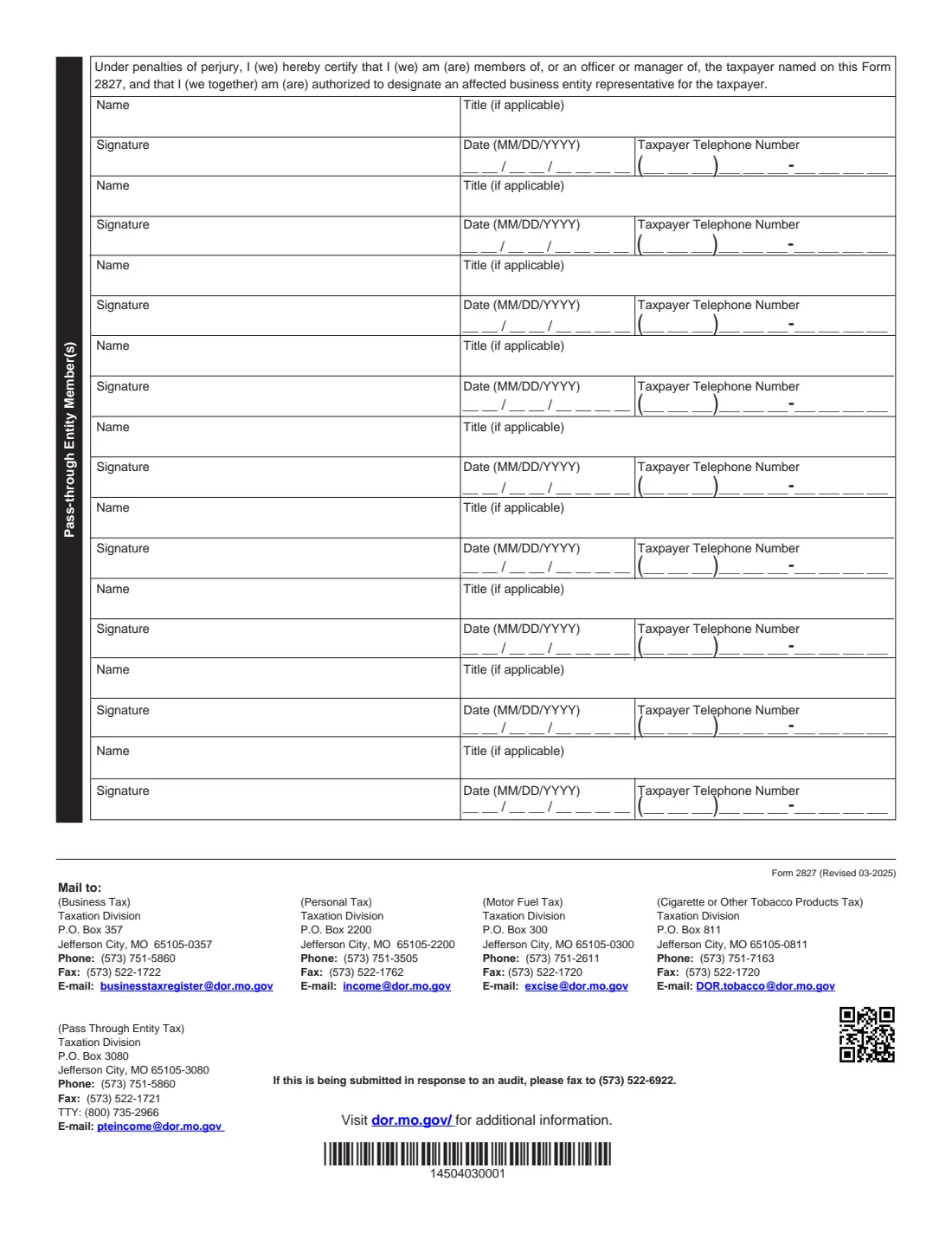
Page 1 identifies the taxpayer and the representatives and sets the scope and what happens to earlier powers of attorney. Page 2 holds the taxpayer's signature under penalties of perjury and each representative's declaration, where they confirm they are aware of Regulation 12 CSR 10-41.030 and choose which kind of representative they are. Page 3 is only for the pass-through entity tax: members, officers or managers sign there to designate an affected business entity representative.
FileIt lets you fill out Form 2827 online. It pre-fills the taxpayer's name and email from the People records in your vault, fills the Missouri tax ID, FEIN, SSN and phone boxes digit by digit, repeats each representative's name on their declaration and ticks the boxes you choose. The PDF is saved in your vault, and you can send it to every signer for e-signature. FileIt never submits it to the Department.
- Who fills it
- The taxpayer: an individual, a couple filing jointly or a business.
- Representatives
- Up to four, each with contact details on page 1 and a signed declaration on page 2.
- ID numbers
- At least one of the Missouri tax ID, the federal EIN or the Social Security number.
- Pass-through entity tax
- Members, officers or managers sign page 3, and the representative's title is 'Affected Business Entity Representative'.
- Where it goes
- Page 3 lists a Taxation Division mailing address, phone, fax and email for each kind of tax; audit responses go to the fax number printed there.
- Edition
- Form 2827 (Revised 03-2025), 3 pages.
Who needs to fill out Form 2827?
- Missouri individuals who want a CPA, attorney or enrolled agent to speak to the Department for them.
- Businesses appointing someone for sales, withholding, motor fuel or tobacco tax matters.
- Pass-through entities naming an affected business entity representative.
- Couples who file a joint Missouri return.
- Taxpayers responding to an audit who want their preparer to handle it.
When to use Form 2827
- Before a representative contacts the Department about your account or an audit.
- When you change accountants and want earlier powers of attorney revoked.
- When you elect the pass-through entity tax and need to designate who represents the entity.
- When you want to limit a representative to certain years, a date range or an estate.
What you need before you start
- The taxpayer's name, Missouri tax ID, FEIN or SSN, Missouri charter number for a corporation or LLC, address, phone and email.
- For a joint return, the spouse's name and SSN; for a business, any DBA name.
- Each representative's name, mailing address, phone, email and which of the eight designations applies to them.
- The tax types and the periods to cover: all periods, a specific year, a date range or a date of death.
- Details of any earlier powers of attorney you want to keep in effect.
What’s on Form 2827
The 2025 edition has 3 pages. FileIt asks for it in 12 parts, and it is signed by Taxpayer and Spouse and Representative 1 and Representative 2 and Representative 3 and Representative 4 and Entity member 1 and Entity member 2 and Entity member 3:
- TaxpayerTaxpayer
- Representative 1Representative 1
- Representative 2Representative 2
- Representative 3Representative 3
- Representative 4Representative 4
- Tax types and periodsTaxpayer
- Removal of powerTaxpayer
- Taxpayer signatureTaxpayer
- Spouse's signatureSpouse
- Pass-through entity member 1 (page 3)Entity member 1
- Pass-through entity member 2 (page 3)Entity member 2
- Pass-through entity member 3 (page 3)Entity member 3
How to fill out Form 2827, step by step
1 Taxpayer details
Enter the taxpayer's ID numbers, name, address, phone and email. The spouse line doubles as the DBA name for a business.
2 Representatives
List up to four representatives with their address, phone and email. For the pass-through entity tax, the affected business entity representative must give a current mailing address, email and phone.
3 Tax types and periods
Tick each tax type, or Other with a description. Then choose one period option: all tax periods, specific years, a range from a beginning to an ending date, or a date of death for an estate.
4 Removal of power
Choose whether earlier powers of attorney stay in effect, or revoke them except those you list.
5 Signatures and declarations
The taxpayer (and spouse) sign page 2 with name, title and phone. Each representative selects their designation, adds a title if needed and signs. For the pass-through entity tax, members sign page 3.
Common mistakes to avoid
- Giving no identification number at all for the taxpayer.
- Ticking more than one period option: the form says to select only one.
- Forgetting page 3 when the pass-through entity tax is ticked.
- Not writing 'Affected Business Entity Representative' as the title for that representative.
- Revoking earlier powers of attorney without listing the ones you meant to keep.
After you fill it out
Everyone signs: the taxpayer on page 2, each representative on their declaration and, if needed, entity members on page 3. FileIt can collect these by e-signature if the Department accepts it for your case.
Send the signed form to the Taxation Division address on page 3 for the tax type, or by the fax or email listed there.
FileIt keeps the PDF in your vault for your records.
Fill out Form 2827 online with FileIt
- Pick the person. Choose someone from People and FileIt fills in their name, date of birth, address and other details it already knows.
- Answer plain-language questions. One part of the form at a time, with the official help text beside each question — 69 fields in all. Your answers save as you go.
- Check the live preview. Watch your answers land on the real Missouri Department of Revenue form, and let FileIt do any worksheet arithmetic.
- Generate the official PDF. FileIt prints your answers into the agency’s own PDF and files it in that person’s folder in your vault. Sign it, or send it for e-signature.
FileIt fills the form — it never files or submits anything for you. Deliver the finished form to whoever asked for it, the way the form’s instructions say.
Start Form 2827 now — it’s freeForm 2827: frequently asked questions
How many representatives can I appoint on Form 2827?
Up to four on the form, each with their own declaration and signature on page 2.
Who can be a representative?
The declaration lists eight kinds, such as a member of the bar, a CPA, an officer or full-time employee of the taxpayer, a fiduciary, an enrolled agent or a tax preparer. Regulation 12 CSR 10-41.030 has the details.
What is an affected business entity representative?
The person who represents a pass-through entity for the pass-through entity tax. Their title on the form is 'Affected Business Entity Representative', and the entity's members sign page 3.
Will a new Form 2827 cancel my old one?
Only if you choose to revoke earlier powers of attorney. You can also keep all earlier ones in effect, or revoke all except those you list.
Is Form 2827 the same as IRS Form 2848?
No. Form 2827 is for Missouri state taxes with the Missouri Department of Revenue; Form 2848 is for federal matters with the IRS.
Can I fill out Form 2827 online?
Yes. FileIt fills it out online and prints your answers on the Department's official PDF. You then sign it and send it yourself; FileIt doesn't submit it.
Official sources
- Blank form (PDF), published by Missouri Department of Revenue: https://dor.mo.gov/forms/2827.pdf
- Official instructions and guidance: https://dor.mo.gov/forms/2827.pdf
- Edition shown on this page: Form 2827 (Revised 03-2025) (checked 2026-10-19).
FileIt is not affiliated with or endorsed by Missouri Department of Revenue or any government. This page explains the form in general terms and is not legal, tax or immigration advice. Always read the official instructions, and check that you are using the edition the recipient accepts. Page last reviewed 2026-10-19.