What is Form 108?
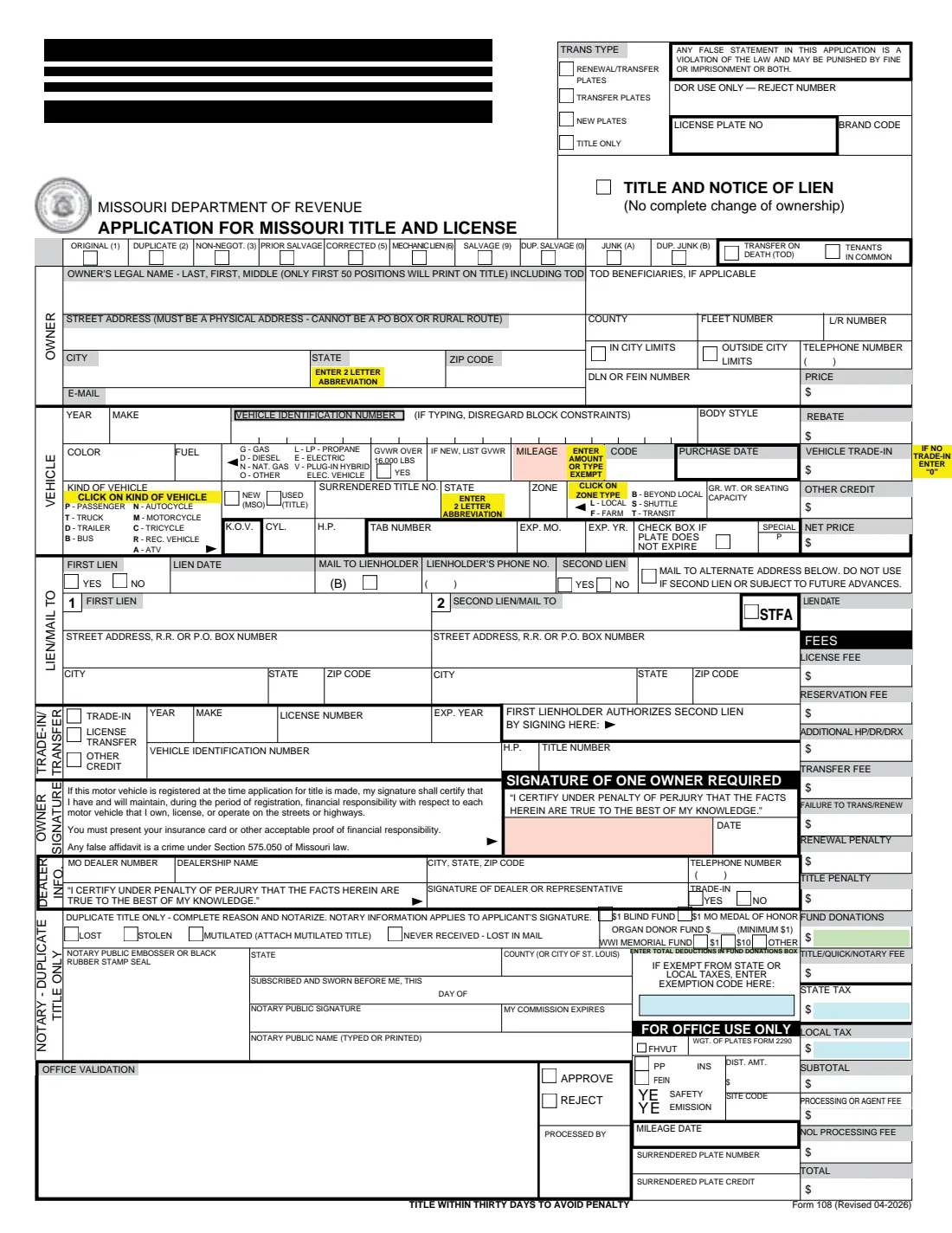
Form 108 is the Missouri Department of Revenue's Application for Missouri Title and License. You use it after buying a car, truck, motorcycle, trailer or ATV to put it in your name, and to get new plates, renew or transfer plates, add a lien, or ask for a duplicate title. The current edition is Form 108 (Revised 04-2026).
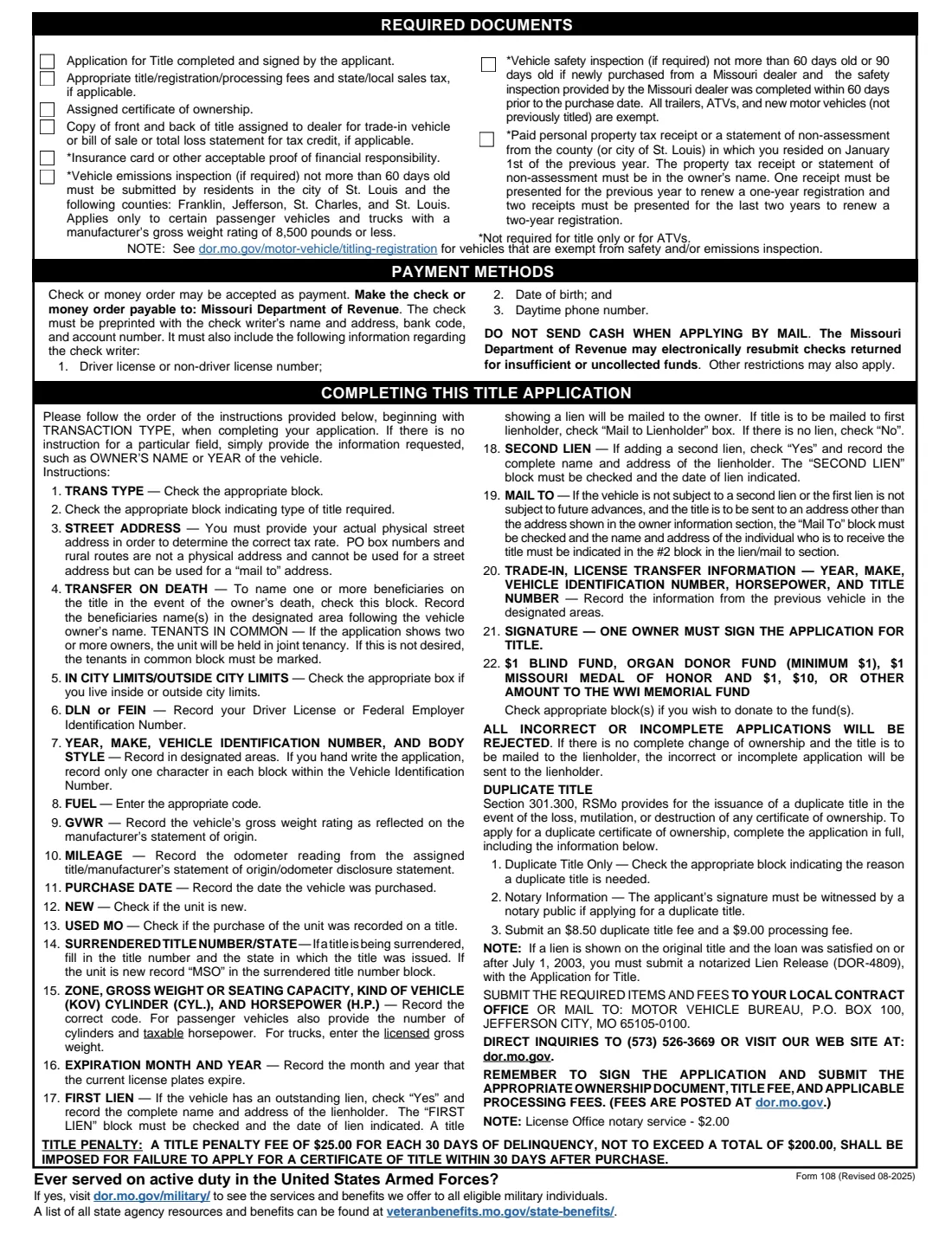
Page 1 is the application itself: transaction and title type, owner, vehicle, price and credits, liens or a mail-to address, any trade-in, dealer information, a duplicate title block with a notary section, optional fund donations, and the fees column the license office completes. Page 2 lists the documents to bring, how to pay and how to complete each field. The form warns that a title not applied for within 30 days of purchase draws a penalty.
FileIt lets you fill out Form 108 online. It pre-fills the owner's name and email from the People records in your vault, builds the 'Last, First Middle' name line and warns you if it goes past the 50 positions that print on the title, fills the VIN one character per block, puts the kind-of-vehicle and zone codes in their boxes, and works out the net price and your donation total. The PDF is saved in your vault. FileIt never files it with the Department.
- Who fills it
- The owner (one owner signs), or a Missouri dealer completing the dealer block.
- Deadline
- Apply within 30 days of purchase: page 2 prints a $25 penalty for each 30 days late, up to $200.
- Where to file
- At a local license office, or by mail to the Motor Vehicle Bureau, P.O. Box 100, Jefferson City, MO 65105-0100.
- Duplicate title
- Same form with a reason and a notarized signature; page 2 lists an $8.50 duplicate title fee and a $9.00 processing fee.
- Fees and tax
- Worked out by the license office; current fees are posted at dor.mo.gov.
- Edition
- Form 108 (Revised 04-2026) with page 2 (Revised 08-2025).
Who needs to fill out Form 108?
- Anyone who bought a vehicle, trailer or ATV and needs a Missouri title in their name.
- Owners renewing or transferring plates to another vehicle.
- Owners whose lender needs a lien recorded on the title.
- Owners whose Missouri title was lost, stolen, mutilated or never received.
- New Missouri residents titling a vehicle from another state.
When to use Form 108
- Within 30 days after buying a vehicle, to avoid the title penalty.
- When you take out a loan on a vehicle you already own (title and notice of lien).
- When you want the title mailed to a lienholder or an alternate address.
- When you need a replacement title, with a notary present for your signature.
What you need before you start
- The assigned title or manufacturer's statement of origin, plus a bill of sale or trade-in title copy if you claim a tax credit.
- Your physical street address and county (a PO box can only be a mail-to address).
- Your driver license number, or a business's FEIN.
- The vehicle's year, make, VIN, body style, color, fuel, odometer reading and purchase date.
- Insurance card or other proof of financial responsibility.
- Where required: a safety inspection, an emissions inspection in St. Louis City and some counties, and a paid personal property tax receipt or statement of non-assessment.
- For a lien: the lienholder's name, address and the lien date.
What’s on Form 108
The 2026 edition has 2 pages. FileIt asks for it in 9 parts, and it is signed by Owner and Dealer:
- Transaction and title typeOwner
- OwnerOwner
- VehicleOwner
- Price and creditsOwner
- Liens and mail toOwner
- Trade-in, license transfer or other creditOwner
- Duplicate title onlyOwner
- Optional donationsOwner
- Dealer informationDealer
How to fill out Form 108, step by step
1 Transaction and title type
Start with the transaction type, as the instructions ask: renewal or transfer of plates, transfer plates, new plates or title only. Then choose the type of title, usually Original. Tick Transfer on Death to name beneficiaries, or Tenants in Common for two or more owners.
2 Owner
Enter the legal name as 'Last, First, Middle' and a physical street address, city, state, ZIP and county, whether you live inside city limits, your phone, email and driver license number.
3 Vehicle
Give the year, make, VIN, body style, color, fuel code, odometer reading and purchase date, the kind of vehicle, whether it is new or used, and the surrendered title number and state. Passenger vehicles add cylinders and taxable horsepower; trucks add the zone and licensed gross weight.
4 Price and credits
Enter the price, any rebate, trade-in and other credit. FileIt works out the net price the license office uses for state and local sales tax.
5 Liens and mail to
Answer whether there is a first lien and give the lienholder and lien date. Block 2 is for a second lienholder or for an alternate mail-to address.
6 Trade-in, duplicate title and donations
Describe any trade-in or license transfer from the previous vehicle's title. For a duplicate title, choose the reason and sign in front of a notary. You can add optional donations to the funds listed.
7 Signature
One owner signs and dates the application, certifying under penalty of perjury that the facts are true, and confirms financial responsibility.
Common mistakes to avoid
- Using a PO box or rural route as the street address.
- Waiting more than 30 days after purchase and paying the title penalty.
- An owner name longer than 50 positions including TOD beneficiaries, which gets cut off on the title.
- Signing a duplicate title application without a notary.
- Ticking the mail-to block when there is a second lien or a lien subject to future advances.
- Mailing cash. Page 2 says to pay by check or money order payable to the Missouri Department of Revenue.
After you fill it out
Sign the application (in front of a notary for a duplicate title).
Take it with the ownership document, inspections, tax receipts, proof of insurance and payment to a license office, or mail it to the Motor Vehicle Bureau in Jefferson City.
FileIt keeps the filled PDF in your vault. When the title arrives, add it to your vault too.
Fill out Form 108 online with FileIt
- Pick the person. Choose someone from People and FileIt fills in their name, date of birth, address and other details it already knows.
- Answer plain-language questions. One part of the form at a time, with the official help text beside each question — 85 fields in all. Your answers save as you go.
- Check the live preview. Watch your answers land on the real Missouri Department of Revenue form, and let FileIt do any worksheet arithmetic.
- Generate the official PDF. FileIt prints your answers into the agency’s own PDF and files it in that person’s folder in your vault. Sign it, or send it for e-signature.
FileIt fills the form — it never files or submits anything for you. Deliver the finished form to whoever asked for it, the way the form’s instructions say.
Start Form 108 now — it’s freeForm 108: frequently asked questions
How long do I have to title a vehicle in Missouri?
Form 108 says to apply within 30 days of purchase. Page 2 prints a penalty of $25 for each 30 days late, up to $200.
Can I use Form 108 for a duplicate title?
Yes. Choose Duplicate as the title type, give the reason (lost, stolen, mutilated or never received) and have your signature notarized. Page 2 lists an $8.50 duplicate title fee and a $9.00 processing fee.
Why can't I use my PO box?
The street address sets your tax rate, so it must be a physical address. You can still have the title mailed to a PO box through the mail-to block.
What does 'only the first 50 positions will print' mean?
The owner's name line, including any TOD beneficiaries, prints on the title only up to 50 characters. FileIt warns you when it is longer.
Who fills in the fees column?
The license office works out the fees, sales tax and total from the current fee schedule at dor.mo.gov.
Can I fill out Form 108 online?
Yes. FileIt fills it out online and prints your answers on the Department's official PDF. You then sign it and take or mail it yourself; FileIt doesn't file it.
Official sources
- Blank form (PDF), published by Missouri Department of Revenue: https://dor.mo.gov/forms/108.pdf
- Official instructions and guidance: https://dor.mo.gov/forms/108.pdf
- Edition shown on this page: Form 108 (Revised 04-2026) (checked 2026-10-19).
FileIt is not affiliated with or endorsed by Missouri Department of Revenue or any government. This page explains the form in general terms and is not legal, tax or immigration advice. Always read the official instructions, and check that you are using the edition the recipient accepts. Page last reviewed 2026-10-19.