What is Form DO-10?
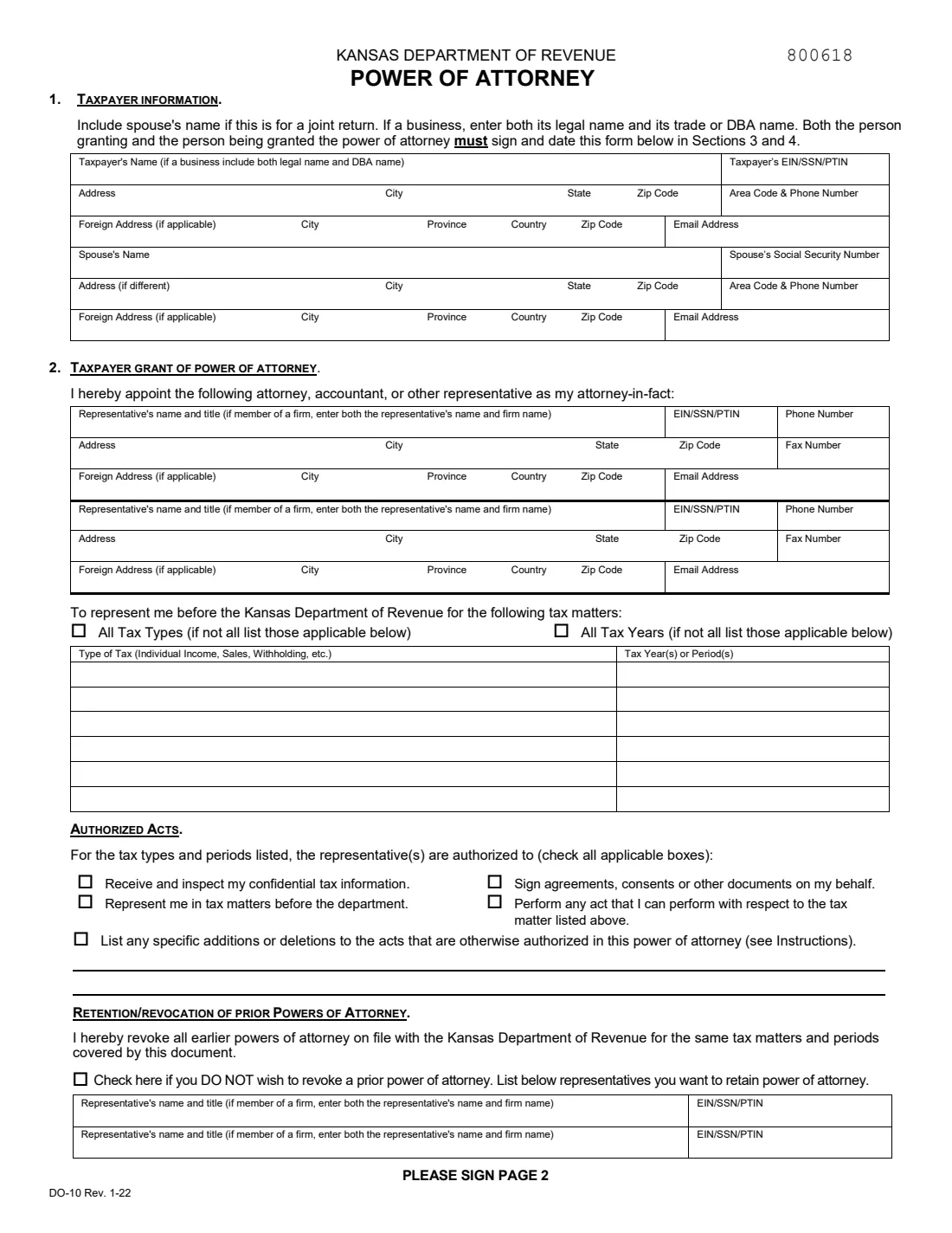
Form DO-10 is the Kansas Department of Revenue's Power of Attorney. With it you, the taxpayer, appoint an attorney, accountant, tax preparer, family member or anyone else as your attorney-in-fact for Kansas tax matters, including audits and collections. The current edition is DO-10 Rev. 1-22.
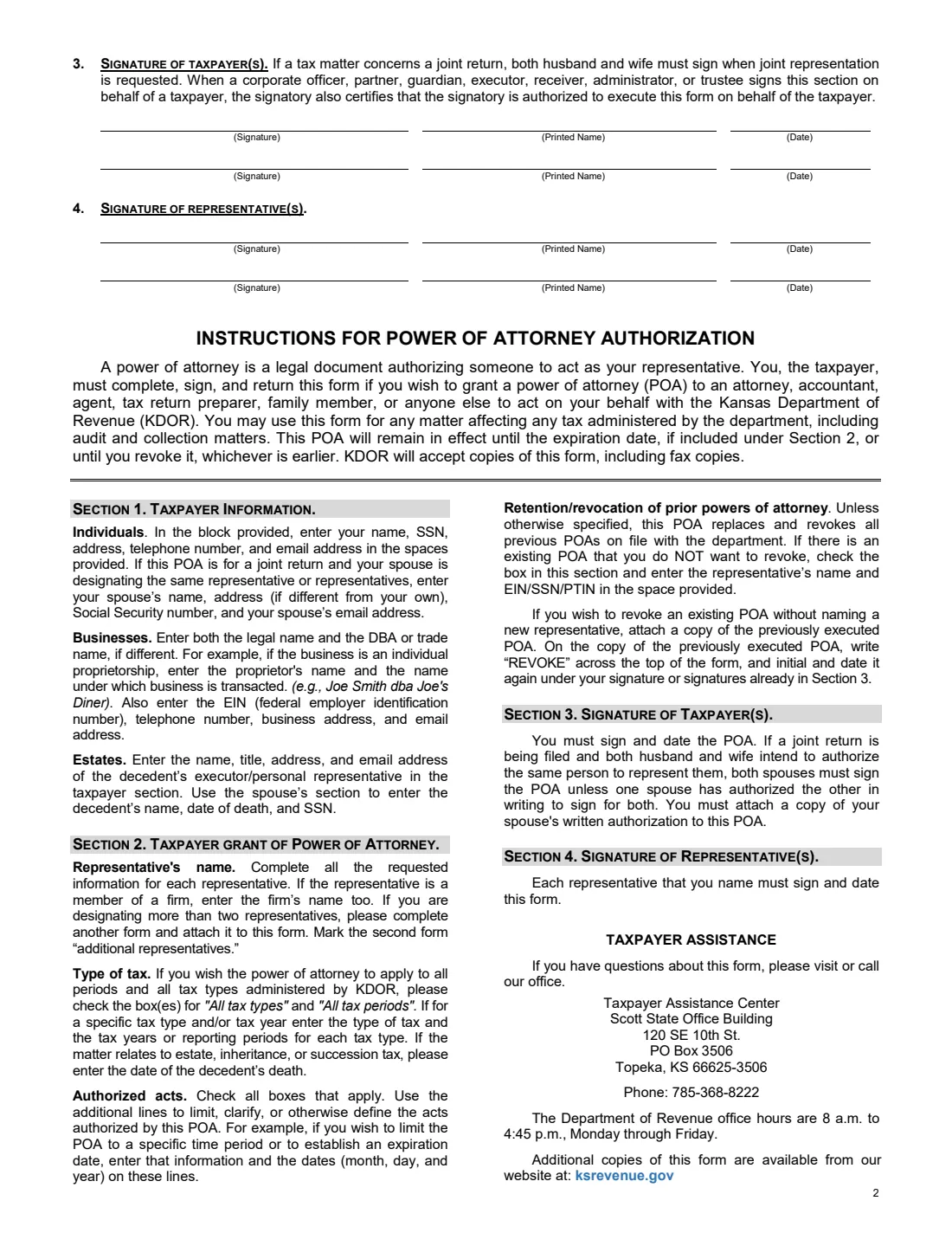
Page 1 holds Section 1 (you and, for a joint return, your spouse), Section 2 (up to two representatives, the tax types and years they cover, the acts they may perform) and the choice to keep or revoke earlier powers of attorney. Page 2 is where you and each representative sign, followed by the instructions. The form stays in effect until any expiration date you write in, or until you revoke it.
FileIt lets you fill out the DO-10 online. It pre-fills your name and email from the People records in your vault, splits each address under the form's own Address, City, State and Zip Code columns, ticks the boxes you choose and repeats each representative's name beside their signature line. The finished PDF goes into your vault, and you can send it to everyone who needs to sign. FileIt never sends it to the department for you.
- Who fills it
- The taxpayer: a person, a couple filing jointly, a business or an estate's executor.
- Who signs
- Both the taxpayer (and spouse, for joint representation) and each representative named on the form.
- Scope
- All Kansas tax types and years, or only those you list, with the acts you tick.
- Copies
- The form says KDOR accepts copies, including fax copies.
- Questions
- Taxpayer Assistance Center, 120 SE 10th St., Topeka (785-368-8222), as printed on page 2.
- Edition
- DO-10 Rev. 1-22, 2 pages.
Who needs to fill out Form DO-10?
- Kansas taxpayers who want an accountant or attorney to deal with the Department of Revenue for them.
- Couples who file jointly and want the same representative for both.
- Business owners appointing someone for sales, withholding or other business taxes.
- Executors handling a deceased person's Kansas tax matters.
- Adult children helping a parent with a Kansas tax notice.
When to use Form DO-10
- Before your representative calls or writes to the department about your account.
- When you receive an audit, assessment or collection notice and want help responding.
- When you change representatives and want earlier powers of attorney revoked.
- When you want to limit an existing arrangement to certain years or give it an end date.
What you need before you start
- Your name (for a business, both the legal name and the DBA name), SSN or EIN, address, phone and email.
- Your spouse's name, SSN and contact details, if this is for a joint return.
- Each representative's name, firm, EIN, SSN or PTIN, address, phone, fax and email.
- The tax types and years or periods to cover, or the decision to cover all of them.
- The names and ID numbers of any earlier representatives you want to keep.
What’s on Form DO-10
The 2022 edition has 2 pages. FileIt asks for it in 8 parts, and it is signed by Taxpayer and Spouse and Representative and Second representative:
- 1. Taxpayer informationTaxpayer
- 1. Spouse (joint return) or decedentSpouse
- 2. Representative 1Representative
- 2. Representative 2Second representative
- 2. Tax mattersTaxpayer
- 2. Authorized actsTaxpayer
- Retention or revocation of prior powers of attorneyTaxpayer
- 3. Signature of taxpayerTaxpayer
How to fill out Form DO-10, step by step
1 Section 1: Taxpayer information
Enter your name, ID number, address, phone and email. A business gives both its legal and trade names. If this is for a joint return, add your spouse below; an estate uses that space for the decedent's name, date of death and SSN.
2 Section 2: Representatives
Name up to two representatives with their firm, ID number and contact details. For more than two, the instructions say to attach another DO-10 marked 'additional representatives'.
3 Tax matters
Tick All Tax Types and All Tax Years, or list each type of tax (for example individual income, sales or withholding) with its years or periods on the six lines.
4 Authorized acts
Tick what your representative may do: receive and inspect your confidential information, represent you, sign agreements and consents, or perform any act you could. Use the two lines to add or remove acts, or to set an expiration date.
5 Keep or revoke earlier powers
This form revokes earlier powers of attorney for the same matters unless you tick the box and list the representatives you want to keep.
6 Sections 3 and 4: Signatures
You (and your spouse, if both are authorizing) sign, print your name and date Section 3. Each representative does the same in Section 4.
Common mistakes to avoid
- Leaving both the tax-type boxes and the lines empty, so the form covers nothing.
- Forgetting that the new form revokes earlier ones unless you tick the box to keep them.
- Only one spouse signing when both want joint representation, without the written authorization the instructions mention.
- A representative not signing Section 4.
- For a business, giving only the trade name and not the legal name.
After you fill it out
You and each representative sign and date page 2, on paper or through FileIt's e-signature if the department accepts it for your case.
Send or fax the signed form to the Kansas Department of Revenue, or give it to your representative to submit.
FileIt keeps the PDF in your vault. To revoke it later, the instructions say to send a copy marked 'REVOKE', initialed and dated again.
Fill out Form DO-10 online with FileIt
- Pick the person. Choose someone from People and FileIt fills in their name, date of birth, address and other details it already knows.
- Answer plain-language questions. One part of the form at a time, with the official help text beside each question — 67 fields in all. Your answers save as you go.
- Check the live preview. Watch your answers land on the real Kansas Department of Revenue form, and let FileIt do any worksheet arithmetic.
- Generate the official PDF. FileIt prints your answers into the agency’s own PDF and files it in that person’s folder in your vault. Sign it, or send it for e-signature.
FileIt fills the form — it never files or submits anything for you. Deliver the finished form to whoever asked for it, the way the form’s instructions say.
Start Form DO-10 now — it’s freeForm DO-10: frequently asked questions
How long does a Kansas DO-10 last?
Until the expiration date you write in the additions and deletions lines, or until you revoke it, whichever comes first.
Can I use the IRS Form 2848 for Kansas?
The DO-10 is the Kansas Department of Revenue's own form for state tax matters. Form 2848 covers federal matters with the IRS.
How many representatives can I name?
Two on the form. The instructions say to attach another DO-10 marked 'additional representatives' for more.
Does the DO-10 cancel my old power of attorney?
Yes, for the same tax matters and periods, unless you tick the box to keep it and list the representatives you want to retain.
Does the form need to be notarized?
The form has no notary section. You and your representatives sign and date it.
Can I fill out Form DO-10 online?
Yes. FileIt fills it out online and prints your answers on the department's official PDF. You then sign it and send it yourself; FileIt doesn't submit anything.
Official sources
- Blank form (PDF), published by Kansas Department of Revenue: https://www.ksrevenue.gov/pdf/do10.pdf
- Official instructions and guidance: https://www.ksrevenue.gov/pdf/do10.pdf
- Edition shown on this page: DO-10 Rev. 1-22 (checked 2026-10-19).
FileIt is not affiliated with or endorsed by Kansas Department of Revenue or any government. This page explains the form in general terms and is not legal, tax or immigration advice. Always read the official instructions, and check that you are using the edition the recipient accepts. Page last reviewed 2026-10-19.