What is Form IT-2104-E?
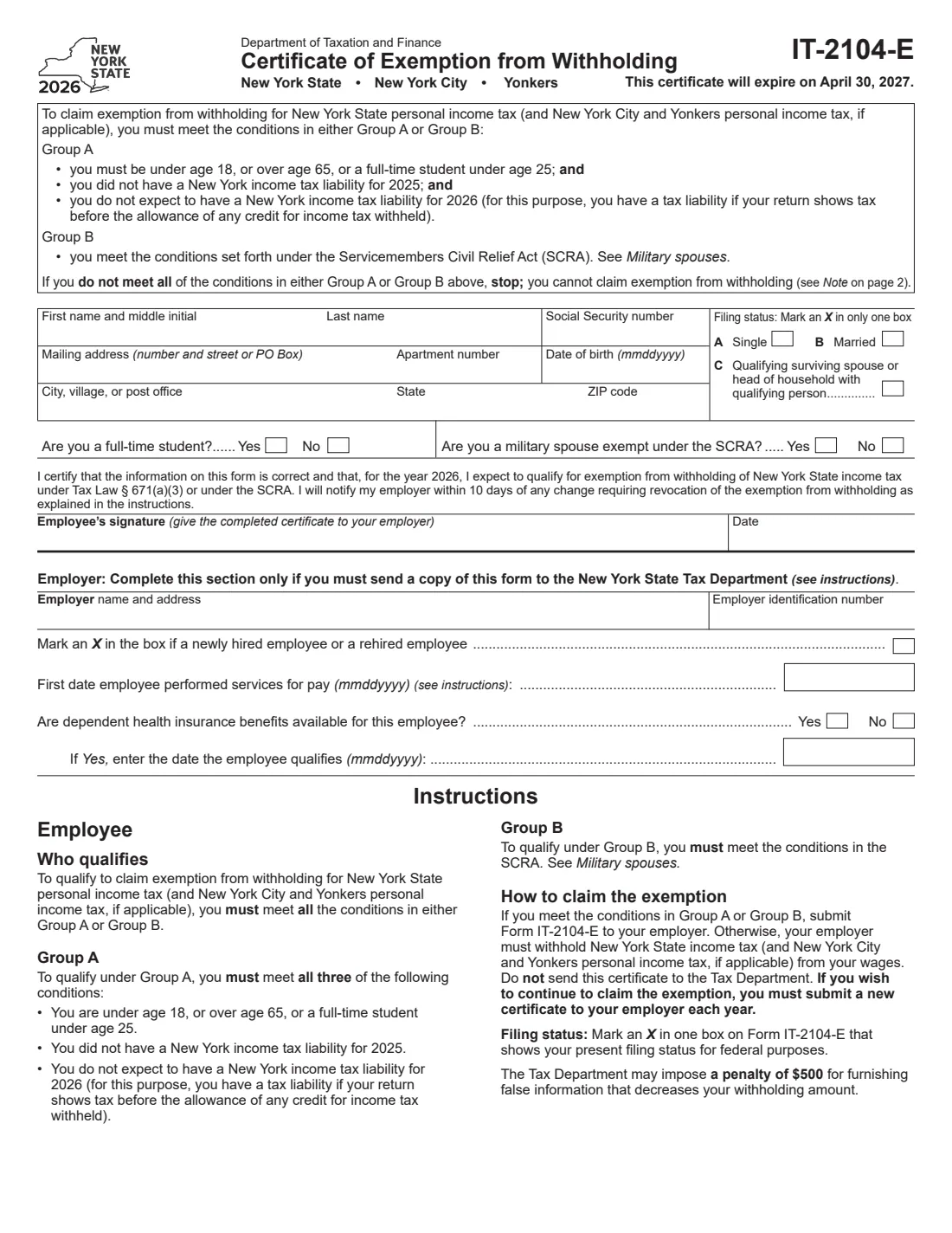
Form IT-2104-E is the New York State Department of Taxation and Finance's Certificate of Exemption from Withholding. It lets an employee claim exemption from New York State personal income tax withholding, and New York City and Yonkers tax if they apply, for one year. The 2026 certificate expires on April 30, 2027, and you must give your employer a new one each year to keep the exemption.
You qualify only if you meet all the conditions in Group A or Group B. Group A: you are under 18, over 65, or a full-time student under 25; you had no New York income tax liability for 2025; and you don't expect one for 2026. Group B: you are a military spouse who meets the conditions of the Servicemembers Civil Relief Act. If you don't qualify, give your employer Form IT-2104 instead.
FileIt lets you fill out the IT-2104-E online. It asks which group you qualify under, checks your age against Group A, pre-fills your name and date of birth from the People records in your vault, and prints your answers on the Tax Department's own PDF. The filled form is saved in your vault, and you can send it for e-signature. FileIt never submits anything: you give the certificate to your employer yourself.
- Who fills it
- The employee. The employer completes the bottom part only when it must send a copy to the Tax Department.
- Given to
- Your employer. Don't send it to the Tax Department yourself.
- Valid for
- 2026. The certificate expires on April 30, 2027.
- Penalty
- The Tax Department may impose a $500 penalty for false information that decreases your withholding.
- Signatures
- You sign and date the certificate.
- Edition
- IT-2104-E (2026), two pages with instructions.
Who needs to fill out Form IT-2104-E?
- Employees under 18 with no New York income tax liability for 2025 and none expected for 2026.
- Full-time students under 25 who meet the same no-liability conditions, for example with a part-time or summer job.
- Employees over 65 who meet the same conditions.
- Military spouses who are exempt under the SCRA: your spouse is in New York on military orders, you are in New York solely to be with your spouse, and you are domiciled in another state.
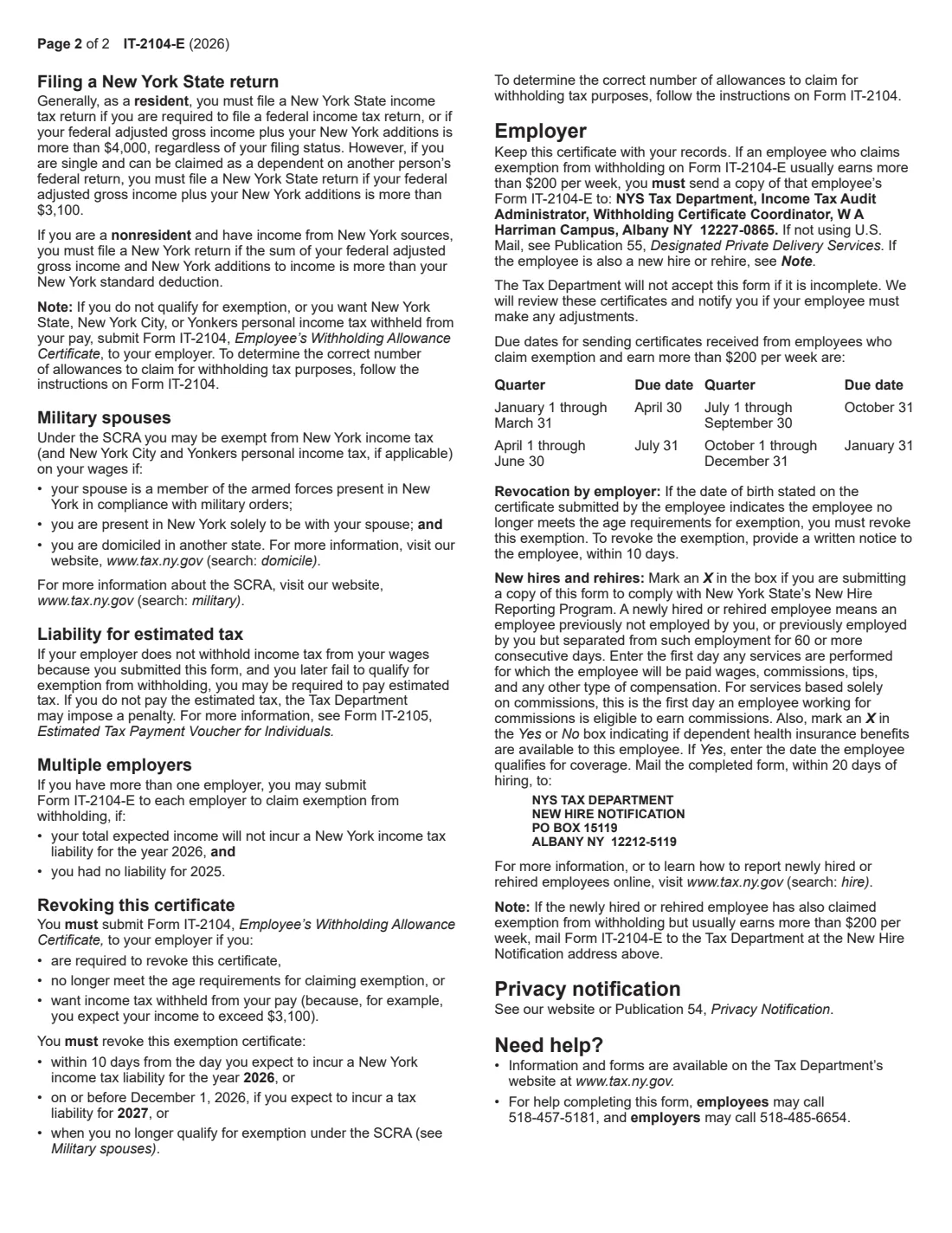
- Employers that need a copy for an exempt employee who usually earns more than $200 a week, or for new-hire reporting.
When to use Form IT-2104-E
- When you start a job and qualify for exemption.
- Every year you want to keep the exemption, because each certificate covers one year.
- When you have more than one employer: you may give one to each employer if your total expected income won't create a New York tax liability for 2026 and you had none for 2025.
What you need before you start
- Your name, Social Security number, mailing address and date of birth.
- Your federal filing status.
- Whether you are a full-time student and whether you are a military spouse exempt under the SCRA.
- Confidence that you had no New York tax liability for 2025 and expect none for 2026 (Group A).
- For the employer part: the employer's name, address and EIN, and new-hire details if it is reporting a new hire.
What’s on Form IT-2104-E
The 2026 edition has 2 pages. FileIt asks for it in 4 parts, and it is signed by Employee:
- Who qualifiesEmployee
- Your detailsEmployee
- Certification and dateEmployee
- Employer: only if you must send a copy to the Tax DepartmentEmployer
How to fill out Form IT-2104-E, step by step
1 Check that you qualify
Read Group A and Group B at the top of the form. You must meet all the conditions in one of them. For Group A, you have a tax liability if your return shows tax before the credit for income tax withheld. If you don't meet them, stop: you can't claim exemption, and the note on page 2 points you to Form IT-2104.
2 Your details and filing status
Enter your first name and middle initial, last name, Social Security number, mailing address, apartment number, date of birth, city, state and ZIP code. Mark one filing status: Single, Married, or Qualifying surviving spouse or head of household with qualifying person, matching your present filing status for federal purposes.
3 Student and military spouse questions
Answer whether you are a full-time student and whether you are a military spouse exempt under the SCRA. FileIt checks these against the group you chose and your date of birth.
4 Certify, sign and date
You certify that you expect to qualify for exemption for 2026 under Tax Law section 671(a)(3) or the SCRA, and that you will tell your employer within 10 days of any change requiring revocation. FileIt prints the date; sign on paper or through FileIt's e-signature.
5 Employer section
Only for the employer, and only when it must send a copy to the Tax Department: its name and address and EIN, and for a new hire or rehire, an X in the box, the first date of services for pay, whether dependent health insurance is available, and if so the date the employee qualifies.
Common mistakes to avoid
- Claiming exemption without meeting all the conditions in Group A or Group B.
- Assuming last year's certificate still applies. You need a new one each year, and the 2026 one expires on April 30, 2027.
- Not revoking it when you expect to have a New York tax liability.
- Sending it to the Tax Department instead of your employer.
- A military spouse choosing Group A instead of Group B.
After you fill it out
Sign and date it and give it to your employer, who keeps it with its records.
Revoke it by giving your employer Form IT-2104 within 10 days of expecting a New York tax liability for 2026, on or before December 1, 2026 if you expect a liability for 2027, or when you no longer qualify under the SCRA or the age rules.
If your employer doesn't withhold and you later fail to qualify, you may have to pay estimated tax (Form IT-2105). FileIt keeps the filled PDF in your vault.
Fill out Form IT-2104-E online with FileIt
- Pick the person. Choose someone from People and FileIt fills in their name, date of birth, address and other details it already knows.
- Answer plain-language questions. One part of the form at a time, with the official help text beside each question — 22 fields in all. Your answers save as you go.
- Check the live preview. Watch your answers land on the real New York State Department of Taxation and Finance form, and let FileIt do any worksheet arithmetic.
- Generate the official PDF. FileIt prints your answers into the agency’s own PDF and files it in that person’s folder in your vault. Sign it, or send it for e-signature.
FileIt fills the form — it never files or submits anything for you. Deliver the finished form to whoever asked for it, the way the form’s instructions say.
Start Form IT-2104-E now — it’s freeForm IT-2104-E: frequently asked questions
Who can claim exemption on Form IT-2104-E?
Someone who meets all the conditions in Group A (under 18, over 65, or a full-time student under 25, with no New York tax liability for 2025 and none expected for 2026) or Group B (a military spouse exempt under the SCRA).
How long is the IT-2104-E valid?
The 2026 certificate expires on April 30, 2027. To keep claiming exemption, submit a new certificate to your employer each year.
Does it cover New York City and Yonkers tax?
Yes. It claims exemption from New York State personal income tax withholding, and New York City and Yonkers personal income tax withholding if applicable.
I have two part-time jobs. Can I give it to both employers?
Yes, if your total expected income won't create a New York tax liability for 2026 and you had none for 2025.
When does my employer send it to the Tax Department?
When you usually earn more than $200 per week, by the quarterly due dates on page 2, or when it uses the form for new-hire reporting. Otherwise the employer just keeps it.
Can I fill out the IT-2104-E online?
Yes. FileIt fills it out online and prints your answers on the official PDF. You sign it and give it to your employer yourself; FileIt does not submit it anywhere.
Official sources
- Blank form (PDF), published by New York State Department of Taxation and Finance: https://www.tax.ny.gov/pdf/current_forms/it/it2104e_fill_in.pdf
- Official instructions and guidance: https://www.tax.ny.gov/pdf/current_forms/it/it2104e_fill_in.pdf
- Edition shown on this page: IT-2104-E (2026), expires April 30, 2027 (checked 2026-10-01).
FileIt is not affiliated with or endorsed by New York State Department of Taxation and Finance or any government. This page explains the form in general terms and is not legal, tax or immigration advice. Always read the official instructions, and check that you are using the edition the recipient accepts. Page last reviewed 2026-10-01.