What is Form HSMV 82040?
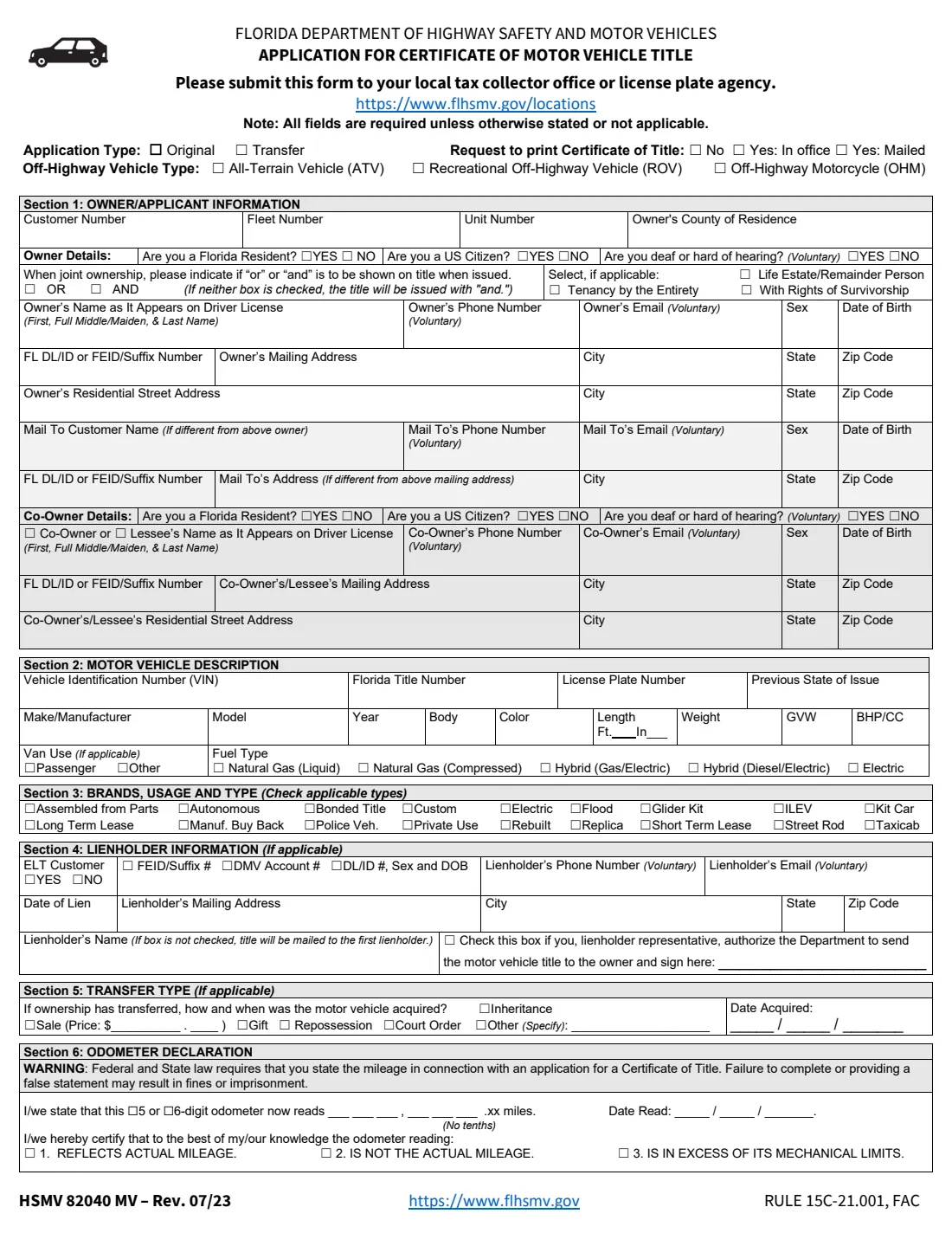
Form HSMV 82040 is the Florida Department of Highway Safety and Motor Vehicles' Application for Certificate of Title With/Without Registration. You use it to title a motor vehicle, mobile home or off-highway vehicle in Florida — whether it's an original title (a new vehicle, or one coming from another state) or a transfer of an existing Florida title to a new owner. The current edition is HSMV 82040 MV Rev. 07/23.
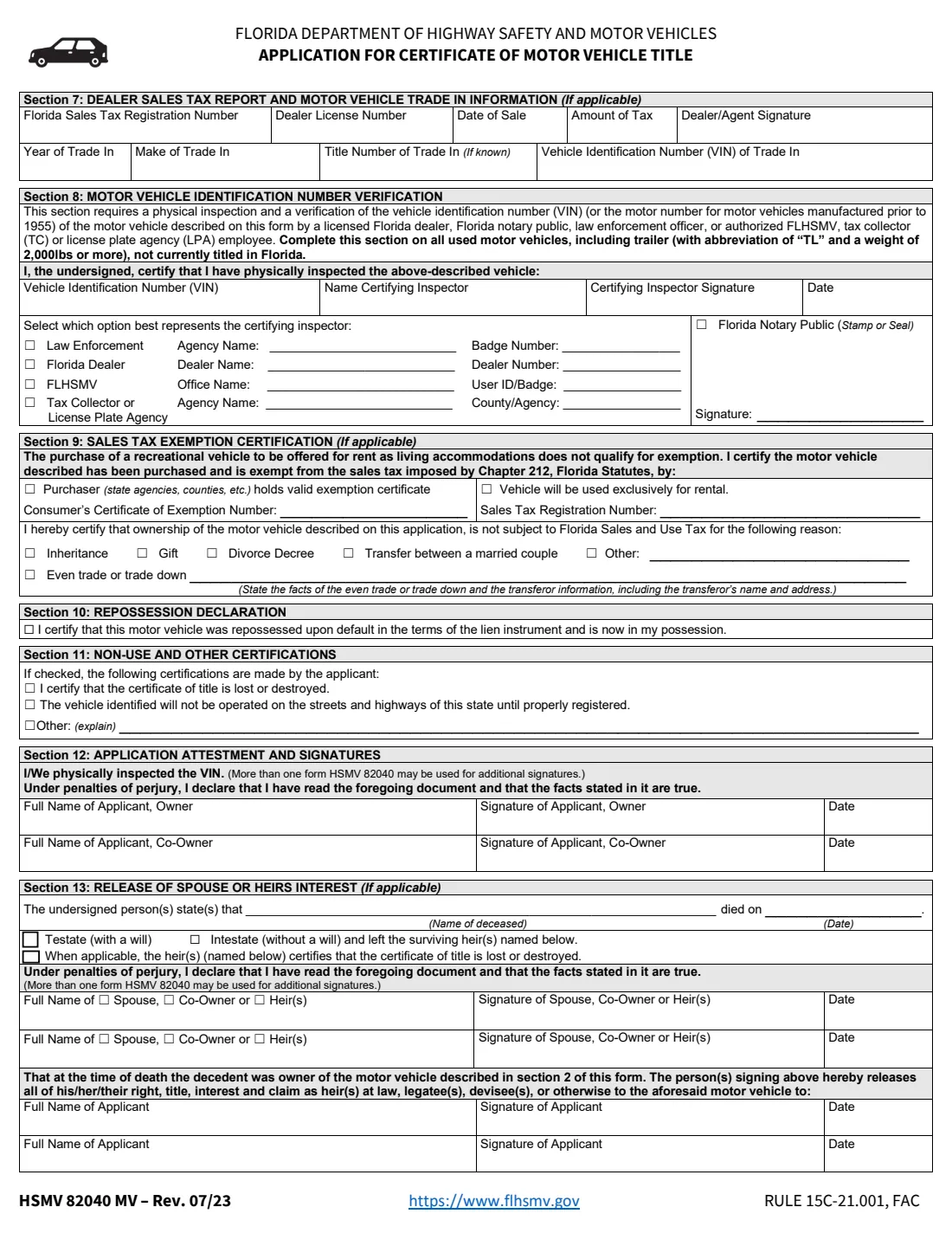
The two-page form collects the owner and any co-owner or lessee, a separate mail-to address, the vehicle description, title brands, the lienholder, how and when the vehicle was acquired, and the federal odometer declaration. Page 2 covers the dealer's sales tax report, VIN verification for used vehicles not titled in Florida, sales tax exemptions, repossession, lost-title and non-use certifications, the signatures, and the release of a deceased owner's interest by a spouse or heirs. The form notes that all fields are required unless stated otherwise or not applicable.
FileIt walks you through the HSMV 82040 section by section, pre-fills your name and date of birth from your vault, copies addresses and the VIN where the form asks for them twice, and prints everything into FLHSMV's own PDF. The finished form is saved in your vault and can be sent for e-signature. FileIt never submits anything: you take the form to your county tax collector office or license plate agency.
- Who fills it
- The owner applying for the title, with any co-owner. A dealer, certifying inspector, lienholder or heirs complete their own sections when they apply.
- Given to
- Your local county tax collector office or license plate agency (flhsmv.gov/locations).
- When
- When titling a vehicle in Florida for the first time, or when ownership of a Florida-titled vehicle is transferred.
- Signatures
- The owner and co-owner sign section 12 under penalties of perjury. Other sections have their own signers.
- Edition
- HSMV 82040 MV Rev. 07/23
- Agency
- Florida Department of Highway Safety and Motor Vehicles (FLHSMV)
Who needs to fill out Form HSMV 82040?
- New Florida residents titling a vehicle brought in from another state.
- Buyers of a vehicle in a private sale who need the Florida title transferred into their name.
- Owners of new vehicles, mobile homes, trailers and off-highway vehicles (ATV, ROV, off-highway motorcycle) needing a Florida title.
- Heirs or a surviving spouse transferring a deceased owner's vehicle, using section 13.
- Lienholders titling a repossessed vehicle (section 10).
- Owners replacing a lost or destroyed title as part of an application (section 11).
When to use Form HSMV 82040
- After buying a vehicle, to transfer the title into your name.
- After moving to Florida with a vehicle titled in another state — an original Florida title, with a VIN verification in section 8.
- When a vehicle's owner has died and the spouse, co-owner or heirs release their interest to the applicant.
- When you want a printed paper title: the form lets you ask for it in the office or by mail instead of an electronic title.
What you need before you start
- Your full name as it appears on your driver license, your Florida driver license or ID number, date of birth, and mailing and residential addresses.
- The same details for any co-owner or lessee, and the mail-to person if the title should go elsewhere.
- The vehicle's VIN, make, model, year, body type, color and weight, plus its current Florida title number or previous state of issue.
- Lienholder details if there's a loan: name, address, date of lien and its FEID, DMV account or DL/ID number.
- The sale price and date acquired, and the odometer reading with the date you read it.
- For a used vehicle not titled in Florida: a physical VIN inspection by a Florida dealer, notary, law enforcement officer or authorized FLHSMV, tax collector or license plate agency employee (section 8).
What’s on Form HSMV 82040
The 2023 edition has 2 pages. FileIt asks for it in 17 parts, and it is signed by Owner / applicant and Co-owner or lessee and Lienholder representative and Dealer and Certifying inspector and Spouse, co-owner or heir:
- Application typeOwner / applicant
- Section 1: Owner / applicantOwner / applicant
- Section 1: Mail to (if different)Owner / applicant
- Section 1: Co-owner or lesseeCo-owner or lessee
- Section 2: Motor vehicle descriptionOwner / applicant
- Section 3: Brands, usage and typeOwner / applicant
- Section 4: LienholderOwner / applicant
- Section 4: Lienholder authorizes mailing the title to the ownerLienholder representative
- Section 5: Transfer typeOwner / applicant
- Section 6: Odometer declarationOwner / applicant
- Section 7: Dealer sales tax report and trade-inDealer
- Section 8: VIN verificationCertifying inspector
- Section 9: Sales tax exemption certificationOwner / applicant
- Section 10: Repossession declarationOwner / applicant
- Section 11: Non-use and other certificationsOwner / applicant
- Section 12: AttestmentOwner / applicant
- Section 13: Release of spouse or heirs interestSpouse, co-owner or heir
How to fill out Form HSMV 82040, step by step
1 Application type and title printing
Tick Original for a first Florida title or Transfer for a change of owner. Then choose whether you want a paper certificate of title — No, Yes in office, or Yes mailed. Off-highway vehicles also tick ATV, ROV or OHM.
2 Section 1: Owner, mail-to and co-owner
Enter the owner's county of residence, residency and citizenship answers, name as on the driver license, contact details, sex, date of birth, DL/ID or FEID number, and both mailing and residential addresses. Use the mail-to rows only if the title should go to someone else or another address. For joint ownership, add the co-owner or lessee and choose "OR" or "AND"; the form says the title is issued with "and" if neither is ticked. You can also mark tenancy by the entirety, rights of survivorship or a life estate.
3 Section 2: Vehicle description
Copy the VIN, Florida title number or previous state of issue, license plate, make, model, year, body, color and weight. Trucks add GVW, motorcycles BHP/CC, and mobile homes or trailers their length. Tick the van use and fuel type if they apply.
4 Section 3: Brands, usage and type
Tick every brand that applies to the vehicle, such as Rebuilt, Flood, Kit Car, Custom, Street Rod, Taxicab, Police Vehicle, Manufacturer Buy Back or Long/Short Term Lease.
5 Section 4: Lienholder
If the vehicle has a loan, enter the lienholder, whether it's an Electronic Lien and Title (ELT) customer, its identifying number, the date of lien and its address. If the box beside the lienholder's name isn't checked, the form says the title is mailed to the first lienholder; a lienholder representative can check it and sign to have the title sent to the owner.
6 Sections 5 and 6: Transfer and odometer
Say how the vehicle was acquired (sale with the price, gift, repossession, court order, inheritance or other) and the date. Then declare the odometer reading without tenths, whether the odometer has 5 or 6 digits, the date read, and whether it reflects the actual mileage, is not the actual mileage, or exceeds its mechanical limits. The form warns that a missing or false statement may result in fines or imprisonment.
7 Sections 7 to 11: Dealer, VIN verification, exemptions and certifications
A dealer completes section 7 with the sales tax and any trade-in. Section 8 is the physical VIN inspection, required on all used motor vehicles (and trailers of 2,000 lbs or more) not currently titled in Florida. Section 9 claims a sales tax exemption — for example an exempt purchaser, rental use, inheritance, gift, divorce decree, transfer between a married couple, or an even trade. Section 10 is a lienholder's repossession declaration, and section 11 certifies a lost title or that the vehicle won't be driven until registered.
8 Sections 12 and 13: Signatures and release of interest
The owner and co-owner print their names, sign and date section 12 under penalties of perjury, confirming they physically inspected the VIN. Section 13 is used when the owner has died: it names the deceased and date of death, whether they left a will, and the spouse, co-owner or heirs who release their interest to the applicant(s).
Common mistakes to avoid
- Leaving fields blank. The form states that all fields are required unless stated otherwise or not applicable.
- Skipping the section 8 VIN verification on a used vehicle that isn't currently titled in Florida.
- Entering the odometer reading with tenths, or leaving the mileage status unticked.
- Not choosing "OR" or "AND" for joint owners — the title is then issued with "and", so both owners must sign to sell.
- Giving a name that doesn't match the driver license exactly.
- Claiming a sales tax exemption without the certificate or registration number the exemption needs.
After you fill it out
Sign section 12 (and have any co-owner sign), then take the form with the current title or other ownership documents to your county tax collector office or license plate agency. Find one at flhsmv.gov/locations.
Bring any other paperwork your situation needs, such as lien documents or the section 13 signatures from heirs. Ask the office about the fees that apply before you go.
Keep a copy. FileIt saves the finished PDF in your vault, alongside your registration and insurance documents.
Fill out Form HSMV 82040 online with FileIt
- Pick the person. Choose someone from People and FileIt fills in their name, date of birth, address and other details it already knows.
- Answer plain-language questions. One part of the form at a time, with the official help text beside each question — 161 fields in all. Your answers save as you go.
- Check the live preview. Watch your answers land on the real Florida Department of Highway Safety and Motor Vehicles (FLHSMV) form, and let FileIt do any worksheet arithmetic.
- Generate the official PDF. FileIt prints your answers into the agency’s own PDF and files it in that person’s folder in your vault. Sign it, or send it for e-signature.
FileIt fills the form — it never files or submits anything for you. Deliver the finished form to whoever asked for it, the way the form’s instructions say.
Start Form HSMV 82040 now — it’s freeForm HSMV 82040: frequently asked questions
What is Form HSMV 82040?
It is Florida's Application for Certificate of Title With/Without Registration, used to title a vehicle, mobile home or off-highway vehicle in Florida or to transfer an existing Florida title.
Where do I submit the HSMV 82040?
At your local county tax collector office or license plate agency. The form points you to flhsmv.gov/locations.
Do I need a VIN verification?
Yes for used motor vehicles, including trailers of 2,000 lbs or more, that are not currently titled in Florida. A Florida dealer, notary public, law enforcement officer, or authorized FLHSMV, tax collector or license plate agency employee does the inspection in section 8.
Will I get a paper title?
Only if you ask. The form has a "Request to print Certificate of Title" choice: No, Yes in office, or Yes mailed.
What does "OR" versus "AND" mean for joint owners?
The form asks joint owners which word should appear between their names on the title. If neither is chosen, the title is issued with "and".
Can I use this form when the owner has died?
Yes. Section 13 lets the surviving spouse, co-owner or heirs state the date of death, whether there was a will, and release their interest in the vehicle to the applicant.
Does FileIt submit the form to FLHSMV?
No. FileIt fills FLHSMV's official PDF and saves it in your vault. You sign it and take it to the tax collector's office yourself.
Official sources
- Blank form (PDF), published by Florida Department of Highway Safety and Motor Vehicles (FLHSMV): https://www.flhsmv.gov/pdf/forms/82040.pdf
- Official instructions and guidance: https://www.flhsmv.gov/motor-vehicles-tags-titles/
- Edition shown on this page: HSMV 82040 MV Rev. 07/23 (checked 2026-09-28).
FileIt is not affiliated with or endorsed by Florida Department of Highway Safety and Motor Vehicles (FLHSMV) or any government. This page explains the form in general terms and is not legal, tax or immigration advice. Always read the official instructions, and check that you are using the edition the recipient accepts. Page last reviewed 2026-09-28.