What is Form G-1145?
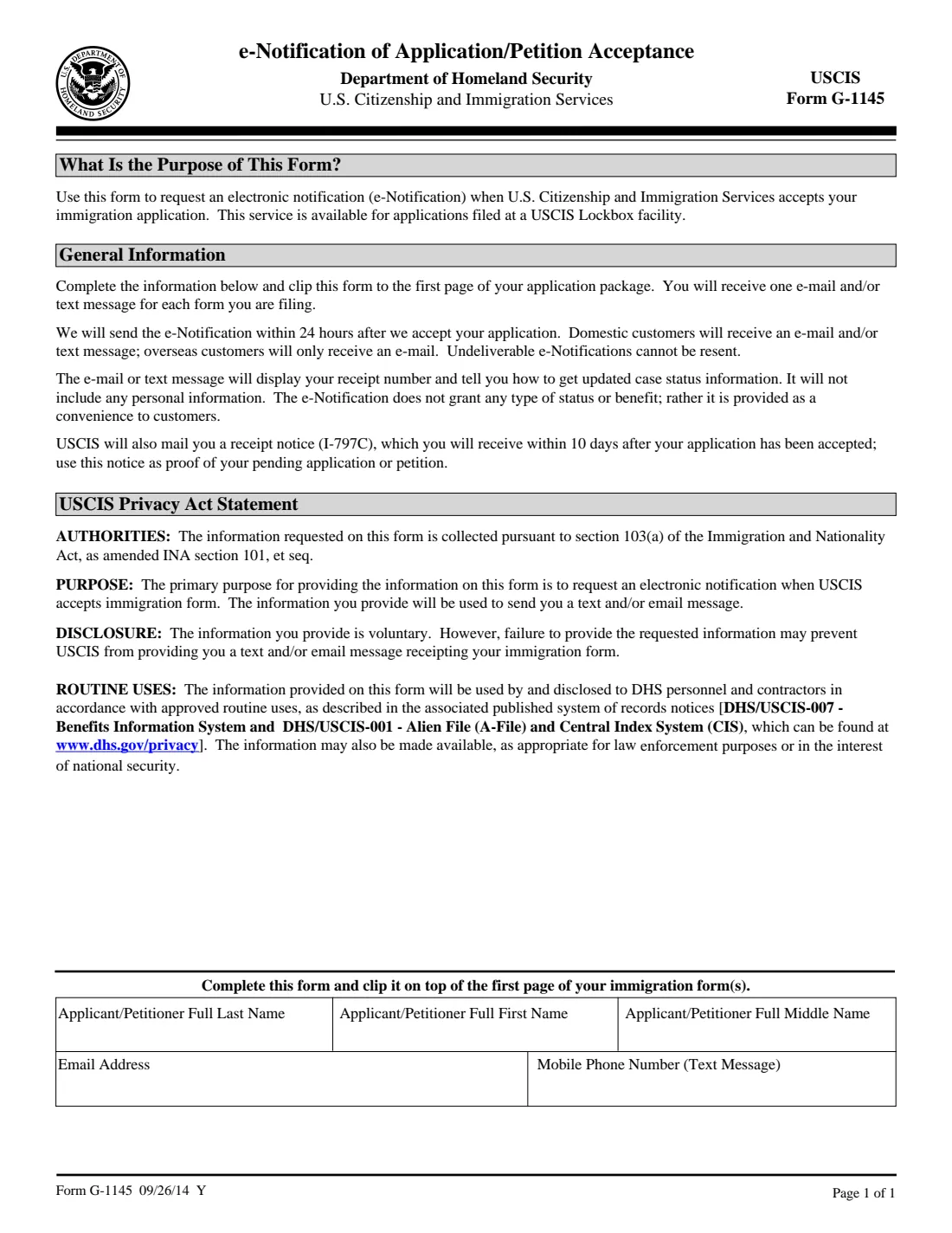
Form G-1145 asks U.S. Citizenship and Immigration Services to send you an electronic notification when it accepts an application or petition filed at a USCIS Lockbox facility. You fill in the applicant's or petitioner's name, an email address and a mobile phone number, and clip the page on top of the first page of the form you're filing.
The form says USCIS sends the e-Notification within 24 hours after it accepts your application: one email and/or text message for each form you file. It shows your receipt number and tells you how to get case status information, and it contains no personal information. It doesn't grant any status or benefit. USCIS also mails a receipt notice (Form I-797C), which the form says arrives within 10 days of acceptance and is your proof of the pending application.
FileIt pre-fills the name and email from the person's vault record and prints your answers onto USCIS's own G-1145 PDF. It saves the finished page in that person's vault folder. You print it and clip it to your package; FileIt never files anything with USCIS.
- Who fills it
- The applicant or petitioner, or whoever prepares the package for them.
- Length
- 1 page: name, email address, mobile phone number.
- Signature
- None. The form has no signature or date line.
- Works with
- Forms filed at a USCIS Lockbox; USCIS lists which ones on its G-1145 page.
- Edition
- 09/26/14 (USCIS also accepts previous editions)
Who needs to fill out Form G-1145?
- Anyone mailing a USCIS application or petition to a Lockbox who wants to know as soon as it's accepted, such as Forms I-90, I-130, I-765, N-400 or N-565.
- Families filing several forms in one package, since USCIS sends one notification per form.
- Preparers and attorneys assembling a package for a client who wants a quick receipt number.
When to use Form G-1145
- When you mail an application or petition to a USCIS Lockbox facility. The form says the service is only available for applications filed at a Lockbox.
- Fill out one for each form in the package if you want a notification for each, clipped on top of that form.
What you need before you start
- The full name (family, given and middle) of the applicant or petitioner.
- An email address, a U.S. mobile number for text messages, or both.
- The completed application or petition it will be clipped to.
What’s on Form G-1145
The 2014 edition has 1 page. FileIt asks for it in 1 parts:
- Who to notifyApplicant / petitioner
How to fill out Form G-1145, step by step
1 Name
Enter the applicant's or petitioner's full last, first and middle name, the same as on the form it goes with. FileIt pre-fills them from the person's vault record.
2 Email address
Where USCIS should email the notification. The form says overseas customers only receive an email.
3 Mobile phone number
The number for the text message. Domestic customers can receive an email, a text message or both.
4 Clip it on top
Print the page and clip it on top of the first page of your immigration form. There's nothing to sign.
Common mistakes to avoid
- Stapling it behind the application instead of clipping it on top of the first page.
- Mistyping the email address or phone number: the form says undeliverable e-Notifications can't be resent.
- Expecting the notification for a form not filed at a Lockbox, or for an online filing.
- Treating the email or text as proof of filing: the mailed Form I-797C receipt notice is the proof of a pending application.
After you fill it out
Print the page, clip it on top of the first page of the form you're filing, and mail the package as that form's instructions say.
Watch for an email or text with your receipt number after USCIS accepts the package, then use it to check case status.
Keep the I-797C receipt notice USCIS mails you. FileIt keeps the G-1145 you made in the person's vault folder alongside the rest of the case.
Fill out Form G-1145 online with FileIt
- Pick the person. Choose someone from People and FileIt fills in their name, date of birth, address and other details it already knows.
- Answer plain-language questions. One part of the form at a time, with the official help text beside each question — 5 fields in all. Your answers save as you go.
- Check the live preview. Watch your answers land on the real U.S. Citizenship and Immigration Services (USCIS) form, and let FileIt do any worksheet arithmetic.
- Generate the official PDF. FileIt prints your answers into the agency’s own PDF and files it in that person’s folder in your vault.
FileIt fills the form — it never files or submits anything for you. Deliver the finished form to whoever asked for it, the way the form’s instructions say.
Start Form G-1145 now — it’s freeForm G-1145: frequently asked questions
Does Form G-1145 cost anything?
USCIS points to its Fee Schedule page for the G-1145 filing fee. The form itself is a notification request and doesn't ask for payment.
Do I sign Form G-1145?
No. The form has only name, email and mobile phone boxes, with no signature or date line.
How soon will I hear from USCIS?
The form says USCIS sends the e-Notification within 24 hours after it accepts your application, and mails a receipt notice (I-797C) within 10 days of acceptance.
Will the text message show my case details?
No. It shows your receipt number and how to get case status information. It doesn't include any personal information.
Can I get a text message if I live abroad?
The form says overseas customers will only receive an email, so give an email address.
Do I need one G-1145 per form?
USCIS sends one email and/or text for each form you file. Clip a G-1145 to each form you want a notification for.
Official sources
- Blank form (PDF), published by U.S. Citizenship and Immigration Services (USCIS): https://www.uscis.gov/sites/default/files/document/forms/g-1145.pdf
- Official instructions and guidance: https://www.uscis.gov/g-1145
- Edition shown on this page: 09/26/14 (checked 2026-10-01).
FileIt is not affiliated with or endorsed by U.S. Citizenship and Immigration Services (USCIS) or any government. This page explains the form in general terms and is not legal, tax or immigration advice. Always read the official instructions, and check that you are using the edition the recipient accepts. Page last reviewed 2026-10-01.