What is Colorado Form DR 0145?
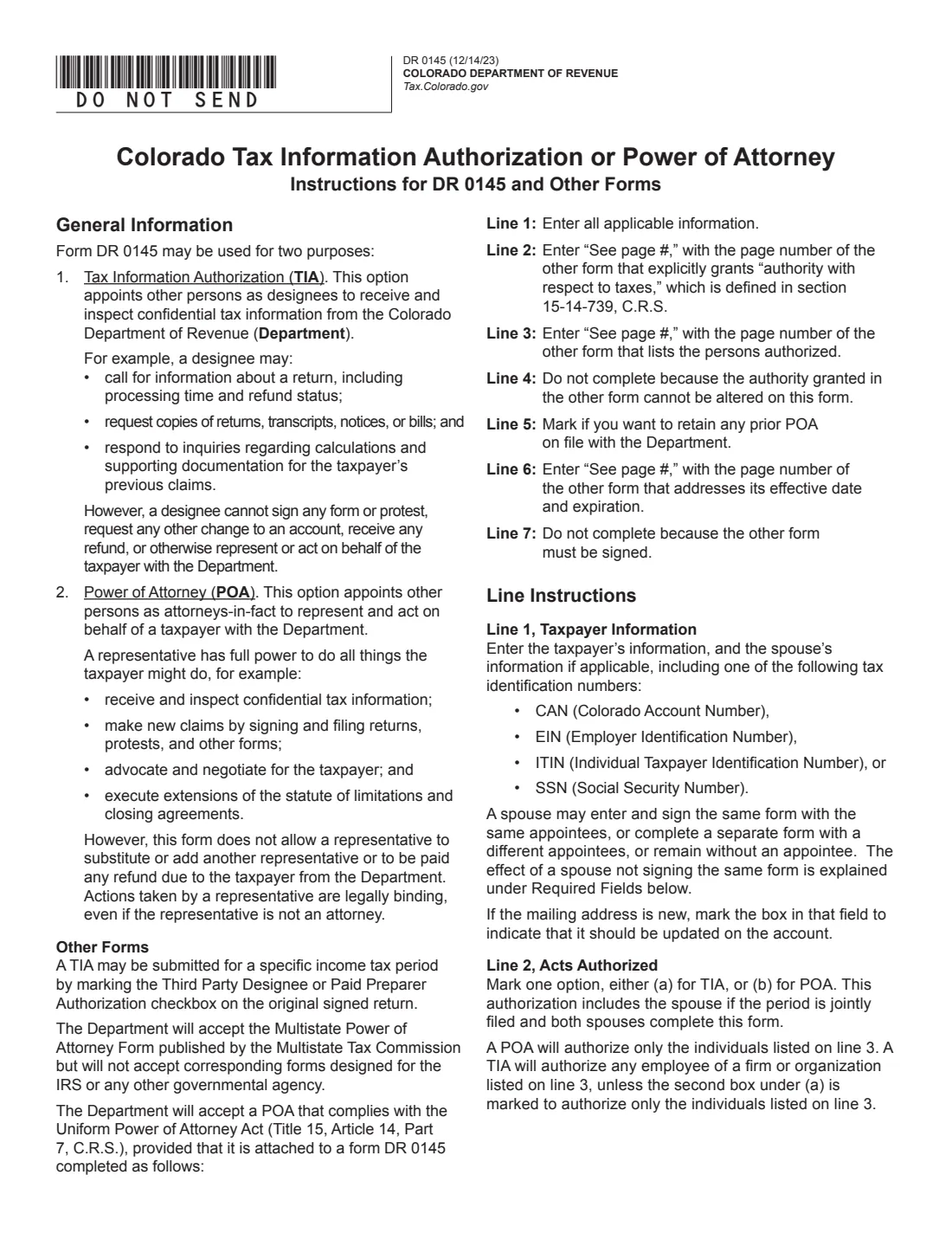
Form DR 0145 serves two purposes, and you choose one. A Tax Information Authorization (TIA) names designees who may receive and inspect your confidential tax information from the Colorado Department of Revenue. They can ask about a return or refund status, request copies of returns, transcripts, notices or bills, and answer questions about your earlier claims, but they can't sign, protest, receive a refund or act for you. A Power of Attorney (POA) makes the people you name attorneys-in-fact who can represent you and do what you can do, such as signing returns, protests, agreements and consents.
Unless you limit it on line 4, the form covers all tax periods and all tax and account types the Department administers as of the date you sign, and it expires five years after it is signed. A POA can't be used to endorse or negotiate a refund check or to substitute or add another representative, and a representative's actions bind you even if they aren't an attorney. The current edition is DR 0145 (12/14/23).
FileIt guides you through DR 0145 in plain English and prints your answers into the Department's own PDF. It keeps each person's details together, checks the period format and saves the finished PDF to your vault. You then sign it and submit it to the Department yourself: FileIt never files anything with the Colorado Department of Revenue.
- Who fills it
- The taxpayer, or a signatory with legal authority to act for the taxpayer. The people named don't sign.
- Given to
- The Colorado Department of Revenue, through Revenue Online (a secure message or Additional Services), or by mail to PO Box 17087, Denver, CO 80217-0087. It can also go in with a protest.
- Signatures
- The taxpayer signs and dates line 7. A spouse included on the form signs too.
- Expires
- Five years after it is signed, or on an individual taxpayer's death.
- Edition
- DR 0145 (12/14/23)
- Agency
- Colorado Department of Revenue
Who needs to fill out Colorado Form DR 0145?
- Individuals who want an accountant or relative to check on a Colorado return or refund, or to request copies of notices.
- Taxpayers who want an attorney, CPA or other person to represent them in a Colorado tax protest or audit.
- Businesses that want an adviser to handle sales and use, withholding, excise or severance tax matters.
- Married couples who want the same designees or representatives for jointly filed periods.
When to use Colorado Form DR 0145
- Choose (a), a Tax Information Authorization, when someone only needs to see and receive your tax information.
- Choose (b), a Power of Attorney, when someone needs to act for you with the Department.
- To keep earlier DR 0145 forms in effect, tick line 5. Otherwise a new form revokes and replaces them.
- A Uniform Power of Attorney Act document or the Multistate Tax Commission's power of attorney can be used instead, attached to a DR 0145 as the instructions describe. IRS forms are not accepted.
What you need before you start
- The taxpayer's name (last, first, or the entity name), one tax ID number (Colorado Account Number, EIN, ITIN or SSN), phone and mailing address.
- Your spouse's name and tax ID number, if they are included.
- For each person authorized: their name (last, first), phone number, and any title or relationship, firm, email, fax and mailing address.
- Any specific tax periods (MM/YY - MM/YY) or tax type you want to limit the form to.
What’s on Colorado Form DR 0145
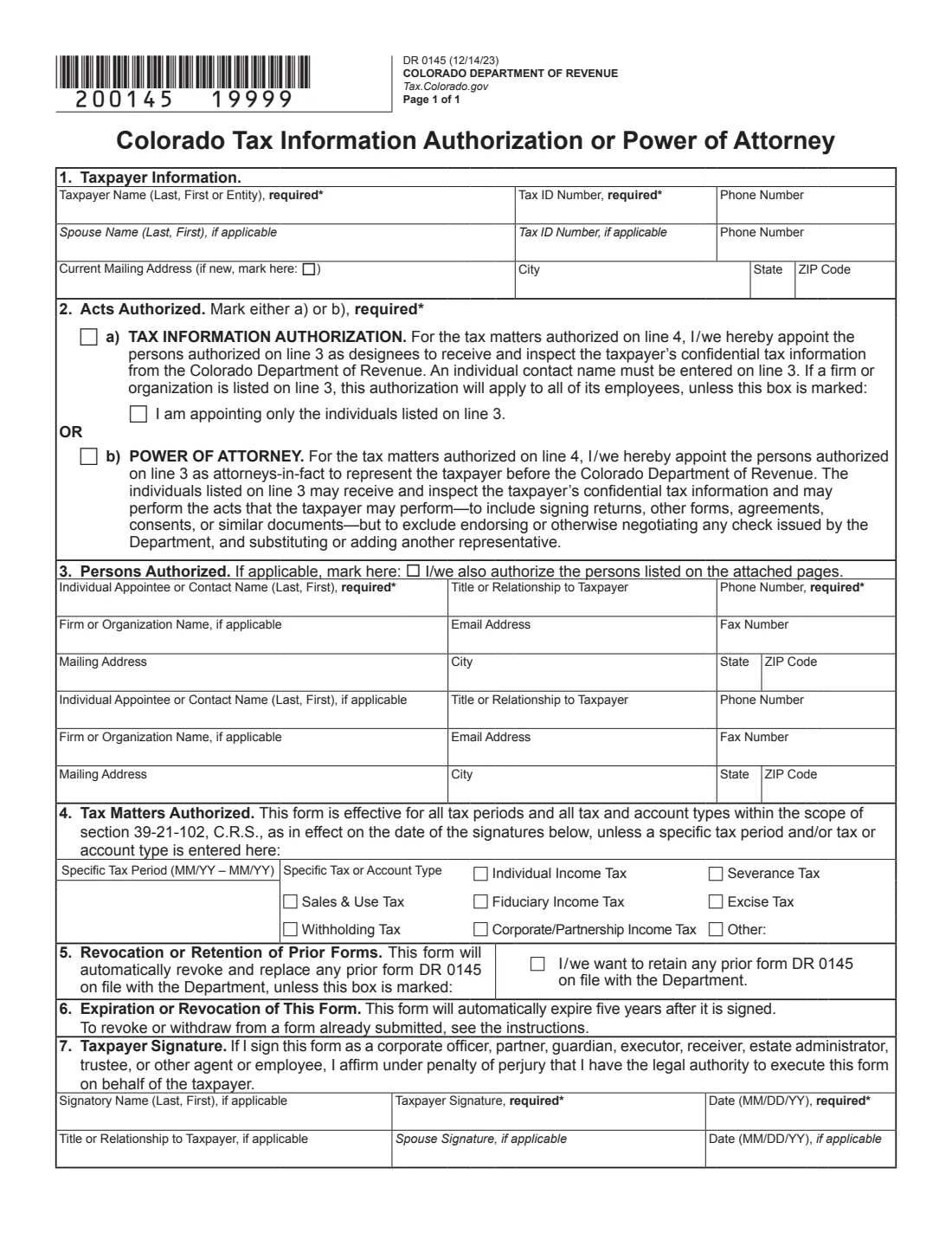
The 2023 edition has 3 pages. FileIt asks for it in 8 parts, and it is signed by Taxpayer and Spouse:
- Line 1: Taxpayer informationTaxpayer
- Line 1: SpouseSpouse
- Line 2: Acts authorizedTaxpayer
- Line 3: Person authorized 1Taxpayer
- Line 3: Person authorized 2Taxpayer
- Line 4: Tax matters authorizedTaxpayer
- Line 5: Revocation or retention of prior formsTaxpayer
- Line 7: Taxpayer signatureTaxpayer
How to fill out Colorado Form DR 0145, step by step
1 Line 1: Taxpayer information
Enter the taxpayer's name and one tax identification number (both required), plus phone and mailing address. Tick the new-address box if the Department should update your address. Add your spouse to have them covered by the same form.
2 Line 2: Acts authorized
Mark (a) for a Tax Information Authorization or (b) for a Power of Attorney. A TIA naming a firm covers all of its employees unless you also tick "I am appointing only the individuals listed on line 3". A POA only ever covers the individuals listed.
3 Line 3: Persons authorized
Enter at least one individual with a phone number. There is room for two; for more, tick the box and attach a list or another copy of the form with the same details.
4 Line 4: Tax matters authorized
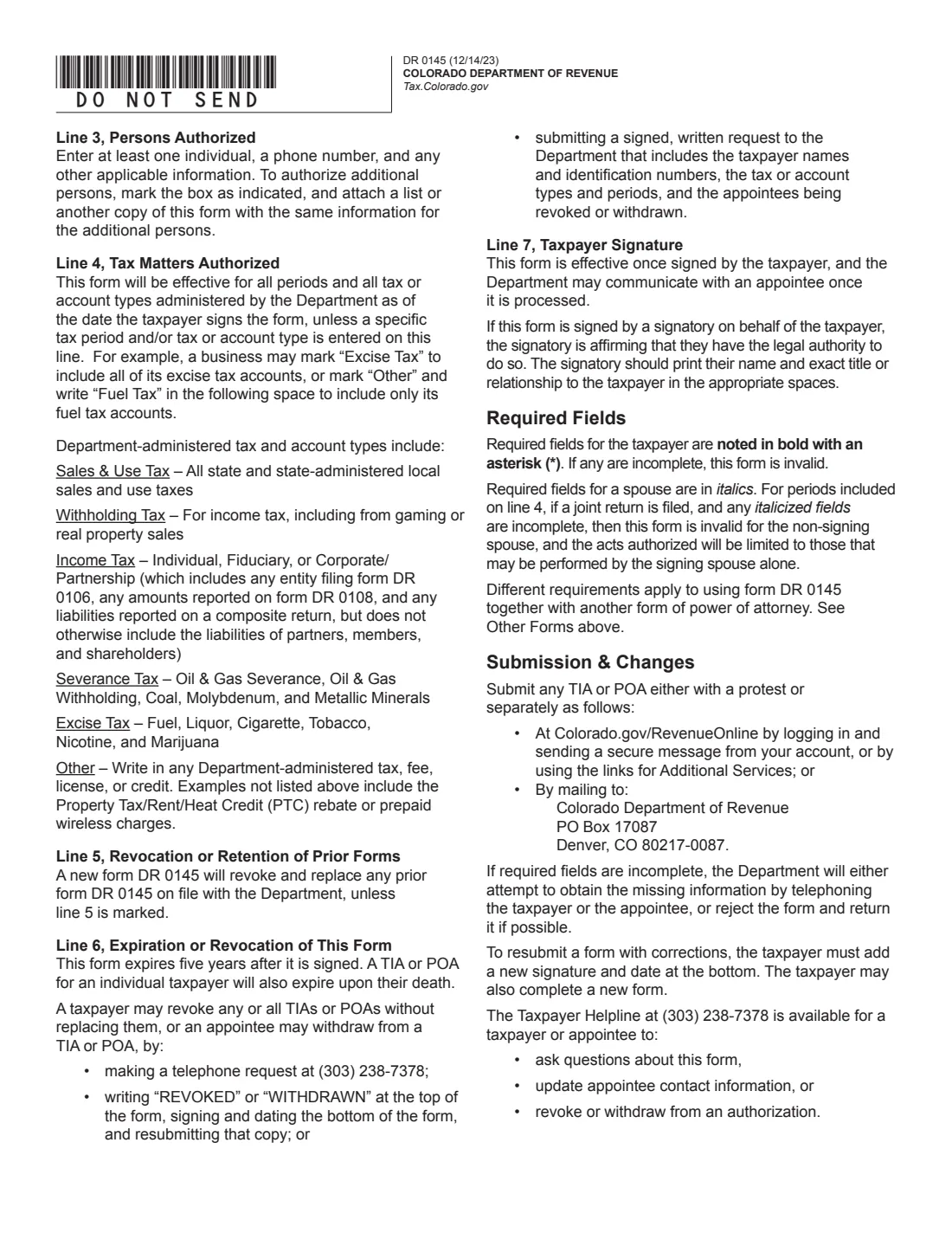
Leave it blank to cover all periods and all tax and account types. Otherwise enter specific periods and/or mark a type: individual, fiduciary or corporate/partnership income tax, sales and use, withholding, severance, excise, or Other (for example Fuel Tax).
5 Lines 5 to 7: Prior forms, expiry and signature
Tick line 5 to keep earlier DR 0145 forms on file. Line 6 reminds you the form expires after five years. On line 7 the taxpayer signs and dates it; a signatory acting for the taxpayer also prints their name and exact title or relationship.
Common mistakes to avoid
- Marking both (a) and (b) on line 2. Choose one.
- Leaving out a required field: the taxpayer's name and tax ID, one individual and phone number on line 3, and the taxpayer's signature and date. The form is invalid without them.
- Leaving the spouse's details or signature incomplete for a jointly filed period. The form then doesn't cover the non-signing spouse.
- Forgetting line 5. A new DR 0145 revokes earlier ones unless it is marked.
- Sending an IRS power of attorney form instead. The Department doesn't accept forms designed for the IRS.
After you fill it out
Sign and date line 7 (your spouse too, if included). FileIt can place signature and date boxes with its optional e-signature, or you can print and sign by hand.
Send only the form page, not the two instruction pages marked *DO NOT SEND*. Submit it in Revenue Online (log in and send a secure message, or use the Additional Services links), mail it to Colorado Department of Revenue, PO Box 17087, Denver, CO 80217-0087, or include it with a protest. FileIt doesn't send it.
It takes effect once signed, and the Department can talk to your appointees once it is processed. It expires after five years. The finished PDF stays in your vault as a record.
Fill out Colorado Form DR 0145 online with FileIt
- Pick the person. Choose someone from People and FileIt fills in their name, date of birth, address and other details it already knows.
- Answer plain-language questions. One part of the form at a time, with the official help text beside each question — 40 fields in all. Your answers save as you go.
- Check the live preview. Watch your answers land on the real Colorado Department of Revenue form, and let FileIt do any worksheet arithmetic.
- Generate the official PDF. FileIt prints your answers into the agency’s own PDF and files it in that person’s folder in your vault. Sign it, or send it for e-signature.
FileIt fills the form — it never files or submits anything for you. Deliver the finished form to whoever asked for it, the way the form’s instructions say.
Start Colorado Form DR 0145 now — it’s freeColorado Form DR 0145: frequently asked questions
Can I fill out Colorado Form DR 0145 online?
Yes. FileIt asks each question in plain English and prints your answers into the Colorado Department of Revenue's official DR 0145 PDF. You then sign it and submit it yourself.
What's the difference between a TIA and a POA on DR 0145?
A Tax Information Authorization lets designees receive and inspect your confidential tax information only. A Power of Attorney lets them represent you and act for you, for example signing returns, protests and agreements.
How long does DR 0145 last?
It expires five years after it is signed. For an individual taxpayer it also ends on their death.
How do I revoke a DR 0145?
Call (303) 238-7378, write "REVOKED" at the top of a copy of the form and sign, date and resubmit it, or send a signed written request with the taxpayer names and ID numbers, the tax types and periods, and the appointees being revoked.
Can I use IRS Form 2848 for Colorado?
No. The instructions say the Department won't accept forms designed for the IRS or any other government agency, though it does accept the Multistate Tax Commission's power of attorney form.
Does the person I appoint have to sign?
No. Only the taxpayer (and a spouse included on the form) signs line 7.
Official sources
- Blank form (PDF), published by Colorado Department of Revenue: https://tax.colorado.gov/sites/tax/files/documents/DR0145_2023.pdf
- Official instructions and guidance: https://tax.colorado.gov/sites/tax/files/documents/DR0145_2023.pdf
- Edition shown on this page: DR 0145 (12/14/23) (checked 2026-09-28).
FileIt is not affiliated with or endorsed by Colorado Department of Revenue or any government. This page explains the form in general terms and is not legal, tax or immigration advice. Always read the official instructions, and check that you are using the edition the recipient accepts. Page last reviewed 2026-09-28.