What is Form DR 0004?
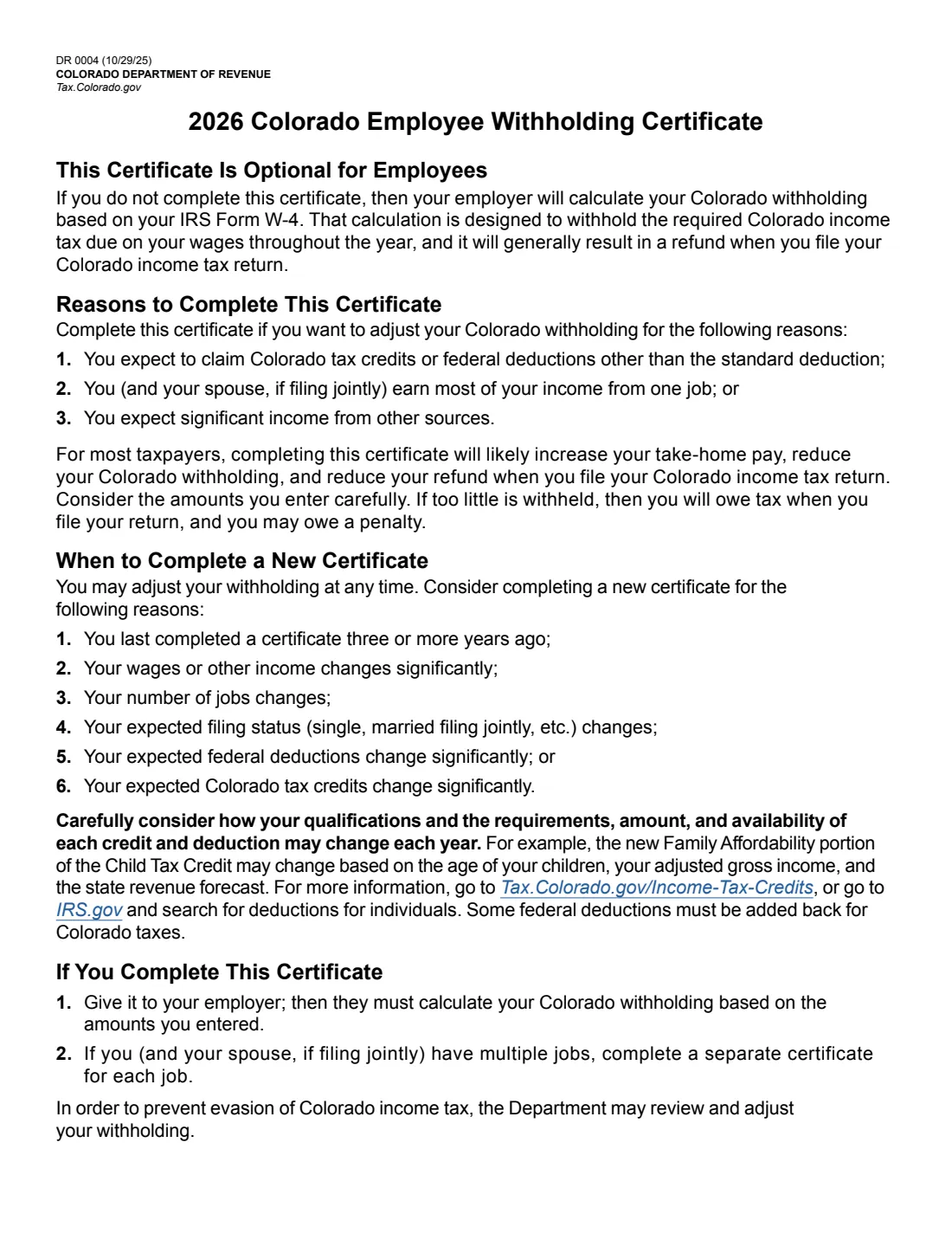
Form DR 0004, the Colorado Employee Withholding Certificate, lets you adjust the Colorado income tax withheld from your pay. It is optional: if you don't complete it, your employer calculates your Colorado withholding from your IRS Form W-4, which the form says is designed to withhold the required tax and will generally result in a refund.
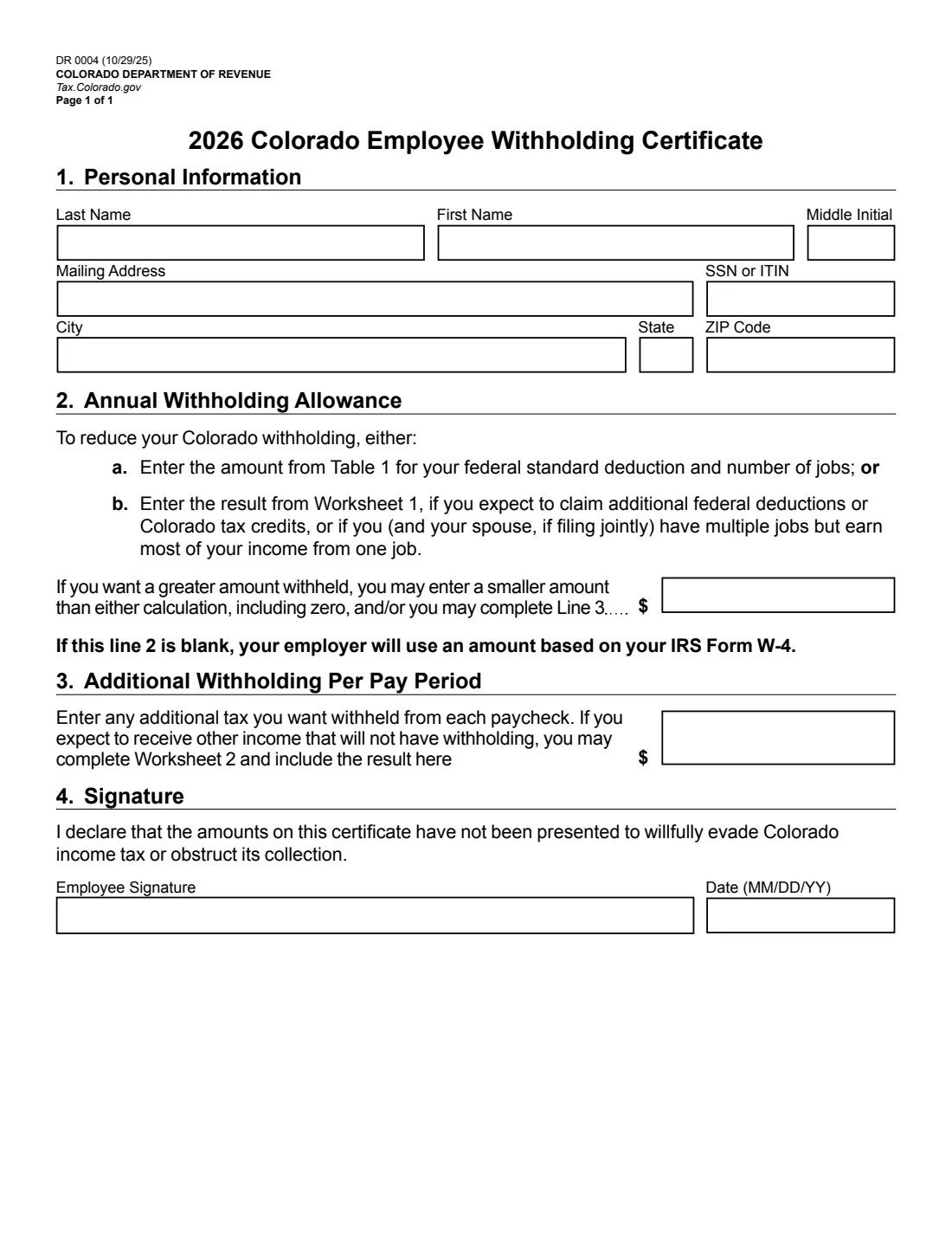
The certificate itself is one page with two numbers: an annual withholding allowance on line 2 (from Table 1, or from Worksheet 1 if you expect extra federal deductions or Colorado credits such as the child tax credit) and an additional amount per pay period on line 3 (from Worksheet 2 if you have other income without withholding). The 2026 edition from the Colorado Department of Revenue is DR 0004 (10/29/25).
FileIt lets you fill out the DR 0004 online in a guided form. It looks up Table 1 and Table 2 for you, does both worksheets, carries the results to lines 2 and 3, and prints everything into the Department's own PDF. The finished form is saved in your vault and can be sent for e-signature. FileIt never submits anything to your employer or the Department of Revenue.
- Who fills it
- The employee. It's optional.
- Given to
- Your employer — the certificate page only, not the worksheets.
- When
- Any time you want to adjust Colorado withholding; the form suggests a new one after big changes or every three years.
- Signatures
- The employee signs and dates it (MM/DD/YY).
- Edition
- 2026, DR 0004 (10/29/25).
- Cost
- Free to fill out on any FileIt account.
Who needs to fill out Form DR 0004?
- Colorado employees who expect to claim Colorado tax credits or federal deductions other than the standard deduction.
- Parents of children age 5 or younger who want lower withholding for the Family Affordability portion of the Colorado child tax credit.
- Couples or people with several jobs who earn most of their income from one job.
- Anyone expecting significant income from other sources, such as interest, dividends, retirement, rental or self-employment income, who wants more withheld.
When to use Form DR 0004
- When you start a job in Colorado and want withholding closer to your actual Colorado tax.
- If you last completed a certificate three or more years ago.
- When your wages or other income change significantly, or your number of jobs changes.
- When your expected filing status, federal deductions or Colorado tax credits change significantly.
What you need before you start
- Your name, mailing address and SSN or ITIN.
- Your expected filing status from IRS Form W-4 Step 1(c), and how many jobs you (and your spouse, if filing jointly) have.
- For Worksheet 1: your expected income from all sources, deductions from W-4 Step 4(b) and its Deductions Worksheet, the number of children who'll be 5 or younger on December 31, and any other Colorado credits you expect.
- For Worksheet 2: your non-business income from W-4 Step 4(a), other non-wage income, and your pay frequency.
What’s on Form DR 0004
The 2026 edition has 5 pages. FileIt asks for it in 6 parts, and it is signed by Employee:
- 1. Personal informationEmployee
- 2. Annual withholding allowanceEmployee
- 3. Additional withholding per pay periodEmployee
- 4. SignatureEmployee
- Worksheet 1: Withholding allowanceEmployee
- Worksheet 2: Additional withholdingEmployee
How to fill out Form DR 0004, step by step
1 1. Personal information
Enter your last name, first name, middle initial, mailing address, SSN or ITIN, city, state and ZIP code.
2 2. Annual withholding allowance
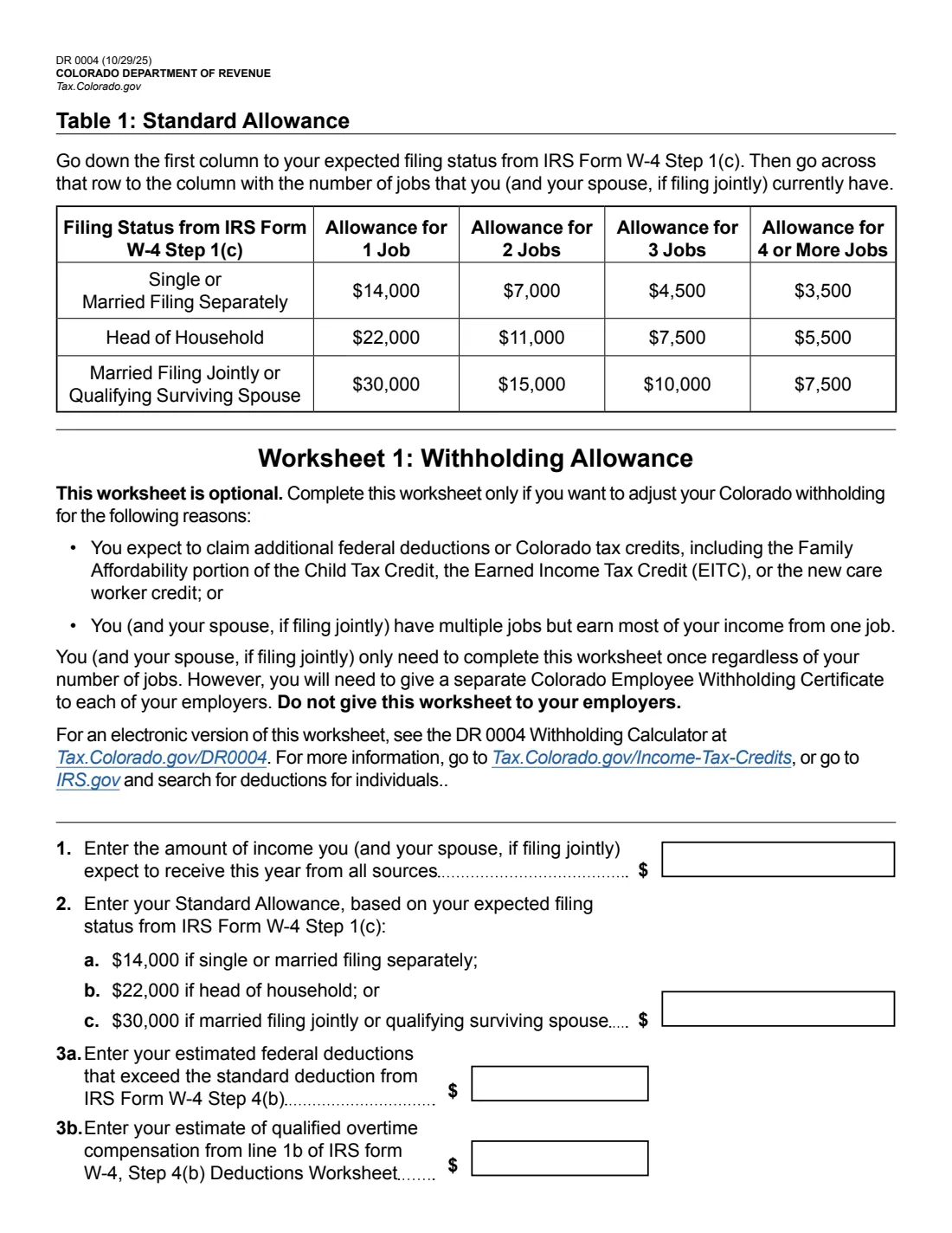
Either take the Table 1 amount for your filing status and number of jobs — for 2026, $14,000 / $7,000 / $4,500 / $3,500 (single or married filing separately), $22,000 / $11,000 / $7,500 / $5,500 (head of household), or $30,000 / $15,000 / $10,000 / $7,500 (married filing jointly or qualifying surviving spouse) for 1 / 2 / 3 / 4 or more jobs — or the result of Worksheet 1. You may enter a smaller amount, including zero, to have more withheld. If line 2 is blank, your employer uses an amount based on your IRS Form W-4.
3 Worksheet 1
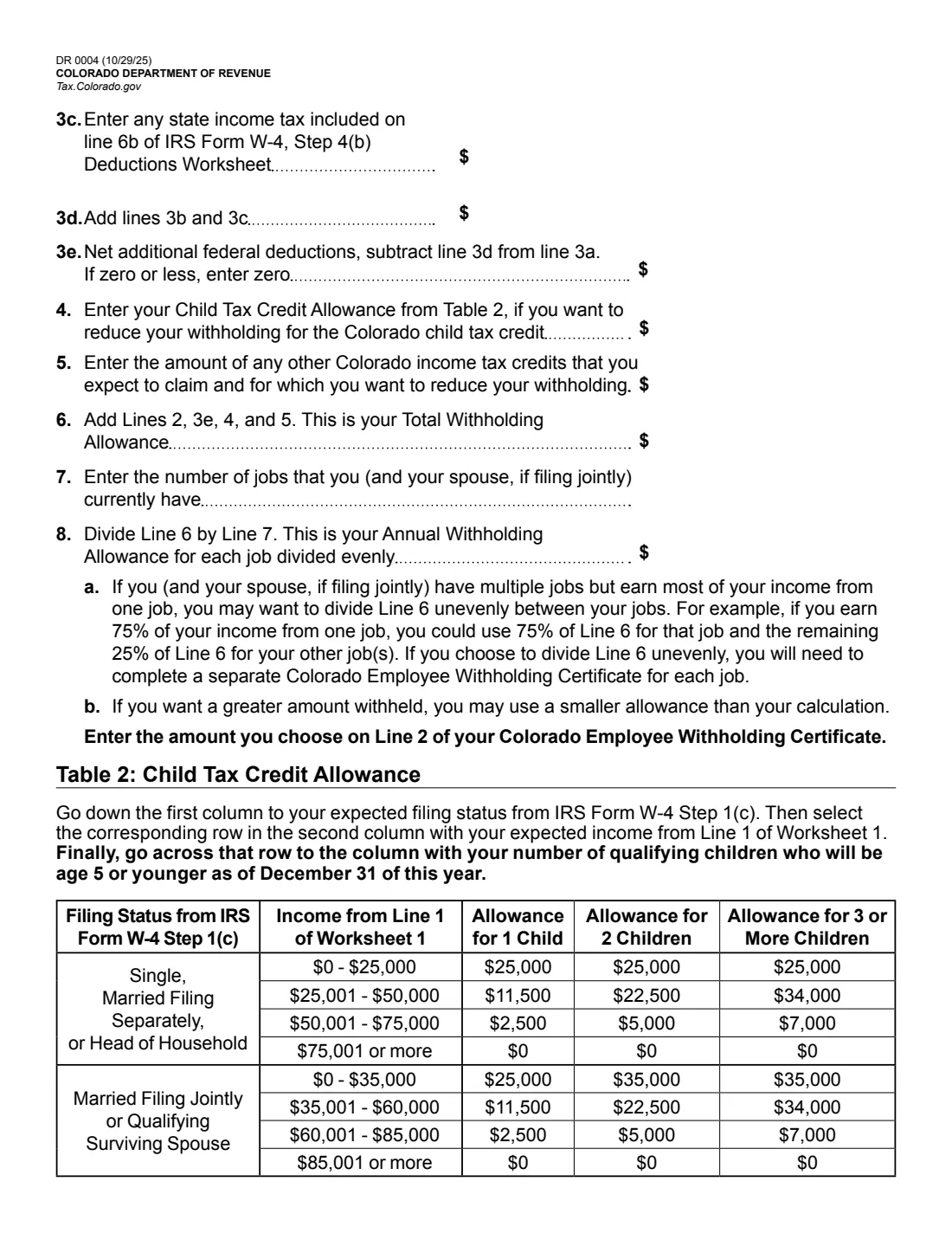
Start with your expected income and your standard allowance ($14,000, $22,000 or $30,000 by filing status). Add net additional federal deductions (W-4 Step 4(b) less qualified overtime and state income tax from its Deductions Worksheet), the Table 2 child tax credit allowance for children age 5 or younger, and any other Colorado credits. Divide by your number of jobs. FileIt does the look-ups and arithmetic. You can split the total unevenly between jobs, with a separate certificate for each.
4 3. Additional withholding per pay period
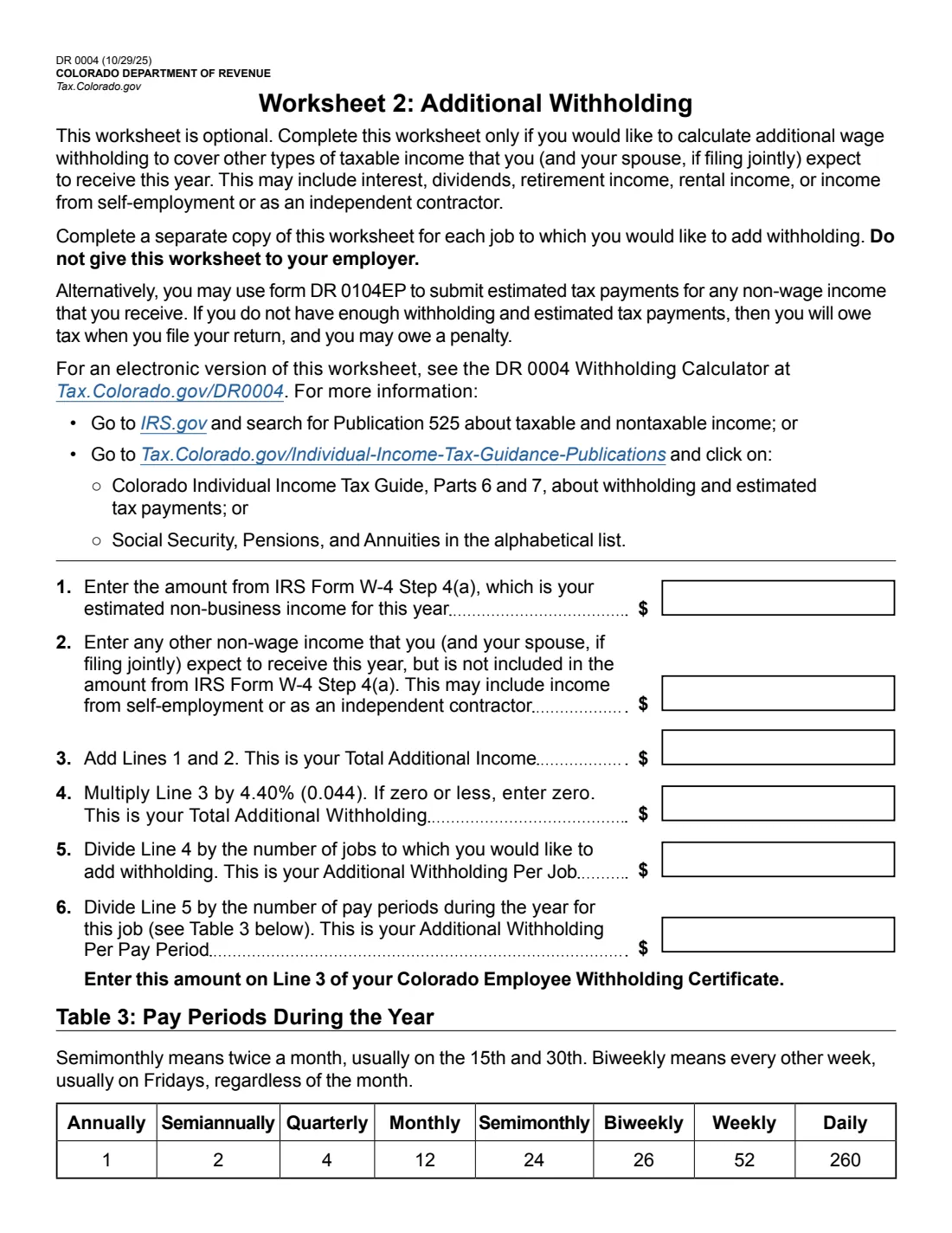
Enter any extra tax to withhold each paycheck. Worksheet 2 works it out for other income: add W-4 Step 4(a) income and other non-wage income, multiply by 4.40%, divide by the number of jobs you want to add withholding to, then by the pay periods in the year (Table 3: 1 annually up to 260 daily).
5 4. Signature
Sign and date the certificate. You declare that the amounts haven't been presented to willfully evade Colorado income tax or obstruct its collection.
Common mistakes to avoid
- Giving your employer the worksheets — the form says not to. Only the certificate page goes to the employer.
- Using one certificate for several jobs — each employer needs its own.
- Completing Worksheet 1 once per job instead of once for all jobs.
- Claiming the full allowance at every job, which can leave too little withheld and a bill (and possible penalty) at filing time.
- Forgetting to revisit the certificate when children age out of the child tax credit allowance or your income changes.
After you fill it out
Sign the certificate and give it to your employer, who must then calculate your Colorado withholding from the amounts you entered. Keep the worksheets.
FileIt saves the finished PDF in your vault folder, so you have a record of the allowance you claimed.
The form notes the Department of Revenue may review and adjust your withholding to prevent evasion of Colorado income tax.
Fill out Form DR 0004 online with FileIt
- Pick the person. Choose someone from People and FileIt fills in their name, date of birth, address and other details it already knows.
- Answer plain-language questions. One part of the form at a time, with the official help text beside each question — 35 fields in all. Your answers save as you go.
- Check the live preview. Watch your answers land on the real Colorado Department of Revenue form, and let FileIt do any worksheet arithmetic.
- Generate the official PDF. FileIt prints your answers into the agency’s own PDF and files it in that person’s folder in your vault. Sign it, or send it for e-signature.
FileIt fills the form — it never files or submits anything for you. Deliver the finished form to whoever asked for it, the way the form’s instructions say.
Start Form DR 0004 now — it’s freeForm DR 0004: frequently asked questions
Do I have to fill out the Colorado DR 0004?
No. The form says the certificate is optional. Without it, your employer calculates Colorado withholding from your IRS Form W-4.
What does line 2 of the DR 0004 do?
It is your annual withholding allowance, which reduces your Colorado withholding. Use Table 1 or Worksheet 1. If line 2 is blank, your employer uses an amount based on your W-4.
How does the child tax credit affect the DR 0004?
Worksheet 1 line 4 adds a Child Tax Credit Allowance from Table 2, based on your filing status, your expected income and the number of qualifying children who'll be 5 or younger on December 31 — if you want to reduce withholding for the Colorado child tax credit.
What rate does Worksheet 2 use?
The 2026 Worksheet 2 multiplies your additional income by 4.40% (0.044) to estimate the extra withholding.
I have two jobs. How many certificates do I need?
One for each job. Worksheet 1 is done once for all jobs, and you can divide the total allowance evenly or unevenly between them.
Can I fill out the DR 0004 online?
Yes. FileIt walks you through the certificate and both worksheets and prints your answers into the official Colorado PDF. The finished form is saved in your vault and can be sent for e-signature; you give the certificate to your employer yourself. The Department also offers its own DR 0004 Withholding Calculator.
Official sources
- Blank form (PDF), published by Colorado Department of Revenue: https://tax.colorado.gov/sites/tax/files/documents/DR_0004_2026.pdf
- Official instructions and guidance: https://tax.colorado.gov/DR0004
- Edition shown on this page: 2026 Colorado Employee Withholding Certificate, DR 0004 (10/29/25) (checked 2026-09-28).
FileIt is not affiliated with or endorsed by Colorado Department of Revenue or any government. This page explains the form in general terms and is not legal, tax or immigration advice. Always read the official instructions, and check that you are using the edition the recipient accepts. Page last reviewed 2026-09-28.